Why a CAPTCHA should not be your first step
Image puzzles cost you real messages. Some visitors give up, some cannot solve them on a phone, and some use screen readers that struggle with them. Classic reCAPTCHA also sends visitor data to Google, which belongs in your privacy notice.
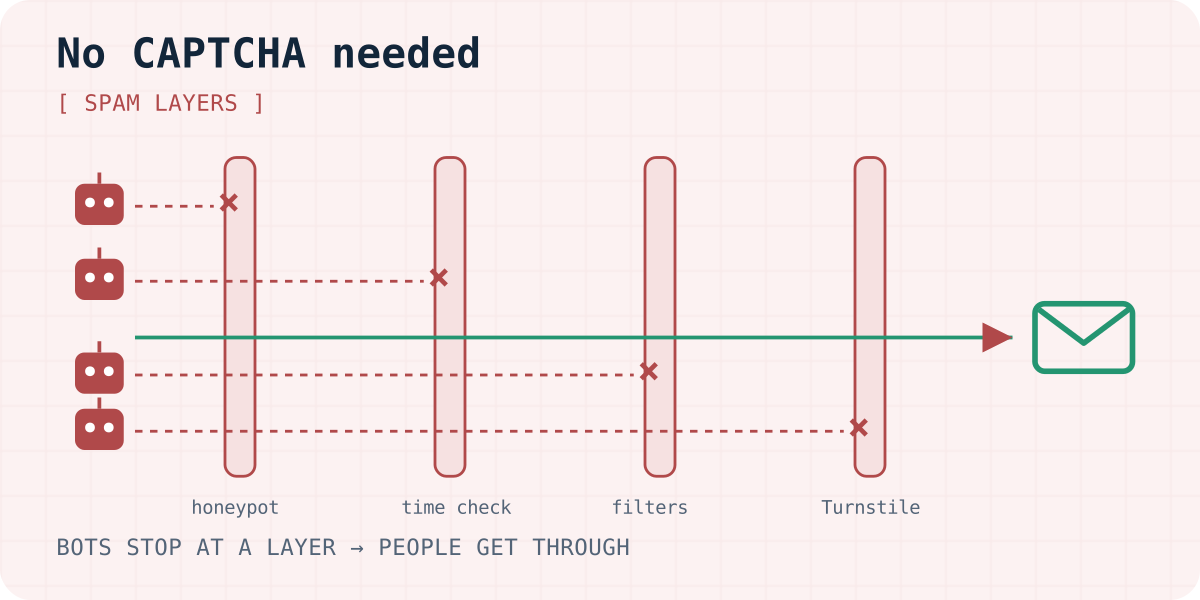
Most contact form spam does not need a puzzle to stop. It comes from scripts that fill every field and post as fast as they can. The layers below catch those scripts silently. Add them in order and stop when the spam does.
1. Add a honeypot field
A honeypot is a text field that people cannot see but bots fill in. If it has a value, the submission is from a bot. Hide it off-screen rather than with display:none, because some bots skip fields that are hidden that way.
Three details matter. Use tabindex="-1" so keyboard users never land in it. Wrap it in aria-hidden="true" so screen readers skip it. And do not show an error when it is filled: accept the post quietly and drop it, so the bot learns nothing.
<!-- Inside your <form>. People never see it; simple bots fill it in. -->
<div aria-hidden="true" style="position:absolute;left:-10000px;width:1px;height:1px;overflow:hidden">
  <label>Leave this field empty <input type="text" name="botcheck" tabindex="-1" autocomplete="off"></label>
</div>
2. Reject forms filled in too fast
A person needs several seconds to type a name and a message. A bot needs milliseconds. Store the time when the page was shown in a hidden field, and let the server reject posts that arrive too quickly. A threshold of one to three seconds catches bots without hurting fast typists or password managers.
Keep the check on the server. A bot can post without ever loading your page, so a missing or strange timestamp should count as a warning sign too.
A hidden timestamp field
<input type="hidden" name="_ts" id="form-ts">
<script>
  // Seconds since 1970 when the page was shown; the server compares it with the submit time.
  document.getElementById("form-ts").value = Math.floor(Date.now() / 1000);
</script>
3. Filter on the server
Bots that pass the first two layers still leave traces in the content. Simple server rules help:
- Links. Real enquiries rarely contain three or more links. Score them as suspicious.
- Stop words. Watch for the words your spam keeps repeating, such as SEO offers or crypto.
- Repeat senders. Limit how many posts one sender can make per minute and per hour.
- Field rules. A phone field full of letters or a name with a URL is not a person.
Prefer a score over hard blocks. Send high scores to a spam folder you can review, so one false positive never loses a real customer.
4. Add Cloudflare Turnstile when bots adapt
If smarter bots get through, add Cloudflare Turnstile. It runs small background checks in the browser and usually shows no puzzle. Its modes are Managed, Non-Interactive and Invisible. The free plan includes up to 20 widgets and unlimited challenges (as of 03.10.2026). Cloudflare says Turnstile does not read form entries.
The widget adds a cf-turnstile-response token to the form. Your server, or your form service, must validate that token with Cloudflare. A widget without server-side validation stops nothing.
The Turnstile widget
<script src="https://challenges.cloudflare.com/turnstile/v0/api.js" async defer></script>
<!-- Inside your <form>; the widget adds a cf-turnstile-response field. -->
<div class="cf-turnstile" data-sitekey="YOUR_SITE_KEY"></div>
What form services do for you
If you use a hosted form service, check what it already filters. You may not need to write any code:
- Formgong treats a filled
botcheckhoneypot as spam and still answers “success”, so bots learn nothing. Posts faster than 1.5 seconds after a_tstimestamp count as spam. Links and stop words add to a score, and Turnstile is available on the Free plan. Its optional script adds typing signals and a small proof-of-work, with no cookies. Spam is kept in a spam folder, is not sent to email or Telegram, and does not count toward your limit. - Netlify Forms filters every submission with Akismet and supports a honeypot field and reCAPTCHA 2.
- FormPost uses a hidden field and an optional arithmetic question instead of reCAPTCHA.
Our HTML contact form example includes the honeypot already, and the HTML docs show how to add Turnstile. Plans are listed under pricing.
Mistakes that let spam in or keep people out
- Making the honeypot field
required, which blocks every real visitor. - Leaving a visible label on the honeypot, so screen reader users fill it in.
- Returning an error to bots, which teaches them which field to skip.
- Checking only in the browser. Bots post directly to your endpoint.
- Deleting spam unseen. Keep a spam folder for a few days and check it for false positives.
Frequently asked questions
Does a honeypot field still work in 2026?
Yes, against the simple bots that send most contact form spam. It is not enough alone against targeted bots, so combine it with a time check, server filters and, if needed, Turnstile.
Is Cloudflare Turnstile free?
Yes. As checked on 3 October 2026, the free plan includes up to 20 widgets and unlimited challenges. You need to validate each token on the server.
Does a honeypot hurt accessibility?
Not if you hide it properly: place it off-screen, wrap it in aria-hidden, and set tabindex to -1. Never make it required.
Why do I still get spam from real people?
Some spam is typed by people, who pass every bot check. Server filters for links and stop words, plus a spam folder you review, are the practical answer.
Should I show an error when spam is detected?
No. Respond as if the post succeeded and drop it quietly. An error tells the bot which check it failed.
Sources and documentation
Official references for this guide: Cloudflare Turnstile, Turnstile widget modes, Turnstile plans, Turnstile server-side validation, Netlify: Spam filters, FormPost. Formgong HTML integration, where data is stored.
Read this article as Markdown