See it working
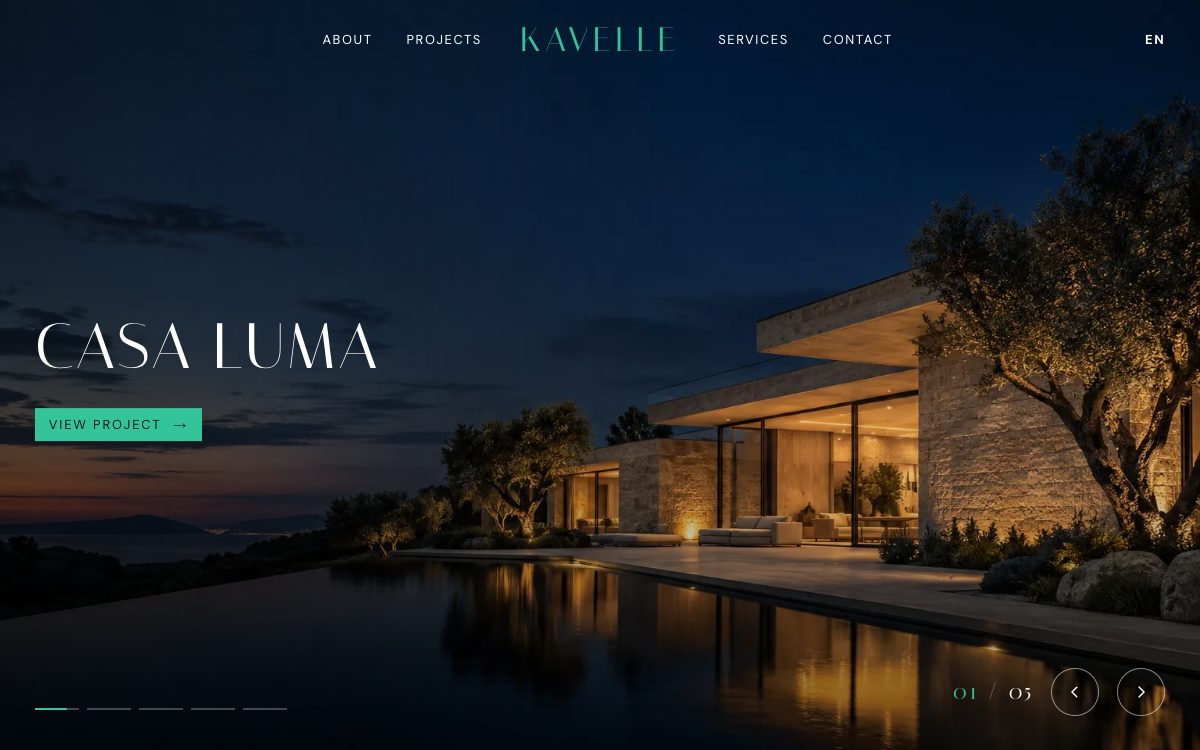
The demo form is real: it posts to a Formgong demo form. Demo messages are kept for seven days and are not emailed to anyone.
Get this template
HTML
Plain HTML files with no build step. They run on any static host.
Download kavelle.zip Live demo Source on GitHub
- Download kavelle.zip and unzip it.
- Create a free form at formgong.com/new and copy its access key. It starts with
fk_and is safe to put in a web page. - Open
index.htmlin a text editor and replace everyfk_your_access_keywith your key. - Upload the folder to a static host such as Cloudflare Pages, Netlify or GitHub Pages.
- Send a test message from the live site and check that it reaches your Formgong inbox.
Or skip the download. Each button below copies the site to your GitHub and publishes it. Then replace the key in your copy as in step 3 and commit, and the host publishes the change on its own.
WordPress
A block theme with the same look. The form comes from the free Formgong plugin.
Download kavelle-wordpress.zip
- Download kavelle-wordpress.zip. Don't unzip it. In WordPress, open Appearance → Themes → Add New Theme → Upload Theme, choose the file, click Install Now, then Activate.
- Install the free Formgong plugin (Plugins → Add New, search for "Formgong"). Create a free key at formgong.com/new and paste it under Settings → Formgong.
- Send a test message from your site and check that it reaches your Formgong inbox.
The contact form is the Formgong plugin's block, not part of the theme. Without the plugin the page has no form.
Shopify
An Online Store 2.0 theme. The home page has the template's design; product, cart and the other store pages are simple pages in the same style.
- Download kavelle-shopify.zip. Don't unzip it. In Shopify admin, open Online Store → Themes → Add theme → Upload zip file, and choose the file.
- Click Customize, open Theme settings → Formgong form and paste a free key from formgong.com/new.
- Send a test message from your site and check that it reaches your Formgong inbox.
The lists (slides, services, projects, figures, contact topics and menu links) are blocks you can add or remove. Everything else is one fixed setting per text.
Astro
The Astro version of the same page. You need Node.js.
- Unzip it, run
npm install, thennpm run devand open localhost:4321.npm run buildputs the static site indist/. - Create a free form at formgong.com/new, copy its access key and paste it over
fk_your_access_keyinsrc/content.json. Every text on the page is in that file. - Send a test message from your site and check that it reaches your Formgong inbox.
Next.js
A Next.js (App Router) version of the same page, built as a static export. You need Node.js.
- Unzip it, run
npm install, thennpm run devand open localhost:3000.npm run buildputs the static site inout/. - Create a free form at formgong.com/new, copy its access key and paste it over
fk_your_access_keyincontent.json. Every text on the page is in that file. - Send a test message from your site and check that it reaches your Formgong inbox.
Nuxt
A Nuxt version of the same page. You need Node.js with npm 11 or newer (npm 10 stops during install), or pnpm.
- Unzip it, run
npm install, thennpm run devand open localhost:3000.npm run generateputs the static site in.output/public/. - Create a free form at formgong.com/new, copy its access key and paste it over
fk_your_access_keyinapp/content.json. Every text on the page is in that file. - Send a test message from your site and check that it reaches your Formgong inbox.
SvelteKit
A SvelteKit version of the same page. You need Node.js.
Download kavelle-sveltekit.zip
- Unzip it, run
npm install, thennpm run devand open localhost:5173.npm run buildputs the static site inbuild/. - Create a free form at formgong.com/new, copy its access key and paste it over
fk_your_access_keyinsrc/lib/content.json. Every text on the page is in that file. - Send a test message from your site and check that it reaches your Formgong inbox.
Hugo
A Hugo site with the page as a theme you can copy into another Hugo site. You need Hugo 0.146 or newer.
- Unzip it, run
hugo serverin the folder and open localhost:1313.hugoputs the static site inpublic/. - Create a free form at formgong.com/new, copy its access key and paste it over
fk_your_access_keyindata/content.json. Every text on the page is in that file. - Send a test message from your site and check that it reaches your Formgong inbox.
Eleventy
An Eleventy version of the same page. You need Node.js.
- Unzip it, run
npm install, thennpm run devand open localhost:8080.npm run buildputs the static site in_site/. - Create a free form at formgong.com/new, copy its access key and paste it over
fk_your_access_keyinsrc/_data/sitedata.json. Every text on the page is in that file. - Send a test message from your site and check that it reaches your Formgong inbox.
Ghost
A Ghost theme. The home page has the template's design; posts, pages, tags and authors use the same header, footer and colours.
- Download kavelle-ghost.zip. Don't unzip it. In Ghost Admin, open Settings → Design & branding → Change theme → Upload theme, then activate it.
- Under Settings → Design & branding → Customize → Homepage, paste a free key from formgong.com/new into Formgong access key.
- Send a test message from your site and check that it reaches your Formgong inbox.
The home page texts are written into the theme files, so you change them there, not in Ghost Admin. Ghost Admin only takes the access key.
What is inside
- A project slider on the first screen: five full-screen projects that cross-fade every 5 seconds with a slow zoom, titles that rise letter by letter, progress bars, a counter and arrows.
- A centred logo with the menu on both sides; the header is transparent over the slider and turns solid as you scroll.
- Project categories in a row you can drag or scroll sideways, a founder block, and four service cards that turn green on hover.
- Studio numbers that count up, and blocks that fade in from their side. Reduced motion stops all of it.
- A contact form under two lines of running text: floating labels, a choice of topic, required email and phone. A service card fills in the topic for the visitor. It shows thanks only when the server answers
success: true.
Questions
How do I add a project to the slider?
Copy one article with the class slide and change its photo and title. The script splits the title into letters and adds it to the cycle.
Can I use the photos?
Yes. They were generated for this template and show fictional rooms and buildings, but replace them with your own work before launch.
Sources
Checked on 08.10.2026 against these public pages: Kavelle on GitHub, MIT License (Open Source Initiative).