See it working
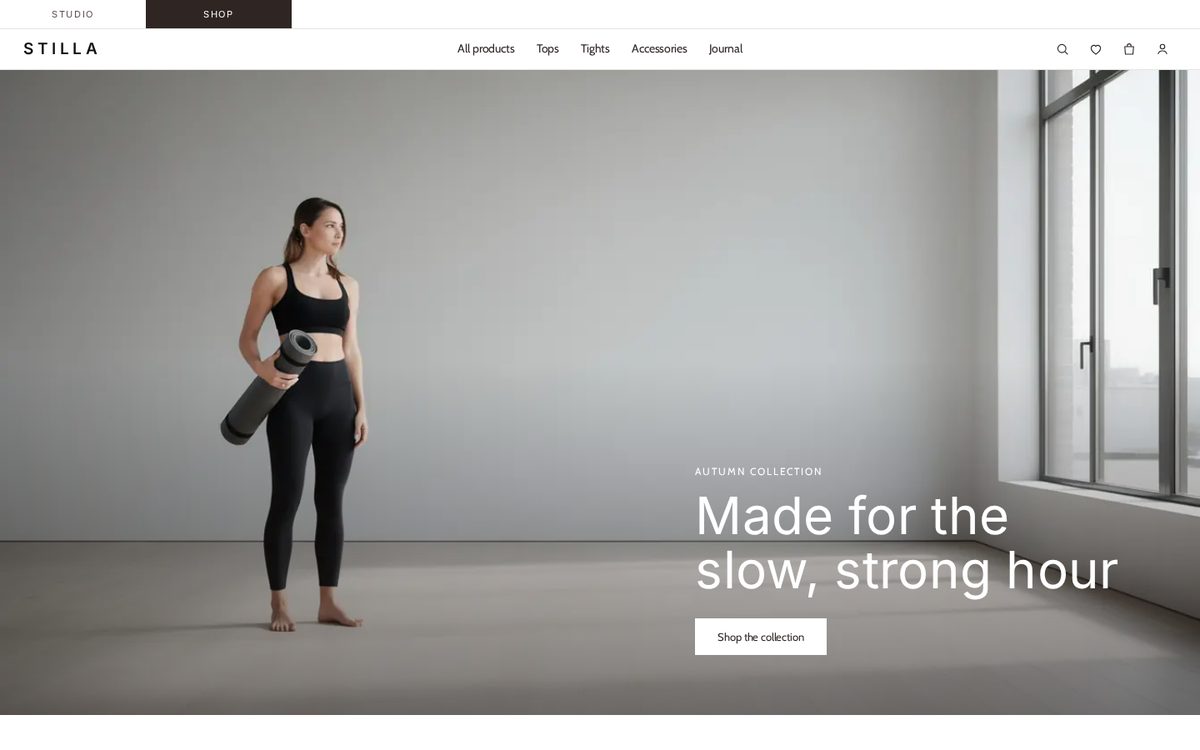
The demo form is real: it posts to a Formgong demo form. Demo messages are kept for seven days and are not emailed to anyone.
Get this template
HTML
Plain HTML files with no build step. They run on any static host.
- Download stilla.zip and unzip it.
- Create a free form at formgong.com/new and copy its access key. It starts with
fk_and is safe to put in a web page. - Replace every
fk_your_access_keywith your key. It is in all the .html files, so use find and replace across the folder. - Upload the folder to a static host such as Cloudflare Pages, Netlify or GitHub Pages.
- Send a test message from the live site and check that it reaches your Formgong inbox.
Shopify
An Online Store 2.0 theme with the same look, for any Shopify plan with an online store.
Download Stilla-1.0.0.zip Shopify demo
- Download Stilla-1.0.0.zip. Don't unzip it.
- In Shopify admin, open Online Store → Themes → Add theme → Upload zip file, and choose the file.
- Create a free key at formgong.com/new. Click Customize, open Theme settings → Formgong and paste it. Without a key the theme's Formgong forms stay hidden.
- Add your products, photos and menus in the theme editor. Shopify never copies them with a theme, so it starts with placeholders. Publish when you're ready.
What is inside
- A Scandinavian storefront: a Studio / Shop switch, a white header with a centred menu and icons, a full-width photo hero, split photo and text sections, a quote, an FAQ and a large newsletter block.
- A catalogue with filter and sort: a split banner with category tabs, a large or small grid, big lifestyle tiles between product cards, and a drawer that filters by category, colour and size and sorts by price or name without reloading.
- Product cards and pages: a second photo on hover, a wishlist heart, colour swatches; on each of the twelve product pages a gallery, colour and size pickers, accordions and related products.
- Three working forms: a size question on every product page (it sends the product name) and two newsletter sign-ups. Each shows thanks only when the server answers
success: true. - Motion: text fades up, cards appear in a short wave and large photos settle as you scroll; reduced motion or no JavaScript shows everything at once.
- Images: eighteen WebP photos generated for this template with FLUX.2 [pro] (Black Forest Labs). The people are not real; no stock photos.
Questions
Is there a real cart and checkout?
No. The bag and the wishlist are demo UI. Link Add to bag to your own shop or payment provider, or take orders by message with a Formgong form. Formgong does not take payments.
How do I add a product?
Copy an article with class card in collections/all/index.html and set data-cat, data-color, data-size and data-price, which the filters read. For its page, copy a folder in products/ and edit the text and photos.
Sources
Checked on 08.10.2026 against these public pages: MIT License (Open Source Initiative).