See it working
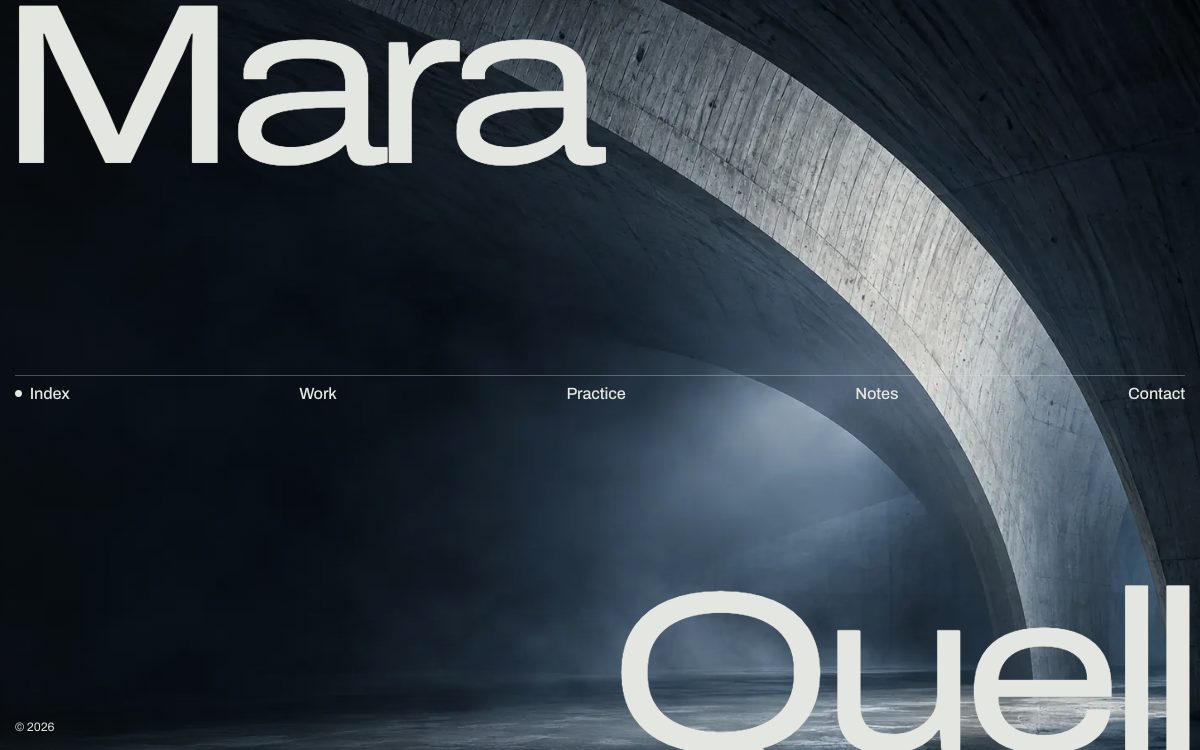
The demo form is real: it posts to a Formgong demo form. Demo messages are kept for seven days and are not emailed to anyone.
Get this template
HTML
Plain HTML files with no build step. They run on any static host.
Download quell.zip Live demo Source on GitHub
- Download quell.zip and unzip it.
- Create a free form at formgong.com/new and copy its access key. It starts with
fk_and is safe to put in a web page. - Open
index.htmlin a text editor and replace everyfk_your_access_keywith your key. - Upload the folder to a static host such as Cloudflare Pages, Netlify or GitHub Pages.
- Send a test message from the live site and check that it reaches your Formgong inbox.
Or skip the download. Each button below copies the site to your GitHub and publishes it. Then replace the key in your copy as in step 3 and commit, and the host publishes the change on its own.
WordPress
A block theme with the same look. The form comes from the free Formgong plugin.
- Download quell-wordpress.zip. Don't unzip it. In WordPress, open Appearance → Themes → Add New Theme → Upload Theme, choose the file, click Install Now, then Activate.
- Install the free Formgong plugin (Plugins → Add New, search for "Formgong"). Create a free key at formgong.com/new and paste it under Settings → Formgong.
- Send a test message from your site and check that it reaches your Formgong inbox.
The contact form is the Formgong plugin's block, not part of the theme. Without the plugin the page has no form.
WordPress version: what you can edit and what is in the zip · All free WordPress themes
Shopify
An Online Store 2.0 theme. The home page has the template's design; product, cart and the other store pages are simple pages in the same style.
- Download quell-shopify.zip. Don't unzip it. In Shopify admin, open Online Store → Themes → Add theme → Upload zip file, and choose the file.
- Click Customize, open Theme settings → Formgong form and paste a free key from formgong.com/new.
- Send a test message from your site and check that it reaches your Formgong inbox.
The settings are flat: one fixed setting per text. Repeated cards are not blocks, so you can edit them but not add, remove or reorder them in the theme editor.
Shopify version: what you can edit and what is in the zip · All free Shopify themes
Astro
The Astro version of the same page. You need Node.js.
- Unzip it, run
npm install, thennpm run devand open localhost:4321.npm run buildputs the static site indist/. - Create a free form at formgong.com/new, copy its access key and paste it over
fk_your_access_keyinsrc/content.json. Every text on the page is in that file. - Send a test message from your site and check that it reaches your Formgong inbox.
Next.js
A Next.js (App Router) version of the same page, built as a static export. You need Node.js.
- Unzip it, run
npm install, thennpm run devand open localhost:3000.npm run buildputs the static site inout/. - Create a free form at formgong.com/new, copy its access key and paste it over
fk_your_access_keyincontent.json. Every text on the page is in that file. - Send a test message from your site and check that it reaches your Formgong inbox.
Nuxt
A Nuxt version of the same page. You need Node.js with npm 11 or newer (npm 10 stops during install), or pnpm.
- Unzip it, run
npm install, thennpm run devand open localhost:3000.npm run generateputs the static site in.output/public/. - Create a free form at formgong.com/new, copy its access key and paste it over
fk_your_access_keyinapp/content.json. Every text on the page is in that file. - Send a test message from your site and check that it reaches your Formgong inbox.
SvelteKit
A SvelteKit version of the same page. You need Node.js.
- Unzip it, run
npm install, thennpm run devand open localhost:5173.npm run buildputs the static site inbuild/. - Create a free form at formgong.com/new, copy its access key and paste it over
fk_your_access_keyinsrc/lib/content.json. Every text on the page is in that file. - Send a test message from your site and check that it reaches your Formgong inbox.
Hugo
A Hugo site with the page as a theme you can copy into another Hugo site. You need Hugo 0.146 or newer.
- Unzip it, run
hugo serverin the folder and open localhost:1313.hugoputs the static site inpublic/. - Create a free form at formgong.com/new, copy its access key and paste it over
fk_your_access_keyindata/content.json. Every text on the page is in that file. - Send a test message from your site and check that it reaches your Formgong inbox.
Eleventy
An Eleventy version of the same page. You need Node.js.
- Unzip it, run
npm install, thennpm run devand open localhost:8080.npm run buildputs the static site in_site/. - Create a free form at formgong.com/new, copy its access key and paste it over
fk_your_access_keyinsrc/_data/sitedata.json. Every text on the page is in that file. - Send a test message from your site and check that it reaches your Formgong inbox.
Ghost
A Ghost theme. The home page has the template's design; posts, pages, tags and authors use the same header, footer and colours.
- Download quell-ghost.zip. Don't unzip it. In Ghost Admin, open Settings → Design & branding → Change theme → Upload theme, then activate it.
- Under Settings → Design & branding → Customize → Homepage, paste a free key from formgong.com/new into Formgong access key.
- Send a test message from your site and check that it reaches your Formgong inbox.
The home page texts are written into the theme files, so you change them there, not in Ghost Admin. Ghost Admin only takes the access key.
Use with AI
A prompt for ChatGPT, Claude, v0, Lovable or Bolt that builds a site in Quell's style: the sections in order, the colours, the fonts, the motion and a contact form that sends to Formgong.
Build a website for an architect or structural engineer portfolio in the style of the free "Quell" template (live demo: https://quell.formgong.com).
Write plain HTML, CSS and a little vanilla JavaScript in one index.html, unless this tool builds in its own stack (v0, Lovable and Bolt use React): then keep the same sections, look and form logic.
Use my business name and details where I give them. Where a section needs photos, names, prices, reviews or other copy I haven't given, use neutral placeholder images (CSS gradients or inline SVG, sized for the layout) and short placeholder text that is clearly marked for me to replace.

Sections, top to bottom:
1. Hero: the studio name in two giant words over a full-screen photo.
2. Section menu that rises after the hero.
3. Work: a thin line down the middle of the page that fills as you scroll, with eight projects on both sides at different sizes and each year on the line.
4. Practice: a short text.
5. Approach: one large statement, "Where the structure is the architecture".
6. Notes: a quote.
7. Contact: "Start a project" with the project form.
8. How we work: two photos with a short text.
9. One wide photo.
10. Footer with the studio name across the full width, filled with a photo.

Colours (define them as CSS variables):
- Background: #0d1113
- Text: #e4e6e1
- Dim text: rgba(228,230,225,.4)
- Lines: rgba(228,230,225,.3)
- Accent (pale green): #a9c2b5

Fonts (Google Fonts): Archivo (variable: width 62 to 125, weight 100 to 900) for everything; the giant name uses a narrow width.

Motion and hover:
- As you scroll the two words of the name slide apart, the menu rises and a dark panel covers the photo.
- On the timeline, hovering a project dims the other photos and shows its name and structure.
- Text reveals line by line, headings word by word, photos come into focus as they scroll in.
- Reduced motion turns it all off.
- Wrap every animation in @media (prefers-reduced-motion: no-preference), so visitors who ask for less motion get the final state.
- Hide content for reveal animations only from JavaScript (add a class such as js to <html> first and hide only under it), so every section is visible without JavaScript.

Contact form, sent to Formgong (a hosted form backend, no server code):
- Project form fields: name, email, project type (chips), location, timing, message. Use these name attributes: name, email, project, location, timing, message. Add a hidden field subject with the value "New project enquiry" so the message is easy to recognise in the inbox.
- The form is <form action="https://formgong.com/submit" method="POST"> with <input type="hidden" name="access_key" value="fk_your_access_key"> and <input type="hidden" name="_lang" value="en">. I will replace fk_your_access_key with my own key from https://formgong.com/new. The key is public and safe in the page.
- Add a honeypot: a text input named botcheck, hidden with CSS (position:absolute; width:1px; height:1px; overflow:hidden; clip-path:inset(50%)), with tabindex="-1" and autocomplete="off".
- Submit with fetch: POST https://formgong.com/submit, body new FormData(form), header Accept: application/json. Disable the button while it sends.
- Show the thank-you message only when the JSON response has success === true. On anything else (an error response, a non-2xx status, a network error) show the error message, keep what the visitor typed and enable the button again.
- Keep the name attributes exactly as listed: Formgong stores each value under its field name.
- Without JavaScript the plain form POST must still work: Formgong then shows its own thank-you page. To send visitors to my own page instead, add <input type="hidden" name="_redirect" value="https://example.com/thanks/"> (I will put my real URL there).
- Do not add a backend, API route, server action, database or email library.

Accessibility: a visible label on every field, a visible focus style, alt text on images, and text contrast of at least 4.5:1.
- Copy the prompt and paste it into the AI tool. Add your business name, services and contact details at the end.
- Create a free form at formgong.com/new and copy its access key. It starts with
fk_and is safe to put in a web page. Replacefk_your_access_keyin the code the tool writes. - Send a test message and check that it reaches your Formgong inbox. The page should say thanks only after the server answers
success: true.
What is inside
- A split name: the studio name in two giant words over a full-screen photo. As you scroll they slide apart, the menu rises and a dark panel covers the photo.
- A work timeline: a thin line down the middle fills as you scroll, with eight projects on both sides at different sizes and each year on the line. On hover the other photos dim and the name and structure appear.
- Quiet motion: text reveals line by line, headings word by word, and photos come into focus as they scroll in. Reduced motion turns it all off.
- A project form with name, email, a choice of project type, place, timing and a message. It shows thanks only when the server answers
success: true. - A footer with the studio name across the full width, filled with a photo.
Questions
How do I add or move a project in the timeline?
Copy one article with the class item. Its --c style sets the columns it takes on a 12-column grid, and the class l puts its name on the left.
Can I use the photos?
Yes. They were generated for this template and show fictional buildings, but replace them with your own work before launch.
Sources
Checked on 08.10.2026 against these public pages: Quell on GitHub, MIT License (Open Source Initiative).