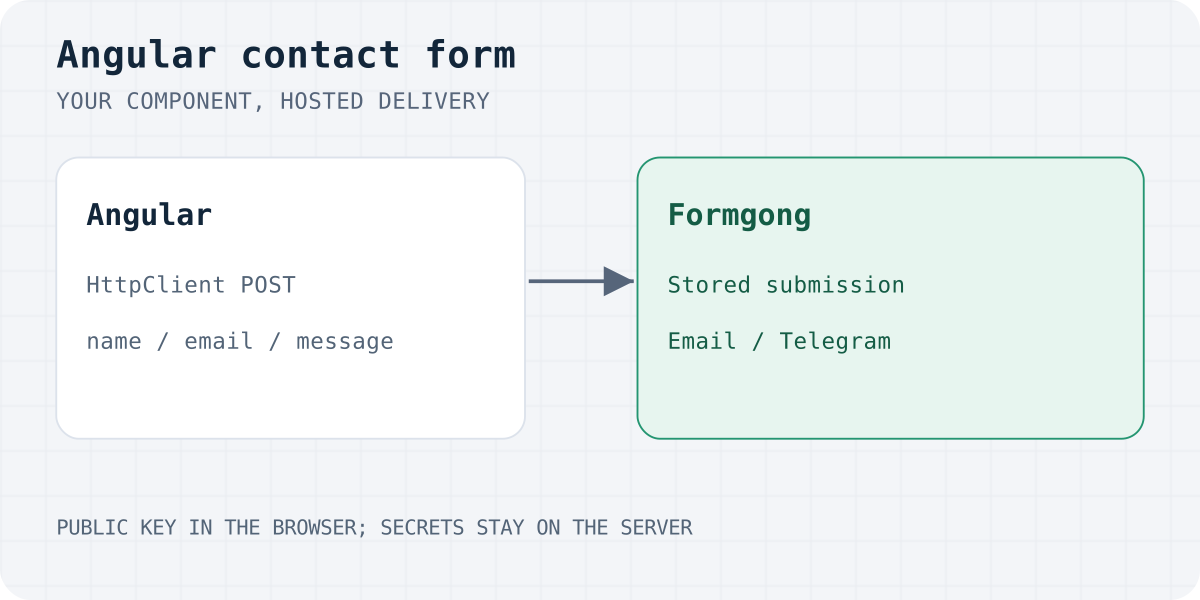
Why you cannot just send email from Angular
Everything in your Angular bundle, including environment.ts, is downloaded by every visitor. That rules out the usual shortcuts:
- An email API key in the frontend (SendGrid, Resend, Mailgun). Anyone can open DevTools, copy the key and send mail as you.
- SMTP credentials. Browsers cannot speak SMTP, and a password in the bundle is public anyway.
- Writing to Firestore and hoping a function emails you. It works, but you now run a database, security rules and a function for one contact form.
You have two honest options: run your own endpoint (NestJS, Express, a serverless function), or post to a hosted form endpoint whose key is designed to be public. Formgong's access_key can only send submissions to your form. It cannot read your inbox or change settings.
What you need
- An Angular 17+ project using standalone components. The control flow (
@if) used below needs Angular 17. - A Formgong form key. Open formgong.com, enter your email, and the key (
fk_…) appears at once. Verify the email so notifications can be delivered. - The Free plan includes 300 submissions a month, Telegram at once, and email as a daily digest.
1. Provide HttpClient
In app.config.ts, add provideHttpClient. The example uses provideHttpClient() for Angular 17+. For SSR on older Angular releases, consider withFetch(); current Angular uses the fetch backend by default.
import { ApplicationConfig } from '@angular/core';
import { provideHttpClient } from '@angular/common/http';

export const appConfig: ApplicationConfig = {
  providers: [
    provideHttpClient(),
    // ...your router and other providers
  ],
};
2. A small service that talks to Formgong
The service owns the request and exposes two signals, state and message, so any component can show progress and errors without extra wiring.
A few details are deliberate:
_langtells Formgong which language to use for its error messages, the thank-you text and the autoreply. It reads the page's<html lang>, so a multilingual Angular site gets the right language without extra code. Formgong supports 12 languages.- Success is
success === true, not "the request did not throw". Show the thank-you message only after Formgong confirms. - Errors keep working. A non-2xx answer reaches the
catchas anHttpErrorResponse, and Formgong's own message is shown when there is one.
NgZone.run makes completion and error states render on older zone-based Angular versions too, even when native async/await resumes outside Angular's zone.
import { DOCUMENT } from '@angular/common';
import { HttpClient, HttpErrorResponse } from '@angular/common/http';
import { Injectable, NgZone, inject, signal } from '@angular/core';
import { firstValueFrom } from 'rxjs';

// Public by design: this key can only send submissions to your form.
const ACCESS_KEY = 'fk_your_access_key';
const ENDPOINT = 'https://formgong.com/submit';

interface FormgongResponse {
  success: boolean;
  message?: string;
}

export type SendState = 'idle' | 'sending' | 'sent' | 'error';

@Injectable({ providedIn: 'root' })
export class FormgongService {
  private readonly http = inject(HttpClient);
  private readonly doc = inject(DOCUMENT);
  private readonly zone = inject(NgZone);

  readonly state = signal<SendState>('idle');
  readonly message = signal('');

  async submit(fields: Record<string, unknown>): Promise<boolean> {
    if (this.state() === 'sending') return false;
    this.state.set('sending');
    this.message.set('');

    // Language of Formgong's messages and the autoreply, e.g. "en", "uk", "pl".
    const lang = (this.doc.documentElement.lang || 'en').split('-')[0];

    try {
      const res = await firstValueFrom(
        this.http.post<FormgongResponse>(ENDPOINT, {
          _lang: lang,
          ...fields,
          access_key: ACCESS_KEY,
        }),
      );
      if (res.success !== true) throw new Error(res.message || 'Could not send. Please try again.');
      this.zone.run(() => {
        this.state.set('sent');
        this.message.set(res.message ?? 'Sent. Thank you!');
      });
      return true;
    } catch (err) {
      // Non-2xx answers arrive as HttpErrorResponse with Formgong's JSON in `error`.
      const body = err instanceof HttpErrorResponse ? err.error : null;
      const text =
        typeof body?.message === 'string'
          ? body.message
          : err instanceof Error && err.message
            ? err.message
            : 'Could not send. Please try again.';
      this.zone.run(() => {
        this.state.set('error');
        this.message.set(text);
      });
      return false;
    }
  }
}
3. The form component
Reactive forms, a honeypot field, and an aria-live status line so screen readers hear the result.
Notes on this component:
- The honeypot is named
botcheck. It is hidden with CSS, notdisplay: none(some bots skip fields hidden that way), andaria-hiddenkeeps it away from assistive technology. A real visitor never fills it. See how to add a honeypot that works. - The form is not cleared on failure. Visitors keep their message and can retry. It resets only after Formgong says the submission arrived.
NonNullableFormBuildermakesgetRawValue()fully typed and makesreset()return to the initial values.
Drop <app-contact-form /> into a page and you are done with the code.
import { Component, inject } from '@angular/core';
import { NonNullableFormBuilder, ReactiveFormsModule, Validators } from '@angular/forms';
import { FormgongService } from './formgong.service';

@Component({
  selector: 'app-contact-form',
  standalone: true,
  imports: [ReactiveFormsModule],
  template: `
    <form [formGroup]="form" (ngSubmit)="onSubmit()">
      <label>
        Name
        <input type="text" formControlName="name" autocomplete="name" />
      </label>

      <label>
        Email
        <input type="email" formControlName="email" autocomplete="email" />
      </label>
      @if (form.controls.email.touched && form.controls.email.invalid) {
        <small role="alert">Enter a valid email address.</small>
      }

      <label>
        Message
        <textarea formControlName="message"></textarea>
      </label>

      <!-- Honeypot: real visitors never see or fill it. -->
      <div class="hp" aria-hidden="true">
        <label>
          Leave this field empty
          <input type="text" formControlName="botcheck" tabindex="-1" autocomplete="off" />
        </label>
      </div>

      <button type="submit" [disabled]="fg.state() === 'sending'">
        {{ fg.state() === 'sending' ? 'Sending…' : 'Send' }}
      </button>

      <p role="status" aria-live="polite">{{ fg.message() }}</p>
    </form>
  `,
  styles: `
    .hp {
      position: absolute;
      inset-inline-start: 0;
      top: 0;
      width: 1px;
      height: 1px;
      overflow: hidden;
      clip-path: inset(50%);
    }
  `,
})
export class ContactFormComponent {
  protected readonly fg = inject(FormgongService);
  private readonly fb = inject(NonNullableFormBuilder);

  protected readonly form = this.fb.group({
    name: ['', Validators.required],
    email: ['', [Validators.required, Validators.email]],
    message: ['', Validators.required],
    botcheck: [''],
  });

  protected async onSubmit() {
    if (this.form.invalid) {
      this.form.markAllAsTouched();
      return;
    }
    // Keep what the visitor typed if the request fails.
    if (await this.fg.submit(this.form.getRawValue())) {
      this.form.reset();
    }
  }
}
4. Test the real thing
This JSON example sends text fields, not file attachments. If your form has Turnstile enabled, also mount its widget, submit cf-turnstile-response, and reset the widget after each attempt; this minimal example does not include the CAPTCHA flow. See the HTML form guide. Unverified recipients can leave submissions held until verification; a thank-you message alone does not mean a notification was sent.
A success message on the page does not prove delivery. Check the full path:
- Submit once with a recognizable message and an email address you control.
- The component should show Formgong's thank-you text.
- Open the form's Submissions in the Formgong dashboard and confirm every field is there.
- If you connected Telegram, the lead appears there immediately. On the Free plan email arrives as a daily digest, so do not wait for an instant email. Pro sends one email per submission.
- Repeat on the published domain. A form that works on
localhost:4200can still fail in production if the key or URL differs.
Prefer a ready-made component?
If you do not need custom markup, there is an official package for Angular 17+:
The package adds the hidden access_key, _lang and botcheck fields for you, shows Formgong's localized message in an aria-live region, and sends the same cookie-free anti-spam signals as Formgong's fg.js (fill time, typing and paste counts, and a small proof-of-work). A hand-written HttpClient form like the one above sends the honeypot but not those extra signals, so if spam becomes a problem, switch to the package or add Cloudflare Turnstile. The package also ships a formgongForm directive and a FormgongService built on signals; see its README for their exact API.
To scaffold the form into an existing project, run npx formgong init in the project root.
npm install @formgong/angular
Angular component
import { Component } from "@angular/core";
import { FormgongContactFormComponent } from "@formgong/angular";

@Component({
  selector: "app-contact-page",
  standalone: true,
  imports: [FormgongContactFormComponent],
  template: `<formgong-contact-form accessKey="fk_your_access_key" />`,
})
export class ContactPage {}
Template-driven forms and Angular Signal Forms
Nothing above depends on the form API you pick. FormgongService.submit() takes a plain object, so you can call it from a template-driven form, a reactive form, or another form API compatible with your Angular version. Pass the form's value and keep the rest.
Common problems
NullInjectorError: No provider for HttpClient. Add provideHttpClient() to app.config.ts (step 1). Standalone apps do not get it from a module.
The page says "Sent" but nothing arrives. Check that the request goes to https://formgong.com/submit and that access_key is your real key, not the fk_your_access_key placeholder. Then check Formgong's Spam tab: a filled botcheck field marks a submission as spam. For the email side, see contact form not sending email.
Browser console shows a CORS error. Make sure you send a JSON body to https://formgong.com/submit with HttpClient.post, as above, and that the URL has no typo. Do not add custom headers you do not need.
It works in ng serve but not after deploy. Re-test on the published domain. If you use server-side rendering, the submit handler runs in the browser only, so nothing changes, but the version-specific HTTP backend configuration may differ.
Frequently asked questions
Can Angular send email without a backend?
Not directly: browsers cannot send email, and an email API key in your bundle is public. Post the form to a hosted endpoint such as Formgong, which sends the notification for you, or run your own server endpoint.
Do I need Firebase for an Angular contact form?
No. Firebase works, but you would then maintain a database, security rules and a function that sends mail. A hosted form endpoint replaces all three for a contact form.
Is it safe to put the Formgong access key in Angular code?
Yes. The key is public by design and can only send submissions to your form. It does not allow reading the inbox or changing settings. On the Pro plan you can also restrict which domains may submit.
Does this work with Angular SSR or prerendering?
Yes. The request is sent only when a visitor submits the form, in the browser. Use provideHttpClient() as in step 1.
How many submissions are free?
300 a month on the Free plan, with unlimited forms. Spam does not count toward the limit.
Sources and documentation
Official references for this guide: Formgong docs, Angular HttpClient, Angular standalone components, Official Formgong Angular package. Formgong HTML form documentation, where data is stored.
Read this article as Markdown