What an HTML file upload needs
A contact form with file upload needs three things the browser will not invent. The form method is POST. The encoding is multipart/form-data. Something on a server has to store the bytes.
A static site can show the form. GitHub Pages, a plain HTML file, and a static export cannot keep the file. The page collects it. A form backend stores it. Without the enctype, the browser sends the file name and drops the bytes.
accept only steers the file picker. The type check has to run on the server, on the bytes.
The steps are:
- Post as multipart. Set method to POST and enctype to multipart/form-data.
- Add a file input. Use input type file. The accept attribute is only a hint for the picker.
- Turn uploads on. Enable Accept file attachments, verify your email, and add Turnstile keys.
- Read the error code. Check success and show the server message. Do not set Content-Type on fetch.
- Download from the inbox. Sign in and open the submission. Notifications do not attach the file itself.
How a form POST is built, field by field, is in how HTML forms work. The choice of receiver, before you add a file, is in form without a backend.
An HTML form with a file input
This is a full html form with file upload example. It posts to Formgong. Replace YOUR_ACCESS_KEY and YOUR_TURNSTILE_SITE_KEY. Leave botcheck empty.
The file input is named attachment. Any name that starts with a letter works, if the rest is letters, digits or underscores, up to 64 characters. You can end it with []. Do not use a control name such as botcheck or access_key for the file. multiple lets the visitor pick more than one file. Each file is a separate part.
The honeypot uses the same off-screen clip as the honeypot form field guide. The Turnstile widget is required for a file even when the form does not require it for text. The widget adds cf-turnstile-response.
A plain submit, with no JavaScript, is enough. The browser builds the multipart body. The same fields, without the file, are on the HTML contact template.
WordPress plugins can add a file field too. This page does not configure Contact Form 7. A WordPress site can use the HTML form instead, as in the WordPress contact form without a plugin. An Angular page posts the same way; the notes for that stack are on the Angular form page.
<form action="https://formgong.com/submit" method="POST" enctype="multipart/form-data">
  <input type="hidden" name="access_key" value="YOUR_ACCESS_KEY">
  <label>Name <input name="name" autocomplete="name" required></label>
  <label>Email <input type="email" name="email" autocomplete="email" required></label>
  <label>Message <textarea name="message" required></textarea></label>
  <label>File
    <input type="file" name="attachment" accept="application/pdf,image/png,image/jpeg,.pdf,.png,.jpg,.jpeg" multiple>
  </label>
  <div aria-hidden="true" style="position:absolute;inset-inline-start:0;top:0;width:1px;height:1px;overflow:hidden;clip-path:inset(50%)">
    <label>Leave this field empty <input type="text" name="botcheck" tabindex="-1" autocomplete="off"></label>
  </div>
  <script src="https://challenges.cloudflare.com/turnstile/v0/api.js" async defer></script>
  <div class="cf-turnstile" data-sitekey="YOUR_TURNSTILE_SITE_KEY"></div>
  <button type="submit">Send</button>
</form>
Limits, types, and why accept is only a hint
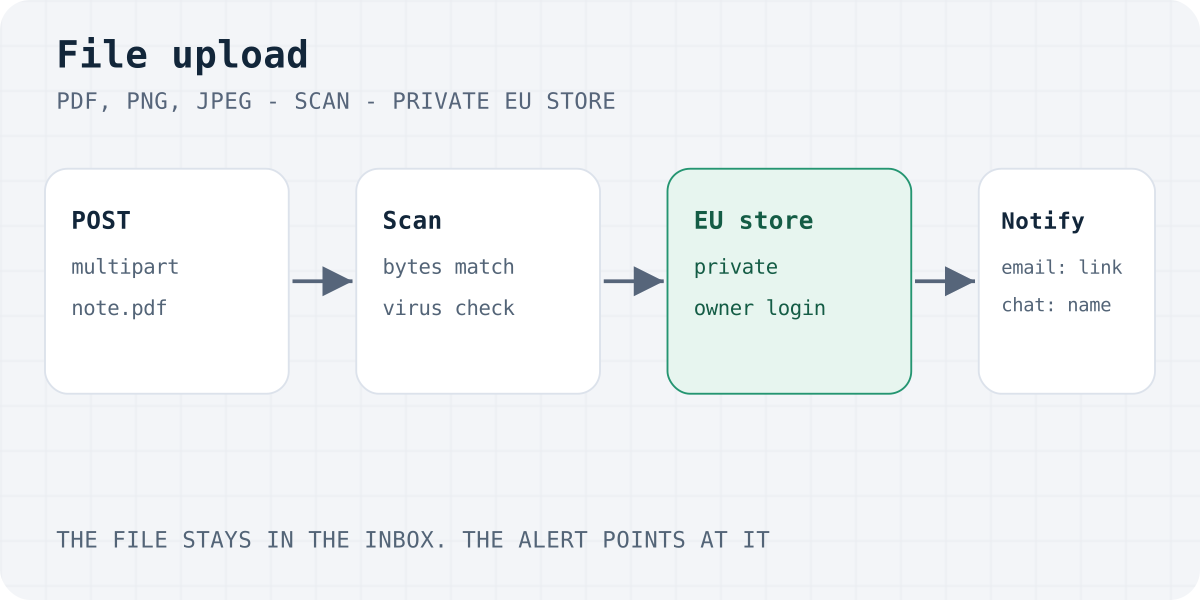
Formgong checks a file three times. The extension has to be pdf, png, jpg or jpeg. The claimed type has to match, or be application/octet-stream, or be empty. The bytes have to match too.
- A PDF starts with
%PDF-and contains%%EOFnear the end. - A PNG starts with the PNG signature and ends with
IEND. - A JPEG starts with the JPEG start marker and ends with the end marker.
Anything else comes back as file_type. Renaming a GIF to .pdf fails. The file is served as a download.
The name can be at most 120 characters. It cannot contain /, \, : or .., and it cannot start with a dot. Hidden Unicode in the name is file_invalid.
| Rule | Limit |
|---|---|
| Files per post | 3 |
| Each file | 5 MiB |
| All files together | 10 MiB |
| Types | PDF, PNG and JPEG only |
| File name | 120 characters, no path characters |
| Free storage | 100 MiB per account |
| Pro storage | 1 GiB per account |
| Business storage | 5 GiB per account |
There is no HTML attribute for a maximum size. A check of File.size in the browser is only a hint, like accept. The details use the same numbers. The server is the check that counts.
Uploads work on every plan, including Free. The storage cap is what changes. A full account rejects a new file with storage_full and keeps the files it already has.
Browser check with the same limits
const MAX_FILES = 3;
const MAX_EACH = 5 * 1024 * 1024;
const MAX_TOTAL = 10 * 1024 * 1024;
const EXT = new Set(["pdf", "png", "jpg", "jpeg"]);

function precheck(files) {
  if (files.length > MAX_FILES) return "too_large";
  let total = 0;
  for (const file of files) {
    const ext = file.name.slice(file.name.lastIndexOf(".") + 1).toLowerCase();
    if (!EXT.has(ext)) return "file_type";
    if (file.size <= 0 || file.size > MAX_EACH) return "too_large";
    total += file.size;
    if (total > MAX_TOTAL) return "too_large";
  }
  return "";
}
Turn file uploads on
Three settings have to be true before a file is accepted. The dashboard hides two of them in Standard mode. Switch to Expert first. The button label is Open expert mode.
- Accept file attachments. Open the form settings, then the tab labelled Attachments, and turn on Accept file attachments. If this is off, the code is
uploads_disabled. - A verified email. The account email has to be verified. If it is not, the code is
uploads_unverified. - Turnstile keys. Open the tab labelled Protection. Set Your own site key and Your own secret key. Put the widget on the page with that site key. A missing token is
turnstile_missing. A missing secret isturnstile_not_configured. A token Cloudflare rejects isturnstile_failed.
The hint under Attachments says files need Turnstile, with keys in Protection and the widget on the page. The Protection checkbox is "Require Cloudflare Turnstile". It is optional for text, on every plan. A file still needs a valid token when that checkbox is off.
If the private store or the virus scanner is down, the code is uploads_unavailable. Retry later. That is not a setting you toggle.
Send the file with fetch
An ajax form submit with file upload uses FormData. Do not set Content-Type yourself. The browser must set the multipart boundary. If you set the header by hand, the server cannot read the parts.
Ask for JSON with Accept: application/json. Success is response.ok and success === true. The body also has id, lang and message. On failure, success is false and code says why. Show result.message. Leave the fields in place. Turn the button back on. Put the message in an element with role="status" and move focus to it.
A JSON body cannot carry a file. If a value in that JSON is an object, the response is invalid_json: "The JSON body is invalid. Send a flat object of strings." Send multipart instead. The same fetch shape, for a form with no file, is on the JavaScript form page and in send email from frontend JavaScript.
| Code | Status | What to fix |
|---|---|---|
| uploads_disabled | 400 | Turn on Accept file attachments. |
| uploads_unverified | 403 | Verify the owner email. |
| turnstile_missing | 400 | Add the widget. A file always needs a token. |
| turnstile_not_configured | 500 | Save the site key and the secret under Protection. |
| turnstile_failed | 400 | Reload the page so the widget can mint a new token. |
| file_type | 415 | Send a real PDF, PNG or JPEG. The extension, the type and the bytes must agree. |
| file_invalid | 400 | Fix the file name or the field name. |
| too_large | 413 | More than 3 files, a file over 5 MiB, or more than 10 MiB together. The visitor sentence mentions 64 KB, which is the text-body cap. The file caps are the ones in the table above. |
| file_unsafe | 400 | The scanner rejected the file, or the post was already spam. |
| storage_full | 429 | The account storage is full. Existing files stay. |
| uploads_unavailable | 503 | The scanner or the store is down. Retry later. |
| rate_limited | 429 | Too many posts. File posts also have a tighter per-minute cap. |
The raw body is a series of parts. One part is the access key. One part is the file, with a filename. The details show a short sample with placeholder bytes, not a real PDF.
fetch with FormData and no Content-Type
const form = document.querySelector("#contact");
const button = form.querySelector("button[type=submit]");
const status = document.querySelector("#form-status");

form.addEventListener("submit", async (event) => {
  event.preventDefault();
  button.disabled = true;
  status.textContent = "Sending…";
  try {
    const response = await fetch(form.action, {
      method: "POST",
      body: new FormData(form),
      headers: { Accept: "application/json" },
    });
    const result = await response.json();
    if (!response.ok || result.success !== true) {
      status.textContent = result.message || "Please try again.";
      button.disabled = false;
      status.focus();
      return;
    }
    status.textContent = result.message || "Thanks. We have your message.";
    status.focus();
  } catch {
    status.textContent = "The form could not be sent. Please try again.";
    button.disabled = false;
    status.focus();
  }
});
What the multipart request looks like
POST /submit HTTP/1.1
Host: formgong.com
Accept: application/json
Content-Type: multipart/form-data; boundary=PLACEHOLDER

--PLACEHOLDER
Content-Disposition: form-data; name="access_key"

YOUR_ACCESS_KEY
--PLACEHOLDER
Content-Disposition: form-data; name="email"

visitor@example.com
--PLACEHOLDER
Content-Disposition: form-data; name="attachment"; filename="note.pdf"
Content-Type: application/pdf

%PDF- PLACEHOLDER %%EOF
--PLACEHOLDER--
Scan, storage, and who can download
Every file is scanned before it is stored. The scanner is a private ClamAV service. It does not write the bytes to a log. An infected file is file_unsafe. If the scanner cannot answer, the code is uploads_unavailable.
A post that is already spam, including a filled honeypot, is rejected with file_unsafe when it has a file. It is not stored as a quiet spam row. A text form still stores honeypot spam and answers success. A file form does not.
Clean files go to a private bucket in the EU. The database holds metadata only: name, size, type and a hash. File bytes are never sent to an AI provider. The privacy notice and the GDPR form backend guide cover that store.
Only the form owner can download a file, after signing in. The link is a dashboard URL. A public access key does not open it. A webhook URL does not open it either.
Files follow the form's retention. They are deleted with the submission, the form or the account. Free keeps submissions for 30 days. Pro and Business can choose 30 days, 90 days, 365 days or Forever. The label is "How long to keep submissions".
What you receive on each channel
The file itself stays in the inbox. Each channel gets a different pointer to it.
- Email on Pro and Business. The message lists links, one per file. The link text is the file name. You sign in, then the download starts. The file is not attached to the email. Pro sends each submission at once, to up to 3 addresses. Business does the same, to up to 5.
- Email on Free. There is no per-submission email. The account gets one next-morning daily digest at 08:00 in the owner time zone, to 1 recipient. The digest shows a count per form and a short preview of fields such as name, email and message. It does not list file links. The file is in the inbox. Open the inbox to download it. Free stores 300 submissions a month per account.
- Telegram. The message includes the file names only, under Attachments. The bytes are not sent to Telegram. Telegram is instant on every plan, including Free.
- Slack and Discord. The chat message includes the file names only. Setup for those channels is on Slack and Discord.
- A generic JSON webhook. The payload can include an
attachmentsarray. Each item has the file name, the size, the type and an owner-authenticated URL. Knowing the webhook URL does not let the receiver download the file. The shape is in the webhook docs.
If a delivery fails for good, the owner gets an alert email. That mail is at most once a day per form and channel, on every plan, including Telegram. It is not the daily digest. The file stays in the inbox. Text delivery to Telegram is the website form to Telegram guide.
Fix a failed file upload
Read result.code before you change the HTML. These are the cases people hit first.
- file_type
- The extension, the claimed type and the bytes disagree, or the file is not a PDF, PNG or JPEG.
accepton the input will not fix a renamed file. - too_large
- More than 3 files, a file over 5 MiB, or more than 10 MiB together. The visitor sentence mentions 64 KB. That text is the shared body cap. The file caps are 5 MiB and 10 MiB.
- turnstile_missing
- The page has no widget, or the script ran after the submit. A file post always needs
cf-turnstile-response. - uploads_unverified
- The owner has not verified their email. Text posts can still work. Files wait for that verification.
- storage_full
- The account is at its storage cap. Free is 100 MiB, Pro is 1 GiB, Business is 5 GiB. Old files are kept. Delete some, or raise the plan, before a new file will store.
- The visitor saw success, and you only have a name
- That is Telegram, Slack or Discord. Those channels send the name. The bytes are in the inbox. On Free, email will not list the link either. Open the submission and use Download.
If the inbox has no row, the post never stored. Check the access key, then the three settings above. Missing mail is covered in contact form not sending email. The React component is on the React form page.
Formgong is a free form backend for static and AI-built sites that delivers submissions to Telegram and email, stores data in the EU, and works in 12 languages. Caps are on the pricing page.
Frequently asked questions
How do I upload a file using an HTML form?
Set method to POST and enctype to multipart/form-data, add an input of type file, and post to a server that stores the bytes. A static file cannot store the upload. With Formgong, turn on attachments, verify your email, and add the Turnstile widget.
What enctype does an HTML form need for a file upload?
Use multipart/form-data. Without it the browser sends the file name and leaves out the bytes. Pair it with method POST. When you use fetch, pass FormData and do not set the Content-Type header yourself.
Can a contact form with file upload be free?
Yes. Formgong accepts files on the Free plan. Free storage is 100 MiB. Email on Free is the next-morning daily digest at 08:00, and that digest does not list file links. Telegram is instant and shows the file name. You download the file from the inbox.
How do I allow only PDF files in an HTML form?
Set accept to application/pdf so the picker prefers PDFs. That hint is not a check. The server has to read the bytes. Formgong allows PDF, PNG and JPEG, and it rejects a file whose bytes do not match the extension.
Does the notification email attach the file?
No. Pro and Business emails list a link for each file. You sign in to download. Free email is a next-morning digest of field previews, with no file links. Telegram, Slack and Discord send the file name only.
Sources and documentation
Official references for this guide: MDN: input type=file, MDN: FormData, RFC 7578: multipart/form-data, Cloudflare Turnstile. Formgong HTML docs, where data is stored.
Read this article as Markdown