POST, then 303, then GET
A thank-you page is the page people see after a form is saved. It is not the place the form should post to.
Setting action to thanks.html only navigates to that file. A static file throws the body away. The visitor sees "thank you" and you never get the message. That pattern shows up in thin tutorials. Skip it.
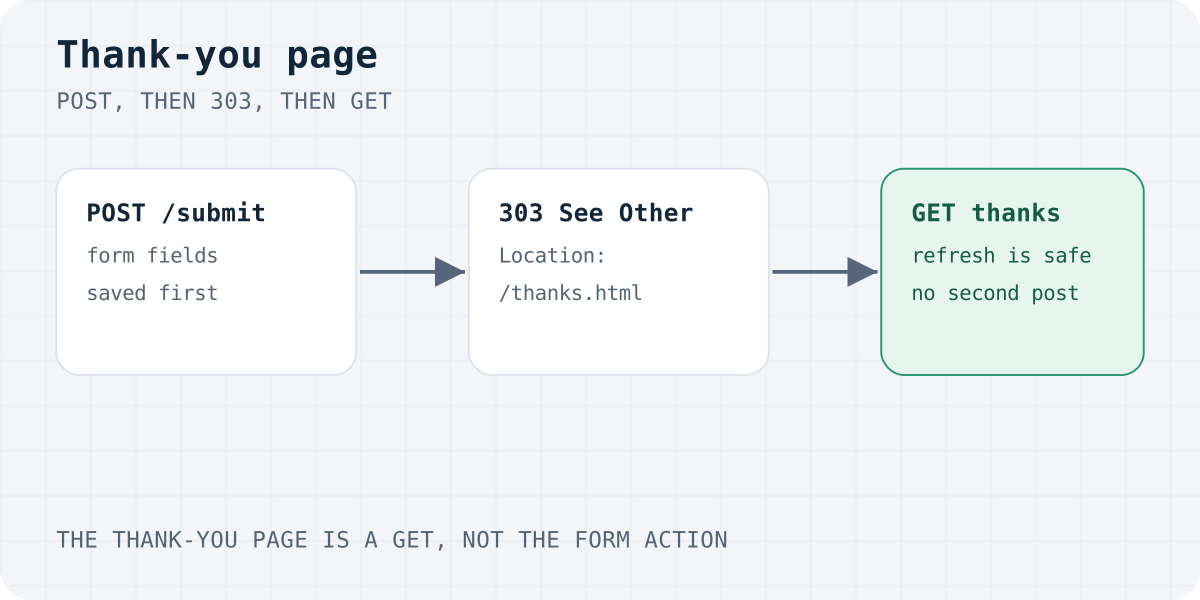
The reliable pattern is POST-Redirect-GET, called PRG. The form posts to a receiver. The receiver saves the lead and answers 303 See Other with a Location header. The browser then GETs the thank-you page. Refresh repeats the GET, not the POST.
RFC 9110 says 303 means the result is at another URI and should be fetched with GET. Use 303 for this. 302 often works in browsers, but the spec is vague about the method. Do not use 307 or 308. Those keep the POST method, so the browser would post the body to the thank-you URL.
Do not use 301. A permanent redirect can be cached. A later submit may skip the POST and open the thank-you page with no lead saved.
This is the exchange Formgong uses for a plain HTML form. The sample fields are short on purpose.
The copy-paste form, before the redirect, is in HTML contact form without a backend. The wider choice of receivers is in form without a backend.
POST /submit HTTP/1.1
Host: formgong.com
Content-Type: application/x-www-form-urlencoded
Origin: https://shop.example

access_key=fk_your_access_key&name=Ada&email=ada%40example.com&message=Hello

HTTP/1.1 303 See Other
Location: https://shop.example/thanks.html

GET /thanks.html HTTP/1.1
Host: shop.example

HTTP/1.1 200 OK
Plain HTML: let the backend redirect
No JavaScript is required. Post to the receiver and tell it where to send people. The steps are:
- Make a real thank-you page. Publish thanks.html on your site. A heading should say the message was received. Add a link back home.
- Post the form to a receiver. The action URL must accept the POST. Do not set action to the thank-you file. That file never sees the fields.
- Redirect with 303. After a good save, the receiver answers 303 See Other and a Location header. The browser then GETs the thank-you page.
- Or stay on the page. If you use fetch, prevent the default submit, read the JSON, and only then show a message or go to the thank-you URL.
- Move the focus. Put the confirmation in a live region and move focus to it. Do not rely on colour alone.
On Formgong, add a hidden field named _redirect, redirect, or _next. The value must be an absolute http or https URL. _next is the name FormSubmit uses. Formgong accepts it too.
You can skip the hidden field and set the URL in the dashboard instead. There is also an error URL. A checkbox tells Formgong to ignore redirect addresses that come from the page, so only the dashboard URL is used.
A URL typed into the form is not trusted the way the dashboard URL is. This stops the endpoint being used as an open redirect.
- With no allowed-domain list, the target must be on the site that sent the form. Same host, with or without
www, or a subdomain or a parent of that host. - A look-alike such as
example.com.evil.comis refused. On a shared suffix such asgithub.io, a sibling subdomain is refused too. - If the form has an allowed-domain list, the target must be on that list. The list is a Pro and Business setting.
- A browser sends
Originon a form POST. If that value is the wordnull, as in a sandboxed frame, the page URL is refused. - A refused page URL is ignored. The visitor goes to the dashboard URL if you set one, or to Formgong's own result page.
- The dashboard URL can point anywhere, because you set it while signed in.
If you run the server yourself, answer with 303 after you save. Express can do it in one call. The form's action is your route, not the thank-you file.
Netlify Forms is different. Their setup doc says the form action is a path on your site, starting with /, such as /thanks.html. That only works when the site is on Netlify and form detection is on. See Netlify Forms not working.
Formgong form with a same-site thank-you URL
<form action="https://formgong.com/submit" method="POST">
  <input type="hidden" name="access_key" value="fk_your_access_key">
  <input type="hidden" name="_redirect" value="https://shop.example/thanks.html">
  <label>Name <input name="name" autocomplete="name" required></label>
  <label>Email <input type="email" name="email" autocomplete="email" required></label>
  <label>Message <textarea name="message" required></textarea></label>
  <div aria-hidden="true" style="position:absolute;inset-inline-start:0;top:0;width:1px;height:1px;overflow:hidden;clip-path:inset(50%)">
    <label>Leave empty <input name="botcheck" tabindex="-1" autocomplete="off"></label>
  </div>
  <button type="submit">Send</button>
</form>
Your own server: 303 after the save
app.post("/api/contact", async (req, res) => {
  await saveLead(req.body);
  res.redirect(303, "/thanks.html");
});
Error redirect field
<input type="hidden" name="_error_redirect" value="https://shop.example/contact.html">
fetch, then a client-side redirect
Use this when the visitor should stay put until you know the result, then move. Call preventDefault. Post FormData. Ask for JSON with Accept: application/json. Do not set Content-Type yourself.
Formgong returns JSON when the request asks for it, when the body is JSON, or when a field named _format is json. A success body is success: true plus id, lang and message. It does not include a redirect URL. Your script already knows /thanks.html. Go there only after response.ok and success === true.
A failed post stays on the page. Put result.message in a live region and move focus to it. Leave the fields filled in. Turn the button back on.
The same fetch shape is on the JavaScript contact form page. Diagnosis steps are in contact form not sending email.
fetch, then location.assign
const form = document.querySelector("#contact");
const button = form.querySelector("button[type=submit]");
const status = document.querySelector("#form-status");

form.addEventListener("submit", async (event) => {
  event.preventDefault();
  button.disabled = true;
  status.textContent = "Sending…";
  try {
    const response = await fetch(form.action, {
      method: "POST",
      body: new FormData(form),
      headers: { Accept: "application/json" },
    });
    const result = await response.json();
    if (!response.ok || result.success !== true) {
      status.textContent = result.message || "Please try again.";
      button.disabled = false;
      status.focus();
      return;
    }
    window.location.assign("/thanks.html");
  } catch {
    status.textContent = "The form could not be sent. Please try again.";
    button.disabled = false;
    status.focus();
  }
});
An inline message, with focus
You can skip the new page. Hide the form only after a true success, and write the reply into a live region. People who use a screen reader should hear it. People who use a keyboard should land on it.
Give the status element role="status" so it is a polite live region. Give it tabindex="-1" so script can focus it. Call focus after you change the text. Do not use alert as the only notice. It steals the page and is easy to miss on a repeat.
Keep the status element outside the form if you set hidden on the form. Otherwise the message disappears with the fields.
This does not change the URL. A bookmark still opens the form, not the confirmation. If you need a shareable URL, redirect instead. history.replaceState can change the address bar, but the URL must be a real page. If it is not, refresh shows a 404.
Colour is not enough. The text has to say what happened.
Inline success with a live region
<form id="contact" action="https://formgong.com/submit" method="POST">
  <input type="hidden" name="access_key" value="fk_your_access_key">
  <label>Name <input name="name" autocomplete="name" required></label>
  <label>Email <input type="email" name="email" autocomplete="email" required></label>
  <label>Message <textarea name="message" required></textarea></label>
  <button type="submit">Send</button>
</form>
<p id="form-status" role="status" tabindex="-1"></p>
<script>
  const form = document.querySelector("#contact");
  const button = form.querySelector("button[type=submit]");
  const status = document.querySelector("#form-status");
  form.addEventListener("submit", async (event) => {
    event.preventDefault();
    button.disabled = true;
    status.textContent = "Sending…";
    try {
      const response = await fetch(form.action, {
        method: "POST",
        body: new FormData(form),
        headers: { Accept: "application/json" },
      });
      const result = await response.json();
      if (!response.ok || result.success !== true) {
        status.textContent = result.message || "Please try again.";
        button.disabled = false;
        status.focus();
        return;
      }
      form.hidden = true;
      status.textContent = result.message || "Thanks. We have your message.";
      status.focus();
    } catch {
      status.textContent = "The form could not be sent. Please try again.";
      button.disabled = false;
      status.focus();
    }
  });
</script>
Stop a second submit on refresh
Browsers warn "Confirm Form Resubmission" when the page on screen is the direct result of a POST. Refresh would send the body again. PRG removes that warning, because the page on screen is a GET.
303 does not cover every double send:
- A double click can fire two posts before the first reply. Disable the submit button on the first click. Turn it back on only if the post fails.
- Back, then forward, can replay a POST that is still in history. With PRG, the history entry is the thank-you GET.
- A dropped reply can make the visitor submit again. Formgong does not take a one-use token from the page. If a second real submit arrives, it is a second lead. Say that on the thank-you page so people are less likely to retry.
An error redirect uses _error_redirect or error_redirect, with the same site check. Formgong adds formgong_error and the error code to that URL. Read the code if you want to show a specific sentence. Do not treat that query as proof of a saved lead.
What the thank-you page should say
The page is a confirmation, not a second form. Keep one job.
- Say the message was received. Use a heading a person can read. Do not rely on a colour or an icon.
- Say what happens next, only if it is true. "We will reply" is fine when you reply. Do not promise an instant email on a plan that sends a daily digest.
- Give one way onward. A link home, or to the page they came from, is enough.
- Do not ask them to fill the form again. A second form on the same screen looks like the first one failed.
If the thank-you URL is public, search engines can index it. A page view is then not the same as a saved form. That is fine for a small site. If you use the URL as a conversion, do not treat every hit as a lead. The analytics section below is the same warning.
Count the thank-you page as a conversion
If the thank-you page is only reached after a save, a page view is a rough conversion. Load the analytics you already use. Do not add a new tracker for this alone without a lawful basis.
Plausible can record a custom event with plausible("Form submit") if their script is already on the page. A GA4 site can send gtag("event", "form_submit") the same way. Use your own event name. Run the call on the thank-you page, not on the submit click. A click is not a save.
Anyone who opens /thanks.html directly is counted too. The number will be higher than the inbox. For an inline message, fire the event in the success branch only, next to the live-region update.
Formgong also has form analytics for views and submits on the form itself. That is separate from your site analytics. It does not replace a thank-you event.
Do not write "a confirmation email is on the way" unless you actually send one. On Formgong Free, the owner email is a daily digest. There is no auto-reply to the visitor on Free. Auto-reply is a Pro and Business setting.
Thank-you page with an optional event
<main>
  <h1>Message received</h1>
  <p>Thanks. We have your note and will reply from the address you gave.</p>
  <p><a href="/">Back to the home page</a></p>
</main>
<script>
  document.addEventListener("DOMContentLoaded", function () {
    if (window.plausible) plausible("Form submit");
    if (window.gtag) gtag("event", "form_submit");
  });
</script>
What Formgong will and will not redirect
A plain HTML post gets 303. If you ask for JSON, you get 200 and no Location header. Your script does the redirect, as in the fetch sample.
Order for a success URL: if the dashboard says to ignore page redirects, only the dashboard URL is used. Otherwise the page field wins when it passes the site check. Then the dashboard URL. If neither is set, Formgong shows its own result page in the visitor's language.
The page field is read as _redirect, then redirect, then _next. The error field is _error_redirect, then error_redirect.
Formspree's plans page, checked 6 October 2026, lists a custom thank-you page on paid plans and not on Free. Formgong's redirect is not tied to a paid plan in the product code. The allowed-domain list is.
Related pages: HTML contact form that sends email, JavaScript contact form, static website contact form, and the HTML docs.
Frequently asked questions
How do I redirect after an HTML form submit?
Post the form to a receiver, not to the thank-you file. The receiver saves the fields and responds with 303 See Other and a Location header. On Formgong, set _redirect, redirect, or _next to an absolute https URL on your own site, or set the URL in the dashboard.
How do I show a thank-you message without leaving the page?
Prevent the normal submit, post with fetch, and ask for JSON. After success is true, write the message into an element with role status and move focus to it. Check both the HTTP status and success. Formgong's JSON body does not contain a redirect URL.
Why does refresh ask to submit the form again?
The page on screen is still the POST response. Refresh sends the POST again. A 303 thank-you page is a GET, so refresh only reloads that page. Also disable the button on the first click so a double click cannot send twice.
Can Formgong use my own thank-you page?
Yes. Use a hidden _redirect, redirect, or _next field, or the dashboard URL. A URL from the page must be http or https. It must be on the site that sent the form, or on the form's allowed-domain list. Any other page URL is ignored.
How do I track a conversion on the thank-you page?
Run your analytics event on the thank-you page, or in the fetch success branch. A click on Send is not a conversion. People who open the thank-you URL directly are counted too, so the event will not match the inbox exactly.
Sources and documentation
Official references for this guide: RFC 9110: 303 See Other, HTML Standard: form submission, MDN: aria-live, Plausible custom events, Netlify Forms setup, Formspree plans, Formgong llms.txt. Formgong HTML docs, where data is stored.
Read this article as Markdown