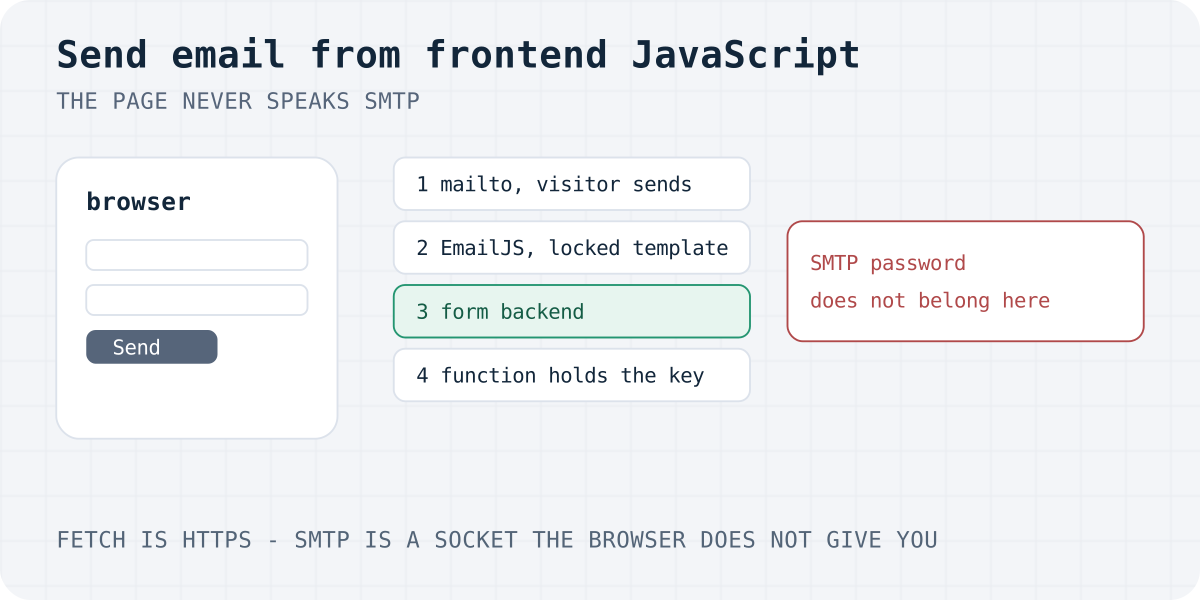
Why a browser cannot send SMTP
People search for send email from frontend JavaScript because a static page has no server. The short answer is that the page still cannot talk to a mail server.
SMTP is the mail protocol. A client opens a TCP socket, often on port 25, 465 or 587, and then speaks a short command language. RFC 5321 describes that conversation. A browser does not give JavaScript a way to open that socket.
Page script can call fetch over HTTP, or it can open a WebSocket. Both are HTTP-family tools. Neither is SMTP. There is no smtp.connect() in the web platform, and there should not be. A page that could open raw sockets could attack any host the visitor can reach.
A library that says it sends SMTP from the browser is not speaking SMTP in the page. It posts to an HTTP service, and that service speaks SMTP. The service still needs a password or an API key. If the key is in the script, it is public.
CORS does not fix this. An email API can allow your site's origin. If the key is also in the page, anyone can copy both and call the API from somewhere else. The browser rule is the point: secrets that send mail do not belong in frontend code.
What a key in the page can do
Here is a real abuse path. You paste a Mailgun, SendGrid or SMTP password into a script so the contact button can send mail. A visitor opens the page, uses View Source, and copies the key. They then call the mail API from their own computer, with your key, and send their own messages.
Those messages can be spam or a phishing note that looks like it came from you. The provider may bill the extra sends, or it may disable the key. People who receive the spam mark it, and your domain gets a worse reputation. You did not mean to run an open relay. The page made the secret public.
SMTP.js-style tutorials show this shape. They put host, user and pass in the browser and call sendMail. Do not ship that. The password is not hidden by minifying the file.
A public form key is a different object. It can add a submission to one form. It cannot read the inbox, change the recipient, or send arbitrary mail. EmailJS says the same about its public key, checked 6 October 2026: a copy can send your templates with your content. It cannot send a custom message the attacker writes. That is safer than an SMTP password. It is still not a reason to skip a domain allowlist, a locked recipient, and a monthly cap.
The four patterns below keep a send-anything secret off the page. The steps are:
- Pick a pattern. Use mailto, a relay with a server-held template, a form backend, or a function that holds the secret.
- Keep secrets off the page. The page may hold a public form key. It must not hold an SMTP password or a send-anything API key.
- Lock the recipient. Set the To address in the mail app link, the email template, or the dashboard. Do not let the page choose it.
- Handle errors. Read the HTTP status and the JSON flag. Tell the visitor what failed, and turn the button back on.
- Slow the bots. Add a honeypot the visitor never sees, and rely on a server rate limit. A click is not a saved message.
The wider set of receivers, including Google Forms and host forms, is in form without a backend.
mailto: the visitor sends the mail
A mailto: link is the only way to start an email with no server and no key. The browser hands the message to the visitor's mail app. The visitor must press Send. You do not get a row in a database, and you do not know if they sent it.
Lock the address in the link. Do not build the address from a field the visitor types. If they can set the To line, your page becomes a tool for writing to other people.
This fails often. A phone may have no mail app. A desktop may open a program the visitor does not use. Webmail such as Gmail in the browser is not always the handler. A form with action="mailto:" is worse than a link: many browsers ignore the body or show a warning. The longer account of that failure is in the mailto form article.
Use a mailto link for a personal site where a missed note is acceptable. Do not use it as the only path for orders or support.
A mailto link with a fixed address
<p><a id="write">Email us</a></p>
<script>
  const note = new URLSearchParams({
    subject: "Note from the website",
    body: "Please write your message here.",
  });
  const link = document.querySelector("#write");
  link.href = "mailto:you@example.com?" + note.toString();
</script>
EmailJS: the template stays on the server
EmailJS is a browser relay, not a form inbox. You connect your own mail account in their dashboard, write a template, and call their script with a public key. The template, including the To address, stays on their server. That is the lock.
Their pricing page, checked 6 October 2026, lists Free at $0 for 200 requests a month and 2 templates. History on Free is 7 days. Attachments are not on Free. Personal is $9 a month for 2,000 requests. The comparison table lists Professional at 5,000 requests for $15, and Business at 25,000 for $40. Past the monthly cap, extra requests are dropped. There is no overage fee. They email you at 80%, 95% and 100%.
Their public-key FAQ says a copied key can send only your templates. Their pricing FAQ says history is stored so you can debug, and you can turn history off. The privacy policy, last modified 8 September 2026 and fetched 6 October 2026, says the main processing is in the United States, on AWS.
EmailJS does not keep a submission inbox. If the mail is lost, the lead is gone, apart from that short history. There is no webhook on the plans we read. For a contact form that must be stored, a form backend fits better. The head-to-head is in Formspree vs EmailJS, and other relays are on EmailJS alternatives.
Put the public key in the page. Do not put the mail-account password there. Turn on the domain allowlist when your plan has it. Handle a rejected promise. A thrown error means the mail was not accepted.
sendForm with a public key and a catch
import emailjs from "@emailjs/browser";

const form = document.querySelector("#contact");
const status = document.querySelector("#form-status");

form.addEventListener("submit", async (event) => {
  event.preventDefault();
  status.textContent = "Sending…";
  try {
    await emailjs.sendForm("YOUR_SERVICE_ID", "YOUR_TEMPLATE_ID", form, {
      publicKey: "YOUR_PUBLIC_KEY",
    });
    status.textContent = "Sent. Check the inbox you set in the template.";
  } catch (error) {
    status.textContent = "EmailJS refused the send. Nothing was stored.";
    console.error(error);
  }
});
A form backend, with fetch and errors
A form backend accepts the POST, stores the fields, and delivers them. The page holds a public access key. The recipient list lives in the dashboard, so a hidden field cannot redirect the mail.
The block below is a complete page script. It posts FormData, asks for JSON, and checks both response.ok and success === true. Do not set Content-Type yourself. The browser must set the multipart boundary.
On failure, the fields stay. The button turns back on. The message goes in an element with role="status", and focus moves there. A network failure hits the catch. Do not treat a click as a saved lead.
The same shape, without the email theory, is on the JavaScript contact form and the HTML contact form.
Formgong is a form backend with a free plan: Telegram at once, email as a daily digest on Free (per submission on Pro), EU data, 12 languages. Free stores 300 submissions a month. Telegram is instant. Email is one digest at 08:00 the next morning, in your time zone, and it covers the previous day. Pro is listed at $9 a month or $86 a year, for 5,000 submissions. Business is listed at $15 a month or $144 a year, for 25,000. The yearly lines say those prices apply once billing opens. A signed-out upgrade is a waitlist and does not charge a card.
Spam uses a honeypot and an optional Turnstile check. A spam row does not use the monthly quota. Files need a verified email and Turnstile: up to 3 files, 5 MiB each, 10 MiB total, PDF, JPEG or PNG. Storage on Free is 100 MiB. Data sits in Cloudflare D1 with EU jurisdiction.
<form id="contact" action="https://formgong.com/submit" method="POST">
  <input type="hidden" name="access_key" value="fk_your_access_key">
  <label>Name <input name="name" autocomplete="name" required></label>
  <label>Email <input type="email" name="email" autocomplete="email" required></label>
  <label>Message <textarea name="message" required></textarea></label>
  <div aria-hidden="true" style="position:absolute;inset-inline-start:0;top:0;width:1px;height:1px;overflow:hidden;clip-path:inset(50%)">
    <label>Leave empty <input name="botcheck" tabindex="-1" autocomplete="off"></label>
  </div>
  <button type="submit">Send</button>
</form>
<p id="form-status" role="status" tabindex="-1"></p>
<script>
  const form = document.querySelector("#contact");
  const button = form.querySelector("button[type=submit]");
  const status = document.querySelector("#form-status");

  form.addEventListener("submit", async (event) => {
    event.preventDefault();
    button.disabled = true;
    status.textContent = "Sending…";
    try {
      const response = await fetch(form.action, {
        method: "POST",
        body: new FormData(form),
        headers: { Accept: "application/json" },
      });
      const result = await response.json();
      if (!response.ok || result.success !== true) {
        status.textContent = result.message || "Please try again.";
        button.disabled = false;
        status.focus();
        return;
      }
      form.hidden = true;
      status.textContent = result.message || "Thanks. We have your message.";
      status.focus();
    } catch {
      status.textContent = "The form could not be sent. Please try again.";
      button.disabled = false;
      status.focus();
    }
  });
</script>
A serverless function that holds the secret
Use this when you already have a host function, such as a Cloudflare Worker, a Netlify Function or a Vercel route. The page calls your URL. The function reads the API key from the environment and sends the mail. The key never ships to the browser.
Hard-code the To address in the function. Ignore any recipient the form posts. Cap the body length. Return a clear JSON error when the mail API refuses the message. Add your own rate limit. The sample below uses a fake host, api.example.test, so it is a shape, not a live account.
You now own bounces, the template, and the domain's DNS records (SPF, DKIM, DMARC). That is the real work a form backend was taking on. If you only need a contact form, the function is extra moving parts.
A static export has no function. Next.js with output: 'export', GitHub Pages and a plain HTML file cannot hide a key this way. Those sites need mailto, EmailJS or a form backend.
A Worker that keeps the mail key in env
export default {
  async fetch(request, env) {
    if (request.method !== "POST") {
      return new Response("Use POST", { status: 405 });
    }
    const form = await request.formData();
    const message = String(form.get("message") || "").trim().slice(0, 5000);
    if (!message) {
      return Response.json({ ok: false, error: "Message is required" }, { status: 400 });
    }
    const sent = await fetch("https://api.example.test/messages", {
      method: "POST",
      headers: {
        Authorization: "Bearer " + env.MAIL_API_KEY,
        "Content-Type": "application/json",
      },
      body: JSON.stringify({ to: "you@example.com", text: message }),
    });
    if (!sent.ok) {
      return Response.json({ ok: false, error: "The mail service refused it" }, { status: 502 });
    }
    return Response.json({ ok: true });
  },
};
Spam, rate limits, and who receives the mail
Any public endpoint will be found. Plan for that before you launch.
- Lock the recipient. Mailto locks it in the link. EmailJS locks it in the template. A form backend locks it in the dashboard. A function locks it in code. If the page can set To, you have an open form mailer.
- Rate-limit on the server. A disabled button only stops a double click in one tab. Formgong allows 30 posts a minute on a form and 20 a minute from one IP. EmailJS drops calls after the monthly plan cap. Your own function needs a limit you write.
- Use a honeypot. Add a field people do not see and do not tab to. Bots fill it. Do not rely on
display: nonealone. The pattern in the fetch sample uses a one-pixel clip andtabindex="-1". More is in contact form spam without a CAPTCHA. - Do not promise instant mail you do not send. On Formgong Free, the owner email is the next morning's digest. Telegram is the instant channel. There is no auto-reply to the visitor on Free.
Quotas and the digest rule are also on the pricing page.
Frequently asked questions
Can I send email from JavaScript without a server?
Not over SMTP. The browser has no socket for it. You can open the visitor's mail app with a mailto link, or call a service that sends the mail for you. That service is still a server, even if you do not host it.
Can I send email without an SMTP server?
You can avoid running SMTP yourself. Mailto uses the visitor's mail app. EmailJS, a form backend, and a hosted mail API speak to mail servers on your behalf. Something on the path still uses SMTP or an equivalent.
Do I need an SMTP server to send email?
You need a mail path, not necessarily your own SMTP server. For a contact form, a form backend or EmailJS is enough. Run your own SMTP only if you want to own the domain's mail setup and the bounces.
Is it safe to put an email API key in frontend JavaScript?
A send-anything key or an SMTP password is not safe there. Anyone can read it and send mail as you. A public form key, or an EmailJS public key tied to your template, can only submit to that form or template. Still lock the recipient and the allowed site.
How do I send email from a React frontend?
Use the same four patterns. In React, call fetch from the submit handler and check the JSON success flag before you show thanks. Do not import an SMTP client into the component. The JavaScript contact form page shows the fetch shape.
Sources and documentation
Official references for this guide: RFC 5321: SMTP, MDN: Fetch API, EmailJS: exposing the public key, EmailJS pricing, EmailJS privacy policy, Formgong llms.txt. Formgong HTML docs, where data is stored.
Read this article as Markdown