How Wix form notifications work
By default, Wix emails the site owner each time someone submits a Wix form. Wix builds this email with Wix Automations, and it comes from notifications@wix-forms.com.
- You can edit the automation to notify other people, change the title and body, or attach a PDF of the submission.
- You can also add an automation that notifies your Wix Inbox.
- Every submission is also stored in a submissions table. Open Forms & Submissions in your site's dashboard to see them, so a missing email does not mean a lost message.
Wix form not sending email: the fixes
- Check spam. Look for mail from
no-reply@wixsiteautomations.comandreply-to@wixforms.com. - Allow the Wix senders. Add
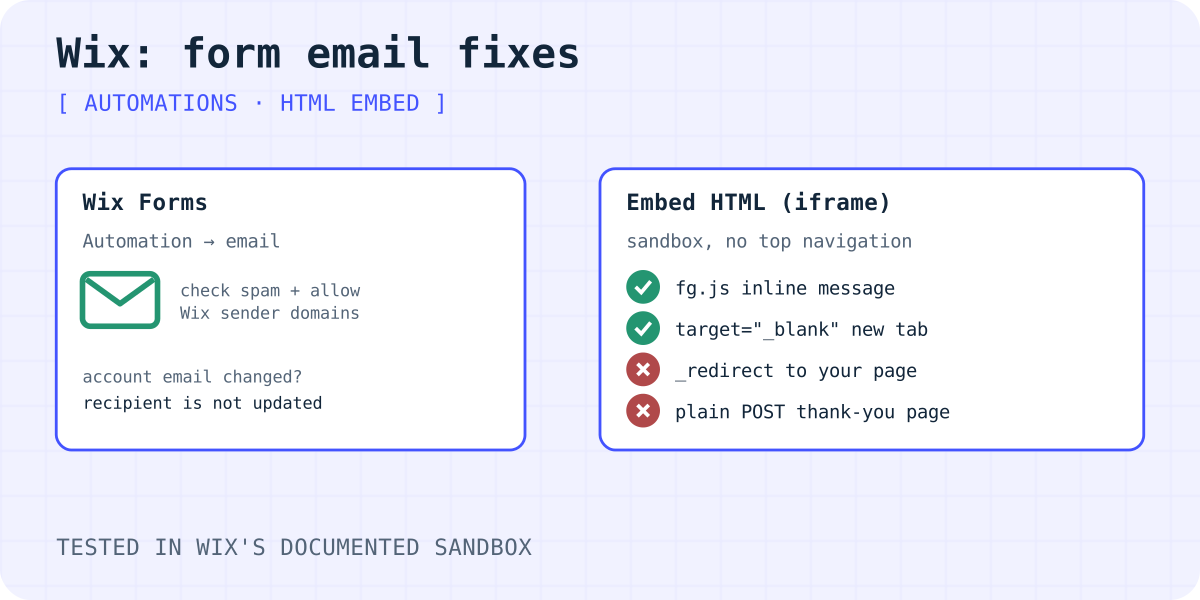
*@automations.ascendbywix.com,*@crm.wix.comand*@wixforms.com, plusno-reply@test.wixshoutout.com, to your safe senders. Keep the asterisk. Then republish the site, as Wix asks. - Check the recipient. Go to Automations, open the automation that sends the form email, and read the Recipients field in the Send an email action.
- Update it after an email change. Changing your Wix account email does not change automation recipients. Edit each one by hand.
- Don't send to yourself from yourself. If the sender and recipient are the same address, some mail providers treat the message as spam. Use another recipient address.
If none of this helps, the general checklist in why a contact form is not sending email covers mail server issues.
Can you use your own HTML form in Wix?
Yes, with care. Wix puts custom code from the Embed HTML element in an iframe. Wix's Studio help lists the sandbox it uses: allow-same-origin, allow-forms, allow-popups, allow-scripts and allow-pointer-lock. The code must use HTTPS.
The sandbox does not include allow-top-navigation, which decides what happens after the form is sent. We tested a Formgong form inside a local page with exactly these sandbox flags. This was not a live Wix site, so test your own page too. Every test submission was saved. What the visitor saw differed:
- Plain form, no script: saved, but the frame showed a browser error, because Formgong's thank-you page can't be shown inside a frame.
- Hidden
_redirectto your site: not used. The frame does not run on your domain, so Formgong treats the redirect as foreign and the frame shows the same error. target="_top": blocked by the sandbox.target="_blank": works. The thank-you page opens in a new tab.- With fg.js and inline messages: works best. The form sends in the background and shows "Sent. Thank you!" inside the frame.
A form that works inside the Wix embed
The code uses fg.js for the inline message, and target="_blank" as a fallback if the script does not load. We tested both paths in the same sandbox.
- Create a free Formgong form and copy its access key. Free includes 300 submissions a month, with email and Telegram alerts.
- In the Wix Editor, click Add Elements → Embed Code → Embed HTML. Click Enter Code, paste the form and click Apply.
- Replace the key, make the element tall enough for the form and its message, and publish.
- Send a test from the live site.
Wix notes that HTML elements are iframes and do not resize with the page, so check the mobile layout too. Setup details for plain HTML are on the HTML form setup page.
<!-- Wix Editor: Add Elements → Embed Code → Embed HTML → Enter Code -->
<form action="https://formgong.com/submit" method="POST" target="_blank">
  <input type="hidden" name="access_key" value="fk_your_access_key">
  <input type="hidden" name="_lang" value="en">
  <label>Name <input type="text" name="name" required></label>
  <label>Email <input type="email" name="email" required></label>
  <label>Message <textarea name="message" required></textarea></label>
  <div style="position:absolute;left:-9999px" aria-hidden="true">
    <input type="text" name="botcheck" tabindex="-1" autocomplete="off">
  </div>
  <button type="submit">Send</button>
  <p data-fg-success hidden></p>
  <p data-fg-error hidden></p>
</form>
<script src="https://formgong.com/fg.js" async></script>
What changes with an embedded form
- No Wix Forms features. Submissions don't reach Wix contacts or Automations. They are in the Formgong inbox, email and Telegram.
- No redirect to a Wix page. Use the inline message instead.
- No domain lock. The embed runs on a separate Wix domain, so don't restrict this form to your site's domain in Formgong.
Frequently asked questions
Where do Wix form submissions go?
They are stored in a submissions table under Forms & Submissions in your site's dashboard. By default Wix emails the site owner through an automation. The email comes from notifications@wix-forms.com.
Why did Wix form emails stop after I changed my email?
Changing your Wix account email does not update the recipients of your form automations (as of 05.10.2026). Edit each automation and enter the new address.
Why does my Wix embed show an error after submit?
The thank-you page tried to load inside the sandboxed frame, and Formgong's pages refuse to be framed. Add fg.js with inline messages, or open the result in a new tab with target="_blank".
Can a form in a Wix HTML embed redirect to my own page?
Not reliably. The sandbox Wix documents blocks navigating the main page, and in our test a redirect from the frame was not used. Show an inline message instead.
Sources and documentation
Official references for this guide: Wix: Choosing who gets notified about form submissions, Wix Forms: Viewing and managing a submissions table, Wix Forms: Troubleshooting, Wix Editor: Embedding a site or a widget, Wix Studio: Adding an HTML iFrame element. Formgong HTML integration, where data is stored.
Read this article as Markdown