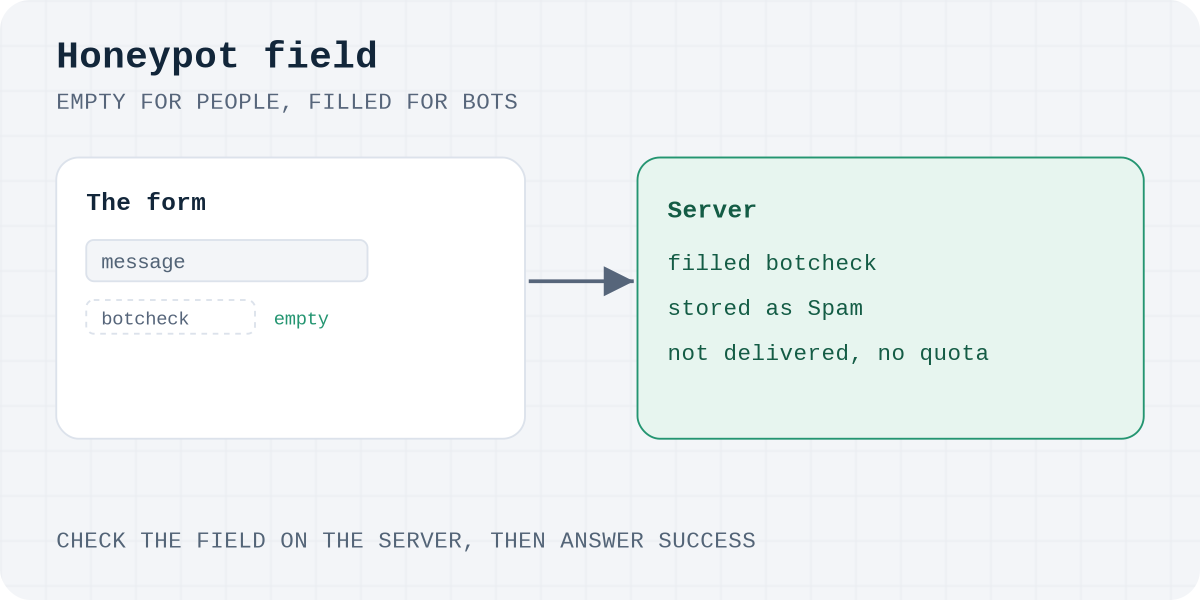
What a honeypot field is
A honeypot form field is a text input that real people never fill. A simple bot fills every input it finds, including this one. If the field is not empty after a trim, the post is from a bot.
Do honeypot fields work? Yes, against scripts that submit a contact form as fast as they can. That is still most contact-form spam. They do not stop a bot that was built to skip hidden fields. They do not stop a person who types the spam by hand.
The check has to run on the server. A script can post straight to your endpoint and never load the page. Hiding the field in the browser is only half of the trap.
Use a honeypot as the first layer, not the only one. A time check, a few content filters, and Cloudflare Turnstile catch the bots that learn to skip the field. That stack is the contact form spam guide. This page stays on the field itself.
Answer the visitor as if the post worked. An error teaches the bot which input to leave blank next time.
Add a honeypot to an HTML form
An html form honeypot field is a normal text input inside the form. The sample below is the one Formgong pages already use. Copy it as it is.
Each piece has one job:
- Wrapper.
aria-hidden="true"tells assistive tech to skip the whole block. The label stays in the HTML for the rare case that the CSS fails and a person can see the field. - Hide. The style clips the box to a one-pixel spot off the flow. It is not
display:noneand nottype="hidden". Some bots skip those and leave the trap empty. - Label. The text is "Leave this field empty". It is inside the hidden wrapper, so a screen reader does not announce it on a normal pass.
- Name.
name="botcheck"is the name to start with. The next section lists the other three names Formgong accepts. - tabindex.
tabindex="-1"keeps the field out of the keyboard tab order. - autocomplete.
autocomplete="off"asks the browser and password managers not to fill it.
The steps are:
- Add an off-screen text field. Put a text input in the form. Hide it with a clip, not with display:none.
- Keep people out of the field. Set aria-hidden on the wrapper, tabindex to -1, and autocomplete to off.
- Use a name the server knows. On Formgong use botcheck, _gotcha, _honey, or _honeypot.
- Reject a filled field on the server. Store a text submission as spam, skip delivery, and still return success.
- Test both paths. Submit once with the field filled and once with it empty. Open the Spam filter.
Honeypot field best practices
- Do not add
required. A required honeypot blocks every real visitor. - Do not show an error when the field is filled. Return the normal success path.
- Do not rely on a check that runs only in JavaScript. The server has to see the value.
- Keep one honeypot. A second hidden field mostly creates more false positives.
- Leave the label in the markup. If the clip style is stripped, a person can still read "Leave this field empty".
The same field is already in the HTML contact form and on the HTML form page. The field reference is the HTML docs.
<!-- Inside your <form>. People never see it; simple bots fill it in. -->
<div aria-hidden="true" style="position:absolute;inset-inline-start:0;top:0;width:1px;height:1px;overflow:hidden;clip-path:inset(50%)">
  <label>Leave this field empty <input type="text" name="botcheck" tabindex="-1" autocomplete="off"></label>
</div>
Which honeypot field name to use
The honeypot field name is the part people get wrong with a hosted backend. Formgong only treats four names as a honeypot: botcheck, _honeypot, _gotcha and _honey. A value in any of them, after trim, is spam.
A field named website is a normal answer. It is stored, and it can be delivered. The usual advice, "pick a legit-sounding name such as website", is fine on a server you wrote. It does nothing on Formgong. That gap is why a copied snippet from another guide can look installed and still let bots through.
Those four names are the ones other backends already use. botcheck is Formgong's own name. _gotcha is the Formspree name. _honey is the FormSubmit name. _honeypot is the extra alias. You do not have to send all four. One is enough.
On your own backend you can choose any name. Prefer a name that autofill will not recognise. website, url, phone and email are poor choices. Password managers treat them as real questions.
Netlify Forms uses an attribute, netlify-honeypot, whose value is the field name. Formgong does not read that attribute. If you point the same HTML at Formgong, the input's name still has to be one of the four. The comparison is on Formgong vs Netlify Forms.
WordPress plugins such as Contact Form 7 and Elementor have their own honeypot add-ons. This page does not set those up. A WordPress site can post a plain HTML form instead, which is the WordPress contact form without a plugin.
Check the honeypot on the server
Formgong's check is fixed. If any of the four fields is non-empty after trim, the submission is spam with score 100 and reason honeypot.
Here is what that means for a text form:
- The row is stored. Open the form inbox and choose the Spam filter. The badge on the row says Spam.
- It is not delivered. No email, no Telegram, and no webhook.
- It does not use the monthly quota.
- The visitor still gets the normal success response, so the bot learns nothing.
A form can store 100 spam rows a day. Past that, the response is rate_limited. Ordinary posts are also limited to 30 a minute per form and 20 a minute per IP.
Other signals can mark a post as spam even when the honeypot is empty. Four or more links add 50 points. A stop word adds 60. One example is "seo services". The spam line is a score of 60. A hidden _ts field holds seconds or milliseconds since the epoch. A post filled in under 1.5 seconds adds 70, which is enough by itself.
The form's block list lives under Protection, in the block labelled Spam rules. The checkbox there is "Require browser signals". When it is on, a post without the signals from fg.js is spam. Protection is hidden while the dashboard is in Standard mode. The button that opens it is "Open expert mode".
A file changes the honeypot result. If the post is already spam and it includes a file, Formgong rejects it with file_unsafe. It does not take the quiet success path. File rules are in the contact form with file upload.
Formgong is a free form backend for static and AI-built sites that delivers submissions to Telegram and email, stores data in the EU, and works in 12 languages. On the free plan, each real submission is emailed right away, to up to 3 recipients. Telegram is instant. Spam never reaches either channel.
If you run the server yourself, do the same. Store the row if you want a review folder. Do not send mail. Answer success. The function in the details is only a shape.
A honeypot check for your own backend
const HONEYPOT_FIELDS = ["botcheck", "_honeypot", "_gotcha", "_honey"];

function honeypotFilled(fields) {
  return HONEYPOT_FIELDS.some((name) => String(fields[name] ?? "").trim() !== "");
}

// Your own backend. Save a spam row if you want a review folder.
// Do not send mail. Still answer success so the bot learns nothing.
export function handleContact(fields) {
  if (honeypotFilled(fields)) return { ok: true, spam: true };
  return { ok: true, spam: false };
}
React, React Hook Form, Vue and Astro
A react honeypot form uses the same input. The mistake is to bind it to state that a script then fills.
An uncontrolled input is the safe default. Put the field in the form and let the browser submit it. Do not give it a value that you set from state. If you do use state, keep the string empty.
React Hook Form can register the field as botcheck. Do not call setValue on it. Do not give it a default other than an empty string. The details block shows both shapes. The rest of a React contact form is on the React form page.
In Vue, skip v-model if any script writes a value into that binding. A plain input in the template is enough. The Vue form page uses the same post.
An Astro page can paste the HTML snippet as it is. Astro does not see the field at build time. If a React or Vue island replaces the form, the island has to include the field too. See the Astro form page.
A Webflow form can add a field named botcheck and hide it in the designer. The name still has to be one of the four. The Webflow notes are on the Webflow form page.
Uncontrolled React input
export function ContactForm() {
  return (
    <form method="post" action="https://formgong.com/submit">
      <input type="hidden" name="access_key" value="YOUR_ACCESS_KEY" />
      <label>Message <textarea name="message" required /></label>
      <div aria-hidden="true" style={{ position: "absolute", insetInlineStart: 0, top: 0, width: 1, height: 1, overflow: "hidden", clipPath: "inset(50%)" }}>
        <label>
          Leave this field empty
          <input type="text" name="botcheck" tabIndex={-1} autoComplete="off" />
        </label>
      </div>
      <button type="submit">Send</button>
    </form>
  );
}
React Hook Form register
import { useForm } from "react-hook-form";

export function ContactForm() {
  const { register, handleSubmit } = useForm();
  return (
    <form onSubmit={handleSubmit(() => {})}>
      <label>Message <textarea {...register("message")} required /></label>
      <div aria-hidden="true" style={{ position: "absolute", insetInlineStart: 0, top: 0, width: 1, height: 1, overflow: "hidden", clipPath: "inset(50%)" }}>
        <label>
          Leave this field empty
          <input type="text" tabIndex={-1} autoComplete="off" {...register("botcheck")} />
        </label>
      </div>
      <button type="submit">Send</button>
    </form>
  );
}
Test that the honeypot works
Send two posts. The first fills botcheck. The second leaves it empty. Use a message you can recognise, such as the word PLACEHOLDER.
Ask for JSON so you can read the body. A text post with the honeypot filled still returns success. That is the point. The proof is in the inbox, not in the HTTP status.
- Open the form in the dashboard. The inbox filters are All, Open, Handled and Spam.
- Choose Spam. The test row should be there, with a Spam badge.
- Open the row. The Reason line says honeypot. The score is 100.
- Confirm that email and Telegram did not get it.
- Send the same post with
botcheckempty. That row is in the main inbox, and it is delivered.
The curl in the details fills the honeypot. Delete the botcheck line for the real-visitor test.
You can also paste the page into the form checker. It warns when a Formgong form has none of the four names. The warning text says the botcheck field is missing.
curl with the honeypot filled
curl -sS -X POST https://formgong.com/submit \
  -H "Accept: application/json" \
  -d "access_key=YOUR_ACCESS_KEY" \
  -d "name=PLACEHOLDER" \
  -d "email=visitor@example.com" \
  -d "message=PLACEHOLDER" \
  -d "botcheck=PLACEHOLDER"
When a real person hits the honeypot
A honeypot can catch a person. Treat that as a bug in the field, not as proof the person is a bot.
Honeypot field triggered
Search logs and support notes use the phrase "honeypot field triggered" for this false positive. The usual causes are:
- Autofill and password managers. They fill a field whose name looks like a website, a URL, a phone or an email.
autocomplete="off"cuts this down. It does not stop every extension. - Browser extensions that write into every input on the page.
- A visible field. If the clip style is missing, the person can see the input and type in it. The label "Leave this field empty" is there for that case.
- Keyboard focus. Without
tabindex="-1", a person tabbing through the form can land in the field and type a character. - A required honeypot. The browser then blocks Send until the trap is filled.
On Formgong, a stored spam row can be put back. Open it and press Not spam. The button label is Not spam. Delivery does not run by itself after that, so send the person a reply from the row if the message was real.
If this happens often, the name is the first thing to change. On your own server, move off website. On Formgong, stay on botcheck and check that the wrapper is still the clipped one, not a field the designer left on screen.
Honeypot vs a time check vs Turnstile
Honeypot vs captcha is a choice of cost. A honeypot asks nothing of the visitor. A puzzle asks for a click, and some people leave. Turnstile is the middle step: a check in the background, with a puzzle only when the check is unsure.
| Check | What it catches | What it misses | On Formgong |
|---|---|---|---|
| Honeypot | Bots that fill every field | Bots that skip hidden fields, and people | Filled field: score 100, reason honeypot. Success on a text form. Not delivered. No quota. |
| Time check | Posts sent in under 1.5 seconds | A bot that waits | Hidden _ts, in seconds or milliseconds. Under 1.5 seconds adds 70. |
| Link and word filters | Four or more links, or a stop word such as "seo services" | A short note that looks human | Links add 50. A stop word adds 60. |
| Turnstile | Bots that pass the cheap checks | A visitor who cannot finish the widget | Optional on every plan, including Free. Required when the form has a file. |
Add Turnstile when spam still arrives after the honeypot and the time check. The widget is free to add, including on the Free plan. The server has to check the token. A widget alone stops nothing. The longer comparison is Turnstile vs reCAPTCHA vs hCaptcha.
A honeypot is not enough when:
- The bot was written for your form and skips the hidden input.
- A person is typing the spam. No field trick stops that. The block list and the stop-word score are the practical tools.
- The form accepts files. A spam post with a file is rejected, and Turnstile is required for every file.
The time-check field is the same snippet the spam guide uses. Paste it next to the honeypot. Plans and the monthly cap are on the pricing page.
Hidden time field
<input type="hidden" name="_ts" id="form-ts">
<script>
  // Seconds since 1970 when the page was shown; the server compares it with the submit time.
  document.getElementById("form-ts").value = Math.floor(Date.now() / 1000);
</script>
Frequently asked questions
What is a honeypot field?
It is a text field people are not meant to fill. Bots that fill every input fill this one too. If it is not empty, the server treats the post as spam. The field has to be checked on the server, because a bot can skip your page and post directly.
Do honeypot fields work?
They work on the simple bots that send most contact-form spam. They do not stop a bot that skips hidden fields, or a person typing the message. Pair the field with a time check, and add Turnstile if spam continues.
How do I add a honeypot field to an HTML form?
Add a text input named botcheck inside an aria-hidden wrapper that is clipped off screen. Set tabindex to -1 and autocomplete to off. Do not use display:none as the only hide, and do not mark the field required.
Does a honeypot field hurt accessibility?
Not when the wrapper is aria-hidden, the input has tabindex -1, and the field is not required. Screen readers skip the wrapper. Keyboard users do not land on the input. The label stays in the HTML in case the CSS fails.
How is a honeypot different from a CAPTCHA?
A honeypot asks the visitor to do nothing. A CAPTCHA asks for a puzzle. Turnstile usually runs in the background. On Formgong the honeypot is always on, and Turnstile is optional on every plan unless the form accepts files.
Sources and documentation
Official references for this guide: MDN: aria-hidden, WebAIM: invisible content, Netlify: spam filters, Cloudflare Turnstile. Formgong HTML docs, where data is stored.