Contact Form 7 not sending email: the form says sent, the email never comes
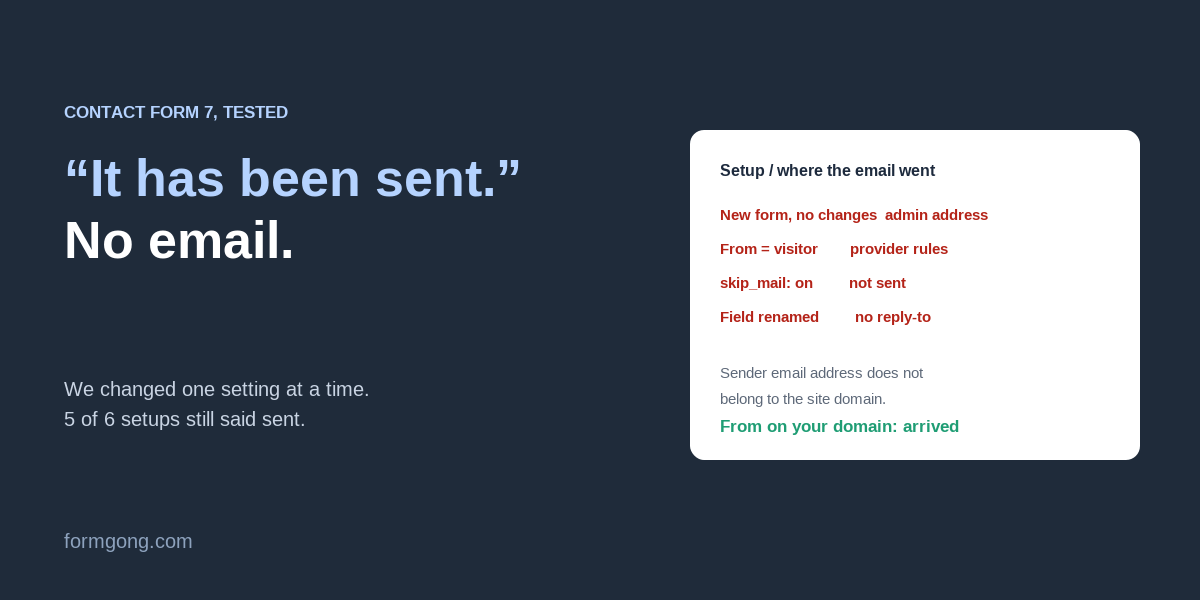
Check the form's Mail tab first. In five of our six test setups Contact Form 7 said “It has been sent” while the email went to the WordPress admin address, went out under the visitor's address, or was never sent at all; it shows an error only when WordPress refuses the email.
The short answer. When Contact Form 7 says “It has been sent” and nothing arrives, check the form's Mail tab first: To is the WordPress admin address by default, From must be an address on your own domain with the visitor in Reply-To, and Additional Settings must not contain skip_mail: on. Then check spam and set up SMTP.
Formgong
Contact Form 7 not sending email: the form says sent, the email never comes
The form says sent. Where did the email go?
Contact Form 7 hands the email to WordPress and shows “Thank you for your message. It has been sent.” as soon as WordPress accepts it. It shows an error only when WordPress refuses outright. Everything that happens after that, and several things that happen before it, never reach the visitor's screen.
On 21 November 2026 we set up a throwaway WordPress 7.1.3 with Contact Form 7 6.2.5 and sent its mail to a test mailbox that keeps every header, so we could see exactly what left the site. Then we changed one setting at a time and sent the same message. In five of six setups the visitor saw the same green thank-you.
WordPress 7.1.3, Contact Form 7 6.2.5, 21 November 2026. The visitor sent the same message each time; WordPress mail went to a test mailbox that keeps every header.
What we set up
What the visitor saw
What happened to the email
A new form, nothing changed
“Thank you for your message. It has been sent.”
Sent to the Administration Email Address in WordPress settings
From set to the visitor's address
The same
Sent with the visitor's address as the sender, so their mail provider's rules apply to it
skip_mail: on in Additional Settings
The same
Not sent at all
The email field renamed in the form only
The same
Sent without a reply address, subject “[your-subject]”
From on the site's domain, the visitor in Reply-To
The same
Sent the way it should be
No mail server on the host
“There was an error trying to send your message. Please try again later.”
Not sent, and the visitor was told
The checks below go in the order we'd use them on a real site: the Mail tab first, because that is where four of the five quiet failures were, then spam, then the error case.
Is the email going to the right address?
A new Contact Form 7 form sends to [_site_admin_email]. That is the Administration Email Address under Settings → General, the one typed in when WordPress was installed. On many sites that was the developer, an agency, or a mailbox nobody opens any more. The form works, the email arrives, and the person who needs it never sees it.
Open Contact → Contact Forms, edit the form, and look at the Mail tab:
Replace [_site_admin_email] in To with the address that should get the messages, or several separated by commas. Save the form and send yourself a test from the live page, not from the editor. One more trap when To is an address on your own domain: if your mailbox lives with Google Workspace or Microsoft 365 but your web host still thinks it handles your domain's mail, the host delivers the message to a local mailbox nobody reads. In cPanel that is Email Routing, which should be set to Remote Mail Exchanger. If To is right and the email still doesn't come, keep going.
Is From set to the visitor's address?
Many tutorials suggest putting [your-email] in From, so the email looks like it came from the visitor. Contact Form 7 itself warns against it: as soon as we saved that, the Mail tab showed “Sender email address does not belong to the site domain.” The form still said “It has been sent”, and the email left with the visitor's address as the sender.
That email was sent by your web host, not by the visitor's mail provider, so it can't pass the provider's checks. Whether it arrives then depends on what the provider asks receivers to do with such mail. We read their DMARC records on 21 November 2026: Yahoo asks every receiver to reject it (p=reject), iCloud asks for it to go to spam (p=quarantine), and Gmail and Outlook ask for nothing on their main domains. So the same form works for one visitor and silently loses the next one's message.
Send from your domain, reply to the visitor
Set From to an address on your own domain, for example Your Site <wordpress@your-site.com>, and keep Reply-To: [your-email] in Additional headers. That is what a new form already does. When we did this, the email went out from the site's address with the visitor's address in Reply-To, so Reply goes to them.
Is skip_mail: on in Additional Settings?
The Additional Settings tab can hold skip_mail: on, which tells Contact Form 7 not to send the email at all. Developers add it while testing, and some plugins switch it on for you. With it on, our visitor saw “It has been sent” and the test mailbox got nothing; WordPress wasn't even asked to send.
Delete the line and save. If a webhook or CRM plugin needs it, that plugin is now the only place your messages go, so check that it really receives them. Our Contact Form 7 webhook test found one popular plugin that switches the email off by default.
Did you rename a field?
The Mail tab refers to fields by name: [your-name], [your-email], [your-subject]. Rename a field in the form and the Mail tab keeps the old name. We renamed the email field to email-address and changed nothing else. The form still said “It has been sent”, but the email arrived without a reply address, so pressing Reply would have written to your own site. A tag that matches no field is printed as it is: our test form had no subject field, and every email came with the subject Olive Bakery "[your-subject]".
Contact Form 7 flags this in the Mail tab when you save (“Invalid mailbox syntax is used in the Reply-To field.”). Use the tags listed above the message body; they always match the current form.
It left WordPress but went to spam
When To, From and Additional Settings are right, the email leaves WordPress, and the rest is up to the receiving mailbox. Look in spam and in any filters first. WordPress doesn't sign mail itself: none of the emails in our test carried a DKIM signature. Unsigned mail from a server your domain hasn't listed is the first thing Gmail and Outlook filter.
The fix is to send through a mail service that signs for your domain, with an SMTP plugin. Our guide to a WordPress contact form not sending email walks through finding the cause in the mail log and setting up SMTP, and it applies to Contact Form 7 unchanged.
No message at all, or the button keeps spinning
When the form shows neither the thank-you nor an error, Contact Form 7's script on the page has stopped, so the reply from WordPress never gets shown. On the WordPress.org support forum, a site with three silent forms got them back by switching off a WooCommerce discounts plugin; a forum moderator traced it to that plugin breaking the page's JavaScript. Open the browser console on the form page and look for a red error, then deactivate plugins one at a time until the form answers again.
If the form shows “There was an error trying to send your message”
That is the one case where Contact Form 7 tells the visitor. On our test site we removed the mail setup, WordPress refused the email, and the visitor saw this error. The same sentence can also mean a spam check stopped the message before any email was tried. Our guide to the Contact Form 7 error trying to send your message tells the cases apart.
Keep a copy that doesn't depend on email
Contact Form 7 keeps no copy of what visitors send, so a lost email is a lost message. Two ways to keep one:
Flamingo, from the same author, stores every submission in WordPress. You see what was sent, but nobody is told.
Our free plugin Formgong for Contact Form 7 sends a copy of each submission to Formgong before Contact Form 7 sends its email, and Formgong delivers it to Telegram, Google Sheets and an inbox. Your form and its email stay as they are. We tested it on the same setup with the email switched off by skip_mail: on, and the plugin still sent the submission.
Either way, send a test from the live page after every change to the form, and once in a while after that. A changed mailbox password or a moved site breaks the email without any sign on the form.
Where did yours stop?
If your Contact Form 7 email went missing for a reason we didn't cover, tell us what the Mail tab said and what you found in the log: support@formgong.com. We'll test it and add it here.
Frequently asked questions
Why does Contact Form 7 say the message was sent when I got no email?
Contact Form 7 reports success as soon as WordPress accepts the email. It can't see what happens after that. In our test it also said “It has been sent” when the email went to the WordPress admin address, when skip_mail: on stopped the email entirely, and when a renamed field dropped the reply address.
Where does Contact Form 7 send emails by default?
To [_site_admin_email], the Administration Email Address under Settings → General in WordPress. Change To in the form's Mail tab to your own address.
What does “Sender email address does not belong to the site domain” mean?
From in the Mail tab is set to an address that isn't on your site's domain, often the visitor's address [your-email]. Mail providers such as Yahoo ask receivers to reject such emails. Put an address on your own domain in From and the visitor in Reply-To: [your-email].
Why do Contact Form 7 emails go to spam?
WordPress doesn't sign mail itself; in our test no email carried a DKIM signature. Send through a mail service with an SMTP plugin so the email is signed for your domain, and keep From on your own domain.