What you are really choosing
You have a Next.js site and need a contact form. The Next.js docs point you to Server Actions, and the action itself is short: read FormData, send an email. The work is in everything around it. A Server Action is a public endpoint, so it needs spam protection and a rate limit. Sending email needs a provider, an API key and a verified domain. And on some hosts it cannot run at all.
The Next.js security guide puts it plainly: “Treat every action as an untrusted entry point.” Anyone who can send the same POST can call it, with or without your page.
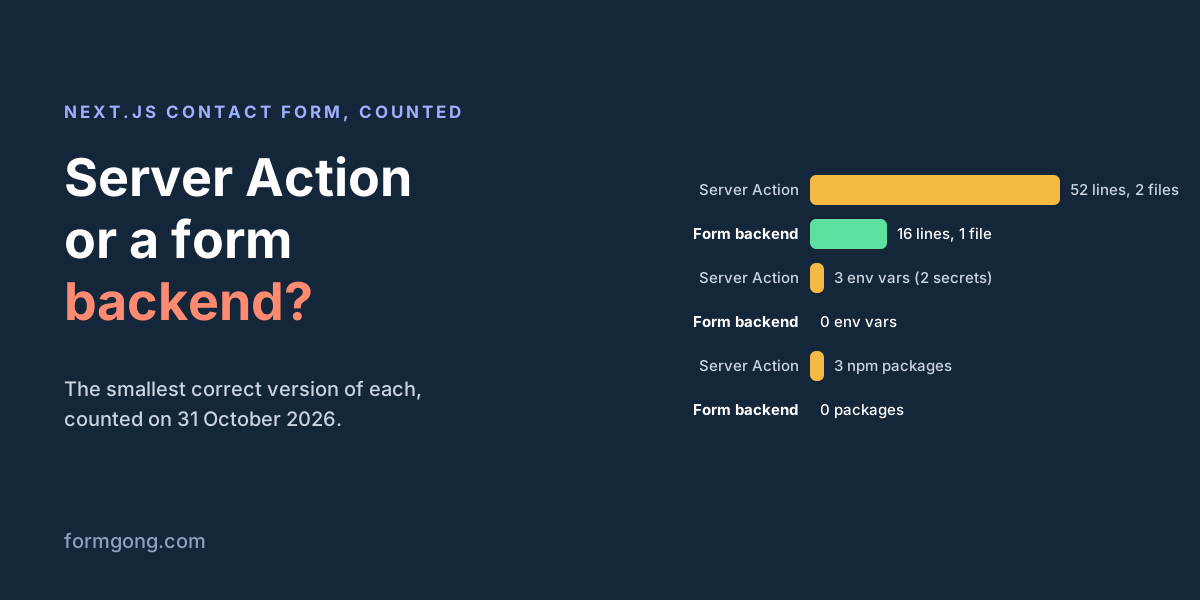
To make the choice concrete, we wrote the smallest version of each that we would put on a real site, and counted what it takes. Neither was run as a Next.js app for this article. The Server Action follows the Next.js forms guide and the Resend and Upstash docs; the Formgong form uses the same fields as our Next.js guide. If your form already exists and fails after deploy, the Next.js contact form errors guide covers the exact messages.
The smallest Server Action contact form we would ship
Four things go into it, each because something breaks without it:
- A honeypot. A hidden
botcheckfield that people never see. Simple bots fill every field, so a filled one means spam. The action answers “thanks” so the bot learns nothing. More in our honeypot guide. - A rate limit that survives serverless. A counter in a JavaScript
Maplooks fine locally and does nothing on Vercel, because each request can land on a different instance. The Next.js docs say it about route handlers on such hosts: “Route Handlers cannot share data between requests.” So the counter lives in Redis, here through Upstash's@upstash/ratelimit, which reads two environment variables. - Validation on the server. The
requiredattribute only stops honest browsers. We check by hand to avoid a fourth package; the Next.js forms guide suggests Zod or Valibot. - The email. Resend sends only from a domain you verified with DNS records, and until then only to your own address.
replyTomakes your Reply button go to the visitor. The exact Resend errors are in our Resend errors guide.
The page is a client component, because showing the action's message needs useActionState.
"use server";

import { headers } from "next/headers";
import { Resend } from "resend";
import { Ratelimit } from "@upstash/ratelimit";
import { Redis } from "@upstash/redis";

const resend = new Resend(process.env.RESEND_API_KEY);
const ratelimit = new Ratelimit({
  redis: Redis.fromEnv(), // UPSTASH_REDIS_REST_URL + UPSTASH_REDIS_REST_TOKEN
  limiter: Ratelimit.slidingWindow(5, "10 m"),
});

export type State = { ok: boolean; message: string };

export async function sendMessage(_prev: State, formData: FormData): Promise<State> {
  // Honeypot: people never see this field, bots fill it in. Pretend it worked.
  if (formData.get("botcheck")) return { ok: true, message: "Thanks, we got your message." };

  const ip = (await headers()).get("x-forwarded-for")?.split(",")[0]?.trim() ?? "unknown";
  const { success } = await ratelimit.limit(ip);
  if (!success) return { ok: false, message: "Too many messages. Try again in a few minutes." };

  const name = String(formData.get("name") ?? "").trim();
  const email = String(formData.get("email") ?? "").trim();
  const message = String(formData.get("message") ?? "").trim();
  if (!name || name.length > 100) return { ok: false, message: "Please enter your name." };
  if (!/^[^\s@]+@[^\s@]+\.[^\s@]+$/.test(email)) return { ok: false, message: "Please enter a valid email." };
  if (message.length < 10 || message.length > 5000) return { ok: false, message: "Please write 10 to 5,000 characters." };

  const { error } = await resend.emails.send({
    from: "Contact form <form@yourdomain.com>", // must be on a domain you verified in Resend
    to: ["you@yourdomain.com"],
    replyTo: email,
    subject: `New message from ${name}`,
    text: `${name} <${email}>\n\n${message}`,
  });
  if (error) return { ok: false, message: "Sending failed. Please try again." };
  return { ok: true, message: "Thanks, we got your message." };
}
app/contact/page.tsx
"use client";

import { useActionState } from "react";
import { sendMessage, type State } from "./actions";

const initial: State = { ok: false, message: "" };

export default function ContactPage() {
  const [state, action, pending] = useActionState(sendMessage, initial);
  return (
    <form action={action}>
      <label>Name <input name="name" autoComplete="name" required /></label>
      <label>Email <input name="email" type="email" autoComplete="email" required /></label>
      <label>Message <textarea name="message" minLength={10} required /></label>
      <div aria-hidden="true" style={{ position: "absolute", left: "-9999px" }}>
        <input name="botcheck" tabIndex={-1} autoComplete="off" />
      </div>
      <button disabled={pending}>{pending ? "Sending…" : "Send"}</button>
      <p role="status">{state.message}</p>
    </form>
  );
}
The same form posting to a form backend
Here the form posts straight to Formgong at https://formgong.com/submit. It is a Server Component with no "use client", no action, no route and no environment variable. It works with JavaScript turned off. The honeypot is the same botcheck field, and Formgong also accepts the names other services use (_gotcha, _honey, _honeypot).
The visitor lands on your thanks page after sending. Formgong accepts a _redirect on your own site. If you want the “sent” message inline instead, the client component from our Next.js guide does it with fetch and reads "success": true or false from the answer. It is the longer one in the table, still with no secret.
// app/contact/page.tsx: a Server Component, no "use client", no API route
export default function ContactPage() {
  return (
    <form action="https://formgong.com/submit" method="POST">
      <input type="hidden" name="access_key" value="fk_your_access_key" />
      <input type="hidden" name="_redirect" value="https://yourdomain.com/thanks" />
      <label>Name <input name="name" autoComplete="name" required /></label>
      <label>Email <input name="email" type="email" autoComplete="email" required /></label>
      <label>Message <textarea name="message" minLength={10} required /></label>
      <div aria-hidden="true" style={{ position: "absolute", left: "-9999px" }}>
        <input name="botcheck" tabIndex={-1} autoComplete="off" />
      </div>
      <button>Send</button>
    </form>
  );
}
Version with an inline “sent” message (client component)
"use client";

import { useState } from "react";

// Paste your key: replace fk_your_access_key with the key from your Formgong form.
const ACCESS_KEY = "fk_your_access_key";

export default function ContactForm() {
  const [status, setStatus] = useState("idle");
  const [notice, setNotice] = useState("");

  async function onSubmit(event) {
    event.preventDefault();
    const form = event.currentTarget;
    if (!(form instanceof HTMLFormElement) || !form.reportValidity()) return;
    const body = new FormData(form);
    body.set("access_key", ACCESS_KEY);
    body.set("_lang", "en");
    setStatus("sending");
    setNotice("");
    try {
      const response = await fetch("https://formgong.com/submit", {
        method: "POST",
        headers: { Accept: "application/json" },
        body,
      });
      const result = await response.json();
      if (!response.ok || !result.success) {
        setStatus("error");
        setNotice(result.message || "Could not send. Please try again.");
        return;
      }
      form.reset();
      setStatus("success");
      setNotice(result.message || "Sent. Thank you!");
    } catch {
      setStatus("error");
      setNotice("Connection failed. Please try again.");
    }
  }

  const sending = status === "sending";
  return (
    <form onSubmit={onSubmit}>
      <label>{"Name"} <input name="name" autoComplete="name" placeholder={"Your name"} required /></label>
      <label>{"Email"} <input name="email" type="email" autoComplete="email" placeholder={"you@example.com"} required /></label>
      <label>{"Message"} <textarea name="message" placeholder={"How can we help?"} required /></label>
      <div aria-hidden="true" style={{ position: "absolute", insetInlineStart: 0, top: 0, width: 1, height: 1, overflow: "hidden", clipPath: "inset(50%)" }}>
        <input name="botcheck" tabIndex={-1} autoComplete="off" />
      </div>
      <button type="submit" disabled={sending}>{sending ? "Sending…" : "Send"}</button>
      <p role={status === "error" ? "alert" : "status"}>{notice}</p>
    </form>
  );
}
What each one takes, counted
| Server Action + Resend | Form posting to Formgong | |
|---|---|---|
| Lines of code | 52 in 2 files | 16 in 1 file (50 for the version with an inline “sent” message) |
| npm packages to add | 3: resend, @upstash/ratelimit, @upstash/redis | 0 |
| Server environment variables | 3: RESEND_API_KEY, UPSTASH_REDIS_REST_URL, UPSTASH_REDIS_REST_TOKEN (2 are secrets) | 0. The access key is public by design and sits in the form |
| Accounts besides your host | 2: Resend and Upstash, plus DNS records to verify your domain in Resend | 1: Formgong |
| Host it can run on | One with a server runtime, such as Vercel or a Node server | Any, including output: "export" and GitHub Pages |
| A copy of each message | None. If the email is lost, so is the message | Stored in the inbox (30 days on Free) |
| Retries when delivery fails | None. The visitor sees an error and has to send again | Up to 5 attempts per channel, then an alert to you by email or Telegram |
| Where you hear about it | Email, Telegram, Google Sheets, Notion, webhooks | |
| Spam checks | Honeypot and 5 posts per 10 minutes per IP | Honeypot, server-side spam score, per-IP and per-form limits, block list, filters |
The line counts are close. The difference sits behind the code: three packages to keep updated, three variables to set on every environment, two dashboards and a DNS change. Leave out the rate limit and the Server Action drops to one package and one account, but then nothing stops a script that ignores your honeypot from sending you a few thousand emails, and Resend counts every one.
What the Server Action version still lacks
It is correct, and it is still a thin contact form. These are the gaps we left open to keep it small:
- No copy of the message. If the email goes to spam or your inbox loses it, there is nothing to look at. Fixing that means a database, which is a fourth service.
- No retries. When Resend answers with an error, the visitor sees “Sending failed” and has to try again. Resend supports an idempotency key, kept 24 hours, that makes your own retries safe, but the retry loop is yours to write, and it keeps the visitor waiting.
- Fields are cleared on errors. React's docs say “all uncontrolled field elements in the form are reset” after the action succeeds. An action that returns a validation message has succeeded, so the visitor types the message again. Keeping it means returning the values and setting
defaultValue: more lines. - Email only. A Telegram or Slack alert is another API, another token and more code in the same action.
- Thin spam protection. A bot that skips the honeypot gets 5 messages through every 10 minutes per IP. There is no content check, block list or throwaway-email filter. Our spam without captcha guide covers what else helps.
- Tied to a deploy. A tab opened before your last deploy can call an action ID that no longer exists. That is “Failed to find Server Action”.
- Small uploads. A Server Action body is capped at 1 MB by default (the error you get), and a Vercel function body at 4.5 MB.
What the form backend version lacks
A form backend is not free of trade-offs, and some of them decide the question:
- The data is not in your database. Messages live in Formgong's inbox. To get them into your own system you add a signed webhook (here is how to verify it), use Google Sheets or Notion, or export CSV.
- No code of yours runs on submit. You cannot check a signed-in user, write a row or call your own API in the same request.
- Another company in the path. If Formgong is down, the form is down. Its checks run on Formgong's servers, configured in the dashboard, not in your repository.
- Free plan limits. 250 submissions a month (spam does not count), messages kept up to 30 days, a small Formgong credit on the default thank-you page and in notification emails, and an automatic reply to the visitor only on paid plans (Starter and Pro).
- The plain version leaves the page. For an inline message you need the client component, which is the longer sample.
Static export and Vercel limits
Where you host the site can make the choice for you. With output: "export", the Next.js static export guide lists Server Actions among the unsupported features, and only GET route handlers are kept. On GitHub Pages, Cloudflare Pages without functions, or any plain file host, a Server Action is not an option. A form that posts to another address works there unchanged; see the GitHub Pages contact form.
On Vercel, a Server Action runs as a function. For a contact form the limits that matter are small: a 4.5 MB request body, a 300-second maximum on Hobby (an email send takes well under that), and Resend's default of 10 API requests per second per team. Await the send before you answer, so the visitor's “sent” is true.
When each one is the right choice
Write a Server Action when the form is part of your app: it creates an account, updates an order, books a slot in your own database, or must know who is signed in. Also when your app already sends email through Resend and has Redis: then the extra cost of one more action is small, and keeping the data in your system is worth it. And when a policy says form data may not pass through another company.
Post to a form backend when it is a contact, quote or lead form: someone writes, you answer. You skip the email provider and its secrets, the site can be a static export, and each message is stored and delivered to email or Telegram with retries. With Formgong the server checks 20 posts a minute per IP and 30 per form, and an MCP server lets Cursor or Claude create the form and wire it into your code. A ready Next.js contact form template is also there.
Did we miss a case?
Which way did you go, and what made the call? If your Server Action needed something this list does not have, or a fact here is out of date, write to support@formgong.com. We read every message and correct the article when we are wrong.
What Formgong's free plan includes
- Build the form or bring your own. The form builder takes the colours and fonts from your site's address, with no sign-up; ready form templates copy into your account; AI writes the fields from one sentence. Any hand-written HTML form works too.
- Websites with the form already connected. 28 free website templates post to Formgong out of the box.
- 250 submissions a month on unlimited forms. Spam does not count. Once a year, a busy month keeps delivering on credit until the 7th instead of stopping.
- Everywhere you work. Email to up to 3 people at once, Telegram with Reply and Handled buttons, Google Sheets, Notion, and 3 signed webhooks for Slack, Discord, Zapier, Make or n8n.
- Emails to your customers in your business's name. Formgong sends them under your business name and replies come back to you, with no email service of your own to set up: a review request to every lead, a reminder a visitor asked for, and review emails after an order with your logo and colours. People who agree can also go straight into your Mailchimp, Klaviyo, Brevo, MailerLite or Kit list. An automatic reply to each visitor is on Pro.
- No captcha needed. A server-side spam filter, a honeypot, allowed domains and a block list; add your own Turnstile key if you want one.
- Files and voice. Visitors can attach files, or record a voice message that arrives transcribed.
- Made for AI-built sites. A hosted form page and a contact button; step-by-step guides for sites built with Lovable, Bolt, v0, Replit and Base44; an MCP server lets Cursor or Claude wire the form for you.
- See what the form does. Analytics for views, starts, conversion and where each lead came from, and an alert when a form goes quiet.
- One account for the rest. Customer reviews and an AI help chat that answers visitors from your own pages, with every message in one inbox. Data is stored in the EU.
Frequently asked questions
Do I need a backend for a Next.js contact form?
Something has to receive the post and send the email. That can be your own Server Action or route handler with an email provider such as Resend, or a form backend the form posts to. In a static export only the second works.
Can I use Server Actions with output: "export"?
No. The Next.js static export guide lists Server Actions as unsupported, and only GET route handlers are kept. Post the form to a service outside the site instead.
How do I rate limit a Next.js Server Action?
Keep the counter in a shared store such as Redis, for example with @upstash/ratelimit, keyed by the visitor's IP. A counter in memory does not work on serverless hosts, because requests can run on different instances.
Is a Server Action contact form secure by default?
Partly. Next.js checks the Origin header against the host and encrypts action IDs, but the action can still be called by anyone who sends the same POST. Validation, spam checks and rate limits are yours to add.
When is a Server Action better than a form backend?
When the submission must change your own data or check a signed-in user, or when form data may not leave your systems. For a contact or lead form, a form backend is less to build and keep.
Sources and documentation
Official references for this guide: Next.js: Forms with Server Actions, Next.js: Server Actions and Mutations, Next.js: Data security, Next.js: Backend for Frontend, Next.js: Static exports, Vercel: Functions limits, Resend: Send emails with Next.js, Resend: Rate limit, Resend: Idempotency keys, Upstash: Ratelimit getting started, React: <form>. Next.js guide, where data is stored.