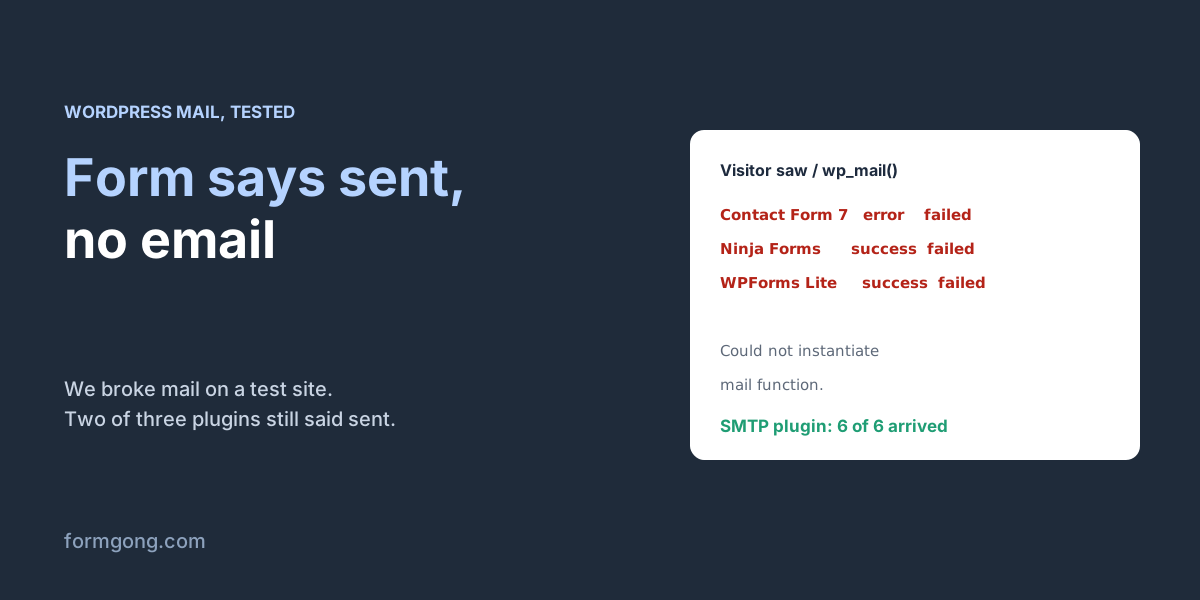
The form said thank you. The email never left
"sent": false, which nobody sees unless they open the browser's Network tab.You test your contact form, it shows a friendly message, and the email never comes. Or a customer calls to ask why you never answered. The form itself is rarely broken. A WordPress form plugin does two jobs, taking the message and emailing it to you, and the second job is handed to WordPress, which hands it to your server. In our test, that last hand-off is where every message died.
We wanted to see this from both sides, so on 10 November we put a fresh WordPress 7.1.3 in a Docker container on our server. The official image has no mail program, which is roughly what you get on a host that has switched PHP's mail() off. We installed Contact Form 7, Ninja Forms and WPForms Lite, left their default forms as they were, sent each one the request its own JavaScript sends, and wrote down what WordPress said about the email.
| Plugin | What the visitor saw | What wp_mail() reported | Copy of the message kept? |
|---|---|---|---|
| Contact Form 7 6.2.4.1 | “There was an error trying to send your message. Please try again later.” | Could not instantiate mail function. | No. The plugin has no table for messages |
| Ninja Forms 3.16.1 | “Form submitted successfully. A confirmation email was sent to emily.carter@example.com.” | Could not instantiate mail function, for both emails | Yes, under Ninja Forms → Submissions |
| WPForms Lite 2.0.4 | “Thanks for contacting us! We will be in touch with you shortly.” | Could not instantiate mail function. | No. Lite created no entries table |
Contact Form 7 was the only one to admit the failure. Ninja Forms and WPForms said thank you, and Ninja Forms went further and told the visitor a confirmation email was on its way. A success message on your form, then, says nothing about the email. With Contact Form 7 and WPForms Lite, the email that failed was also the only copy of the message.
Whatever plugin you use, the email can stop in one of three places. The message never reaches WordPress; WordPress tries to send it and fails; or the email leaves your server and is refused or filtered on the way. Each has its own test, so go through them in that order instead of trying fixes at random.
Did the message reach WordPress?
No mail setting will help if the submission never gets to WordPress, so rule that out first. Send a test from the live page in a private window. Logged in as an admin you may see details a visitor never sees, which is handy later but misleading now.
If the form shows its normal success or error message, the submission reached WordPress. If the button keeps spinning, or nothing happens, it didn't. The usual causes are a security plugin or firewall blocking the request, and a cached copy of the page whose security token has expired. In our Contact Form 7 test, blocking the REST API for visitors left the spinner turning with no message at all; in our Elementor test, a stale token got a 403 response with the body -1. Open the browser's developer tools on the Network tab, submit again, and look at the request the form sends. Anything other than a 200 points at caching or security, not mail. Exclude the contact page from your page cache and check the firewall's log for blocked requests. If neither explains it, try the form on a staging copy with a default theme and every plugin except the form plugin switched off, then turn them back on one at a time until it breaks again.
If your plugin keeps submissions, look there too. In our test Ninja Forms saved the message even though both emails failed, so a full Submissions screen with an empty inbox means the form is fine and only the email is broken.
Does WordPress fail to send the email?
Plugins don't say why an email failed. WordPress knows, and you can make it tell you in two ways, neither of which needs a plugin.
The quickest one is your login page. Log out, or open a private window, click “Lost your password?” on wp-login.php and enter your username. That makes WordPress send an email through the same function your form uses. On our broken server the page answered with “Error: The email could not be sent. Your site may not be correctly configured to send emails.” If you see that, the problem is the site's mail, not the form, and the next section fixes it. If instead you are told to check your email and the reset link arrives, WordPress can send, and the problem is in the form's settings or further down the line. Don't count on Site Health for this: we checked its code in WordPress 7.1.3 and it never sends or even mentions email. The email tests you may have read about come with SMTP plugins.
For the actual reason, add a tiny must-use plugin. Save the code below as wp-content/mu-plugins/log-mail.php, creating the mu-plugins folder if your site doesn't have one. WordPress runs everything in that folder on every request, so there is nothing to activate. Then submit your form once and open wp-content/mail-log.txt.
What you find there narrows it down. If the file has no new line at all, your plugin never asked WordPress to send anything. Check that the notification is switched on, that its conditional logic matches your test, and that a spam check didn't stop the message first. A line ending in “handed over” means WordPress passed the email on, so skip to the part about refused mail below. A line starting with FAILED gives you the reason, and these are the ones we saw.
“Could not instantiate mail function.” means PHP's mail() could not run, because the server has no mail program or the host has switched it off. That is what every plugin hit on our test server. “SMTP Error: Could not connect to SMTP host. Failed to connect to server” appeared once we had an SMTP plugin set up with a wrong port: the plugin is there, but the mail server can't be reached, often because the host blocks that port. Try the other port your mail provider lists, usually 587 or 465. If the log says the SMTP login failed, our guides to Gmail's 535 error and Office 365's 535 error cover the usual causes. And “Invalid address: (From)” means the From address itself was rejected before anything was sent, which we hit in our Elementor test on a site whose From address came out as email@localhost.
When you've found the cause, delete log-mail.php again. It writes a line for every email the site sends, password resets and order emails included, and nothing ever trims that file.
<?php
// wp-content/mu-plugins/log-mail.php
// One line in wp-content/mail-log.txt for every email WordPress tries to send.
add_action( 'wp_mail_failed', function ( $error ) {
	file_put_contents( WP_CONTENT_DIR . '/mail-log.txt',
		gmdate( 'c' ) . ' FAILED ' . $error->get_error_message() . "\n", FILE_APPEND );
} );
add_action( 'wp_mail_succeeded', function ( $mail ) {
	file_put_contents( WP_CONTENT_DIR . '/mail-log.txt',
		gmdate( 'c' ) . ' handed over: ' . $mail['subject'] . "\n", FILE_APPEND );
} );
Fix a failing wp_mail(): send through SMTP
By default WordPress sends mail with PHP's mail(), which passes the email to whatever mail program the server has. Some hosts limit it or switch it off, and even when it works, the mail comes from a server that nobody has said may send for your domain. Our PHP mail() guide shows that part in detail. An SMTP plugin replaces that hand-off: WordPress logs in to a real mail account and sends through it, the way your email app does.
We checked the fix on the same broken server. We installed WP Mail SMTP, the one most guides recommend (FluentSMTP and Post SMTP do the same job), pointed it at a test mail server, and set it to force the From address to forms@olive-bakery.test, an address on the test site's own domain. Without changing a single form setting, Contact Form 7 switched to “Thank you for your message. It has been sent.”, Ninja Forms' email action reported "sent": true, and all six emails we sent arrived: the three form notifications, Ninja Forms' confirmation to the visitor, and two plain test emails. Every one came from the site's address, and the form notifications carried the visitor's address in Reply-To, so hitting Reply still answers the customer.
On your own site you need a real account to send through. That can be the mailbox you already have on your domain, at Google Workspace, Microsoft 365 or your host, or a sending service. The From address should be that account's address, or another one on the same domain. Switch on the plugin's option to force it, otherwise a form plugin can still put some other address in From. Then send the plugin's test email before you touch the form again. A failed test prints the error that matters. A test that arrives while the form stays silent sends you back to the form's notification settings.
Our test server accepted every email it was given, so this proves WordPress now hands the email to a mail server. Whether Gmail or Outlook then accepts it depends on the next section.
WordPress sent it, but it never arrived
When the log says the email was handed over and your inbox stays empty, the email left WordPress and was refused, quarantined or filed as spam somewhere after that. WordPress never hears about it. Contact Form 7's “It has been sent” and the other plugins' thank-you messages mean only that this hand-off worked.
A common cause is the From address. Many tutorials tell you to put the visitor's email there so you can hit Reply. Then your server sends mail claiming to be from Yahoo or iCloud, and those domains publish a DMARC policy telling every receiver what to do with mail that uses their name without their permission. Contact Form 7 warns about this in its own editor: with the visitor's address in From, it showed “Sender email address does not belong to the site domain.”
| Visitor's address ends in | Policy | What it asks receivers to do |
|---|---|---|
| yahoo.com | p=reject | Refuse the message |
| aol.com | p=reject | Refuse the message |
| icloud.com | p=quarantine | Treat it as suspicious, usually spam |
| gmail.com | p=none, sp=quarantine | No instruction for gmail.com itself; the receiver decides |
| outlook.com, hotmail.com | p=none | No instruction; the receiver decides |
So a form that sends “From: someone@yahoo.com” asks the receiving server to refuse its own notification. Put an address on your site's domain in From and the visitor's address in Reply-To, in every form and in the SMTP plugin. WordPress's own default, which we saw as wordpress@olive-bakery.test, is already on your domain. The question then is whether your domain allows the server that sends it, which is what SPF and DKIM records say. A mail account or sending service gives you the exact records to add; our guide to contact form emails going to spam walks through them.
Before you change DNS, look properly in the receiving mailbox. Check the spam folder and any filters, and on Google Workspace or Microsoft 365, the quarantine in the admin console, which is separate from the spam folder. And reread the To address in the form's settings: a notification can go to an old address, or to whoever built the site years ago.
Contact Form 7, WPForms and Elementor
All three plugins we tested send through WordPress, so the checks above apply to each of them. Where they differ is in what they tell the visitor and what they keep.
Contact Form 7 is the one that tells the visitor when sending fails, with a red border around the error. The same sentence with an orange border means a spam check stopped the message, and then no email is attempted at all. It keeps no copy of messages, so install Flamingo, its companion plugin, before you start testing. Our Contact Form 7 error guide goes through each colour.
WPForms Lite thanked our visitor and kept no entry, so when its email fails, the message is gone. Open the form's Settings → Notifications and check the Send To address. While you debug, also switch off “Optimize Email Sending” in WPForms' email settings. It queues emails to go out later, and you want each test to send right away. The rest is in our WPForms guide.
Elementor's Form Lite widget, from the Hello Plus add-on, showed two error sentences at once when mail failed, and without Elementor Pro it saved nothing. See our Elementor form guide. We haven't tested Gravity Forms or Divi's contact module for this article, so we won't guess how they report a failure; the mail log above will show you either way.
Ninja Forms not sending email
Ninja Forms is the one most likely to fool you, because its default success message promises an email. The default “Contact Me” form says “Form submitted successfully. A confirmation email was sent to” the visitor's address, and it said that on our test server while both of its emails failed. The plugin knew it had failed, because the reply it sent to the browser listed the email action with "sent": false. To see that on your site, open the browser's Network tab, submit the form and click the admin-ajax.php request; the answer is under data → actions → email.
Your message is probably still there, though. Ninja Forms saved our submission even though no email left, so look under Ninja Forms → Submissions and pick the form. If your messages are there, only the email is broken, and the steps above fix it. If they aren't, check that the form still has its “Record Submission” action under Emails & Actions, then go back to the first step: the submission may not be reaching WordPress.
The default form has two email actions, and both are on. One sends a confirmation to the visitor, using the form's email field. The other notifies you at {system:admin_email}, which is the address under Settings → General in WordPress, so a stale admin address there means your notifications go somewhere you don't read. Open each action under Emails & Actions and check the To field, keep From on your own domain and make sure Reply-To on the notification is {field:email}, as it is in the default form. With an SMTP plugin set up, as described above, our test form's email action changed to "sent": true and both emails arrived.
When the email works again, edit that success message anyway. It lives in the form's Success Message action, and on our test site it promised Emily an email she never got.
If you'd rather not depend on WordPress mail
Every fix above is about getting your WordPress server, or an account it logs in to, trusted by Gmail and Outlook. If the contact form is the only thing on the site that sends email, you can take that part out. With Formgong, the form posts its data to Formgong instead of to WordPress, so delivery doesn't depend on your host's mail, an SMTP plugin or its password. Every submission is kept in an inbox you can search, and then sent to you by email and, if you like, to Telegram, so a filtered email no longer means a lost message. The Formgong plugin for WordPress adds a form block and a shortcode, and a plain HTML form works as well; our guide to a WordPress contact form without a plugin has the steps.
Keeping your current plugin is fine as well. Once SMTP is set up, send yourself a test from the live page now and then, because a changed mailbox password or a site move breaks it without any warning on the form. Forms outside WordPress have their own guide, contact form not sending email.
Where did yours stop?
Which plugin was it, and where did the email stop? Write to support@formgong.com with what the form showed and the line from your mail log. When it's a case we haven't seen, we set it up on a test site and add what we find to this page.
Frequently asked questions
Why is my WordPress contact form not sending email?
Usually the form works and the email fails. Form plugins hand the email to WordPress's wp_mail(), which uses the server's PHP mail() unless an SMTP plugin is set up, and some hosts limit or switch that off. If mail does leave, a From address that isn't on your domain gets it refused or sent to spam.
How do I test if WordPress can send email without a plugin?
Use “Lost your password?” on wp-login.php. If WordPress cannot send, the page says “The email could not be sent. Your site may not be correctly configured to send emails.” For the exact reason, log the wp_mail_failed hook from a small file in wp-content/mu-plugins.
Why does Ninja Forms say a confirmation email was sent when nothing arrives?
Because that sentence is the form's default success message, and Ninja Forms shows it whether or not the email went out. We saw it while both emails failed; the response in the browser said "sent": false for the email action. The message itself was saved under Ninja Forms → Submissions.
Do I need an SMTP plugin for WordPress contact form emails?
If the mail log or the lost-password test shows WordPress can't send, yes. WP Mail SMTP, FluentSMTP or Post SMTP make WordPress log in to a mail account instead of calling the server's mail(). On our broken test server, adding one made all six emails arrive without touching a form.
Are my form messages lost when the email fails?
It depends on the plugin. In our test Ninja Forms kept the message under Submissions, while Contact Form 7 and WPForms Lite kept no copy, so the failed email was the only one. Contact Form 7 can keep copies with its companion plugin Flamingo.
Sources and documentation
Official references for this guide: Formgong: Contact Form 7 “There was an error trying to send your message”, Formgong: PHP mail() not sending email, Formgong: WordPress contact form without a plugin. WordPress, where data is stored.