What we tested
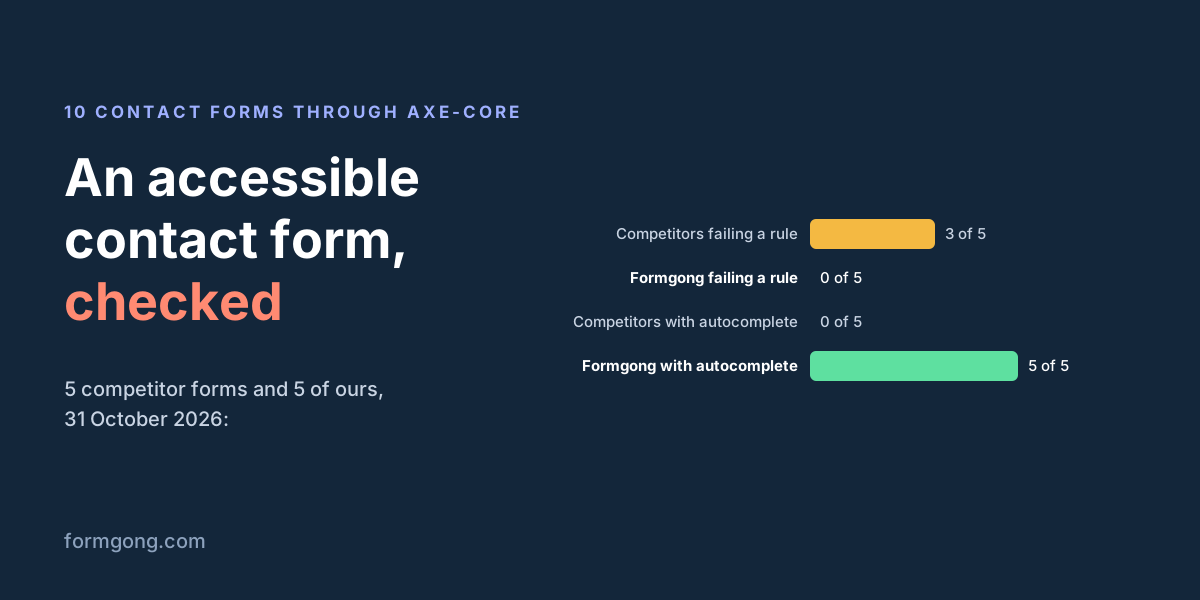
We took the contact form you get from five form backends without an account: the generators of Basin, Splitforms and Formcarry, the form on Web3Forms' home page and the Simple Contact Form in Formspree's library. From Formgong we took the generator and form builder code, the hosted form page and the contact pages of three website templates. Each copied form went into the same blank page with a language and a title. Live pages were tested as they are.
Then we ran axe-core 4.10.3 in Chromium with the WCAG 2.0, 2.1 and 2.2 A and AA rules, pressed Tab through every form, and pressed Send on an empty form. Nothing was submitted: the test blocked every request that was not a page load.
| Form | What we tested | axe | Field border | autocomplete on name and email | Empty form |
|---|---|---|---|---|---|
| Formgong generator and form builder | Copied code (both give the same HTML) | 0 | 2.56:1, now 4.76:1 | Yes | Stopped |
| Formgong hosted form page | Live page | 0 in the form, 1 on the page (footer link, 4.4:1, now fixed) | 2.56:1, now 4.76:1 | Yes | Stopped |
| Craftline template | Live contact page | 0 | 1.29:1 | Yes | Stopped |
| Orrery template | Live contact page | 0 | 1.6:1 | Yes | Stopped |
| Shoal template | Live contact page | 0 | 21:1 | Yes | Stopped |
| Basin | HTML form generator, copied code | 1: button text 3.97:1 | 1.61:1 | No | Sent (no required fields) |
| Splitforms | HTML form generator, copied code | 1: button text 3.29:1, grey credit line | 1.46:1 | No | Stopped |
| Formcarry | Contact form generator, copied code | 0 | 1.15:1 | No | Sent (no required fields) |
| Web3Forms | Form on its home page | 1: three fields with no label | 4.54:1 | No | Stopped |
| Formspree | Simple Contact Form from its library | 0 | 2.56:1 | No | Stopped |
Two results matter more than the axe column. Every form let you reach every field and the button with Tab, and no Tab stop landed on a hidden spam field. And 8 of the 10 forms draw field borders too faint to meet WCAG, a check that axe does not run.
1. A visible label for every field
Each input needs a <label> tied to it with for and id, or wrapped around it. A screen reader reads that label when the field gets focus, and clicking the label puts the cursor in the field. This covers WCAG 1.3.1, 3.3.2 and 4.1.2.
Placeholder text is not a label. The W3C forms tutorial points out that it disappears as soon as someone types and is usually drawn in low contrast. In our check of 9 copy-paste contact forms from search results, 5 left fields without a label. Here, the Web3Forms home-page form has none on its three fields, which axe rated critical.
A label hidden with CSS passes axe, so check this by eye too. Our Shoal template keeps its labels for screen readers only and shows the placeholder as the visible label. axe found nothing. Once you start typing, the field no longer says what it is. We are moving those labels back into view.
2. autocomplete on name, email and phone
WCAG 1.3.5 asks that fields about the user say what they are in code, so browsers and assistive tools can fill them in. For a contact form that means autocomplete="name", "email" and "tel". It saves typing for everyone and matters most for people with motor or memory impairments.
None of the 5 competitor forms set it. All 5 of ours do. The same gap showed up in our earlier study: 0 of 9 copy-paste snippets had a single autocomplete attribute.
3. Keyboard and a visible focus
You should be able to Tab to every field and the button in reading order, type, and send with Enter (WCAG 2.1.1 and 2.4.3). In all 10 forms, Tab reached every field and the button in order.
Focus is where forms differ. WCAG 2.4.7 asks that keyboard focus is visible, and 2.4.11 that it is not hidden behind something like a sticky bar. Basin and Formcarry remove the browser's outline and only change the border colour; Basin's goes from a faint grey to blue. Shoal makes the bottom border 1 pixel thicker. All three are easy to miss. A solid outline of 2 to 3 pixels that contrasts with the background is the safe choice.
4. Contrast for text, buttons and field borders
Text, including the button text, needs a contrast ratio of at least 4.5:1 against its background (WCAG 1.4.3). axe flagged the white-on-blue button in Basin's form at 3.97:1 and the white-on-orange one in Splitforms' at 3.29:1, plus Splitforms' grey credit line under the form. It also flagged the small "Formgong" link under our hosted form at 4.4:1, which we darkened the same day.
Field borders are a separate rule. If a border is what shows that a box is a text field, it needs 3:1 against the colour around it (WCAG 1.4.11, and W3C's examples for text inputs say so directly). Only 2 of 10 forms passed: Web3Forms, which keeps the browser's default border at 4.54:1, and our Shoal template. When we measured, our generator drew a #94a3b8 border at 2.56:1; we changed it the same day to #64748b, which is 4.76:1 on white. Anything that dark or darker passes.
axe does not measure borders, so a clean axe run says nothing about this. Use a contrast checker on the border colour and the background next to it.
5. Errors in text, tied to the field
WCAG 3.3.1 asks that an error names the field and says what is wrong in text, not by colour alone. Mark fields that must be filled with required. Put each error in a line linked to its field with aria-describedby, set aria-invalid="true", and move focus to the first field with a problem. A screen reader then reads the label and the error together.
Basin and Formcarry mark no field as required, so pressing Send on an empty form went straight to the network, where our test blocked it. The other 8 stopped the empty form and put focus on the first field. Our generator writes the browser's own message into each field's error line and sets aria-invalid; our templates leave it to the browser's built-in message bubble.
6. A success message people hear
If the form sends with JavaScript and stays on the page, the "message sent" line has to reach screen reader users without moving focus. WCAG 4.1.3 asks that such messages can be "presented to the user by assistive technologies without receiving focus" (WCAG 2.2). In practice that is an element with role="status" that is on the page from the start, empty, and gets the text when the request ends. The W3C tutorial on notifications shows the same pattern with aria-live.
Our three templates do this, and after a success they also move focus to a "Thank you" heading. Our generator's status line has role="status" but is hidden with display:none while empty. Screen readers can miss text that appears at the same moment as its container, so we changed it the same day to stay on the page. If your form goes to a thank-you page instead, the new page with a clear heading is the message. Our guide to thank-you pages after a form covers both.
7. A spam trap screen readers skip
A honeypot is a field people never fill and bots do. It must stay out of the way of people who do not see the screen: put it in a wrapper with aria-hidden="true", give the input tabindex="-1" and autocomplete="off", and move it off-screen. display:none also hides it from screen readers, though some bots skip fields hidden that way. Never make it required.
Splitforms and Web3Forms hide theirs with display:none; ours use the off-screen wrapper. In none of the 10 forms did Tab land on the trap. Our honeypot guide has the full markup and the server check.
8. A captcha only if you need one
WCAG 1.1.1 allows a CAPTCHA, but asks for alternatives that use different senses, for example audio next to a picture puzzle. A puzzle still stops some people, so start with a honeypot and a server-side spam filter, and add a captcha only if spam gets through.
If you add one, pick a widget that usually needs no puzzle. Cloudflare's documentation states that Turnstile meets WCAG 2.2 AA; that is the vendor's own claim, and we did not test it with a screen reader. Our comparison of Turnstile, reCAPTCHA and hCaptcha covers privacy and set-up, and stopping spam without a captcha covers the rest. WCAG 3.3.8 on puzzles applies to logging in, not to contact forms.
What a clean axe run does not tell you
axe passed every Formgong form and two of the competitor forms, yet our own run found placeholder-only visible labels, faint field borders and a status line that may not be announced. Automated rules cover part of WCAG. After the scan, do three things yourself:
- Fill and send the form with the keyboard only, watching where focus is.
- Measure the contrast of field borders and the focus outline, not only the text.
- Turn on VoiceOver or NVDA, send the form empty and then filled, and listen for the error and the "sent" message.
The form checker catches fields without a label, a form that does not send and missing spam protection on a live page.
A contact form that passes these checks
This is the shape of the form our generator gives you, with a darker field border and a status line that stays on the page. Replace the key with your own from Formgong, or point action at your own backend.
<form id="contact" action="https://formgong.com/submit" method="POST" novalidate>
  <input type="hidden" name="access_key" value="fk_your_access_key">

  <label for="c-name">Name</label>
  <input id="c-name" name="name" type="text" autocomplete="name" required aria-describedby="c-name-error">
  <p id="c-name-error" class="error"></p>

  <label for="c-email">Email</label>
  <input id="c-email" name="email" type="email" autocomplete="email" required aria-describedby="c-email-error">
  <p id="c-email-error" class="error"></p>

  <label for="c-message">Message</label>
  <textarea id="c-message" name="message" rows="4" required aria-describedby="c-message-error"></textarea>
  <p id="c-message-error" class="error"></p>

  <!-- Spam trap: hidden from screen readers and skipped by Tab -->
  <div aria-hidden="true" style="position:absolute;left:-9999px">
    <input type="text" name="botcheck" tabindex="-1" autocomplete="off">
  </div>

  <button type="submit">Send message</button>
  <!-- Keep this on the page from the start, empty. Do not hide it with display:none. -->
  <p id="c-status" role="status"></p>
</form>

<style>
  #contact input, #contact textarea { border: 1px solid #64748b; } /* 4.76:1 on white */
  #contact :focus-visible { outline: 3px solid #4338ca; outline-offset: 2px; }
  #contact .error { color: #b91c1c; }
</style>

<script>
  var form = document.getElementById("contact");
  var status = document.getElementById("c-status");
  form.addEventListener("submit", function (event) {
    event.preventDefault();
    var first = null;
    form.querySelectorAll("[aria-describedby]").forEach(function (field) {
      var ok = field.checkValidity();
      field.setAttribute("aria-invalid", ok ? "false" : "true");
      document.getElementById(field.getAttribute("aria-describedby")).textContent = ok ? "" : field.validationMessage;
      if (!ok && !first) first = field;
    });
    if (first) { first.focus(); return; }
    status.textContent = "Sending…";
    fetch(form.action, { method: "POST", headers: { Accept: "application/json" }, body: new FormData(form) })
      .then(function (r) { return r.json(); })
      .then(function (data) {
        if (data.success === true) { form.reset(); status.textContent = "Thank you. Your message was sent."; }
        else status.textContent = data.message || "Could not send. Please try again.";
      })
      .catch(function () { status.textContent = "Could not reach the server. Check your connection and try again."; });
  });
</script>
How Formgong's forms handle this
- Generated code. The form generator and form builder give every field a label tied to it,
autocompletefor name, email and phone, and an error line linked witharia-describedby. The optional script marks invalid fields, writes the browser's message and moves focus to the first problem. - Spam trap. Every form we generate has a
botcheckfield in anaria-hiddenwrapper withtabindex="-1". A submission that fills it is marked as spam on the server. - Turnstile is optional. You can add Cloudflare Turnstile to a form. It is required only when the form takes file uploads or voice messages.
- Hosted form page. If you have no site, each form has its own page at
/f/<key>with the same labelled fields. - Privacy line. Set a privacy policy address once and one line with a link appears under the send button. There is no forced consent checkbox.
- Templates. The website templates announce success and errors in a status region and move focus to the "Thank you" heading.
What Formgong's free plan includes
- Build the form or bring your own. The form builder takes the colours and fonts from your site's address, with no sign-up; ready form templates copy into your account; AI writes the fields from one sentence. Any hand-written HTML form works too.
- Websites with the form already connected. 28 free website templates post to Formgong out of the box.
- 250 submissions a month on unlimited forms. Spam does not count. Once a year, a busy month keeps delivering on credit until the 7th instead of stopping.
- Everywhere you work. Email to up to 3 people at once, Telegram with Reply and Handled buttons, Google Sheets, Notion, and 3 signed webhooks for Slack, Discord, Zapier, Make or n8n.
- Emails to your customers in your business's name. Formgong sends them under your business name and replies come back to you, with no email service of your own to set up: a review request to every lead, a reminder a visitor asked for, and review emails after an order with your logo and colours. People who agree can also go straight into your Mailchimp, Klaviyo, Brevo, MailerLite or Kit list. An automatic reply to each visitor is on Pro.
- No captcha needed. A server-side spam filter, a honeypot, allowed domains and a block list; add your own Turnstile key if you want one.
- Files and voice. Visitors can attach files, or record a voice message that arrives transcribed.
- Made for AI-built sites. A hosted form page and a contact button; step-by-step guides for sites built with Lovable, Bolt, v0, Replit and Base44; an MCP server lets Cursor or Claude wire the form for you.
- See what the form does. Analytics for views, starts, conversion and where each lead came from, and an alert when a form goes quiet.
- One account for the rest. Customer reviews and an AI help chat that answers visitors from your own pages, with every message in one inbox. Data is stored in the EU.
Frequently asked questions
Does a contact form have to meet WCAG?
WCAG applies to the whole page, so a form on a page that must meet WCAG 2.2 AA has to meet it too. Which laws require which level depends on your country and sector.
Is placeholder text enough instead of a label?
No. Placeholder text disappears when someone starts typing and is usually low contrast. Use a visible label tied to the field with for and id; keep the placeholder for an example at most.
Does a honeypot field confuse screen reader users?
Not when it sits in a wrapper with aria-hidden="true", the input has tabindex="-1" and autocomplete="off", and it is not required. Screen readers skip it and Tab never lands on it. In our test of 10 forms, no Tab stop reached a honeypot.
Are captchas accessible?
WCAG 1.1.1 allows a CAPTCHA if alternatives using different senses are offered. A honeypot and a server-side filter stop most contact form spam without one. Cloudflare states that Turnstile meets WCAG 2.2 AA.
Is an axe scan enough to check a form?
No. On 31 October 2026 axe passed forms whose visible labels were only placeholders and whose field borders were under the 3:1 WCAG asks for. Add a keyboard-only test, a border contrast check and a screen reader pass.
Sources and documentation
Official references for this guide: WCAG 2.2 (W3C Recommendation), Understanding WCAG 2.2: Non-text Contrast, W3C WAI forms tutorial: labels, W3C WAI forms tutorial: instructions, W3C WAI forms tutorial: notifications, axe-core, Cloudflare Turnstile docs, Copy-paste contact form study (method and data). Formgong HTML form docs, where data is stored.