Why do SaaS testimonials matter so much?
Someone evaluating your software cannot hold it in their hands. They can start a trial, but a trial costs them an afternoon and a login, and before they spend that they want to know one thing: has a company like mine made this work? A testimonial is the cheapest answer you can give them.
That is a higher bar than a shop review. A shopper buying a mug wants to know it arrived unbroken. A team lead choosing a help desk wants to know that someone with a similar team, a similar volume and similar tools got a result. A quote that says “great product, highly recommend” tells them nothing about that.
What do SaaS home pages actually show?
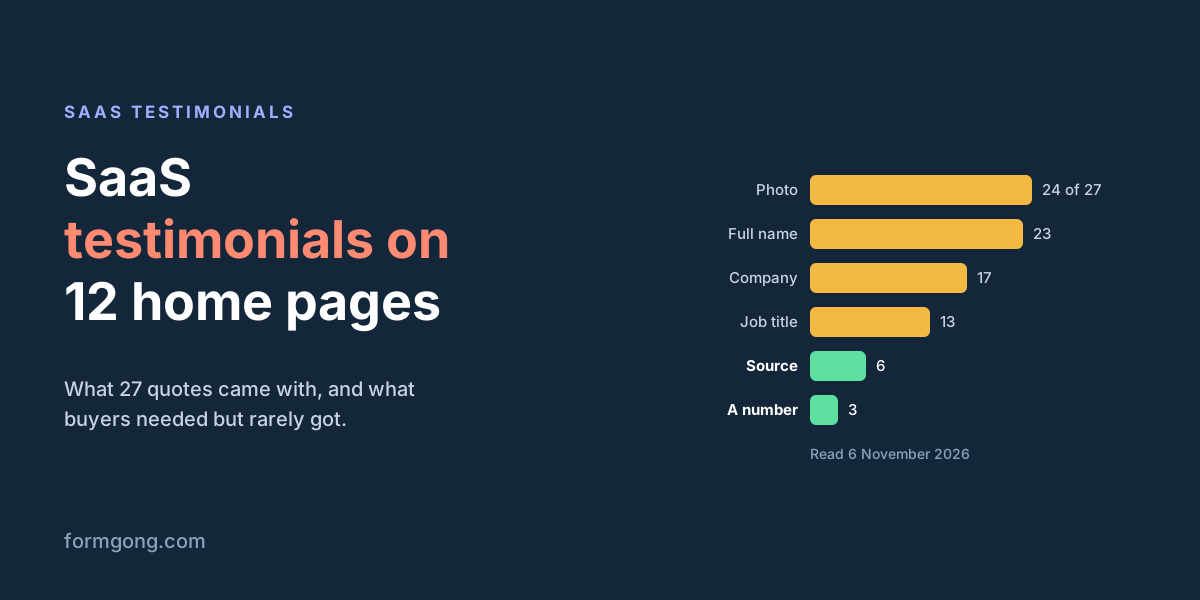
We opened the home pages of 12 SaaS products on 6 November 2026: form tools (Basin, Formspree, Tally, Typeform, Jotform, Web3Forms, Forminit, which used to be Getform, and Formcarry), two testimonial tools (Senja and Testimonial.to) and two chat tools (Tidio and Crisp). All 12 loaded. Seven showed quotes from named customers, 27 quotes in all.
| The quote came with | Quotes |
|---|---|
| A photo | 24 of 27 |
| A full name | 23 of 27 |
| A company | 17 of 27 |
| A job title | 13 of 27 |
| Where the quote came from | 6 of 27 |
| A number in the quote | 3 of 27 |
Faces and names were nearly universal. What was mostly missing was the part a buyer can use or check. Only 3 of the 27 quotes had a number in them, such as how long setup took. Only 6 said where the quote came from, such as a review site or a social post, and all 6 were on the two pages that sell testimonial tools. The other five sites used something else: Typeform and Tidio showed company cards with a result in the headline instead of a person's quote, and Jotform and Tidio showed their average ratings on review platforms.
The short quotes read well and say little. Tally's page quotes a founder saying Tally beats Typeform “hands down”, which is a fine line for people who already know both. A buyer who knows neither learns that one person prefers it.
What makes a good SaaS testimonial?
It answers the buyer's question about fit, which takes more than a face and a compliment.
Start with who is speaking: a full name, a job title and a company, and if you can, a hint of the company's size or type, because a five-person agency and a bank have different problems. A photo helps people believe the person exists. The role and company are what help them decide whether that person is like them.
Then the job the customer used the product for. “We route support emails from three shops into one inbox” says more than any adjective, and it lets the right buyer recognise themselves.
Then what changed, before and after, with a number if the customer has one: hours a week, replies a day, how long setup took. The number has to be theirs and true for them. If it is much better than most customers get, the US FTC's Endorsement Guides (16 CFR 255.2) expect you to say what people can generally expect.
Last, say where the quote came from. A link or a label pointing to the original review or post lets a sceptical buyer check that the person and the words are real. On the pages we read, this was the rarest detail outside the testimonial vendors.
What kinds of SaaS testimonials are there?
Most software companies end up with five kinds, and each does a different job.
- A short quote with a name, role and company. It fits on the home page and next to a plan, and it is the kind we counted above.
- A case study: a page or a PDF about one customer, with the problem, the setup and the result. This is what a buyer forwards to their boss, so it can carry the numbers a quote has no room for.
- A video of a customer talking for a minute or two. It is harder to fake than text, and harder to get.
- Reviews on a software review site such as G2 or Capterra. You don't choose the words, which is why buyers trust them. Show the rating with the site's name, so people know where to check it.
- A public post where a customer praises you on LinkedIn, X or a community forum. Ask before you copy it onto your site; a post being public is not the same as permission to use it in your marketing.
You don't need all five at the start. A dozen good short quotes and one case study for your most common type of customer cover most of what a buyer looks for.
How do you collect SaaS testimonials?
Ask at the moment the customer has just got value, not on a schedule. Good moments are when an account reaches its first real milestone, when a support ticket closes with a thank-you, after a renewal, or when someone gives you a top score in a satisfaction survey. Ask one specific question, such as “what did you do before, and what changed?”, rather than “could you write us a testimonial?”. Our article on how to ask a client for a testimonial has email templates you can adapt.
Make answering take one click: a link to a page with stars, a name field and a text box, no account. Offer a short video as an option, never a requirement; our guide to collecting video testimonials covers file sizes and what to ask for.
Email is not the only way in. A 20-minute call with a happy customer often gives you a better quote than any form, because you can ask “can you give me an example?” when they say something vague; write down their words, then send them the quote to approve. Put the same review link in your help centre, in the footer of support replies and in the account settings, so people who want to say something nice can do it without waiting to be asked. Customer success managers can drop the link into a quarterly check-in once the customer has said the account is going well.
Then get permission in writing for each detail you will show: the name, the title, the company, the photo and the logo. Many people are happy to praise a tool and still need their manager's OK before their company name appears on your site.
What should you ask a SaaS customer?
Ask about the job, the switch and the result. These five work for most software products:
- What were you using before, and why did you start looking for something else?
- What nearly stopped you from signing up?
- What do you use it for most days?
- What has changed since you started, and is there a number you watch that moved?
- How long did it take to get set up?
The first two give you the objections your next buyer has, in a customer's words. The fourth gives you the number. Send no more than three in one request, picked for the customer: a new account gets the setup question, a two-year customer gets the one about what changed. Our article on testimonial questions has versions for other kinds of business and explains how to fit them on one form.
Can you edit a testimonial?
You can shorten it, but you cannot change what it says. The FTC's Endorsement Guides, read in the eCFR on 6 November 2026, say that an endorsement must reflect the honest opinion or experience of the person giving it (16 CFR 255.1(a)). Once you put words in quotation marks, you are presenting them as that person's exact words, and you may not take them out of context or reword them in a way that distorts their opinion or experience (255.1(b)).
Some testimonial guides recommend tidying a customer's wording before you publish it. If you do, send the edited version back and ask the customer to approve it, and keep their reply. Here is a made-up example of a fair cut. The customer wrote: “Honestly the first week was rough because the import kept timing out, but support sorted it and now our two-person team answers about 80 tickets a day without anyone working weekends.” A shorter version that keeps the meaning: “The first week was rough… but support sorted it and now our two-person team answers about 80 tickets a day.” A version that does not: “Now our two-person team answers about 80 tickets a day.” The second uses only their words, yet a reader would think setup went smoothly, and the customer said it didn't.
Two more rules catch SaaS companies. If you gave the customer something for the testimonial, such as free months or a discount, that is a connection a buyer would not expect, and the guides say it must be disclosed clearly and conspicuously (255.5). And a testimonial a business writes itself, which misrepresents that the person exists or used the product, is banned outright by the FTC's 2024 rule on reviews and testimonials (16 CFR 465.2), which our article on the FTC fake reviews rule summarises.
Where should SaaS testimonials go?
Put each one where it answers the doubt the visitor has on that page. On the home page, two or three short ones from customers your best buyers will recognise. On the pricing page, one next to each plan from a customer on that plan, because that is where people ask whether the plan is enough. On a sign-up or demo page, one about setup time. On a page that compares you with a competitor, one from someone who switched.
A separate page with every testimonial, often called a wall of love, is useful too, as long as it shows them in a plain order and does not quietly drop the lukewarm ones. Our testimonial widget page shows one way to put such a list on any site, and testimonial page design covers how many to show and how they look on a phone.
Outside the website, the same quotes work in the places buyers meet you before they sign: a line in onboarding or trial emails, a slide in the sales deck, a reply to a prospect who asks “who else uses this?”, and posts on LinkedIn. Match the quote to the reader there too, so a prospect in healthcare gets the quote from a clinic. Paid ads are stricter: a quote in an ad is a claim you make, and our article on testimonial advertising goes through what the FTC expects before one runs.
How do you keep track of SaaS testimonials?
Keep them in one place with the details you will need later: the date, the customer's plan and company size, what the quote is about (setup, support, a feature, switching from a competitor) and what they gave you permission to show. A spreadsheet is enough for the first fifty. Without it, six months later nobody remembers whether the customer agreed to their logo, or whether they are still a customer.
Look through it every few months for two things. Quotes from people who have since left should come down. And the lukewarm answers, the “it's good, but…”, are a cheap list of what to fix: the same complaint from three customers is worth more to your roadmap than one more five-star quote is to your home page.
How do you know if your testimonials work?
Test one page at a time. Pick the page with the most traffic and a clear next step, such as the pricing page and its trial button, and show half of the visitors a version with a testimonial next to the plans and half a version without, using whatever A/B testing tool you already have. Run it until each version has had enough visitors for a difference to mean something; on a small site that can take weeks, and a result after three days is usually noise.
Watch the step right after the page, such as trial sign-ups, rather than revenue months later, which mixes in everything else that changed. If you can't run a test, change one page, write down the date, and compare the same weeks before and after. That is weaker evidence, but it beats guessing.
How do you collect and show testimonials with Formgong?
Formgong treats a testimonial as a review: you send customers a review link, they leave stars, a name and a text, and nothing is public until you approve it. The widget labels the count as approved reviews, so the number never pretends to be everything you received. If your demo or contact form runs on Formgong, you can switch on review requests for that form, and each lead gets one email 3, 7 or 14 days after they wrote to you.
There is no separate field for job title, company or logo. The name field takes up to 80 characters, so “Dana Reyes, Head of Support at Northwind” fits, but set the widget's name option to Full name first: new sites start with first name and last initial, which would cut it short. Customers can attach a video they already have, and you approve it like any review. The Reviews dashboard exports a site's reviews as a CSV file with the rating, text, name, date, your reply and the status, which is a starting point for the spreadsheet above.
We run the same setup on this blog. Under every article is a rating form that goes to our own review site, and ratings wait for our approval before they appear under the article.
What do your testimonials say?
If you have a testimonial that clearly changed how buyers reacted, or a field you wish the review form had for B2B customers, tell us at support@formgong.com. It helps us decide what to build next.
Frequently asked questions
What is a SaaS testimonial?
A quote from a named customer about using a software product, usually with their role and company, shown on the vendor's website or in sales material.
What should a SaaS testimonial include?
The person's full name, job title and company, the job they used the product for, what changed with a number if they have one, and where the quote came from.
Can I edit a customer's testimonial?
Shorten it if you have to. Words in quotation marks must be theirs and still mean what they meant, so send the short version to the customer and keep their OK.
Do I have to disclose free months given for a testimonial?
Yes, in the US. Free or cheaper service in return for a testimonial is a connection buyers don't expect, and the FTC's Endorsement Guides say you have to disclose it clearly.
Sources and documentation
Official references for this guide: Formgong: Testimonial widget, Formgong: How to ask a client for a testimonial. Reviews, where data is stored.