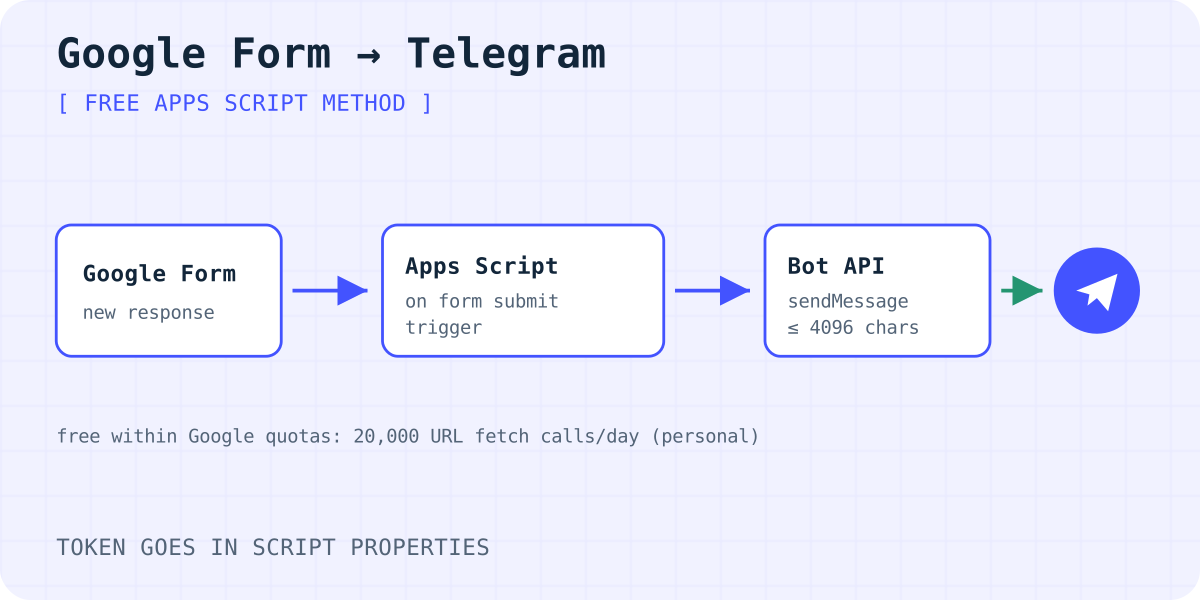
Three ways to get Google Form responses in Telegram
- Apps Script (free, a little code). A script attached to the form sends each response to your bot. This article shows it step by step.
- No-code automation. Zapier, Make and IFTTT each have a ready "Google Forms to Telegram" template. They are quick to set up, but each one has its own plan limits.
- A form on your own website. If the form lives on your site, not in Google Forms, a form backend can deliver to Telegram with no script. More on this at the end.
To be clear: Formgong does not connect to Google Forms. It only receives forms that post to it from your own pages.
Step 1: create the bot and find your chat id
- In Telegram, open @BotFather, send
/newbotand follow the steps. Copy the token it gives you. Treat it like a password. - Open your new bot and press Start, or send it any message. A bot can't write to you first.
- For a group, add the bot to the group and send a message there.
- Open
https://api.telegram.org/bot<token>/getUpdatesin a browser. Find"chat":{"id":…}in the reply. That number is your chat id. Group ids start with a minus sign.
The Telegram bot guide for contact forms explains bots, chat ids and groups in more detail.
Step 2: add the script to the form
- Open the form in edit mode. From the ⋮ menu, choose Apps Script. This creates a script bound to the form.
- Delete the sample code and paste the script below. Save it.
- Open Project Settings (the gear icon). Under Script properties, add
TELEGRAM_TOKENandTELEGRAM_CHAT_ID. The token stays out of the code this way.
The script reads every answer, puts "Question: answer" on its own line and sends one plain-text message. Telegram allows 1 to 4,096 characters per message, so the script cuts longer text. Plain text also means answers can't break the message formatting.
// Google Form → Extensions/⋮ menu → Apps Script. Paste, save, run createTrigger once.
// Project Settings → Script properties: TELEGRAM_TOKEN and TELEGRAM_CHAT_ID.

function createTrigger() {
  ScriptApp.newTrigger("sendToTelegram")
    .forForm(FormApp.getActiveForm())
    .onFormSubmit()
    .create();
}

function sendToTelegram(e) {
  const props = PropertiesService.getScriptProperties();
  const token = props.getProperty("TELEGRAM_TOKEN");
  const chatId = props.getProperty("TELEGRAM_CHAT_ID");
  const lines = e.response.getItemResponses().map((item) => {
    const answer = item.getResponse();
    const value = Array.isArray(answer) ? answer.join(", ") : String(answer);
    return item.getItem().getTitle() + ": " + value;
  });
  const text = ("New form response\n\n" + lines.join("\n")).slice(0, 4096);
  const res = UrlFetchApp.fetch("https://api.telegram.org/bot" + token + "/sendMessage", {
    method: "post",
    contentType: "application/json",
    payload: JSON.stringify({ chat_id: chatId, text: text }),
    muteHttpExceptions: true,
  });
  if (res.getResponseCode() !== 200) console.error(res.getContentText());
}
Step 3: turn on the trigger
The script runs only when an installable form submit trigger calls it. There are two ways to add one:
- In the editor, choose
createTriggerand click Run once. Google asks you to authorize the script. Allow it. - Or open Triggers (the clock icon), click Add Trigger, choose
sendToTelegram, the event source From form and the event type On form submit.
Use one way, not both, or every response arrives twice. Then send a test response from the form's public link. Don't run sendToTelegram from the editor: it has no response to read and stops with an error.
Limits and common problems
- Quotas. Personal Google accounts get 20,000 URL fetch calls and 90 minutes of trigger runtime a day; Workspace accounts get 100,000 calls and 6 hours. One response uses one call.
- Responses created by scripts don't count. Google says
FormResponse.submit()in another script does not fire the trigger. - File uploads. Answers to a file upload question are Drive file ids, not the files.
- Nothing arrives. Open Executions in Apps Script. A
chat not founderror means the chat id is wrong or you never pressed Start in the bot. - Owner changes. The trigger runs as the person who created it. If they lose access to the form, create it again.
When the form is on your own website
Google Forms makes sense for surveys and sign-up sheets. For a contact form on your own site, you can skip both Google and the script. An HTML form that posts to a form backend can send each message to Telegram and email directly.
Formgong does this on every plan, including Free, with 300 submissions a month and storage in the EU. You connect Telegram from the dashboard, so there is no token or chat id to copy. The steps are in how to send website form submissions to Telegram.
Frequently asked questions
Can I send Google Form responses to Telegram without code?
Yes. Zapier, Make and IFTTT each have a ready Google Forms to Telegram template. Check each service's plan limits before you rely on it.
Is the Apps Script method free?
Yes, within Google's daily quotas. A personal account can make 20,000 URL fetch calls a day (as of 05.10.2026), and each response uses one.
Why does my script not send anything?
Usually the trigger is missing or not authorized, the chat id is wrong, or you never pressed Start in the bot. The Executions page in Apps Script shows the error.
Does Formgong work with Google Forms?
No. Formgong receives forms on your own website that post to it. It can't read Google Forms responses.
Sources and documentation
Official references for this guide: Apps Script: Installable triggers, Apps Script: Event objects (form submit), Apps Script: Quotas, Apps Script: Properties service, Telegram Bot API, Zapier: Google Forms and Telegram, Make: Google Forms and Telegram, IFTTT: Google Forms and Telegram. Formgong documentation, where data is stored.
Read this article as Markdown