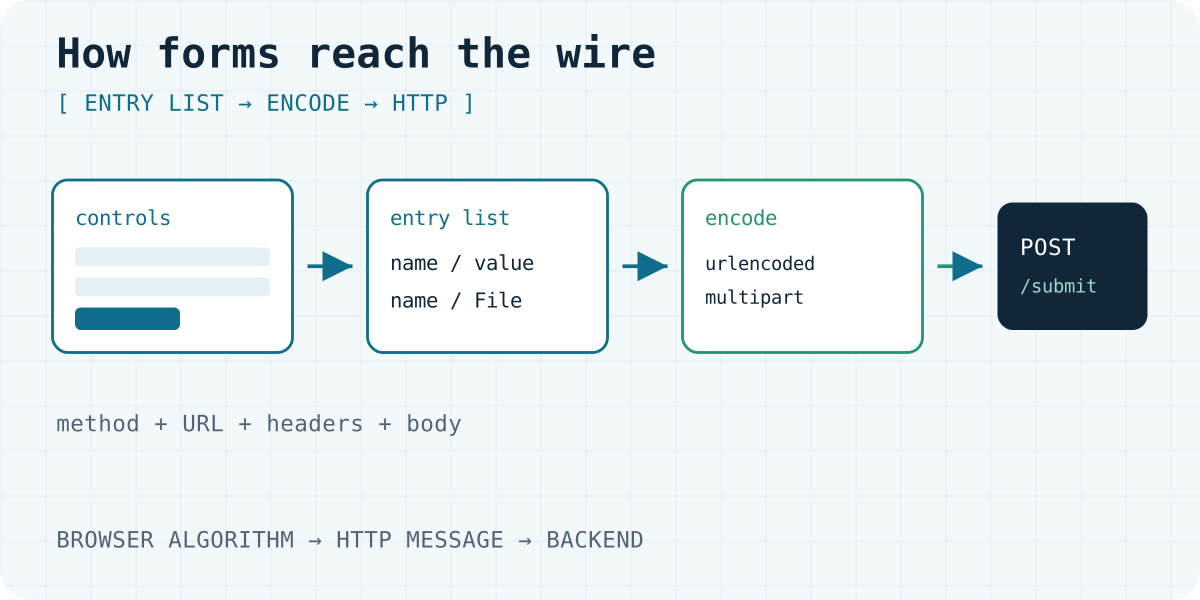
Why form submission is still the product API
An HTML form is still one of the most common trust boundaries on the open web. Static hosts, AI builders and plain marketing sites all ship a <form> that posts somewhere. Frameworks and copy-paste snippets hide what happens next. The browser does not. It runs a defined encoding and navigation algorithm, then emits a concrete HTTP request: method, URL, headers and body.
This article walks that lifecycle to the bytes a backend receives. It stays defensive: schematic threat context, no exploit payloads. Understanding the request shape is the foundation for choosing or building a form backend that treats every field as untrusted data — not SQL, not HTML, not a shell argument, and not a prompt.
We build Formgong, a form backend for static and AI-built sites. Product notes below match the public llms.txt reference. They do not replace the specs.
Many sites never run an application server. Pages live on GitHub Pages, Cloudflare Pages, Netlify, Framer, or an export from an AI builder. The contact form still has to deliver somewhere: email, Telegram, Sheets, a webhook, or later an agent tool.
That delivery path usually starts with attributes the HTML Living Standard owns — not your React runtime and not your edge Worker. WHATWG form submission defines how controls become an entry list, how that list is encoded (urlencoded, multipart or plaintext), and how navigation proceeds. Your backend only sees the HTTP message that falls out of that algorithm.
If you only need a durable action URL and a thank-you redirect, skim HTML form action explained and the HTML setup page. Keep reading here for the wire-level contract: enctype, POST semantics, redirects, and the Origin and Fetch Metadata signals around a browser POST.
[ Visitor fills controls ]
          |
          v
[ Browser: construct entry list ]
          |
          v
[ Encode: urlencoded | multipart | text/plain ]
          |
          v
[ HTTP request: method + URL + headers + body ]
          |
          v
[ Form backend / app server ]
          |
          v
[ Response: HTML, JSON, or redirect (often PRG) ]
Attributes that become the HTTP request
WHATWG groups the attributes that drive submission under form submission attributes. They can sit on the <form> or on a submit control (formaction, formmethod, formenctype, formtarget, formnovalidate).
action and formaction set the request URL
The action is the URL that receives the submission. An empty or missing action resolves to the current document URL. Relative URLs resolve against the page. Absolute https:// URLs are clearer when the endpoint is a third-party form backend.
Button-level formaction overrides the form’s action for that click. That matters when one form has “Save draft” and “Publish” buttons aimed at different handlers. The short companion article stays on this attribute; the rest of this page is what the browser does after the URL is chosen.
method and formmethod
| Keyword | What the browser does |
|---|---|
get | Default if the form’s method is missing or invalid. Encode the entry list into the URL query string and navigate with HTTP GET. |
post | Put the encoded entry list in the request body and navigate with HTTP POST. |
dialog | Close the nearest <dialog> if present. Otherwise do not submit as a network request. |
Contact and lead forms almost always want post. GET puts field values in the address bar, browser history, proxy logs, and often Referer when the thank-you page links out. Search boxes are the classic GET use case: a shareable query string is a feature.
enctype and formenctype
| State | Typical use |
|---|---|
| urlencoded | application/x-www-form-urlencoded, the default. Text fields only. A compact name=value&… body. |
| multipart | multipart/form-data. File uploads, or when you need per-part metadata. |
| text/plain | Rare. Human-readable debug style. Poor structure. An invalid or missing enctype falls back to urlencoded. |
File inputs require multipart. Formgong accepts files only as native FormData or multipart/form-data, not as base64, and only after attachments are enabled on that form. See the docs overview and llms.txt.
Target, novalidate, and who actually submits
target/formtarget. Which navigable receives the response (_self,_blank, a named frame). Opening_blankwithoutrel="noopener"on related links can exposewindow.opener. Prefernoopenerornoreferreron outbound links from success pages.novalidate/formnovalidate. Skip constraint validation for that submit. Useful for a “Save incomplete” button.- Implicit submission. Pressing Enter in a text control can submit without clicking the button (implicit submission). Design for that: one clear default submit path.
Every control that should travel must have a non-empty name. Nameless fields are omitted from the entry list. The form checker flags unnamed fields on public HTML, along with a missing action and a GET contact form.
Inside the form submission algorithm
The normative steps live in WHATWG: the form submission algorithm and constructing the entry list. The mental model:
- Validate unless
novalidateis set. - Construct the entry list — an ordered list of name/value pairs. Values may be strings or
Fileobjects. Order and duplicate names matter for checkbox groups andselect multiple. - Select a character encoding (selecting a form submission encoding). A hidden
_charset_control, as discussed in RFC 7578 §4.6, can advertise the charset used for text parts. - Encode the entry list with the chosen enctype.
- Navigate — or, with
fetchandFormData, skip full navigation while still using the same entry-list ideas.
URL-encoded bodies
application/x-www-form-urlencoded produces a single string of percent-encoded pairs. It cannot carry true file bytes — only a filename if a file control is forced through a non-multipart path. Prefer it for simple contact forms without uploads.
Multipart bodies
multipart/form-data is defined for the wire by RFC 7578 (July 2015) and wired into HTML by WHATWG’s multipart serializer. Each part has a boundary delimiter from the Content-Type parameter, Content-Disposition: form-data; name="…", an optional filename for files, and an optional per-part Content-Type.
Security note, from the RFC. RFC 7578 §4.2 and §7 warn receivers not to use the client-supplied filename blindly, not to honour directory components, and to treat uploaded content as untrusted, including executable content. Store under generated names. Constrain types. Never concatenate a user filename into a shell path.
Plain text
text/plain is a lossy, uncommon encoding. Avoid it for production backends unless you are debugging by eye.
Newlines are not what the user typed
Browsers normalize newlines in form submission. The WHATWG blog post Newline normalizations in form submission (27 May 2021) documents that string values are normalized toward CRLF during encoding, with historical browser differences around when that happens (entry-list construction versus serialize time) and special cases for filenames. Later spec work aligned late normalization across enctypes.
Implication for backends: do not assume byte-identical equality between a DOM value, a FormData entry inspected in JavaScript, and the body your Worker parses. Compare and store after your own normalization rules. Signature checks and idempotency keys should hash the parsed field map you accept, not raw request bytes, unless you carefully freeze encoding assumptions.
What HTTP request does the backend receive?
Once encoded, the browser issues an HTTP request whose semantics come from RFC 9110 — HTTP Semantics (June 2022). The three listings below are the same three fields, name, email, and message, except the third listing is JSON from fetch and the second adds a file. They are HTTP/1.1 messages, the syntax in RFC 9112: each header line ends in CRLF (bytes 0x0D 0x0A), and a blank line, CRLF CRLF, ends the header block. On HTTP/2 or HTTP/3 the same header fields and the same body bytes travel in binary frames. The body rules do not change.
application/x-www-form-urlencoded
This is the default enctype. The HTML algorithm turns the entry list into name/value pairs, normalizes stray newlines to CRLF, then runs the URL Standard serializer. In that serializer a space byte (0x20) is written as + (0x2B), not as %20. Bytes in the form percent-encode set, including @, &, =, and a literal +, become % plus two hex digits. @ is the three bytes 0x25 0x34 0x30 (%40). A literal plus sign in the field is %2B, because + already means space.
POST /submit HTTP/1.1
Host: form.example
Content-Type: application/x-www-form-urlencoded
Content-Length: 61

name=Ada+Lovelace&email=ada%40example.com&message=hello+world
The body is name=Ada+Lovelace&email=ada%40example.com&message=hello+world. The + in Ada+Lovelace is one byte, 0x2B. A textarea value line one, then a line feed, then line two, is normalized to CRLF and then percent-encoded, so that part of the body is line+one%0D%0Aline+two. The six characters %0D%0A are the encoded CRLF, not a raw line break in the body.
multipart/form-data
A file input uses multipart/form-data. The HTML multipart encoding algorithm normalizes newlines in names and in non-file values to CRLF, then encodes the list with RFC 7578. The boundary parameter is a token the browser generates. Each part starts with -- plus that token. The closing line adds a further --. Non-file parts must not have a Content-Type header. A file part carries filename and the file’s media type. In names and filenames, only CR, LF, and " are escaped, as %0D, %0A, and %22. The space in Ada Lovelace stays byte 0x20. The plus-sign rule belongs to urlencoded bodies only.
POST /submit HTTP/1.1
Host: form.example
Content-Type: multipart/form-data; boundary=----FormBoundaryExample
Content-Length: 246

------FormBoundaryExample
Content-Disposition: form-data; name="name"

Ada Lovelace
------FormBoundaryExample
Content-Disposition: form-data; name="note"; filename="hello.txt"
Content-Type: text/plain

hello
------FormBoundaryExample--
Content-Length 246 counts the body with CRLF at every line break, including the blank line (CRLF CRLF) between each part’s headers and its value, and the CRLF after the closing boundary. Ten line breaks written as LF only would be 10 bytes shorter. The file bytes here are the five characters hello. The filename is metadata, not a path to open.
JSON via fetch
application/json is not an HTML form enctype. The form submission algorithm never emits it. The request exists because script called fetch. JSON.stringify leaves a space as byte 0x20. It does not write + or %20. A newline inside a JSON string becomes the two characters \ and n, not CRLF. The Fetch Standard sends text/plain;charset=UTF-8 for a string body when you forget Content-Type, so set application/json yourself. When the body is FormData, do not set Content-Type: the browser has to write the boundary.
await fetch("https://form.example/submit", {
  method: "POST",
  headers: {
    "Content-Type": "application/json",
    "Accept": "application/json"
  },
  body: JSON.stringify({
    access_key: "fk_your_access_key",
    name: "Ada Lovelace",
    message: "hello world"
  })
});POST /submit HTTP/1.1
Host: form.example
Content-Type: application/json
Accept: application/json
Content-Length: 81
{"access_key":"fk_your_access_key","name":"Ada Lovelace","message":"hello world"}Formgong’s public reference asks JSON clients to send both of those headers. A client that sends Accept: application/json reads { "success": true } and stays on the page. An HTML form that does not send that header receives a 303 (llms.txt, checked 05.10.2026).
POST is neither safe nor idempotent
RFC 9110 §9.3.3 defines POST: the target resource processes the representation in the request according to the resource’s own semantics. POST is not safe and not idempotent in the RFC’s sense (§9.2). That is why browsers warn on resubmit, and why form endpoints usually answer with a redirect instead of a 200 HTML body that stays on the POST URL.
GET (§9.3.1) is safe and idempotent. It fits search. It is the wrong method for “create a lead, charge a card, or send email” if you want to avoid replay and log leakage.
Headers a form endpoint actually uses
| Header | Role for a form endpoint |
|---|---|
Content-Type | Urlencoded, multipart/form-data with a boundary, or (via fetch) often application/json. |
Content-Length | Body size, or transfer framing when the body is chunked. |
Origin | Scheme, host and port of the initiating context, when the browser sends it. |
Referer | Full or trimmed previous URL. Privacy-sensitive. Not always present. |
Cookie | Session cookies for that host. Central to classical CSRF on cookie-authenticated apps. |
Sec-Fetch-* | Fetch Metadata signals about how the request was initiated: Site, Mode, Dest, User. |
User-Agent | Abuse signal, together with the client address at the edge. Store both under your privacy policy. |
A form backend typically parses the body into a map or multimap of text fields, optional file objects with a content type and size limits, and metadata such as a timestamp. It should not treat dashboard-session secrets as part of the submission.
Public Formgong submit uses a public access_key in the body (it belongs in frontend code), a honeypot, optional Turnstile, and optional fg.js signals. That is a different trust model from “a cookie proves the user is logged into our SaaS.” The field list is in llms.txt.
GET submissions leak
If someone ships method="get" on a contact form, field values appear in the browser history and in screenshots of the address bar, in CDN and origin access logs that record the request target, and in Referer on later navigations from the result page (depending on Referrer-Policy). Treat that as a product bug for personal data, not as a bookmarking feature.
Navigation, redirects, and the thank-you page
Post / Redirect / Get
The classic pattern:
- The browser POSTs the form.
- The server processes the submission (store and notify).
- The server responds with a redirect, ideally 303 See Other (RFC 9110 §15.4.4), with
Locationpointing at a thank-you or result URL. - The browser follows with GET.
- Refreshing the thank-you page repeats GET. It does not replay POST.
302 Found is widely used, but historically ambiguous about method switching. 303 is the status that explicitly means “see this other resource with GET.” 307 and 308 preserve the method and are usually the wrong tool after a successful form POST.
Formgong’s public reference states the product behaviour directly: HTML forms that do not send Accept: application/json receive 303 redirects, on success and on error (llms.txt, checked 05.10.2026). Clients that ask for JSON stay on the page and read { "success": true } or a stable error code. That 303 is this product’s choice. It is not a claim that every form backend does the same.
Same tab versus a new tab
The default target keeps the flow in the same tab, which is the simplest model for a contact form. target="_blank" can surprise people on a phone and complicates focus. If you must open a new context, harden opener relationships on any page you control.
Hosted thank-you versus the customer origin
Hosted form backends often offer a default thank-you page on the backend’s origin, a customer redirect URL back to the site that owns the brand, or both.
Formgong follows that pattern. After a plain HTML POST, the visitor lands on Formgong’s thank-you page in their language, or on the absolute http/https URL in a hidden _redirect field (also accepted as redirect or _next). Errors can use _error_redirect the same way. A URL sent by the page must be on the site that sent the form — the same host as Origin or Referer, ignoring www., or a subdomain or parent of it — or on a domain the form allowlists. Otherwise Formgong ignores it and uses the dashboard redirect or the hosted page. The dashboard redirect can point elsewhere. Origin: null cannot be checked, so a page-supplied target is refused in that case. Details: HTML contact forms and llms.txt.
When you host the success page yourself, encode submitted fields before they reach HTML. The redirect is a common place for that field map to be rendered again. The families and the defenses are in the injection taxonomy. Treat the field map as untrusted text when you render it.
Trust boundaries the browser exposes
This section is not a CSRF recipe. It explains why cookie-authenticated POSTs and public form endpoints need different controls, using primary references.
Classical CSRF versus a public form token
Classical CSRF: the victim is logged into a site; cookies are attached automatically; a cross-site page triggers a state-changing request that the site mistakes for user intent. Defenses are summarized in the OWASP CSRF Prevention Cheat Sheet: synchronizer tokens, signed double-submit cookies, Fetch Metadata policies, Origin and Referer checks, and SameSite as defense in depth.
Public HTML form backends: the submit URL is meant to be called cross-origin from static sites. Auth is usually a form-scoped public key in the body, not a session cookie for the form vendor. The bank-style CSRF problem does not map one-to-one: anyone who knows the public key can POST. The product problems become spam, abuse, quota theft, and injection into downstream sinks, not forging a logged-in dashboard action. Dashboard session cookies for the vendor’s admin UI still need classical CSRF protection. The public submit endpoint needs rate limits, bot signals, and careful egress.
Origin and Referer verification
OWASP recommends verifying that the source origin (from Origin, or Referer if Origin is absent) matches an expected target for cookie-authenticated state changes. Missing headers and the literal Origin: null must not be treated as proof of same-origin. Form backends that accept posts from many customer sites often allowlist by configured domain, or accept broadly and lean on spam controls. Document which model you use.
Sec-Fetch-Site as a primary signal
The W3C Fetch Metadata Request Headers define Sec-Fetch-Site values same-origin, same-site, cross-site and none. OWASP’s CSRF sheet treats Sec-Fetch-Site as the primary Fetch Metadata signal for rejecting cross-site non-safe methods on sensitive cookie-auth endpoints, with a fallback when headers are absent. Practitioner overview: MDN Sec-Fetch-Site.
For a public form POST that is supposed to be cross-site, Sec-Fetch-Site: cross-site is often normal. Use metadata for dashboard APIs and for anomaly scoring, not as a blunt “block all cross-site POSTs” rule on a public submit URL.
SameSite cookies, as of October 2026
Cookie SameSite (Strict, Lax or None) limits when browsers attach cookies on cross-site requests. Practitioners can start with OWASP SameSite and the CSRF cheat sheet. The in-progress IETF text is draft-ietf-httpbis-rfc6265bis-22 (revision dated 1 December 2025, still a draft on the check day 05.10.2026). Until an RFC number ships, prefer OWASP “as of” language plus a dated link to the draft. Browser defaults still move.
Laxstill sends cookies on top-level navigations with safe methods, so GET must not change state.- Same-site is not same-origin. Sibling subdomains can still be same-site.
- SameSite does not replace tokens on high-value cookie sessions. It is defense in depth.
- It does little for public, cookie-less form endpoints.
Cookie-auth state change?
  |- yes -> CSRF token and/or Fetch Metadata policy
  |         + SameSite defense-in-depth
  |         + never mutate on GET
  '- no (public form key) -> abuse/spam controls
            + treat fields as untrusted
            + Origin allowlist optional per product
What a form backend has to guarantee
Use this as a checklist whether you run your own Worker or pick a host:
- Parse explicitly. Know whether you accepted urlencoded, multipart or JSON. Reject surprising
Content-Typevalues if your API is JSON-only. - Treat every field as untrusted text or file bytes. Do not splice values into SQL, HTML, email headers, a shell, a template language, or a language-model prompt. Parameterize storage. Prefer structured APIs for Telegram, Sheets and webhooks.
- Separate accept from deliver. Accepting a browser POST and fan-out to email, Telegram, Sheets or tool calls are different failure domains. Queue or isolate egress. Sign webhooks — Formgong documents the HMAC on the webhooks page.
- Normalize thoughtfully. Account for CRLF normalization and charset. Store a canonical field map.
- Filename hygiene. Generate storage keys. Ignore client path components (RFC 7578 §7).
- PRG for HTML POSTs. Redirect after success so refresh is safe.
- Abuse controls without over-claiming. Honeypots, rate limits, optional CAPTCHA or Turnstile, and proof-of-work each stop a different kind of junk. None of them make prompt injection impossible.
- Observability with privacy. Log field names and sizes. Redact secrets. Know your retention region. Formgong stores submission data in Cloudflare D1 with EU jurisdiction (llms.txt).
- Document the browser contract for your users: method, enctype, success redirect fields, and JSON
Acceptbehaviour.
The injection families that start from this field map are catalogued in Types of Injection Attacks on Web Forms (2026). Next in the series, Indirect Prompt Injection in MCP covers the cases where that map is copied into a language model or a tool call.
A durable action URL, without hiding the contract
If you need an HTTPS action that accepts browser POSTs and optional fetch JSON, then routes them to a web inbox, Telegram, email, Sheets or signed webhooks — without standing up your own multipart parser, mailer and spam path — Formgong’s HTML endpoint is one option:
- Setup: HTML contact forms
- Field reference: HTML docs and llms.txt
- Other backends: Compare form backends
You still choose enctype, field names, _lang, the honeypot, and whether success stays on Formgong’s thank-you page or returns via _redirect. Formgong reduces surface area. It does not replace this article, and it does not make every downstream injection class impossible.
The key below is public. Replace the placeholder. The comment shows an optional thank-you URL on your own site; it is ignored unless that host matches the page that submitted, or a domain you allowlisted.
<form action="https://formgong.com/submit" method="POST">
  <input type="hidden" name="access_key" value="fk_your_access_key">
  <input type="hidden" name="_lang" value="en">
  <!-- optional: <input type="hidden" name="_redirect" value="https://yoursite.example/thanks"> -->
  <label>Name <input name="name" autocomplete="name" required></label>
  <label>Email <input type="email" name="email" autocomplete="email" required></label>
  <label>Message <textarea name="message" required></textarea></label>
  <div aria-hidden="true" style="position:absolute;inset-inline-start:0;top:0;width:1px;height:1px;overflow:hidden;clip-path:inset(50%)">
    <label>Leave empty <input name="botcheck" tabindex="-1" autocomplete="off"></label>
  </div>
  <button type="submit">Send</button>
</form>
Frequently asked questions
When do I need multipart/form-data?
When any control is a file upload, or when a library sends FormData that includes files. Text-only contact forms can stay on the default application/x-www-form-urlencoded. WHATWG lists both as valid enctypes; RFC 7578 defines the multipart media type.
Is GET acceptable for a contact form?
No for messages that contain personal data. GET is for safe, shareable queries. Contact forms should use POST so values stay out of the address bar, history and many access logs. RFC 9110 defines those method properties.
Does a cross-origin form POST require CORS?
A full-page form POST does not use CORS for the navigation itself. CORS matters when JavaScript (fetch or XHR) reads a cross-origin response. Form backends that support AJAX usually document an Accept header and a JSON body.
Will SameSite cookies stop abuse of a public form endpoint?
Usually not. Public endpoints often authorize submit with a form-scoped key in the body, not a first-party session cookie. SameSite helps cookie-authenticated apps as defense in depth (OWASP). Pair it with tokens or Fetch Metadata there.
How is this different from the HTML form action article?
HTML form action explained is the short practical attribute guide: which URL the browser posts to. This article is the lifecycle after that choice: encoding, the HTTP message, redirects, and the trust boundary around a public form endpoint.
Sources and documentation
Official references for this guide: HTML Standard: form submission, HTML Standard: constructing the entry list, RFC 9110 — HTTP Semantics, RFC 9112 — HTTP/1.1, URL Standard: urlencoded serializer, Fetch Standard, RFC 7578 — multipart/form-data, W3C Fetch Metadata Request Headers, OWASP CSRF Prevention Cheat Sheet, OWASP: SameSite, IETF draft-ietf-httpbis-rfc6265bis-22, WHATWG blog: newline normalizations in form submission, MDN: Sec-Fetch-Site, Formgong llms.txt. Formgong HTML integration, where data is stored.
Read this article as Markdown