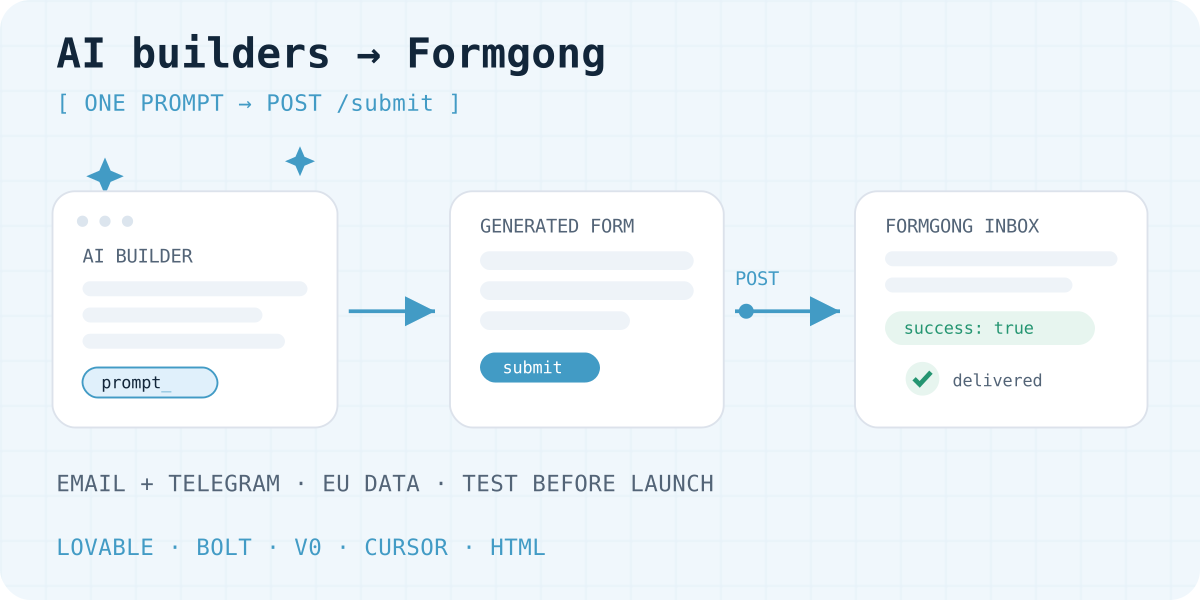
Why the generated form posts nowhere
Lovable, Bolt, v0, and Cursor generate great interfaces: fields, validation, a button, and a "Thank you!" message. But by default that button often does nothing useful — the handler shows gratitude immediately, without any network request. The data is not saved anywhere.
The other pattern: the AI wires up Supabase or Lovable Cloud by itself. That works, but for a simple contact form it drags in a database, access configuration, and usually a separate email service such as Resend.
You can check your form in a minute: open developer tools, select the Network tab, and submit. If there is no POST request, the form is decorative — which is exactly what happens with most generated sites.
Three working routes for a form
1. The builder's own backend. Lovable Cloud / Supabase plus an email connector. It makes sense when your app already has authentication, database records, or other server-side flows. For an isolated contact form it is excess infrastructure.
2. A hosted form backend. The form POSTs to one endpoint with a public key; the service stores submissions and notifies you by email and Telegram. The fastest route for landing pages and brochure sites: no schemas, edge functions, or servers.
3. Your own serverless function. Full control and full responsibility: code, secrets, spam filtering, and delivery retries are yours. Justified when the form is already part of more complex logic.
This article covers the second route: it works the same in Lovable, Bolt, v0, Cursor, and any other builder that generates HTML or React.
Choosing a form backend: the criteria
Proof of delivery. "Thank you" on the page proves nothing. You need a submission store with statuses: accepted, delivered, spam. In Formgong that is an inbox with per-channel delivery details.
Spam protection. A honeypot at minimum; better when optional Turnstile/captcha and spam scoring exist, and spam does not consume your monthly allowance.
Notification channels. Email is the baseline; a fast team reaction needs Telegram; integrations need signed webhooks.
Data location. If your customers are in the EU, check where submissions physically live. Formgong keeps everything on Cloudflare with EU jurisdiction: D1, the queue, and files are European.
Changes without rebuilding the site. Recipients, redirects, and auto-reply should change in a dashboard — not in code the AI has to regenerate.
One prompt that works in any builder
Open your project's chat and ask it to connect the existing form while keeping the design. The prompt below suits Lovable, Bolt, v0, and Cursor; replace fk_your_access_key with the key from your Formgong dashboard (the Connect website section of that form).
Connect this form to Formgong. Keep its design and field names.
1. Send a POST request to https://formgong.com/submit (FormData or JSON with access_key).
2. access_key: fk_your_access_key (a public key; it can stay in the code).
3. Show success only after a response with success: true.
4. On error, keep the entered field values and show an error message.
5. Add a hidden botcheck field (honeypot) with no visible UI change.
6. Do not add tokens, secrets, or file inputs.
What the API request looks like
A submission handler example. Replace the key, and add pending, success, and error states in your form component.
async function onSubmit(event) {
  event.preventDefault();
  const fields = Object.fromEntries(new FormData(event.currentTarget));
  const response = await fetch("https://formgong.com/submit", {
    method: "POST",
    headers: {
      "Content-Type": "application/json",
      Accept: "application/json",
    },
    // _lang: language of Formgong messages and the autoreply (multilingual site: document.documentElement.lang).
    body: JSON.stringify({ _lang: "en", ...fields, access_key: "fk_your_access_key" }),
  });
  const result = await response.json();
  if (!result.success) throw new Error(result.message || "Could not send. Please try again.");
  return result.message; // localized "Sent. Thank you!"
}
Test delivery, not the success message
When the builder applies the changes, send one recognizable test submission and walk the whole path:
- Request. The Network tab shows a POST to
https://formgong.com/submitwithsuccess: truein the response. - Record. The submission appears in that form's Formgong inbox, with all fields.
- Email. On Free, the email arrives in the next-morning 08:00 digest, in the account owner's timezone, for one recipient. On Pro and Business, each lead is emailed. Check the spam folder.
- Telegram. Telegram is instant on every plan, including Free. If a chat is connected, the message arrives in that chat.
After publishing, repeat on the real domain: an editor preview can behave differently. The full walkthrough is the article "Contact form not sending email".
After launch: changes without regenerating
Once the form works, most changes do not require going back to the builder. The Formgong dashboard changes email recipients, connected Telegram chats, post-submit redirects, the visitor auto-reply, and protection.
If submissions suddenly stop arriving after a redesign, do not guess: Formgong's form diagnostics loads your page and shows whether the snippet is installed correctly — endpoint, method, key, and required fields.
Form analytics shows where visitors abandon a form. That is cheaper than an A/B experiment and needs no regenerated code.
Typical AI-generated form mistakes
- "Success" appears but there is no request
- The builder generated a decorative handler. Ask it: "Send the data with fetch and show success only after a success: true response".
- The code still contains fk_your_access_key
- That is a placeholder. Take the real key from your form's Connect website section and replace it.
- Fields are cleared after an error
- The visitor loses their text. The handler should keep the values and show the error; add that to your next prompt.
- The form broke after enabling Turnstile
- The widget must be added to the code and send
cf-turnstile-response. Refresh the integration example in the dashboard after changing protection. - The submission exists but no email arrives
- Check the owner's and recipients' email verification. Unverified addresses are not delivery destinations; see the delivery troubleshooting guide.
Frequently asked questions
Does an AI-builder form need Supabase?
No, not for an isolated contact form. A hosted backend accepts the POST with a public key and delivers notifications; Supabase or Lovable Cloud make sense when your app already uses them for other flows.
Is it safe to keep access_key in generated code?
Yes. It is a public submission key: it grants no inbox or settings access. Secrets, bot tokens, and email provider keys never belong in frontend code.
Does the prompt work in any builder?
Yes, for builders that generate HTML or React and can run fetch: Lovable, Bolt, v0, Cursor. They differ only in how changes are applied; what you verify is the result — the POST request and success: true.
Where are customer submissions stored?
Submissions and files are stored in the EU, in Cloudflare D1 and file storage with EU jurisdiction. Notifications sent to Telegram, Slack, or Discord are processed by those services, outside that store. You still need a privacy policy on the site.
Sources and documentation
Official references for this guide: Lovable Cloud, MDN: Fetch API. Formgong documentation, where data is stored.
Read this article as Markdown