Two ways, and no plugin
WordPress core does not ship a contact-form block. The blocks list covers text, media, design, widgets, theme, and embeds. Comments are a different form. A contact form is something you add.
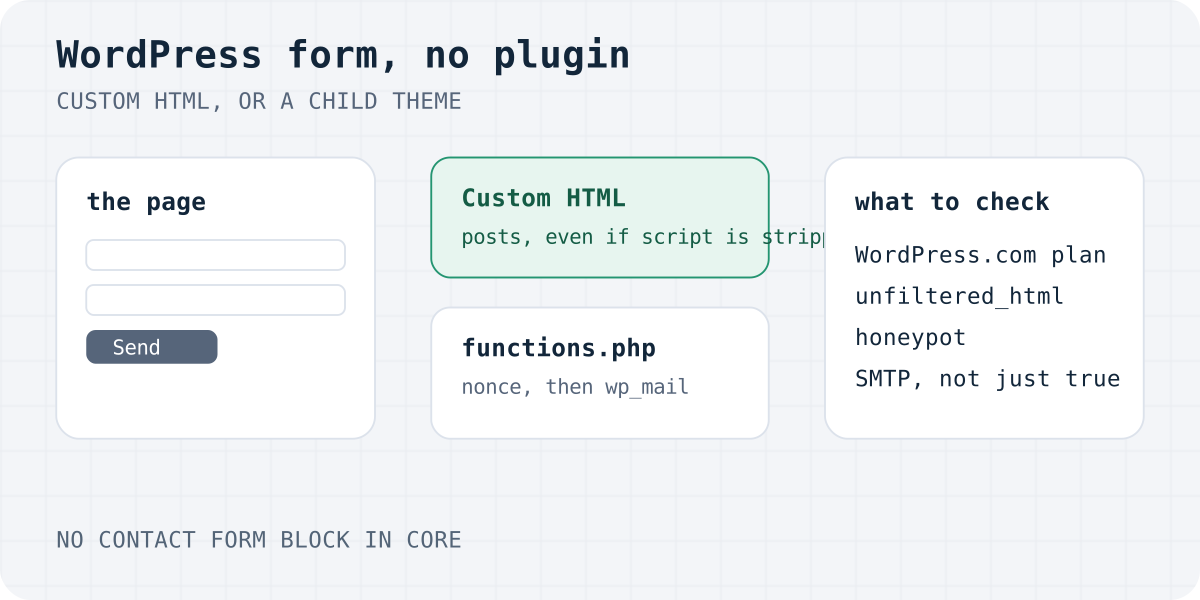
You have two honest routes, and they solve different jobs.
- Custom HTML block. The form is markup. It posts to a receiver you do not host. You do not add PHP, and you do not add a form plugin. This is the path below.
- A handler in the theme. The form posts to
admin-post.php. Your child theme checks a nonce, cleans the fields, and callswp_mail. You maintain that code.
A plugin such as Contact Form 7 is a third route. It is fine when you want entries and mail inside WordPress and you will keep the plugin updated. It is not this page. The generic setup, including Elementor Pro webhooks, stays on the WordPress contact form page.
The wider choice, when the site is not WordPress, is form without a backend. The same post shape is on the HTML contact form and the JavaScript contact form.
Custom HTML block, with fetch
The form below is the one to paste. It works in two ways. If the script is saved, fetch keeps the visitor on the page and writes the result into a live region. If WordPress removes the script, the form still has method="POST" and an action, so the browser submits it anyway.
Replace fk_your_access_key. Leave botcheck empty. Change the privacy link to your own policy. Do not set Content-Type yourself. FormData sets the boundary.
- Open the page. Edit the page or post. Open the block inserter and search for HTML.
- Add Custom HTML. Insert the Custom HTML block. In the classic editor, use the Text tab. In Elementor, use the HTML widget.
- Paste the form. Paste the form, replace the access key, and point the privacy link at your own policy.
- Save and view the code. Update the page. If the form or the script vanished, read the limits section before you paste it again.
- Test on the live URL. Submit from the published page. Check the inbox or Telegram, not only the on-screen message.
In the block editor, search for HTML and choose Custom HTML. WordPress.com’s guide, last reviewed on 5 October 2026, uses that search. In the classic editor, open the Text tab so the code is not escaped. In Elementor, the free HTML widget takes the same paste. Divi and other builders use their code or HTML module.
Preview inside the editor is not a test. Open the published URL and send one message you can recognise.
A thank-you URL, when you want one, is a hidden _redirect field. It must stay on your site. The pattern is in thank-you page after form submission.
<form id="contact" action="https://formgong.com/submit" method="POST">
  <input type="hidden" name="access_key" value="fk_your_access_key">
  <input type="hidden" name="_lang" value="en">
  <label>Name <input name="name" autocomplete="name" required></label>
  <label>Email <input type="email" name="email" autocomplete="email" required></label>
  <label>Message <textarea name="message" required></textarea></label>
  <p>We use your details only to reply. <a href="/privacy">Privacy notice</a>.</p>
  <div aria-hidden="true" style="position:absolute;inset-inline-start:0;top:0;width:1px;height:1px;overflow:hidden;clip-path:inset(50%)">
    <label>Leave empty <input name="botcheck" tabindex="-1" autocomplete="off"></label>
  </div>
  <button type="submit">Send</button>
  <p id="form-status" role="status" tabindex="-1"></p>
</form>
<script>
  var form = document.getElementById("contact");
  var button = form.querySelector("button[type=submit]");
  var status = document.getElementById("form-status");
  form.addEventListener("submit", function (event) {
    event.preventDefault();
    button.disabled = true;
    status.textContent = "Sending…";
    fetch(form.action, {
      method: "POST",
      body: new FormData(form),
      headers: { Accept: "application/json" }
    }).then(function (response) {
      return response.json().then(function (result) {
        return { ok: response.ok, result: result };
      });
    }).then(function (payload) {
      if (!payload.ok || !payload.result || payload.result.success !== true) {
        status.textContent = (payload.result && payload.result.message) || "Please try again.";
        button.disabled = false;
        status.focus();
        return;
      }
      form.reset();
      status.textContent = payload.result.message || "Thanks. We have your message.";
      status.focus();
    }).catch(function () {
      status.textContent = "The form could not be sent. Please try again.";
      button.disabled = false;
      status.focus();
    });
  });
</script>
The same form with no script, if the editor strips JavaScript
<form action="https://formgong.com/submit" method="POST">
  <input type="hidden" name="access_key" value="fk_your_access_key">
  <input type="hidden" name="_lang" value="en">
  <label>Name <input name="name" autocomplete="name" required></label>
  <label>Email <input type="email" name="email" autocomplete="email" required></label>
  <label>Message <textarea name="message" required></textarea></label>
  <p>We use your details only to reply. <a href="/privacy">Privacy notice</a>.</p>
  <div aria-hidden="true" style="position:absolute;inset-inline-start:0;top:0;width:1px;height:1px;overflow:hidden;clip-path:inset(50%)">
    <label>Leave empty <input name="botcheck" tabindex="-1" autocomplete="off"></label>
  </div>
  <button type="submit">Send</button>
</form>
Load the listener from the child theme instead of the block
add_action('wp_enqueue_scripts', function () {
  if (!is_page('contact')) return;
  wp_enqueue_script(
    'site-contact',
    get_stylesheet_directory_uri() . '/contact.js',
    array(),
    null,
    true
  );
});
contact.js in the child theme
var form = document.getElementById("contact");
if (form) {
  var button = form.querySelector("button[type=submit]");
  var status = document.getElementById("form-status");
  form.addEventListener("submit", function (event) {
    event.preventDefault();
    button.disabled = true;
    status.textContent = "Sending…";
    fetch(form.action, {
      method: "POST",
      body: new FormData(form),
      headers: { Accept: "application/json" }
    }).then(function (response) {
      return response.json().then(function (result) {
        return { ok: response.ok, result: result };
      });
    }).then(function (payload) {
      if (!payload.ok || !payload.result || payload.result.success !== true) {
        status.textContent = (payload.result && payload.result.message) || "Please try again.";
        button.disabled = false;
        status.focus();
        return;
      }
      form.reset();
      status.textContent = payload.result.message || "Thanks. We have your message.";
      status.focus();
    }).catch(function () {
      status.textContent = "The form could not be sent. Please try again.";
      button.disabled = false;
      status.focus();
    });
  });
}
What WordPress removes from the block
Checked against WordPress docs on 6 October 2026.
- WordPress.com. The Custom HTML guide says
form,input,textarea, andscriptneed a paid plan with hosting features turned on. On the free plan those tags disappear when you save. The same guide says hosting features turn on after you install at least one plugin. A no-plugin form on WordPress.com free is not available through this block. Their Form block is a separate WordPress.com feature. It is not in the core blocks list. - Self-hosted, form tags.
wp_kses_allowed_html()allows aformin post content wheninputorselectis allowed. An author can save the form. They cannot save a script. - Self-hosted, script tags.
unfiltered_htmlis what lets a user store JavaScript in a post. The roles page gives it to administrators and editors on a single site. On Multisite, only super admins have it. Everyone else loses the script on save. The form without the script still posts. - Child theme. Put
functions.phpchanges in a child theme. A parent theme update replaces the parent file. Do not put PHP inside the Custom HTML block. The block is HTML. PHP there is shown as text, or stripped.
If the code vanishes, do not paste it ten more times. Check the plan on WordPress.com, or the role on a self-hosted site, then use the plain form or the theme file.
functions.php, a nonce, and wp_mail
Use this when the lead must stay on your host and you do not want another account. Put it in the child theme. Add a Shortcode block with [site_contact_form]. A Custom HTML block cannot print the nonce, because the nonce is PHP.
The handler does five jobs. It checks the nonce. It drops a filled honeypot without saying why. It cleans the fields. It refuses an empty name, a bad email, or an empty message. It redirects after the post, so refresh does not send the form again.
wp_mail() is “similar to PHP’s mail function”. The reference says a true return means the method accepted the request. It does not mean the person received the email. That is the usual reason a WordPress contact form looks fine and the mail never shows up.
Logged-out visitors hit admin-post-nopriv. Logged-in visitors hit admin-post. Register both. The sample uses the admin email from Settings. Change that address if the mailbox you read is different.
Child theme: shortcode plus admin-post handler
add_shortcode('site_contact_form', function () {
  $error = isset($_GET['form']) && $_GET['form'] === 'error';
  ob_start();
  if ($error) {
    echo '<p role="alert">Please check the fields and try again.</p>';
  }
  ?>
  <form method="post" action="<?php echo esc_url(admin_url('admin-post.php')); ?>">
    <input type="hidden" name="action" value="site_contact">
    <?php wp_nonce_field('site_contact', 'contact_nonce'); ?>
    <label>Name <input name="name" autocomplete="name" required></label>
    <label>Email <input type="email" name="email" autocomplete="email" required></label>
    <label>Message <textarea name="message" required></textarea></label>
    <div aria-hidden="true" style="position:absolute;inset-inline-start:0;top:0;width:1px;height:1px;overflow:hidden;clip-path:inset(50%)">
      <label>Leave empty <input name="botcheck" tabindex="-1" autocomplete="off"></label>
    </div>
    <button type="submit">Send</button>
  </form>
  <?php
  return ob_get_clean();
});

add_action('admin_post_nopriv_site_contact', 'site_contact_handle');
add_action('admin_post_site_contact', 'site_contact_handle');

function site_contact_handle() {
  $nonce = isset($_POST['contact_nonce']) ? sanitize_text_field(wp_unslash($_POST['contact_nonce'])) : '';
  if (!wp_verify_nonce($nonce, 'site_contact')) {
    wp_die(esc_html('Invalid request.'), '', array('response' => 403));
  }
  $back = wp_get_referer();
  if (!is_string($back) || $back === '') $back = home_url('/');
  if (!empty($_POST['botcheck'])) {
    wp_safe_redirect(home_url('/'));
    exit;
  }
  $name = isset($_POST['name']) ? sanitize_text_field(wp_unslash($_POST['name'])) : '';
  $email = isset($_POST['email']) ? sanitize_email(wp_unslash($_POST['email'])) : '';
  $message = isset($_POST['message']) ? sanitize_textarea_field(wp_unslash($_POST['message'])) : '';
  if ($name === '' || !is_email($email) || $message === '') {
    wp_safe_redirect(add_query_arg('form', 'error', $back));
    exit;
  }
  $sent = wp_mail(
    get_option('admin_email'),
    'Contact form: ' . $name,
    "Name: {$name}\nEmail: {$email}\n\n{$message}",
    array('Reply-To: ' . $email)
  );
  if (!$sent) {
    wp_safe_redirect(add_query_arg('form', 'error', $back));
    exit;
  }
  wp_safe_redirect(home_url('/thanks/'));
  exit;
}
Spam, and mail that never arrives
A public form will be found. A honeypot is the small check you can ship without a plugin.
- Name the field
botcheck. People do not see it. Bots often fill it. Do not usedisplay:nonealone. The sample hides it off screen, setstabindex="-1", and turns autocomplete off. - On the PHP path, pretend it worked. Redirect home and store nothing. An error message teaches the bot to skip the field.
- On the Formgong path, leave it empty. A filled honeypot is stored as spam and is not emailed or sent to Telegram.
- Host mail and spam are different problems.
wp_mailuses the server’s mail. The From address is often the host, not your domain. Receivers then file it as spam, or drop it. An SMTP plugin can fix that. It is also another plugin, which this page is trying not to add.
More on filters without a puzzle is in contact form spam without a CAPTCHA. If mail fails and you are not sure which step broke, use contact form not sending email.
Why not only Contact Form 7
Contact Form 7 is a normal choice. It is not free of upkeep. This is the trade, not a ranking of brands.
| Contact Form 7 | Custom HTML block | functions.php and wp_mail | |
|---|---|---|---|
| What you maintain | The plugin, and often a second plugin for SMTP or storage. | The markup. The receiver is a service. | The theme code, on every WordPress change. |
| Through WordPress mail, unless you add SMTP. | The service sends it. Formgong Free email is a daily digest, not one letter per lead. | wp_mail. True is not delivery. | |
| Spam | You add a filter. Their docs show a Turnstile integration. | Honeypot in the markup. The service can filter too. | Only what you code. The sample is a honeypot. |
| Where the lead lives | In the email, unless another plugin stores it. | In the service inbox. Formgong also keeps it for 30 days on Free. | Only in the email, unless you write storage yourself. |
| Telegram | Not built in. A webhook plugin is a separate guide. | Formgong sends Telegram on Free, at once. | Not unless you call the Bot API yourself. |
If you already run Contact Form 7 and only want Telegram, keep the plugin and follow Contact Form 7 and Elementor to Telegram. Do not rebuild the form for that job.
A privacy line at the form
A contact form collects a name, an email, and a message. Tell people that next to the button, and link to your privacy policy. The sample sentence is a starting point. Replace it with your controller name and your real page.
For a reply, a required consent checkbox is usually the wrong control. A notice is the duty to inform. Consent, as its own unticked box, belongs to marketing. Do not block the form on that box.
This is general information, not legal advice. The longer template, including what to put in the policy, is in the GDPR contact form guide.
Where Formgong fits, and where it does not
Formgong is a free form backend for static and AI-built sites that delivers submissions to Telegram and email, stores data in the EU, and works in 12 languages.
On Free, you get 300 submissions a month, unlimited forms, one recipient, and 30 days of retention. Telegram is instant. Email is one daily digest to that address. It goes out at 08:00 in your time zone and covers the previous day. There is no auto-reply on Free. Pro and Business email each submission. Pro is listed at $9 a month or $86 a year, for 5,000 submissions. Business is $15 a month or $144 a year, for 25,000.
After the monthly cap, a 20 percent grace still delivers. Further leads are stored and not sent, up to another 300, until you upgrade or the month resets. Past that, new posts are refused.
Use the PHP handler when the lead must not leave the host and you accept the mail risk. Use Contact Form 7 when you want the form inside wp-admin and you will keep plugins patched. Use the Custom HTML block when you want no plugin and you can live with the digest on Free, or you will use Telegram.
The public key may sit in the block. It cannot read the inbox. Plans are on pricing. Storage is on where data is stored.
Frequently asked questions
Can I add a WordPress contact form without a plugin?
Yes. Paste the form into a Custom HTML block, or handle the POST in a child theme. Core has no contact-form block. On WordPress.com, form and script tags in that block need a paid plan with hosting features on.
Why does my contact form code disappear in WordPress?
WordPress.com removes form, input, textarea, and script tags on the free plan. On a self-hosted site, a script is saved only if your role has unfiltered_html. Administrators and editors have it on a single site. On Multisite, only super admins do. The form without the script can still be saved.
Why is my WordPress contact form not sending email?
wp_mail returning true only means PHP accepted the message. It does not mean the inbox received it. Check the spam folder and the From address. A success line in the browser is not delivery either. Submit once and look at the place the form posts to.
Do I need an SMTP plugin for a WordPress contact form?
Not for a form that posts to a form backend. That service sends the notice. You do need reliable mail, often SMTP, if the only sender is wp_mail. An SMTP plugin is still a plugin.
Does a WordPress contact form need a consent checkbox?
Usually not for a reply. Put a short notice at the form and the details in your privacy policy. Use a separate unticked checkbox only for marketing, and do not make it required. This is general information, not legal advice.
Sources and documentation
Official references for this guide: WordPress.com: Add custom HTML, WordPress: roles and capabilities, WordPress: wp_mail(), WordPress: wp_kses_allowed_html(), WordPress: blocks list. Formgong for WordPress, where data is stored.
Read this article as Markdown