Why leads end up in Telegram — and why they get lost there
For a small team, Telegram is the fastest channel: an enquiry lands where you already spend the day, straight on your phone. Nobody has to open a mailbox or a separate CRM to see a new lead.
But a chat is a stream. A new message pushes the previous one off the screen, and a lead nobody picked up yesterday is invisible today. That is how "forgotten" enquiries appear: the notification was technically delivered, yet the customer never got an answer.
A full CRM is often overkill for a contact form: you do not need deals, pipelines, or call logging for a few dozen requests a day. Three things are enough — a status on every lead, a reminder for unhandled ones, and a copy you can find later. Here is how to assemble that inside Telegram.
Telegram buttons and the four dashboard statuses
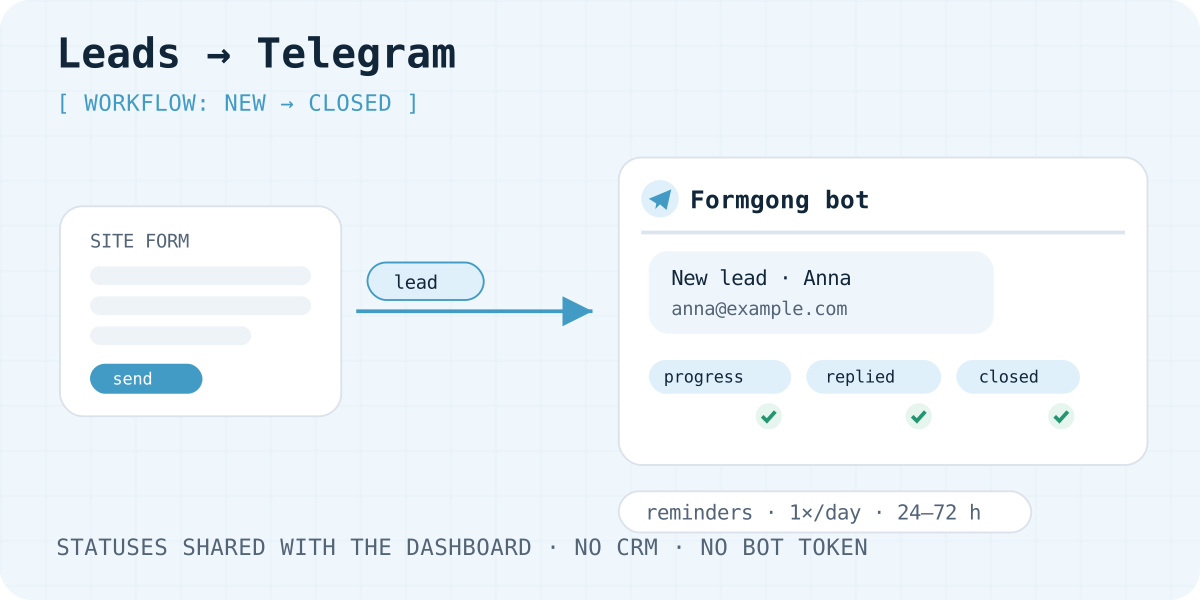
A new submission starts as New. The submission has four workflow statuses: New, In progress, Replied, and Closed. On the submission page, the owner sets any of those four with Message workflow and Update status. That control is hidden for spam and for held submissions.
The Telegram message does not use those four names as buttons. In a chat linked to the form, the buttons are:
- Reply opens your mail app when the visitor left an email. The link is a signed redirect. If there is no email, Telegram tells you to open the submission in the dashboard. Reply does not change the status.
- Mark handled sets the status to Closed. The inbox lists Closed submissions under Handled. It does not set In progress or Replied. The button then shows a check mark.
- Mark as spam sets the spam flag. It does not change New, In progress, Replied, or Closed. Spam is left out of the daily reminder. The message then keeps Open in the dashboard.
- Open in the dashboard opens that submission. It does not change the status.
The buttons work only in a chat linked to that form. Someone in an unlinked group cannot change the submission, and a disconnected chat stops answering the buttons. A status change in the dashboard updates the submission record. It does not rewrite the buttons already on the Telegram message.
1. Connect the form and the chat
First, make submissions arrive: get a key at Formgong, verify your email, and connect the site. There is a ready HTML example and a prompt-based Lovable guide.
Then link the chat: a private one through the connection link in the form settings, a group with the /connect command and a fresh code. The full walkthrough with checks is the Telegram connection guide. The command sample is below; replace the placeholder with the code issued in your dashboard.
/connect YOUR_CONNECTION_CODE
2. Private chat or team group
A private chat fits when one person handles enquiries. A group fits a team: everyone sees new leads, and Mark handled sets that submission to Closed.
Mind customer data: every group member sees the submissions sent there. Keep private enquiries in a private chat, and create a working group with the right membership for shared handling.
If you are an agency or run several projects, use a separate group per client. Telegram is connected per form, not per account: each form has its own chat or group.
3. Reminders for unhandled leads
Statuses solve half of the problem: you can see who took what. The other half is leads nobody took. For those, the form's Telegram settings include reminders: 24, 48, or 72 hours, off by default.
Once a day the bot sends one aggregate message to the connected chat: how many new unhandled submissions are older than the chosen time, and in which form. Spam, held submissions, and imported history do not count, so the reminder never turns into noise.
It is not a replacement for discipline, but an insurance policy: if a lead sits for a day without a status, someone will definitely hear about it again.
Spam, data, and the limits of this approach
The "Mark as spam" button takes a submission out of the workflow: it is flagged and no longer appears in reminders. Most bots never reach the chat at all — the honeypot stops them, with optional Turnstile as an extra layer.
Telegram is a notification channel, not storage: the full record of every submission, with all fields, stays in the form inbox, where CSV export also works. Data lives in D1 with EU jurisdiction, so for GDPR-sensitive enquiries this is a controlled record with a copy, not loose messenger correspondence.
To be honest about the limits: if you need deals, pipeline forecasts, calls, and CRM-team integrations, that is full-CRM territory. Statuses and reminders cover the need "do not lose a website enquiry", and for most small teams that is enough.
If buttons or reminders do not work
- I press a button and the status does not change
- Buttons work only in a chat linked to that form. Reply and Open in the dashboard do not change the status. Mark handled sets Closed. Check that the chat is still linked and that the bot has not been removed from the group.
- The dashboard status and the Telegram buttons do not match
- Mark handled sets Closed on the submission record. A later change in the dashboard updates that record and does not rewrite the buttons already on the Telegram message. Reload the submission page to see the saved status.
- Reminders never arrive
- Check that the form's Telegram settings select 24, 48, or 72 hours rather than Off. Reminders only cover submissions in the New state: if everything is in progress, silence is correct.
- The group receives submissions but has no buttons
- Confirm the group is connected to this exact form via
/connectwith a fresh code. The connection code is not theaccess_key.
Frequently asked questions
Do I need my own Telegram bot?
No. The workflow uses the Formgong bot: connect a private chat via the link in the form settings, or a group with /connect and a fresh code. No bot token ever reaches your website's code.
Does this replace a CRM?
No. It is a lightweight workflow for website enquiries: statuses, reminders, and an inbox. Deals, sales pipelines, and call logging belong to a full CRM; a contact form usually does not need them.
Who can change a lead's status?
The form owner sets New, In progress, Replied, or Closed on the submission page in the dashboard, unless the submission is spam or held. In a linked Telegram chat, Mark handled sets Closed. Reply does not change the status. Mark as spam sets the spam flag, not a workflow status. A dashboard change does not rewrite the buttons on the Telegram message.
What do reminders and Telegram cost?
Telegram notifications, statuses, and reminders are included as delivery channels in your plan. Free covers 300 submissions per account per month; reminders are off by default and enabled per form.
Sources and documentation
Official references for this guide: Telegram: bot deep links, Telegram: inline keyboards. Formgong documentation, where data is stored.
Read this article as Markdown