What is a contact form auto-reply?
It is the email a person gets a few seconds after they send your contact form. Your own notification goes to you; the auto-reply goes to them, at the address they typed into the form. Some tools call it an autoresponder or a confirmation email. In Contact Form 7 it is called Mail (2).
It does one useful thing: it tells someone who just pressed Send that the message did not vanish. Without it, a careful person sends the form again, or writes to your other address, or gives up and asks someone else. With it, they know when to expect you and what to do if they can't wait.
It is also an email your website sends to an address a stranger typed in. That part is easy to forget, and it is where most of the trouble comes from. We cover it after the examples.
What should an auto-reply say?
Three things, in this order. That the message arrived. When a person will answer, as a real time (“within one working day”, not “as soon as possible”). And what to do if it is urgent: a phone number, opening hours, a booking link or a help page.
Put the topic in the subject line, so it doesn't look like a newsletter. “We got your message” is the most common subject and it is fine, but “Your quote request reached us” tells the reader which form it came from. Sign with the name of your business, not “Admin” or “No reply”.
End with one line for the person who never sent anything: “If you didn't send a message on our website, you can ignore this email.” It looks odd until you remember that anyone can type any address into your form. That line turns an unexpected email into something the reader can safely ignore, instead of a spam report.
Leave out what doesn't belong in the first reply: discount codes, newsletter sign-ups, attachments and long signatures with five links. The visitor asked you a question. A reply that sells to them looks like a mailing, and Gmail sorts it that way.
Three auto-reply examples to copy
Change the business name, the times and the contact line. {name} is the visitor's name from the form; drop the greeting's name if your form has no name field. In the first example, a general contact form, the urgent line is a phone number.
Subject: We got your message, {name}

Hi {name},

Thanks for writing to us. A person reads every message, and we reply
within one working day, usually sooner.

If it can't wait, call us on +1 555 0100 between 9:00 and 17:00.

If you didn't send a message on our website, you can ignore this email.

Maple Street Bakery
Quote request auto-reply
For a quote, the useful thing to ask for is the material that makes the quote faster. Asking for a reply with photos also tells the visitor that replying reaches a person, which only holds if Reply-To points at an inbox you read.
Subject: Your quote request reached us

Hi {name},

Thanks for asking about a quote. We price every job by hand, so you
will get a number from us within two working days.

To make it faster, reply to this email with photos of the space or a
rough plan. Replies come straight to our team.

If you didn't ask for a quote on our website, you can ignore this email.

North Ridge Renovations
Support request auto-reply
For support, a link to your help pages answers some questions before you even read them. Keep it to one link.
Subject: We're looking into it

Hi {name},

Your message is with our support team. We answer in the order messages
arrive, Monday to Friday, and most get a reply the same day.

Many questions are already answered in our help pages at
example.com/help. If yours is there, you don't need to wait for us.

If you didn't contact us, you can ignore this email.

Pixel & Pine support
Why you shouldn't copy the message into the auto-reply
A bot doesn't care about your form, but it does care about anything that sends email to an address it chooses. If your auto-reply repeats what the visitor wrote (“You wrote: …”), a bot can type a stranger's address into the email field and an ad into the message field. Your site then sends that ad to the stranger, from your domain and under your name. They report it as spam, and your mail to real customers starts landing in spam with it.
The tools disagree on this. Formspree's own guide, read on 14 November 2026, says its auto-response cannot include submitted fields, not even the name, and gives exactly this reason. splitforms lets any field into the reply, including the first 100 characters of the message. Contact Form 7's ready-made auto-reply repeats the whole message, as our WordPress test below shows.
Two habits keep you safe whatever tool you use. Don't repeat free text the visitor typed; if you want to confirm what they asked, name the form or the topic they picked from a list. And make sure the form sends an auto-reply only after a human check (a CAPTCHA or a browser check) passed, and only a few times a day to the same address.
Our test: 7 submissions, 3 auto-replies
On 14 November 2026 we set up one Formgong form with the auto-reply on. The subject and body used {name}, the body also had {message}, and Reply-To pointed at our support inbox. Then we sent the form seven times in different ways. The visitor address was an inbox of ours that forwards to Gmail, so we could see what arrived.
| # | How the form was sent | Address field | Browser check passed | Result |
|---|---|---|---|---|
| 1 | Typed by hand on the form page | email | Yes | Auto-reply sent |
| 2 | curl POST, no browser | email | No | No auto-reply |
| 3 | A script filled name and email and sent seconds after the page loaded | email | No | No auto-reply |
| 4 | Typed by hand, same address | email | Yes | Auto-reply sent (2nd today) |
| 5 | Typed by hand, same address | email | Yes | Auto-reply sent (3rd today) |
| 6 | Typed by hand, the input renamed, a new address | e-mail | Yes | No auto-reply |
| 7 | Typed by hand, same address as 1, 4 and 5 | email | Yes | No auto-reply (4th today) |
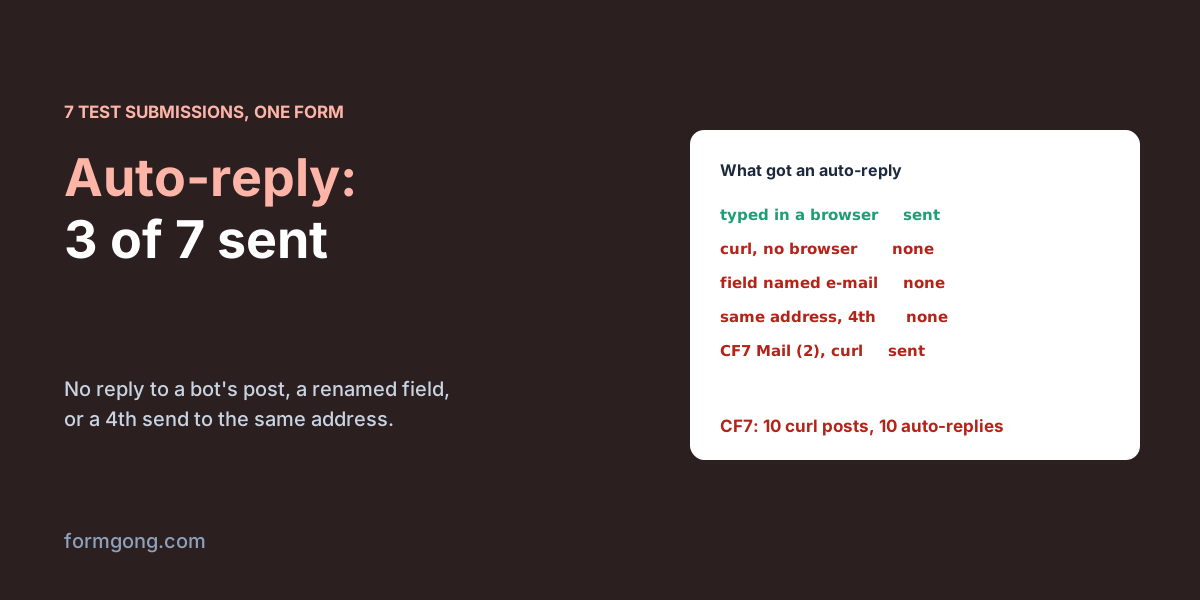
Only three of the seven got an auto-reply. A post from curl, with no browser, got none (row 2): that is what a bot's post looks like. Row 3 came from a real browser, but a script filled the fields and pressed Send a few seconds after the page loaded, and it failed the browser check the same way. Row 6 renamed the field to e-mail, so there was no address to reply to. Row 7 was the fourth submission from the same address that day, and Formgong sends at most three.
The first reply reached the Cloudflare mail server 13 seconds after we pressed Send, with SPF, DKIM and DMARC all passing. Gmail put all three replies in the inbox, under the Updates tab rather than Primary. {name} came out as “Dana Test”, and {message} stayed in the email as plain text, braces and all, because Formgong fills in the name and nothing else.
Contact Form 7 and WPForms auto-replies
We also tried the two most installed WordPress form plugins on a throwaway WordPress 7.1.3 site, with a local mail catcher so nothing left the server: Contact Form 7 6.2.5 and WPForms Lite 2.0.4.
In Contact Form 7 the auto-reply is Mail (2), on the Mail tab. It ships ready-made and switched off, and ticking “Use Mail (2)” sends it to [your-email]. The ready-made body starts with “Message Body:” and the visitor's own message, and the subject repeats the subject they typed, so the default is exactly the echo described above. CF7 knows this: the moment we ticked Mail (2), its configuration check said “Unsafe email config is used without sufficient protection.” It goes away once reCAPTCHA, Turnstile or a members-only form is on. Without them it is only a warning, and the auto-reply still went out every time.
It also went out for a plain curl POST to the form's REST endpoint, with no browser, no page load and no cookie. Ten of those in three seconds, all with the same address, produced ten auto-replies to that address. There is no daily cap per address. If you use Mail (2), add Turnstile or reCAPTCHA to the form and replace the message tag in the body with your own text.
The field name matters here too. We renamed the email field to contact-email and left Mail (2) pointing at [your-email]. The visitor still saw “Thank you for your message. It has been sent.”, but only our own notification went out; the auto-reply did not. The configuration check flags the broken tag, so look there after you rename a field.
WPForms Lite has a single notification per form, and “Add New Notification” opens a “Multiple notifications is a Pro Feature” box. With that one notification you can still reach the visitor: put the email field's smart tag next to {admin_email} in Send To, or turn on Carbon Copy. Both send the visitor a copy of your own notification, with the full list of fields and the visitor's own address in Reply-To. That is a copy of your notification, not an auto-reply you wrote. For a separate reply, WPForms asks you to upgrade from Lite.
Auto-reply not arriving? Check these first
Start with the field name. Most tools read the address from one field: Formspree needs a field named exactly email and its guide says email_address, Email and user_email all fail, Contact Form 7 uses whatever tag you put in Mail (2)'s To line, and Formgong reads email, Email or _replyto. Our row 6 shows what a renamed field does: the submission arrives, the auto-reply never leaves.
Then look at the plan and the switch. Formspree has auto-responses only on its Professional and Business plans; Formgong has them on paid plans, not on Free. The setting belongs to one form, so a second form on another page does not get it until you turn it on there too.
If you test with your own address, remember the limits. Formgong sends at most three auto-replies a day to one address, skips addresses on test domains such as example.com, and skips submissions that went to spam or are held for review. So the fourth test from your own inbox looks like a bug and isn't one. Use a second address, or wait until tomorrow.
If the reply was sent but nobody sees it, look in spam and in Gmail's other tabs; ours landed under Updates. A typo in the domain (gmial.com) passes every format check, so the reply goes out and bounces. And if your site sends the reply itself through WordPress, the reply depends on the server's mail setup, which is the subject of WordPress contact form not sending email.
Setting up an auto-reply in Formgong
Open the form's Settings, switch the dashboard to Expert, and turn on “Send an auto-reply” under Auto-reply. Write the subject and the body; {name} is the only placeholder, and Formgong trims it to 60 characters and removes links and addresses from it, so a bot can't use a name field to post a link. Put the address you answer from in Reply-To. Leave the subject empty and the visitor gets a default one in the language of the page they sent the form from.
The reply comes from Formgong's sending address, with a line at the bottom naming your form. That is on purpose: the body is text you wrote, and a sender name anyone can set would make the form a tool for phishing. Your visitor still answers you, because Reply-To goes to your inbox.
Formgong sends an auto-reply only when the visitor passed the browser check from fg.js or Cloudflare Turnstile, so add the script to the page as below. The form itself is plain HTML. The thank-you page the visitor sees after Send is a separate setting, and so is spam protection without a CAPTCHA.
<form action="https://formgong.com/submit" method="POST">
  <input type="hidden" name="access_key" value="fk_your_access_key">
  <label>Name <input type="text" name="name" required></label>
  <label>Email <input type="email" name="email" required></label>
  <label>Message <textarea name="message" required></textarea></label>
  <button type="submit">Send</button>
</form>
<script src="https://formgong.com/fg.js" defer></script>
Is your form tool missing here?
If you use a form tool we didn't test and its auto-reply behaves differently, tell us at support@formgong.com with its name. We will run the same seven submissions and add what we find.
Frequently asked questions
What is a contact form auto-reply?
An email the form sends to the person who filled it in, at the address they typed. It confirms the message arrived, says when you will answer and what to do if it is urgent. Contact Form 7 calls it Mail (2).
Should the auto-reply include a copy of the message?
No. If the reply repeats what was typed, a bot can put a stranger's address and an ad into your form, and your site mails the ad. Confirm the topic instead, and send replies only after a human check.
Why is my contact form auto-reply not sending?
Usually the email field has a name the tool doesn't read, the feature is off or not on your plan, or a daily limit was hit while testing with one address. Check spam and Gmail's Updates tab too.
Can people reply to an auto-reply?
Yes, if you set Reply-To to an inbox you read. Without it, replies go to the sending address, which is often a no-reply box.
Sources and documentation
Official references for this guide: Formgong: Thank-you page after form submission, Formgong: WordPress contact form not sending email. HTML forms, where data is stored.