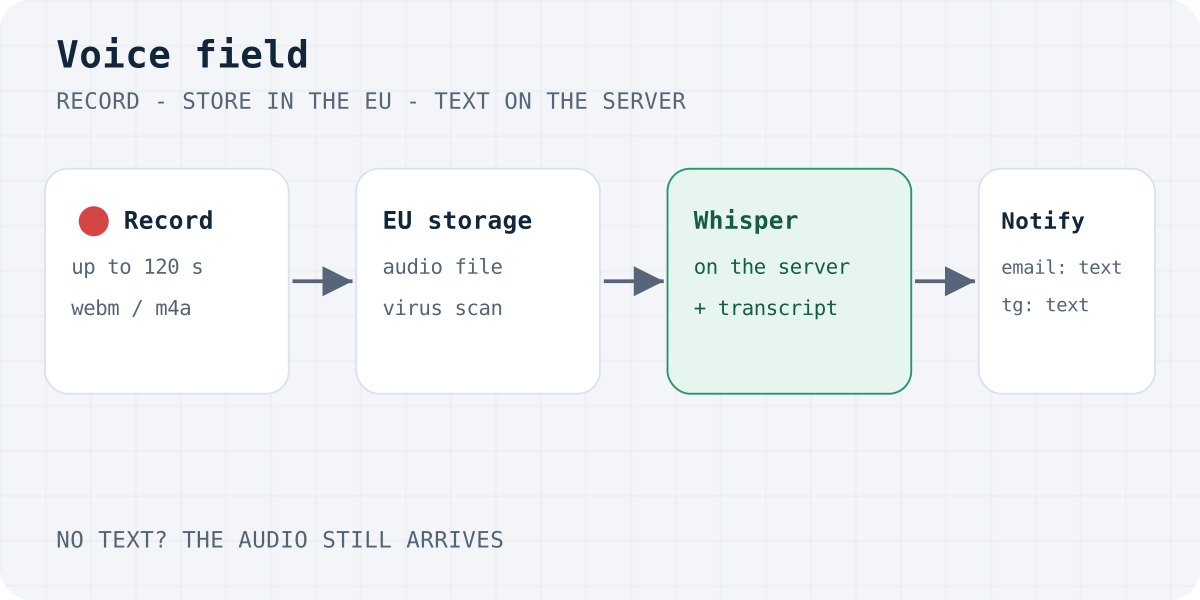
What a voice field does
Some people would rather talk than type. A long question, a quote request, a testimonial or a bug report is often faster to say. A voice recording form gives them a Record button inside the form you already have.
The Formgong voice field adds two things to your form. The first is an audio file, named voice by default. The second is a text box, voice_transcript, where the visitor can type if they prefer. After the form is sent, Formgong writes the transcript into that field when the visitor left it empty.
There is no separate widget or hosted page. The field works in plain HTML, WordPress, Next.js, Astro and Shopify theme sections, because it only adds a file input and a text box inside your own <form>. Forms sent with fetch(new FormData(form)) pick both up too.
The steps are:
- Post as multipart. Use method POST and enctype multipart/form-data, like any form with a file.
- Add the voice element. Place a div with data-formgong-voice inside the form and load voice.js.
- Turn uploads on. Enable file uploads for the form, verify your email, and add Turnstile.
- Record and send. The visitor records up to 2 minutes, plays it back and sends. Typing instead is fine too.
- Read and listen. The transcript comes with the notification. The audio plays in the dashboard.
The recording is a normal file upload. The rules from contact form with file upload apply: POST, multipart, Turnstile, and a verified owner email.
Copy-paste HTML for a form with voice recording
This form posts to Formgong. Replace YOUR_ACCESS_KEY and YOUR_TURNSTILE_SITE_KEY. In the dashboard, open the form settings and turn on file uploads. Uploads also wait until your account email is verified.
The data-formgong-voice element takes three attributes:
data-name: the field name of the audio. The text box is<name>_transcript. Defaultvoice.data-lang: the language of the buttons and hints, any of our 12 site languages. Without it the page'slangis used. It does not change the transcription, which detects the spoken language.data-max-seconds: a shorter limit. It can never go above 120 seconds.
If your form has no method, or uses GET, the script switches it to POST and multipart, because a file cannot travel any other way.
The honeypot and Turnstile stay exactly as on any Formgong form. Turnstile is required for every post that carries a file, voice included. The honeypot pattern is explained in honeypot form field.
The recorder has a visible label, a timer, a stop button and a preview player, and it works with the keyboard. Microphone access is asked only when the visitor taps Record. Recording again replaces the earlier clip, so an old take is never sent by mistake.
<form action="https://formgong.com/submit" method="POST" enctype="multipart/form-data">
  <input type="hidden" name="access_key" value="YOUR_ACCESS_KEY">
  <label>Email <input type="email" name="email" autocomplete="email" required></label>
  <label>Message <textarea name="message"></textarea></label>

  <!-- The recorder: a file input named "voice" and a text box "voice_transcript" -->
  <div data-formgong-voice data-name="voice"></div>

  <div aria-hidden="true" style="position:absolute;inset-inline-start:0;top:0;width:1px;height:1px;overflow:hidden;clip-path:inset(50%)">
    <label>Leave this field empty <input type="text" name="botcheck" tabindex="-1" autocomplete="off"></label>
  </div>
  <script src="https://challenges.cloudflare.com/turnstile/v0/api.js" async defer></script>
  <div class="cf-turnstile" data-sitekey="YOUR_TURNSTILE_SITE_KEY"></div>
  <button type="submit">Send</button>
</form>
<script src="https://formgong.com/voice.js" defer></script>
Speech to text on the server
We first built this field to run Whisper inside the visitor's browser. It meant a download of more than 500 MB and a computer with WebGPU, so phones and slow connections got no text at all. We moved the work to our server, and the page now only records.
When the visitor presses Send, Formgong stores the submission and answers the page straight away, so the visitor does not wait. A background job then sends the recording to Whisper large-v3-turbo on Cloudflare Workers AI. The text goes into voice_transcript, marked as an automatic transcript. Only after that do your email and Telegram notifications go out, so the text is already in them.
You do not set a language. The model works it out from the speech.
We tested it with clips made by the macOS voices: 12 seconds of English and 15 seconds of Ukrainian, as WAV, as WebM (what Chrome records) and as M4A (what Safari records). Every word came back right in all of them. Short clips took 1 to 5 seconds. Two-minute clips took 20 to 33 seconds, so a long message reaches you about half a minute after a plain one would. Synthetic voices are clean, so expect more mistakes with a real microphone, a noisy room or a strong accent, and keep the audio for checking names and numbers.
If the visitor typed in the text box, their words stay and the recording is not sent to the model at all.
If the transcription fails, you still get the message. That covers a model error, a time-out and the day's speech quota running out. The notification then has the audio link and no text.
What the site owner receives
In the dashboard, the submission shows an audio player and a download button. The server answers byte-range requests, so the clip plays and seeks in Safari as well. The transcript is a normal field named voice_transcript, with an "Automatic transcript" label when our server wrote it.
The notification email carries the transcript as a field and a private link to the recording. The audio is never attached to the email. You sign in to listen. Every plan, Free included, gets an email for each submission. Telegram, webhooks, Google Sheets and Notion get the same text.
This is what the voice part of the post looks like on the wire, with the text box left empty:
POST /submit HTTP/1.1
Host: formgong.com
Content-Type: multipart/form-data; boundary=PLACEHOLDER

--PLACEHOLDER
Content-Disposition: form-data; name="access_key"

YOUR_ACCESS_KEY
--PLACEHOLDER
Content-Disposition: form-data; name="voice"; filename="voice.webm"
Content-Type: audio/webm

(Opus audio bytes)
--PLACEHOLDER
Content-Disposition: form-data; name="voice_transcript"


--PLACEHOLDER--
Voice reviews
The field also works in a Formgong review form. When the reviewer gives a rating and leaves the text empty, the transcript becomes the review text.
A review with a recording always waits for you, whatever your publish setting, so you can listen before anything goes public. The "Mask rude words" switch applies to the text as to any review. On the review card you get a private player. Your public review widget shows the text only and never plays the audio.
Limits, file checks and privacy
| Rule | Limit |
|---|---|
| Recording length | 120 seconds |
| Voice file size | 4 MB (our 2-minute WebM test clip was 0.5 MB) |
| Formats | WebM/Opus, MP4/AAC (.m4a), Ogg, WAV |
| Files per post | 3, and 10 MiB together |
| Free storage | 100 MiB per account |
The server checks the file header, the extension and the declared type together. A file that does not match is refused with file_type. Every recording gets the same virus scan as other uploads.
Recordings are stored privately in the EU and are deleted with their submission. To make the text, the audio is sent once to Cloudflare Workers AI, and we keep no other copy. A voice is personal data, so mention voice messages and the transcription in your privacy notice. The lawful basis questions are the same as for any form; see GDPR by form type.
If your site sends a Content Security Policy, the voice field needs only our script and blob: for the preview player. Turnstile needs its own two entries.
CSP directives for the voice field
script-src 'self' https://formgong.com https://challenges.cloudflare.com;
frame-src https://challenges.cloudflare.com;
media-src 'self' blob:;
Other ways to collect voice messages
Other tools can do this too. Which one fits depends on where your form lives:
- Jotform has a Voice Recorder widget. It suits forms built and hosted in Jotform.
- Google Forms has no recorder. People use add-ons or ask for an audio file upload.
- WordPress plugins such as Voice Audio Widgets add a recorder to Contact Form 7.
- Your own code.
MediaRecordercan record in any browser. You still need a server that stores and checks the file, and a speech API for the text.
Pick Formgong if you have your own HTML form on a static or AI-built site and want the audio and the text in one inbox, without building the storage and speech parts yourself.
Formgong is a free form backend for static and AI-built sites that delivers submissions to Telegram and email, stores data in the EU, and works in 12 languages. Plans and storage are on the pricing page.
Did it get your words right?
We have tested the transcription with clean test voices, not yet with real phones and real rooms. If you add the field to your form, tell us how the text came out: the language, the device you recorded on, and which words it got wrong. Write to support@formgong.com. Wrong names and numbers are the most useful examples, and we will add what we learn to this page.
Frequently asked questions
Can a website form record audio?
Yes. Browsers can record from the microphone with MediaRecorder after the visitor allows it. The form then posts the recording as a file with enctype multipart/form-data, and a server has to store it. With Formgong, add the voice element and load voice.js.
Does the voice field work on iPhone?
Safari on iPhone records M4A audio, which Formgong accepts, and the transcription runs on our server, so the phone downloads nothing extra. We have not tested it on real iPhones yet, so try your own form on a phone before you rely on it.
Is the audio sent to a speech-to-text service?
Yes, once. After the form is sent, Cloudflare Workers AI runs Whisper large-v3-turbo on the recording. Formgong stores the recording privately in the EU. If the visitor typed the text themselves, the recording is not sent to the model.
What if the transcription fails?
You still get the message and the audio. The notification goes out without the text, and you can listen in the dashboard. This covers model errors, time-outs and the daily speech quota running out.
How long can a voice message be?
Up to 120 seconds, and the file can be up to 4 MB. You can set a shorter limit with data-max-seconds. The recording counts toward the usual 3 files and 10 MiB per submission.
Sources and documentation
Official references for this guide: MDN: MediaRecorder, Cloudflare Workers AI: whisper-large-v3-turbo, OpenAI: Whisper, Cloudflare Turnstile. Formgong HTML docs, where data is stored.