Start with WooCommerce's own review email
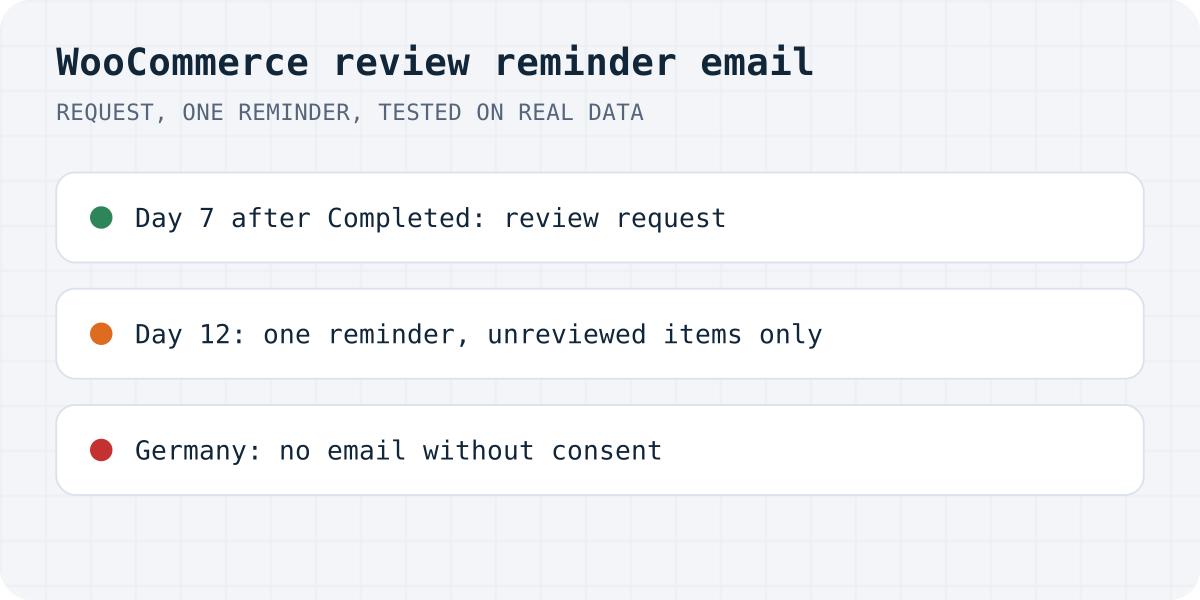
You may not need a plugin at all. Recent versions of WooCommerce have a review request email of their own, still marked beta and switched off by default. This is how WooCommerce's docs describe turning it on:
- Open WooCommerce, Settings, Advanced, Features and enable “Customer review request (beta)”. WooCommerce creates a “Review your order” page for the email's link.
- Open WooCommerce, Settings, Emails, Review request. Enable the email and choose how many days to wait after an order is marked Completed. The default is seven.
The buyer gets one link to a page with every product from the order. A star rating is required for each product they review, the text is optional, and guests can use it without an account. Reviews follow your normal moderation settings.
WooCommerce's docs describe one email and say nothing about a reminder for buyers who ignore it. There is also no coupon and no way to answer inside the email. If you turn on Formgong's emails below, leave WooCommerce's review request off, or buyers get two requests for the same order.
Connect the Formgong plugin with a store token
The Formgong plugin is free on wordpress.org; review emails need version 1.3.1 or later, and coupons need 1.3.3 (the current version is 1.3.4). You also need a free Formgong account with a review site, under Reviews in the dashboard.
In the Formgong dashboard, open Settings, Stores, pick your store and choose WooCommerce under Connection. Copy the Reviews key and click Create a store token. The token is shown once, so paste it into WordPress right away. It can only send orders to Formgong, and you can revoke it later under Account, API tokens.
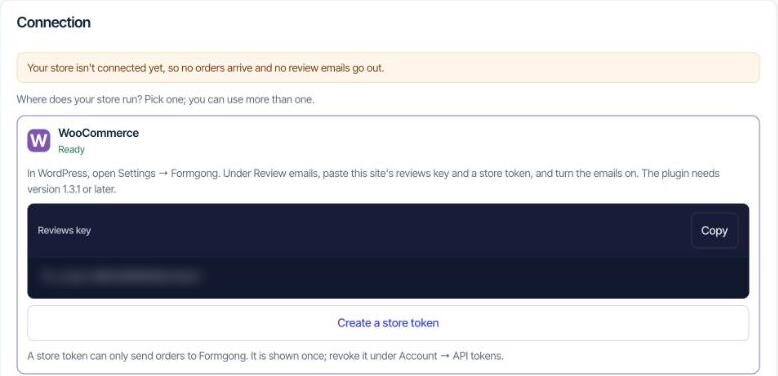
In WordPress, open Settings, Formgong. Paste the Reviews key in the Product reviews row. In the Review emails row, tick “Email buyers a review request after a completed order”, paste the token into Store token and save.
From then on, when an order reaches Completed, the plugin sends Formgong the order number, the buyer's email address and first name, and each product's name, picture and page address. Refunds and cancellations cancel the email for that order. A developer can stop single orders with the formgong_review_email_allowed filter.
Choose the delay and the reminder
Everything else is set in the Formgong dashboard under Emails, your store, Review emails.
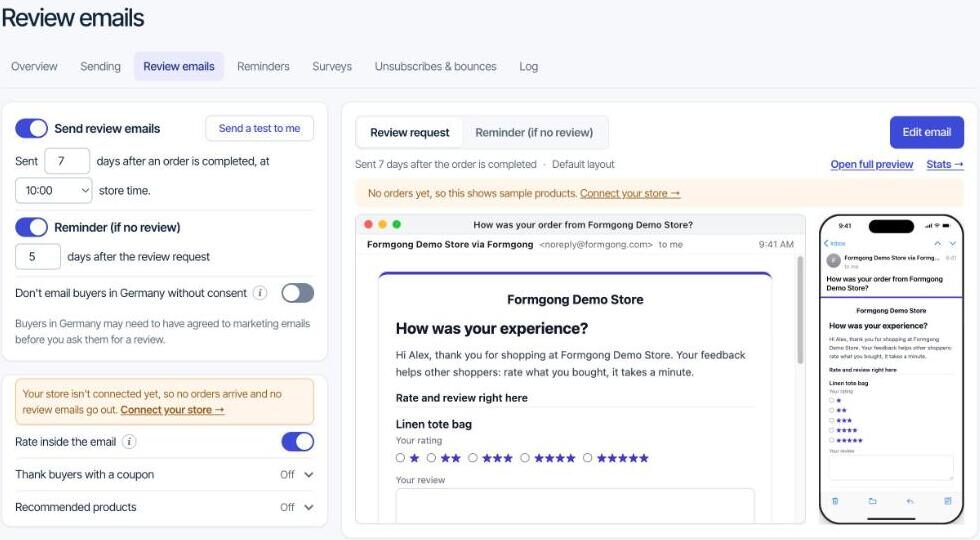
The first email goes a set number of days after the order is completed, seven by default, at an hour you choose in your store's time. Pick the delay from how long delivery takes. Many stores mark an order Completed when it ships, not when it arrives, and a buyer asked to review a parcel still in transit either ignores the email or writes “haven't received it yet”.
The reminder goes once, five days after the request by default. It lists only the products that still have no review, and it is skipped when the buyer has already reviewed everything. One reminder is the most Formgong sends; a third email about the same order starts to feel like spam to the buyer.
On the free plan, review emails go out at up to 20 a day per store. An email held back by that limit goes the next day.
Let buyers review inside the email
“Rate inside the email” is on by default. The email then carries a star choice and a text box for each product, with one Send reviews button at the end. Whether the buyer sees it depends on their mail app, because some apps strip forms out of email.
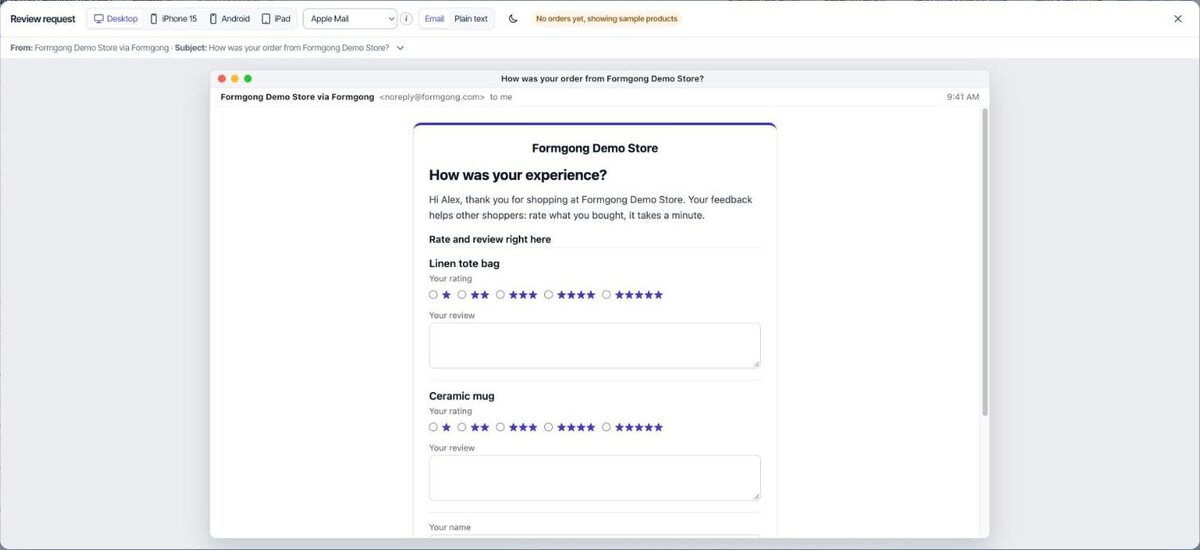
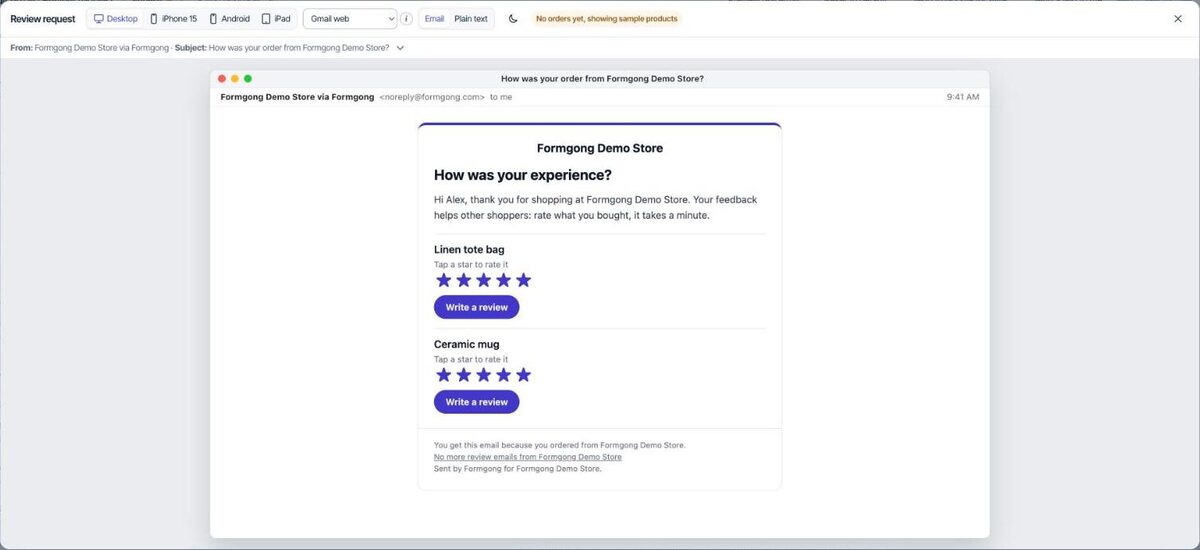
Apple Mail, Yahoo, AOL and Thunderbird show the form. Gmail, Outlook, Proton and Samsung Mail do not, so the same email shows a row of stars and a Write a review button instead, and a tap opens the review page. Either way the review counts as verified, because the link belongs to that order. The editor's preview has a mail app menu, so you can see both versions before you send anything.
Thank buyers with a coupon, and label it
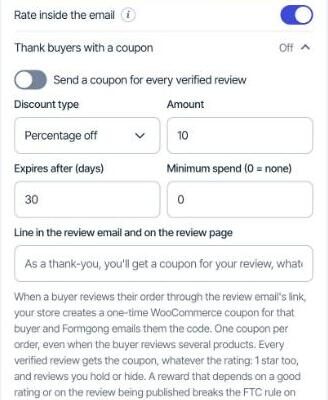
A small discount on the next order is a fair thank-you, as long as it does not buy praise. In the US, the FTC's rule on consumer reviews, in force since 21 October 2024, allows incentives for reviews only when there is no requirement, said or implied, that the review be positive. FTC staff also say that not disclosing an incentive can break the FTC Act.
Formgong's coupon is built around both rules. Under “Thank buyers with a coupon”, you choose a percentage or a fixed amount, how many days it lasts and a minimum spend. When a buyer reviews through the email's link, the plugin creates a WooCommerce coupon that can be used once, only with that buyer's email address, and Formgong emails it to them. Each order reviewed this way gets one coupon, whatever the rating and even if you decide not to publish the review. Those reviews show “Received a store coupon for reviewing” and is marked as incentivized in the Google feed.
Buyers in Germany need consent first
In 2018 Germany's Federal Court of Justice (BGH, case VI ZR 225/17) ruled on a shop that asked for a review in the email carrying the invoice. The court treated the request as advertising, and sending it without the buyer's prior consent as unlawful.
Formgong's switch for this is called “Don't email buyers in Germany without consent”. With it on, orders with a German billing address get no review email unless the order says the buyer agreed to marketing email; no address from those orders is kept. The plugin reads that agreement from the newsletter checkbox of Mailchimp for WooCommerce. With another consent tool, a developer can pass it through the formgong_review_marketing_consent filter. This is not legal advice, so ask a lawyer about your own checkout if you sell to Germany a lot.
Test the email on your own orders
Do not turn the emails on until you have seen one. The editor has a “Preview real email” button. It builds the email from one of your 10 latest real orders, the latest by default, with the buyer's name masked, and shows it as it would arrive. You can switch between desktop, iPhone, Android and iPad, pick the mail app and try dark mode. Nothing is sent or saved. A store without orders gets its newest products, or sample ones like in our screenshots.
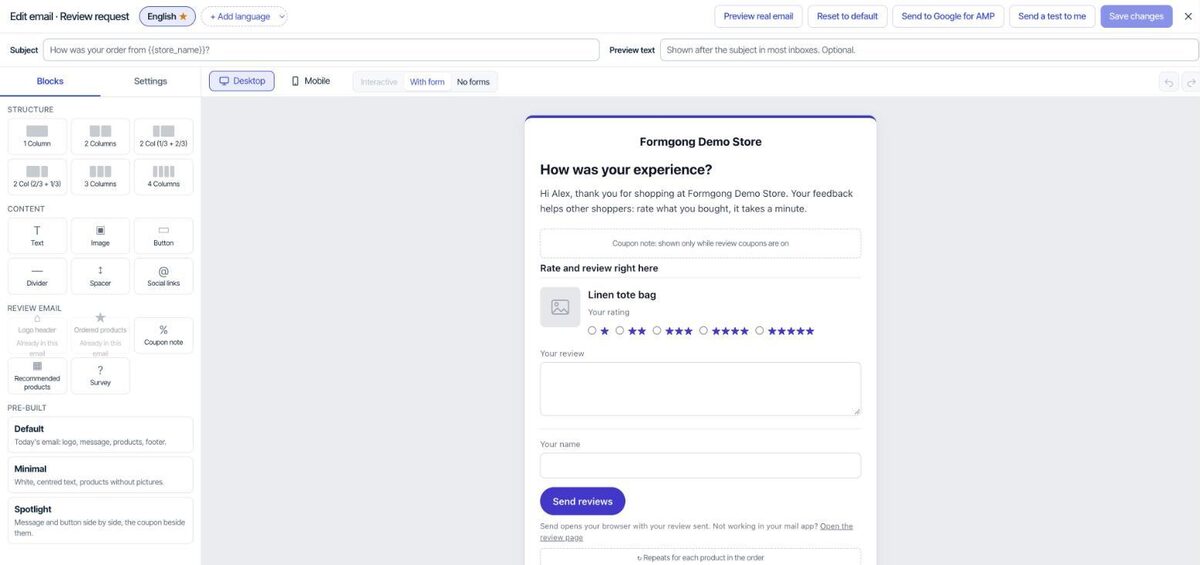
Then click Send a test to me and open it on your phone, in the app your buyers are most likely to use. Check that the product pictures load, that the stars and buttons are easy to tap, and that the link opens your review page. After the first real emails go out, the Overview tab counts sent emails, reminders, opened review pages and reviews. An opened page is counted when it loads on our server, with no tracking pixel in the email.
The rest of the kit
Reviews collected this way show on your product pages through the same plugin, with photos and videos on the free plan. If you are comparing tools first, see free WooCommerce review plugins compared.
The same Formgong account covers the rest of a small shop's site. Contact forms email you and post to Telegram, an AI help chat answers visitors from your own pages and can suggest products, and the free website templates come with the form already connected. Messages from all of them land in one inbox.
Tell us how it went
Set it up and something was unclear, or a mail app showed the email differently from our preview? Write to support@formgong.com with the app and what you saw. We will fix the email or this page.
Frequently asked questions
Does WooCommerce send review reminder emails?
WooCommerce sends one review request email as a beta feature that is off by default. Its docs do not describe a reminder. For a follow-up, use a plugin such as Formgong, which sends one reminder for products that still have no review.
How many days after an order should I ask for a review?
After the parcel has arrived. WooCommerce and Formgong both default to seven days after the order is marked Completed. If Completed means shipped in your store, add your usual delivery time.
Can I give a coupon for a WooCommerce review?
Yes, if the coupon does not depend on the review being positive and the review says it was rewarded. Formgong gives every verified review the same coupon and labels it Received a store coupon for reviewing.
Can I email German customers asking for a review?
Germany's Federal Court of Justice treated an emailed review request after a purchase as advertising that needs prior consent (VI ZR 225/17). Ask only buyers who agreed to marketing email, and check your checkout with a lawyer.
Sources and documentation
Official references for this guide: WooCommerce: Product Reviews (Customer review request), FTC: Consumer Reviews and Testimonials Rule, questions and answers, LTO: BGH VI ZR 225/17 on review requests by email (German), WordPress.org: Formgong. WooCommerce, where data is stored.