Where Shopify reviews actually live
Shopify itself has no reviews feature any more. Every review you see on a store comes from an app such as Judge.me, Loox, Yotpo, Okendo, Stamped or ours, and the app reaches the page in two ways: an app embed that loads its script on every page, and blocks that you place in the theme. When reviews disappear, check these two first.
| What you see | Likely cause | Fix |
|---|---|---|
| Reviews gone everywhere after a theme change | The app embed and blocks are not in the new theme | App embeds on, blocks added again |
| Reviews on most products, not on a few | Those products use another template | Add the block to that template |
| No stars on collection pages | The theme reads stars from a field the app does not fill | Turn on Product rating, or use the app's own card stars |
| New reviews missing | They wait for approval | Approve them in the app |
| Old reviews gone since 2024 | Shopify Product Reviews was shut down | A current app, and an import if you kept an export |
| No stars in Google | Google decides, and has its own rules | See our guide to showing reviews on Shopify |
After a theme change: the embed and the blocks stay behind
Shopify's developer docs say: “By default, app embed blocks are deactivated after an app is installed.” The same holds for a theme you publish later. Apps have to be switched on again, because, in Shopify's words, they “won't be active by default” in a new theme.
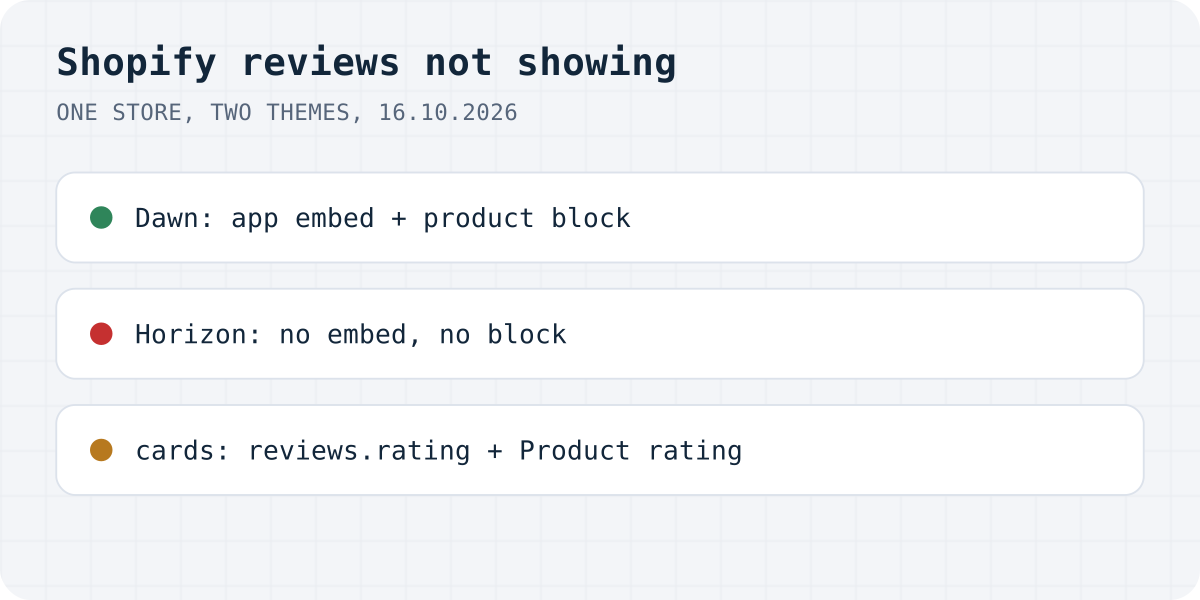
We checked how literal that is on our development store, where our own review app is installed. The store has three themes. In the live Dawn 16.1.0, the file config/settings_data.json lists the app's embed with disabled: false, and templates/product.json holds the app's product reviews block. In Horizon 4.3.0 on the same store, both are absent. The vintage Debut theme has a product.liquid template, which cannot hold app blocks at all. Publish Horizon and the reviews disappear from every product, although nothing changed in the app.
- Open the theme editor for the theme that is now live.
- Click the App embeds icon and turn on your review app's embed. Save.
- Open a product page in the editor, click Add block, pick your app's reviews block under Apps and save.
Some products show reviews, others do not
Each product uses one template, which you pick in the product's admin page under Theme template. When you add a reviews block while editing the default product template, it appears on every product that uses that template and nowhere else. Shopify puts it this way: “When you edit a template, your changes apply to every page that uses the template.”
So when a few products lack reviews, open one of them in admin, read its template, and add the block to that template too. We saw this on a live store that uses Loox: a product with 24 reviews showed none, because its template, made with a page builder, had no reviews block. Page builders such as Shogun, GemPages and PageFly draw their own pages, so the reviews need the builder's own element for that app.
No stars on collection pages
Collection-page stars depend on the theme more than on the app. In Dawn, product cards on collection, search and home pages do not accept app blocks. They draw stars only from Shopify's standard rating field, and only when a setting is on. The card code on our store's Dawn 16.1.0 reads:
{%- if show_rating and card_product.metafields.reviews.rating.value != blank -%}
The setting is called Product rating, in the Product grid and Featured collection sections, and the theme editor says “An app is required for product ratings.” Its default is off. The field, reviews.rating, is meant to be filled by the review app: Shopify's docs say rating apps “should write to this standard metafield and update it whenever a product's rating has changed.”
So you need both: Product rating ticked, and an app that writes the field. If your app does not, you get no stars however long you look for the setting. A Shopify Community thread from October 2024 had exactly this with Yotpo on the Sense theme; the fix was pasting Yotpo's star code into card-product.liquid. Some apps avoid the edit with an embed that adds stars to the cards; Judge.me has an Install button for collection stars, and our app has a “Star ratings on product cards” embed.
New reviews are waiting for approval
Review apps publish on rules: everything at once, only 4 stars and up, or after you approve. When a store owner asked on the Shopify Community why reviews were not appearing on a new website, Shopify's staff answer was that automatic publishing was disabled in the app, so the reviews were waiting. Open the app's moderation page and filter by pending or unpublished reviews before you change anything in the theme.
Shopify's own Product Reviews app is gone
If your store used Shopify's free Product Reviews app, its reviews are not coming back on their own. Shopify removed it from the App Store in September 2023 and shut it down on May 6, 2024. Its help page then said: “As of May 6, 2024, the Product Reviews app is no longer available to install. You no longer have access to your existing product reviews in your admin, and reviews from the app no longer display on your store.”
Before the shutdown, Shopify's checklist told merchants to export the reviews to CSV and import them into one of five partner apps: Judge.me, Loox, Okendo, Stamped.io and Yotpo. A Shopify staff member wrote in May 2024 that after the shutdown the reviews were “not accessible, or exportable”. If you have the export, any of those apps can import it, and so can ours. If you do not, the accepted answer on that thread suggests searching your inbox for the old review notification emails and rebuilding the list by hand.
Old themes sometimes still carry the app's code, which can print an empty “reviews” heading or old stars. Remove the leftover snippet from the theme, or ask the theme's developer.
The same problems with Formgong Reviews
Most of this page is about Shopify themes, and our app lives under the same rules. Here is where it behaves the same and where it differs, checked on our development store on 16.10.2026.
| Problem | With Formgong |
|---|---|
| Theme change drops the embed and blocks | Same. Our app uses the same Shopify mechanism, as the test above shows. |
| Stars missing on collection cards in Dawn | Our “Star ratings on product cards” embed adds stars to cards without editing theme code. |
| Reviews waiting for approval | Same idea. Written reviews wait for you by default; a bare star rating can publish itself. |
| Reviews lost with Shopify Product Reviews | We import a Shopify Product Reviews CSV export, as well as Judge.me, Loox and Yotpo exports. Imported reviews wait for your approval. |
Formgong Reviews is the review tool we build. Approved reviews show as stars and cards on each product page, Pro adds an AI summary written from the approved reviews, and you can bring old reviews in from a Judge.me, Yotpo, Loox or Shopify Product Reviews export. To collect new ones you send customers a review link after the order. Our Shopify app, which also publishes a Google product reviews feed, has been in Shopify's App Store review since 14.10.2026; until it is listed, the widget goes into a Custom Liquid section with one script line, as the review widget page shows.
The same account covers the rest of a small shop's site: contact forms that email you and post to Telegram, an AI help chat that answers visitors from your own pages, and free templates with the form already connected.
Still not showing?
Which review app do you use, and which of these fixed it? Write to support@formgong.com and tell us what you see on the page. If it is a case we have not covered, we will check it and add it here.
Frequently asked questions
Why are my reviews not showing on Shopify?
Usually the review app's embed is off in the current theme, the reviews block is not on the template the product uses, or the reviews are waiting for approval. Shopify's own Product Reviews app stopped working on May 6, 2024.
Why did my reviews disappear after I changed my Shopify theme?
App embeds and blocks are saved inside each theme. A new theme starts without them. Turn on the app embed and add the reviews block again; the reviews themselves are still in the app.
Why are review stars not showing on my Shopify collection page?
Themes like Dawn show card stars only from Shopify's reviews.rating field and only with Product rating turned on. If your review app does not fill that field, use the app's own card stars or code.
What happened to Shopify Product Reviews?
Shopify shut the app down on May 6, 2024. Reviews from it no longer display, and Shopify staff said they could no longer be exported after that date.
Sources and documentation
Official references for this guide: Shopify: Theme app extension configuration, Shopify: Templates, Shopify: Standard metafield definitions, Shopify Help Center: Product reviews (archived 26 May 2024), Shopify Community: Shopify Product Reviews app data gone. Shopify, where data is stored.