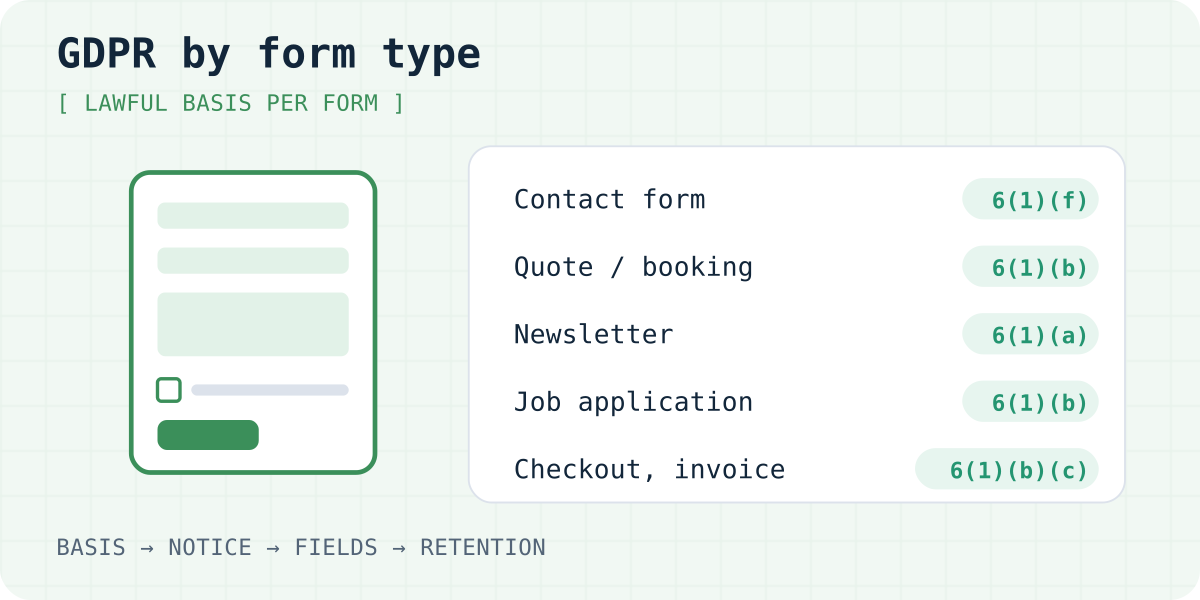
Five things every form has to settle
Whatever a form asks for, the same five questions come up. Answer them once for each form on your site, then write the answers into your privacy policy.
- Why you collect the data and on which lawful basis. Art. 6(1) GDPR lists six bases, and website forms almost always use one of four: consent (a), a contract or steps the person asked for before one (b), a legal obligation (c), or your legitimate interests (f). Choose before the form goes live. The EDPB says a controller cannot switch from consent to legitimate interest later because the consent turned out to be invalid (Guidelines 05/2020, paras 121 to 123).
- What you tell people at the form. Art. 13 lists what they must learn when you collect the data: who you are, the purpose and basis, who receives the data, any transfer outside the EEA, how long you keep it, their rights, and whether they have to give it.
- Which fields you need. Art. 5(1)(c) says data must be "limited to what is necessary" for the purpose. Every extra field is one more thing to explain, protect and delete.
- When you delete it. Art. 5(1)(e) forbids keeping data longer than the purpose needs, and Art. 13(2)(a) makes you state the period or how you decide it.
- Who else handles it. A form backend, email service or CRM that stores submissions for you is your processor, and Art. 28(3) requires a contract with it. If any of them moves data outside the EEA, Chapter V (Art. 44 to 49) applies as well.
A consent checkbox belongs only on forms where consent is the basis for that part of the processing. When it is, four rules apply. The box starts empty: Recital 32 says "silence, pre-ticked boxes or inactivity" are not consent, and in Planet49 (C-673/17, 1 October 2019) the EU Court of Justice held that a pre-ticked box the user has to untick does not give valid consent. The request has to be clearly separate from other text (Art. 7(2)). The form must not refuse to send because the box is empty when the data is not needed for what the person asked (Art. 7(4) and Recital 43). And withdrawing has to be as easy as agreeing (Art. 7(3)).
Use one box per purpose. In the EDPB's own example, a single box for marketing emails and for sharing details with other group companies is not valid consent for either (Guidelines 05/2020, para 45).
Form by form: the short version
This is the usual starting point. Your facts can change the answer, so read the section for each form below.
| Form | Usual lawful basis | Consent checkbox | Delete when |
|---|---|---|---|
| Contact form | Art. 6(1)(f); (b) for questions about your services | Only for marketing extras | The conversation is over, plus a short follow-up period |
| Quote, booking or appointment | Art. 6(1)(b) | No | No contract follows; otherwise it becomes a customer record |
| Newsletter or marketing sign-up | Art. 6(1)(a), plus national e-marketing rules | Yes, unless the whole form is the sign-up | The person unsubscribes |
| Account or registration | Art. 6(1)(b) | Only for extras such as marketing | The account is closed |
| Job application with CV | Art. 6(1)(b); national employment law | Only to keep the CV for future roles | The hiring round ends, plus the period for claims |
| File upload | Same as the form it is part of | No extra box | With the submission |
| Order, checkout, invoice | Art. 6(1)(b); (c) for tax records | Only for marketing | After delivery and returns; invoices when tax law allows |
| Feedback or review | Art. 6(1)(f); decide separately for publishing | Fits when publishing is optional | You stop showing or using it |
| Survey | Art. 6(1)(f) or (a) | If you rely on consent | The analysis is done; anonymise sooner if you can |
| Event registration | Art. 6(1)(b) | For sharing with sponsors or partners | After the event and its paperwork |
| Health and other Art. 9 data | Art. 6(1) basis plus an Art. 9(2) condition | Explicit consent, if that is the condition | As early as care and law allow |
| Forms used by children | As above; Art. 8 when consent is used for an online service | Parent's consent under 16, or the national age | As for the form type |
| B2B lead form | Art. 6(1)(f) or (b) | For marketing emails where national law asks | The lead goes cold |
| Tracking, analytics, embeds | ePrivacy Art. 5(3) for the device; GDPR for the data | Yes, cookie consent | Per tool; state the cookie lifetime |
Contact form
Someone writes to you and you reply. Your legitimate interest in answering and keeping the correspondence (Art. 6(1)(f)) covers most messages. When the message asks about your services, the EDPB says replying can rest on Art. 6(1)(b), because the person is taking a step towards a possible contract (Guidelines 2/2019, para 46). If you rely on (f), Art. 13(1)(d) makes you name the interest in your notice.
No consent box is needed to answer. Add one only if you want to send marketing as well, and keep it optional. Name, email and the message are enough for most sites. Ready notice text and a copyable form are in our GDPR contact form template.
Quote, booking and appointment requests
The person asks for a price, a restaurant table, a slot at the hairdresser or a call with a plumber. That is a step at their request before a contract, so Art. 6(1)(b) fits even if they never book (Guidelines 2/2019, paras 45 and 46). The EDPB gives a small example: someone types a postal code to see if a company serves their area, and that processing also falls under (b).
The same paragraph has a limit. Art. 6(1)(b) does not cover "unsolicited marketing" or anything done only on your initiative (para 47). If you want to keep the address for offers later, that is a separate purpose with its own basis. Ask only for what the quote or booking needs. A phone number can be optional when email works, and a date of birth rarely belongs on a booking form.
Once the person books, the data becomes part of the contract. When the work is done, invoices and accounting records usually stay for as long as national tax law requires, and that retention rests on Art. 6(1)(c) (Guidelines 2/2019, example 4).
<style>
  .fg-form label { display: block; margin: 0 0 12px; }
  .fg-form input:not([type="checkbox"]), .fg-form textarea { display: block; width: 100%; box-sizing: border-box; margin-top: 4px; padding: 10px; font: inherit; }
  .fg-form textarea { min-height: 120px; }
  .fg-form small { display: block; margin-top: 10px; opacity: .75; }
</style>
<form class="fg-form" action="https://formgong.com/submit" method="POST">
  <input type="hidden" name="access_key" value="fk_your_access_key">
  <input type="hidden" name="_lang" value="en">
  <input type="hidden" name="_subject" value="New quote request">
  <label>Name <input type="text" name="name" autocomplete="name" required></label>
  <label>Email <input type="email" name="email" autocomplete="email" required></label>
  <label>Phone <input type="tel" name="phone" autocomplete="tel"></label>
  <label>What do you need? <input type="text" name="service" required></label>
  <label>Preferred date (optional) <input type="text" name="preferred_date"></label>
  <label>Details <textarea name="message"></textarea></label>
  <div aria-hidden="true" style="position:absolute;inset-inline-start:0;top:0;width:1px;height:1px;overflow:hidden;clip-path:inset(50%)">
    <label>Leave this field empty<input type="text" name="botcheck" tabindex="-1" autocomplete="off"></label>
  </div>
  <button type="submit">Send</button>
  <small>We use these details to prepare your quote and, if you book, to carry out the job. Phone is optional. Details: <a href="/privacy-policy">privacy policy</a>.</small>
</form>Account and registration forms
Creating an account the person asked for is performance of a contract, Art. 6(1)(b). The contract covers what the account needs: login details, the service itself, billing if it is paid. The EDPB does not accept (b) for usage metrics or for improving the service, because the service could run without them (Guidelines 2/2019, paras 48 and 49). Those need legitimate interest or consent, and marketing needs its own basis as above.
Plan for closure on day one. When the contract ends, processing for it should stop, and records you keep for legal reasons must have a basis and a period you announced from the start (Guidelines 2/2019, paras 41 and 43).
Job applications with a CV
Applying for a job is a step towards an employment contract at the applicant's request, so Art. 6(1)(b) is the usual basis. Art. 88 lets each EU country add its own rules for recruitment, so check the employment data rules where you hire.
Consent is a poor basis here. The EDPB says consent between employers and staff, current or future, is rarely free because people fear what happens if they refuse (Guidelines 05/2020, paras 21 and 22). It also says consent can work when refusing has no consequences. An optional box to keep the CV for future roles is that kind of case, as long as it has no effect on the current application.
CVs carry more than you ask for. People add photos, dates of birth, health details or religion. Say on the form what you want and what to leave out, because Art. 9 data needs its own condition. Criminal record information is covered by Art. 10 and is only allowed where the law authorises it. For retention, the UK regulator gives a useful rule of thumb: without a clear business reason, do not keep records of unsuccessful applicants beyond the period in which they could bring a claim about the recruitment (ICO, storage limitation guidance).
<form action="https://formgong.com/submit" method="POST" enctype="multipart/form-data">
  <input type="hidden" name="access_key" value="fk_your_access_key">
  <input type="hidden" name="_lang" value="en">
  <input type="hidden" name="_subject" value="Job application">
  <label>Name <input name="name" autocomplete="name" required></label>
  <label>Email <input type="email" name="email" autocomplete="email" required></label>
  <label>Role you are applying for <input name="role" required></label>
  <label>CV (PDF)
    <input type="file" name="attachment" accept="application/pdf,.pdf" required>
  </label>
  <label>
    <input type="checkbox" name="talent_pool" value="yes">
    Keep my application for 12 months and contact me about other roles. This does not affect this application.
  </label>
  <p>We use your application to assess it for this role. Please leave out health details, photos and other
    information we did not ask for. More in our <a href="/privacy-policy">privacy policy</a>.</p>
  <div aria-hidden="true" style="position:absolute;inset-inline-start:0;top:0;width:1px;height:1px;overflow:hidden;clip-path:inset(50%)">
    <label>Leave this field empty <input type="text" name="botcheck" tabindex="-1" autocomplete="off"></label>
  </div>
  <script src="https://challenges.cloudflare.com/turnstile/v0/api.js" async defer></script>
  <div class="cf-turnstile" data-sitekey="YOUR_TURNSTILE_SITE_KEY"></div>
  <button type="submit">Send application</button>
</form>
File uploads
An upload has the purpose and basis of the form it sits on, so it does not need a separate checkbox. It does carry more risk. A file can hold anything: a scanned ID, a photo of an injury, a whole CV. Restrict the file types and sizes to what the purpose needs (Art. 5(1)(c)), keep the files private, and delete them with the submission. Art. 32 asks for security that matches the risk, and a folder of public file links does not meet that.
In Formgong, uploads accept PDF, PNG and JPEG only. Every file is virus-scanned, stored privately in the EU and deleted together with its submission. The details and the code are in contact form with file upload.
Orders, checkout and invoices
Delivering what someone bought is the textbook case for Art. 6(1)(b). The EDPB names the delivery address and card details as data that is necessary for an online purchase (Guidelines 05/2020, para 30). Keeping invoices because tax law requires it is Art. 6(1)(c).
Consent rules come in with the extras added to checkout. Sharing the buyer's details with partners or signing them up for offers is not needed for the sale, so it cannot be a condition of buying (Art. 7(4)). The ICO gives this exact example: a furniture shop that makes consent to share data with other stores part of checkout does not get valid consent. For your own similar products, the ePrivacy soft opt-in described under newsletters may apply, with an opt-out at checkout and in every email.
Feedback and review forms
Private feedback about your service, read by you and your team, fits legitimate interest (Art. 6(1)(f)). Publishing a review is a different purpose because it puts the person's words and often their name in public. Decide the basis for publishing before you collect, tell people at the form that the review will be public, and let them choose how their name appears. A first name and an initial are usually enough, and that keeps to data minimisation. If publishing is optional for the person, consent fits well and has to be as easy to withdraw as it was to give.
If you build on Art. 6(1)(f) instead, the person can object under Art. 21(1), and you need a plan for taking a review down.
Surveys
Truly anonymous answers are outside the GDPR: Recital 26 says the rules do not apply to information that no longer relates to an identifiable person. In practice survey data is rarely that clean. Free-text answers name people, small groups make answers traceable, and the survey tool may log IP addresses. Treat the survey as personal data unless you have checked.
For feedback from your own customers, legitimate interest often works. For research where taking part is optional and the questions go deeper, consent is the clearer basis. Either way, say in the notice what you collect and when you will delete or anonymise the answers.
Event registration
Registering someone for an event they asked to attend is Art. 6(1)(b). Two parts need care. Dietary or access needs can reveal health or religion, which are Art. 9 categories, so ask only what the venue needs and make those fields optional. And sharing the attendee list with sponsors is a separate purpose that needs its own optional consent, naming the companies (Guidelines 05/2020, para 45).
Health and other sensitive data (Art. 9)
Art. 9(1) prohibits processing health data, data revealing racial or ethnic origin, political opinions, religious beliefs, trade union membership, genetic and biometric data, and data about sex life or sexual orientation. You need an Art. 6(1) basis and one of the exceptions in Art. 9(2). For a website form that is usually explicit consent (Art. 9(2)(a)), or, for doctors and clinics, the provision of health care under national law by professionals bound by secrecy (Art. 9(2)(h) and 9(3)). Art. 9(4) lets member states add conditions for health data.
Explicit consent means an express statement. The EDPB's example is a screen with Yes and No boxes and wording such as "I, hereby, consent to the processing of my data" (Guidelines 05/2020, paras 93 and 96). Small businesses lose one exemption here too. The rule that firms with fewer than 250 staff need not keep records of processing does not apply when they process Art. 9 data (Art. 30(5)).
Think about where the data ends up. A notification email that copies the whole message puts the details in every inbox it reaches, which matters for Art. 32 security. In Formgong you can set a form to "Don't keep", which deletes what people wrote once it has been delivered, usually within 10 minutes.
Forms used by children (Art. 8)
Art. 8 applies when two things are both true: consent is the basis, and you offer an online service directly to a child (Guidelines 05/2020, para 127). Then a child under 16 cannot consent alone, and a parent has to give or authorise it. Member states may lower that age, but not below 13, so the age depends on the country. You have to make reasonable efforts to check that the parent really consented. For low-risk cases the EDPB says checking by email may be enough (paras 125 and 136).
Even outside Art. 8, children's interests weigh more in a legitimate interest test (Art. 6(1)(f)), and Recital 38 singles out marketing and profiling. Write the notice in words the child can follow (Art. 12(1) and Recital 58).
B2B lead forms
The GDPR protects people. A work email such as jane.doe@company.com identifies Jane, so it is personal data (Art. 4(1)). A demo request or a sales enquiry fits Art. 6(1)(b) or (f) in the same way as a contact form.
Two habits need care. If you add data about the lead from other sources, such as a job title from a database, Art. 14 obliges you to tell the person, because that data did not come from them. And if the form offers a guide or webinar and you also want to send sales emails, ask for that separately. Under Art. 7(4) consent is presumed not freely given when the download depends on agreeing to something it does not need. Whether email marketing to business addresses needs consent depends on national ePrivacy law.
Tracking, analytics and third-party embeds
Cookies and similar technologies follow a different law. Art. 5(3) of the ePrivacy Directive requires consent before anything is stored on or read from the visitor's device, unless it is strictly necessary for a service the visitor asked for. Planet49 applied this to a pre-ticked cookie box and added that people must be told how long cookies last and whether third parties can access them. Consent under that rule must meet the GDPR standard (Guidelines 05/2020, footnote 27).
So a cookie banner and a form notice do different jobs, and one does not replace the other. Watch for tools that record a visitor's form input before they press Send, such as session replay scripts, and for embedded forms, maps or captchas loaded from another company's servers. Each of them belongs in your cookie notice and, if it receives form data, in your privacy policy as a recipient.
Processors, contracts and transfers outside the EEA
Every service that stores or forwards submissions for you is a processor. Art. 28(3) requires a written contract that, among other things, limits it to your instructions and makes it help you answer access and deletion requests. Under Art. 28(2) it may only bring in sub-processors with your authorisation, and must tell you about changes. Processors do not have to be named in a consent request, but your privacy notice must list recipients or categories of recipients under Art. 13(1)(e) (Guidelines 05/2020, para 65).
If a processor sends data outside the EEA, the transfer needs a basis under Chapter V, for example an adequacy decision or standard contractual clauses (Art. 46(2)(c)), and the notice must say so (Art. 13(1)(f)). Check chat apps used for notifications and AI features in particular. Our GDPR form backend checklist goes through what to look for in a form service.
For Formgong, submissions are stored in the EU, a data processing agreement under Art. 28 is part of the terms, and the where data is stored page lists the optional features, such as Telegram delivery, that can process data outside the EU.
Setting up these forms with Formgong
Every example above posts to the same Formgong endpoint, so one account covers a contact form, a quote form and a job application. To connect a form on your own site, follow the step-by-step guide for your platform in the Formgong docs: plain HTML, WordPress, Wix, Shopify and AI builders such as Lovable. Submissions go to email and one inbox, and each form has its own retention setting: 30 days on the free plan, or "Don't keep" for forms that should not store anything after delivery. Our free website templates come with the form already connected, and the help chat answers visitors' questions from your own pages.
This article is general information, not legal advice. National laws add rules, especially for marketing, employment and health, so have a lawyer or your data protection officer check anything you are unsure about.
Did we miss a form you run, or does your country handle one of these differently? Write to support@formgong.com and tell us. We read every message and update the guide.
Frequently asked questions
Does every website form need a GDPR consent checkbox?
No. A checkbox is needed only where consent is the lawful basis, for example a newsletter added to a contact form. Contact, quote, booking, order and account forms usually rely on Art. 6(1)(b) or (f) and need a clear notice at the form instead.
Can a GDPR consent checkbox be pre-ticked?
No. Recital 32 says pre-ticked boxes are not consent, and the EU Court of Justice confirmed it for a pre-ticked box in Planet49 (C-673/17). The box must start empty and the person must tick it.
Can I make a consent checkbox required to send the form?
Not when the data is not needed for what the person asked. Art. 7(4) presumes such consent is not freely given. A quote request must work without the marketing box.
How long can I keep form submissions?
The GDPR sets no number. Keep data only as long as the purpose needs (Art. 5(1)(e)), state the period in your notice (Art. 13(2)(a)) and delete on schedule. Tax law may require keeping invoices longer.
Is a cookie banner enough for my forms?
No. Cookie consent covers storing and reading data on the device under the ePrivacy Directive. What people type into a form is covered by the GDPR and needs its own notice at the form.
Sources and documentation
Official references for this guide: GDPR, Regulation (EU) 2016/679 (EUR-Lex), ePrivacy Directive 2002/58/EC, consolidated (EUR-Lex), CJEU, Planet49, C-673/17 (EUR-Lex), EDPB Guidelines 05/2020 on consent, EDPB Guidelines 2/2019 on Art. 6(1)(b), ICO: What is valid consent?, ICO: Storage limitation. Where Formgong stores data, where data is stored.