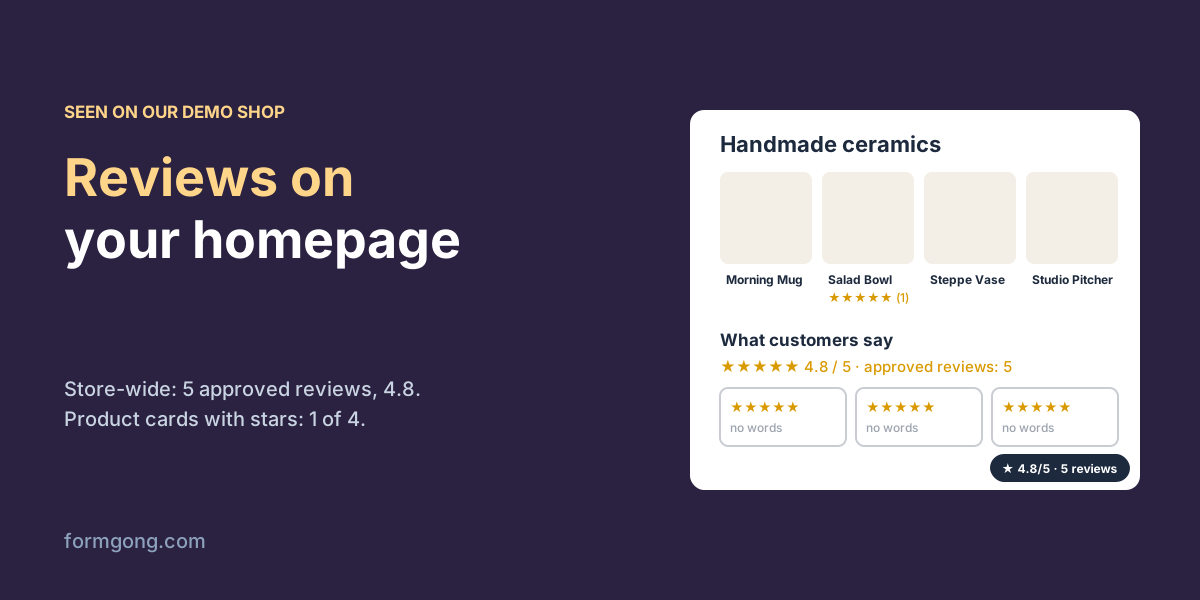
We put a review badge, a list and a carousel on a test homepage, fed by our demo shop's real reviews, and looked at what a first-time visitor actually sees.
The short answer. Show your whole shop's rating near the top, a short row of recent reviews that have words in them, and stars under each product card. On our demo shop on 3 November 2026, the store-wide list held 5 approved reviews with an average of 4.8, while only 1 of the 4 product cards on the homepage had any stars.
Formgong
How to show reviews on your homepage
Why does a homepage need different reviews from a product page?
A lot of your visitors never reach a product page. They land on the homepage from a search, an ad or a friend's link, look around for a few seconds and decide whether you are worth their time. If the only reviews on your site sit at the bottom of each product page, those visitors see none of them.
The reviews you do have are also spread thin across products. Our demo shop, Glyna, sells four ceramic pieces and shows them on its homepage with stars under each card. On 3 November 2026 the shop had 5 approved reviews in total, but only 1 of the 5 was tied to one of those four products, so only one card showed stars. A visitor scanning the homepage saw one lonely rating of “(1)” and three blank cards. The same 5 reviews, shown together as the shop's reviews, add up to 4.8 out of 5.
So the homepage needs reviews of the whole shop, pulled from every product, and a product page needs reviews of that one product. Our guide to adding reviews to a website covers the product page side.
What should you put on the homepage?
Three pieces do most of the work, and each one answers a different moment of the visit.
The overall rating goes near the top, where people decide whether to scroll at all. A small badge with the average and the number of reviews behind it is enough, and it should link to the reviews themselves so a doubtful visitor can check them. A rating nobody can check is just a number.
A short row of reviews goes after your bestsellers or your main offer, where a visitor who is interested wants to hear from someone like them. Three to six reviews is plenty. Trustindex's guide to homepage review sliders, which we read on 3 November 2026, says much the same about placement and warns against walls of reviews that take over the page.
Stars under product cards help people choose between products. Leave a card blank when a product has no reviews instead of showing five empty stars, which reads as “nobody liked this”. If you are just starting out, our guide to getting your first reviews is the place to begin.
What does a visitor actually see?
We built a plain test homepage with a hero, a grid of Glyna's four products, a review list and a corner badge, all reading Glyna's real public reviews through our widget script. Then we opened it in Chromium on our test server at desktop width and at a phone width of 390 pixels, once with the list as a grid and once as a carousel.
What Chromium showed on 3 November 2026. Glyna's own homepage was only read, never changed.
Check
What we saw
Stars on the 4 product cards of Glyna's real home page
1 of 4 cards had stars, “★★★★★ (1)”; the other 3 showed nothing
Store-wide badge on the test homepage
“★ 4.8/5 · 5 approved reviews”, fixed in the bottom right corner
Review list, grid, 3 shown
4.8 out of 5, “approved reviews: 5”, rating bars, a sort menu, 3 cards and “Show more reviews”
The same list as a carousel
One row with Previous and Next buttons, no autoplay, the same 3 cards
Words in the 3 newest reviews
0 of 3; they were star ratings without text
Requests to formgong.com per page view
4 (the script, the reviews, two rating summaries), at both widths
Two things surprised us. The carousel and the grid cost exactly the same, four small requests, so you can pick by look rather than by speed. And the three newest reviews, which a newest-first list puts on top, had no words at all. Three of Glyna's five approved reviews are star ratings from verified buyers who left no comment. On a product page that is fine, because the rating bars use them. On a homepage, a row of empty star cards tells a new visitor very little.
Which reviews work best on a homepage?
The ones with words in them, about a product or service you want people to try, from customers who sound like your buyers. A sentence such as “the glaze is even darker in real life, and it survived the dishwasher” does more than a fifth five-star rating ever will. If your review tool lets you feature reviews by hand, feature those.
What you should not do is feature only the five-star ones. Yotpo's homepage guide, updated on 8 October 2026, suggests showing reviews of your top-rated products. Choosing which products to feature is your call, but within those products the reviews should be the real mix. The FTC's questions and answers on its reviews rule, which we read on 3 November 2026, say that “the use of non-representative consumer reviews in marketing could be deceptive”. Careful visitors also notice a page where every review is perfect. Our article on whether reviews increase sales explains why a rating a little under 5 tends to sell better than a perfect one.
A carousel also needs a light touch with motion. Ours does not move by itself unless you ask it to, and it stays still for visitors who have turned on reduced motion. People reading a review hate it sliding away mid-sentence.
Will homepage reviews give you stars in Google?
Usually not, and it is better to know that before you add markup. Google's review snippet guidelines, read on 3 November 2026, say that when the business being reviewed controls the reviews about itself, pages with LocalBusiness or Organization markup are not eligible for star results, and that this covers reviews shown through a third-party widget. Reviews of your shop on your own homepage are exactly that case.
Product pages are different, because there the reviews are about a specific product. If stars in search are what you are after, put the markup on product pages. Our guide to review stars that don't show in Google walks through the rules.
How do you add this with Formgong?
Formgong's review widget is one script and a few HTML elements, and it works on any site, so you can paste the code below into a homepage built with WordPress, Webflow, Shopify or plain HTML. Without data-product, the list and the badge use every approved review of the site, which is what a homepage needs. With it, they show one product's reviews, which is what product cards and product pages need. The widget docs list every option.
Where we differ from the other homepage guides we read is in what the widget refuses to do. It has no setting that hides low ratings. The average and the count always include every review you approved, and the count is labelled “approved reviews” so it never passes for every review you received. The small pop-up that can appear in a corner shows the newest reviews that have words in them, whatever their stars. Trustindex's homepage slider page, read on 3 November 2026, lists “Hide your negative reviews” among its features. There is a gap on our side too. The list sorts newest first and cannot yet skip reviews without words, which is how Glyna ended up with three star-only cards on top. Until it can, the corner pop-up is the way to put written reviews in front of homepage visitors, and a public reply under a star-only review gives its card some text. See the review widget page for the plans and limits.
Homepage reviews
<!-- Near the top: the shop's rating, fixed in a corner, linking to the reviews below -->
<div data-formgong-badge="fk_your_access_key" data-href="#reviews" data-position="bottom-right"></div>

<!-- Under each product card: stars, only for products that have approved reviews -->
<span data-formgong-stars="fk_your_access_key" data-product="mug-blue"></span>

<!-- After the bestsellers: a row of reviews from the whole shop -->
<section id="reviews">
  <div data-formgong-reviews="fk_your_access_key" data-layout="carousel" data-limit="6"
       data-title="What customers say"></div>
</section>

<script src="https://formgong.com/reviews.js" defer></script>
What works on your homepage?
If you have moved reviews onto your homepage and seen a change, or our widget does something odd on your theme, tell us at support@formgong.com. We read every message and will add what we learn here.
Frequently asked questions
Should I put reviews on my homepage?
Yes, if you have a few real ones. Show the shop's overall rating near the top and a short row of written reviews further down, linked to the full list.
How many reviews should a homepage show?
Three to six in a row or carousel, plus the overall rating and count. More than that turns the homepage into a review page.
Can I show only my five-star reviews on the homepage?
You can choose which products to feature, but showing only perfect reviews misleads visitors, and the FTC says non-representative reviews in marketing can be deceptive.
Do homepage reviews show stars in Google?
Usually not. Google treats reviews a business shows about itself as self-serving and does not give those pages star results.