Why does reCAPTCHA v3 fail quietly?
reCAPTCHA v3 never shows the visitor a puzzle. It watches how the page is used and hands your form a token. Google then tells your server, with a score from 0.0 to 1.0, how likely the visitor is a person. All the protection happens in the few lines of server code that read that answer. If those lines are wrong, the form still works and nothing tells you the check lets bots through.
So this setup spends most of its time on the server side. We ran it end to end on 3 November 2026: Google's real script in Chromium, Google's real siteverify, and a local copy of Formgong's form backend behind it.
How do you add reCAPTCHA v3 to the page?
Load the script with your site key in the render parameter. When the visitor sends the form, call grecaptcha.execute with an action name and put the token into the form. Google's v3 page asks you to call it at that moment, not on page load, because a token expires after two minutes.
The action name, contact here, travels inside the token, so your server can tell a token made for this form from one made on your login page. Google lets you hide the floating badge only if the form shows the line “This site is protected by reCAPTCHA” with the Google privacy policy and terms, so the sample keeps that line under the button.
<form id="contact">
  <label for="name">Name</label> <input id="name" name="name" required>
  <label for="email">Email</label> <input id="email" name="email" type="email" required>
  <label for="message">Message</label> <textarea id="message" name="message" required></textarea>
  <input type="hidden" name="g-recaptcha-response">
  <button type="submit">Send</button>
  <p id="status" role="status"></p>
  <p class="hint">This site is protected by reCAPTCHA and the Google Privacy Policy and Terms of Service apply.</p>
</form>
<script src="https://www.google.com/recaptcha/api.js?render=YOUR_SITE_KEY"></script>
<script>
  var SITE_KEY = "YOUR_SITE_KEY";
  var BACKEND = "/contact"; // your own server route (below)
</script>
<script>
  var form = document.getElementById("contact");
  var statusLine = document.getElementById("status"); // not "status": that name is window.status, a string
  form.addEventListener("submit", function (event) {
    event.preventDefault();
    if (!form.reportValidity()) return;
    statusLine.textContent = "Sending…";
    // Ask for the token when the visitor acts, not on page load: tokens expire after two minutes.
    grecaptcha.ready(function () {
      grecaptcha.execute(SITE_KEY, { action: "contact" }).then(function (token) {
        form.elements["g-recaptcha-response"].value = token;
        return fetch(BACKEND, { method: "POST", body: new URLSearchParams(new FormData(form)) });
      }).then(function (response) { return response.json(); }).then(function (data) {
        statusLine.textContent = data.success ? "Thanks, your message was sent." : (data.message || "Not sent.");
      }).catch(function (error) {
        statusLine.textContent = "Not sent: " + String(error && (error.message || error));
      });
    });
  });
</script>
How do you check the token on the server?
Your server posts the token and your secret key to Google's siteverify endpoint and reads four fields from the answer. success says the token is real and unused. score is the 0.0 to 1.0 judgement, and Google's v3 page suggests 0.5 as a starting threshold. action must be the name your page used. hostname must be your own site, or someone could solve the check on their page and post the token to yours.
The passes function checks all four and treats a missing score as a failure. That last part matters more than it looks, as the next section shows.
export const SITEVERIFY = "https://www.google.com/recaptcha/api/siteverify";

export async function siteverify(secret, token, ip) {
  const body = new URLSearchParams({ secret, response: token ?? "" });
  if (ip) body.set("remoteip", ip);
  const response = await fetch(SITEVERIFY, { method: "POST", body });
  return response.json();
}

// All four checks. A missing score is a failure, never a pass.
export function passes(result, { action, hostnames, minScore = 0.5 }) {
  return result.success === true
    && typeof result.score === "number" && result.score >= minScore
    && result.action === action
    && hostnames.includes(result.hostname);
}
The small Node backend that uses it
// Between the page and the form backend: verify the token, then forward the fields without it.
import http from "node:http";
import { siteverify, passes } from "./verify.mjs";
const SECRET = process.env.RECAPTCHA_SECRET;
const FORM_ENDPOINT = "https://formgong.com/submit";
const ACCESS_KEY = "fk_your_access_key";
const PORT = Number(process.env.PORT || 8790);

http.createServer(async (req, res) => {
  const cors = { "access-control-allow-origin": "https://your-site.example", "content-type": "application/json" };
  if (req.method === "OPTIONS") { res.writeHead(204, { ...cors, "access-control-allow-headers": "content-type" }); return res.end(); }
  let raw = ""; for await (const chunk of req) raw += chunk;
  const fields = new URLSearchParams(raw);
  const token = fields.get("g-recaptcha-response");
  fields.delete("g-recaptcha-response");
  const result = await siteverify(SECRET, token);
  const ok = passes(result, { action: "contact", hostnames: ["your-site.example"] });
  if (!ok) { res.writeHead(403, cors); return res.end(JSON.stringify({ success: false, message: "We could not confirm you are not a bot. Please try again." })); }
  fields.set("access_key", ACCESS_KEY);
  const forwarded = await fetch(FORM_ENDPOINT, { method: "POST", headers: { Accept: "application/json" }, body: fields });
  res.writeHead(forwarded.status, cors);
  res.end(await forwarded.text());
}).listen(PORT, "127.0.0.1");
Can you test reCAPTCHA v3 with Google's test keys?
Only partly. Google's reCAPTCHA FAQ publishes one test key pair and introduces it as being for reCAPTCHA v2, with the promise that “all verification requests will pass”. For v3 the same FAQ says to create a separate key for testing environments and warns that scores may not be accurate there, since v3 learns from real traffic. There is no v3 test key.
We tried the v2 test key in the v3 script anyway. grecaptcha.execute returned a token of about 1,700 characters and the badge appeared, so the page side can be exercised. Then we asked siteverify about it with the test secret:
| What we sent | What Google answered |
|---|---|
| Test secret + the token the page got | success: true, hostname testkey.google.com, no score, no action |
| Test secret + the same token a second time | The same answer: no replay check |
Test secret + the made-up token abc | The same answer |
| Test secret + no token at all | The same answer |
| A wrong secret + the page's token | success: false, invalid-input-response |
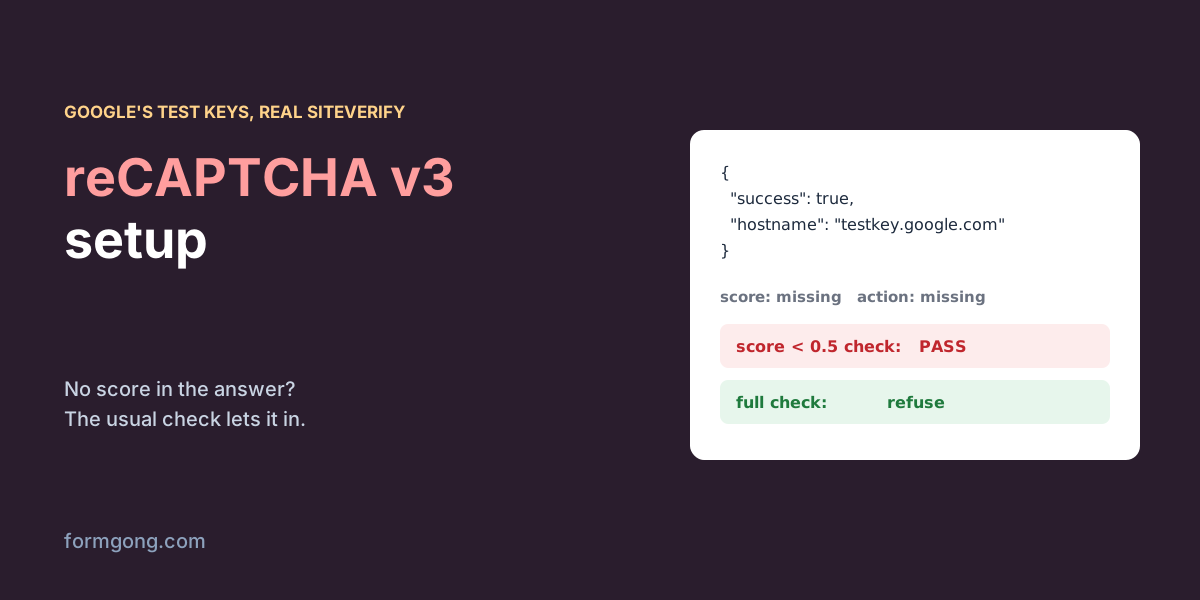
Every answer to the test secret is a success with no score and no action, even for no token at all. A wrong secret came back as invalid-input-response, not the invalid-input-secret you might look for in Google's error table. We could not test a real score. That needs a real v3 key on a real domain, and the score is the part Google says depends on real traffic.
Which score check lets bots through?
Many tutorials check the answer like this. It reads well and it is wrong:
// The check many tutorials show. undefined < 0.5 is false, so a result without a score gets through.
export function naivePasses(result) {
  if (!result.success || result.score < 0.5) return false;
  return true;
}
What did the two checks decide?
| Answer | Decision |
|---|---|
| Any of the 4 test-secret answers above | Common check: passes · Full check: refuses |
| Example v3 answer, score 0.9, right action and site | Common check: passes · Full check: passes |
| Example v3 answer, score 0.3 | Common check: refuses · Full check: refuses |
Example v3 answer from another form (action login) | Common check: passes · Full check: refuses |
| Example v3 answer solved on another site | Common check: passes · Full check: refuses |
In JavaScript undefined < 0.5 is false, so an answer without a score sails through the common check. With the test key that meant every answer passed, including the one for no token at all. On the full path, the backend with the common check forwarded the message and it was stored; the backend with the full check answered 403 and the visitor saw “We could not confirm you are not a bot.” The common check also passed a token made for another form and one solved on another site, because it never looks at the action or the hostname.
The competitor guides we read on 3 November 2026 show the same gaps. Formspree's guide to the reCAPTCHA JavaScript API checks only success, and the Splitforms v3 setup guide checks only the score. Neither mentions the action or the hostname.
Do you need reCAPTCHA at all?
For a contact form that gets a few spam posts a day, usually not. A hidden honeypot field catches the bots that fill in every input, and our honeypot guide shows how. Our article on stopping spam without a CAPTCHA covers what to add when that is not enough. Neither loads a script from Google, which also keeps reCAPTCHA out of your privacy notice.
reCAPTCHA v3 earns its place where bots behave like people, such as sign-ups, logins, or a form that one script is hammering. If you want a challenge without Google, Cloudflare Turnstile works the same way on the server, and our Turnstile, reCAPTCHA and hCaptcha comparison sets the three side by side, with load times in the speed test.
How does this work with Formgong?
Formgong does not verify reCAPTCHA tokens. If you post a form with a reCAPTCHA token straight to https://formgong.com/submit, it arrives as an ordinary field. In our test the token was stored with the message and printed in the notification email. To use reCAPTCHA v3 with Formgong, put a small backend in front, like server.mjs above, which checks the token and forwards the other fields.
What Formgong does check is its own spam protection. On every form it files a post with a filled-in honeypot field as spam, and you can switch on Cloudflare Turnstile with your own keys, on the Free plan too. Formgong then verifies the token on its server and refuses it unless it was solved on your own site, one of your allowed domains or the page that sent the form. That is the hostname check the common reCAPTCHA code leaves out. Static Forms' reCAPTCHA page, read on 3 November 2026, puts reCAPTCHA v3 on its Starter plan and up. Formspree, on the other hand, verifies your own reCAPTCHA keys on every plan, which Formgong does not do. Our guide to Turnstile siteverify errors shows where the switch is and what each error means.
Did reCAPTCHA v3 behave differently for you?
If you have a real v3 key and see answers that differ from these, or the full check refuses people it should not, write to support@formgong.com. We will add what you found, with your permission.
Frequently asked questions
Does Google have test keys for reCAPTCHA v3?
No. The published test keys are for v2. Google says to create a separate v3 key for testing, and its scores there may not be accurate.
What score should I use for reCAPTCHA v3?
Google suggests 0.5 as a starting threshold. Log the scores your real visitors get for a while before you move it.
Why should I check the action and hostname?
The action proves the token was made for this form, and the hostname proves it was solved on your site rather than someone else's.
Does Formgong verify reCAPTCHA tokens?
No. Formgong verifies Cloudflare Turnstile and uses honeypot fields. A reCAPTCHA token sent to it is stored as an ordinary field.
Sources and documentation
Official references for this guide: Formgong: Turnstile vs reCAPTCHA vs hCaptcha, Formgong: Honeypot form field. HTML forms, where data is stored.