Your markup is valid, but Google shows no stars
You added review markup, the Rich Results Test says your items are valid, and weeks later your page still shows up in Google as a plain blue link. That is the most common version of this problem, and it usually has nothing to do with a syntax error.
Google is direct about it: "Google does not guarantee that your structured data will show up in search results," even when the test passes. Valid markup only makes a page eligible. On top of that, some of the rules that decide whether stars appear are rules no testing tool checks. So the first step is to find out which kind of problem you have: a page type that can never get stars, a missing field, a rating visitors can't see, or a page Google simply chose not to decorate.
We tested five pages in Google's own tools
To see what the tools catch, we wrote five small pages on 31 October 2026: one correct product page and four that break a Google rule in a different way. We pasted each one as code into Google's Rich Results Test and ran it through the Schema Markup Validator. Neither needs an account.
| Test page | What is wrong | Schema Markup Validator | Rich Results Test | Stars in search |
|---|---|---|---|---|
| Product with 2 reviews and their average | None | 0 errors | 4 valid items | Can get stars |
| Café rating its own reviews (LocalBusiness) | Self-serving | 0 errors | 5 valid items | Never |
| Product average with no review count | Required field missing | 0 errors | 2 invalid items: "Either ratingCount or reviewCount should be specified" | No |
| Product rated 4.9 from 120 reviews, none on the page | Rating hidden from visitors | 0 errors | 2 valid items | No, against Google's rules |
| Product rated "4,6" with a comma | Google asks for a dot | 0 errors | 2 valid items, read as "4,6" | Not safe to rely on |
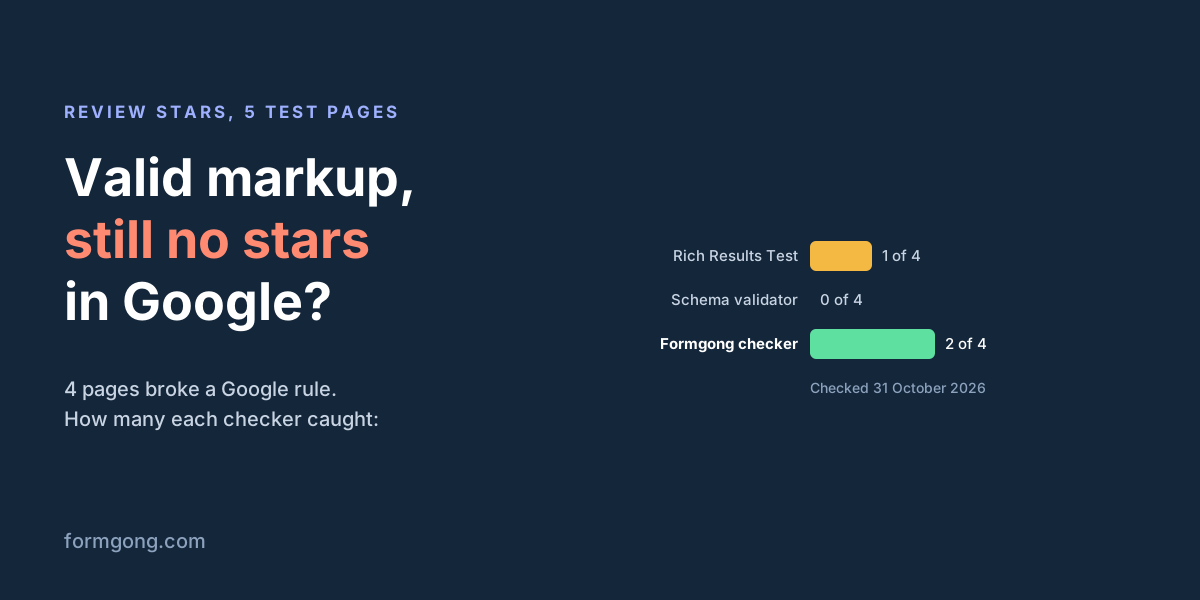
The Schema Markup Validator found no errors in any of the five pages. It checks that the schema.org vocabulary is used correctly, not whether Google will show stars. The Rich Results Test caught one of the four broken pages, the one with a missing review count. It called the café's markup valid, though Google's own rules say that page will never get stars. It also passed the product whose rating appears nowhere on the page, and the rating written with a comma.
So a green result in either tool tells you the markup can be read. It does not tell you the page can get stars. Below is the café's markup that passed with 5 valid items.
<script type="application/ld+json">
{
  "@context": "https://schema.org",
  "@type": "LocalBusiness",
  "name": "Corner Cafe",
  "address": { "@type": "PostalAddress", "streetAddress": "1 Main St", "addressLocality": "Springfield" },
  "aggregateRating": { "@type": "AggregateRating", "ratingValue": "5", "reviewCount": 2 },
  "review": [
    { "@type": "Review", "author": { "@type": "Person", "name": "Carla M." },
      "reviewRating": { "@type": "Rating", "ratingValue": 5 }, "reviewBody": "Best flat white in town." },
    { "@type": "Review", "author": { "@type": "Person", "name": "Dan R." },
      "reviewRating": { "@type": "Rating", "ratingValue": 5 }, "reviewBody": "Friendly staff." }
  ]
}
</script>
Reviews of your own business never get stars
Since September 2019, Google does not show review stars for what it calls self-serving reviews. If a business controls the reviews about itself, its pages that use LocalBusiness or Organization markup are "ineligible for star review feature," in the words of Google's review snippet guide. That includes reviews shown through an embedded widget, even a Google or Facebook reviews widget.
This is why a café, a dentist, a plumber or a SaaS home page with an Organization rating gets no stars, however clean the markup. The test page above is exactly this case. Adding more reviews or fixing fields will not change it.
What does still qualify: reviews of products you sell, on each product's own page, and sites that review other businesses. If you run a shop, put the rating on product pages, not on the home page or the About page. If you run a local service with no products, review markup will not bring stars to your own site; spend the effort on getting reviews and showing them to visitors instead.
A required field is missing or in the wrong format
If the page is eligible, check the fields Google requires. Missing ones make the item invalid, and the Rich Results Test does report these:
- A count with every average. An
aggregateRatingneedsratingValueand eitherreviewCountorratingCount. Google's guide: "At least one of ratingCount or reviewCount is required." - A name for the reviewed item. The product, course or app needs its
name, also when the review is nested inside it. - An author on every review. A real name, shorter than 100 characters. Text like "50% off until Saturday" does not count as a name.
- A type Google accepts. The reviewed item must be one of 17 types, such as Product, SoftwareApplication, Course, Book or Recipe. Reviews on a
Serviceor a plainWebPageare not eligible. - A dot in decimals. Write
4.6, not4,6. Google's guide asks you to "use a dot instead of a comma". The test passed our comma version, which is no reason to keep it. - An average when you list several reviews. If you mark up more than one review, Google asks for the
aggregateRatingof them too.
For a product page, Google's product snippet rules add one more: the Product needs a name and at least one of review, aggregateRating or offers. Here is the product page from our test, which passed with 4 valid items.
<script type="application/ld+json">
{
  "@context": "https://schema.org",
  "@type": "Product",
  "name": "Stoneware mug",
  "image": "https://shop.example.com/mug.jpg",
  "sku": "MUG-01",
  "aggregateRating": {
    "@type": "AggregateRating",
    "ratingValue": "4.5",
    "reviewCount": 2,
    "bestRating": 5,
    "worstRating": 1
  },
  "review": [
    { "@type": "Review", "author": { "@type": "Person", "name": "Anna K." }, "datePublished": "2026-10-02",
      "reviewRating": { "@type": "Rating", "ratingValue": 5 }, "reviewBody": "Keeps tea hot, glaze is lovely." },
    { "@type": "Review", "author": { "@type": "Person", "name": "Ben T." }, "datePublished": "2026-10-20",
      "reviewRating": { "@type": "Rating", "ratingValue": 4 }, "reviewBody": "Good mug, a bit heavy." }
  ]
}
</script>Google can read it and still chooses not to show it
If the page passes everything above and still has no stars, look at these.
Time. A new or changed page can take days to be recrawled. Use URL Inspection in Search Console to ask for a recrawl, then wait.
Google's choice. Google picks the result type for each search, device and location. Stars may show for one query and not for another, or not at all.
A manual action. If Google decided the markup was spammy, it ignores the structured data on the page while the page itself keeps ranking. Search Console's Manual Actions report says if this happened. The Review snippets report in the same place shows which pages Google read as valid or invalid.
Stars in Google Shopping are a separate system
Stars under a product in Google Shopping and in Shopping ads do not come from your page markup. Google compiles them from several sources, and the way to add your own reviews is Merchant Center's Product Ratings, which has its own rules:
- 50 reviews to start. "You must have a minimum of 50 reviews across all of your products." Below that, no ratings show on Shopping or ads.
- A full feed every month. You send a product reviews feed at least monthly, through Merchant Center or a supported reviews aggregator. Each upload replaces the last one, so it must include all reviews.
- All reviews, including bad ones. Google asks you to share all your product reviews, "including low-star reviews." A feed of only five-star reviews breaks the policy.
- Incentives declared. A discount for a review is allowed only if it does not depend on the rating, and those reviews must carry the
is_incentivized_reviewtag. - GTINs that match. Google matches reviews to products mainly by GTIN, and the identifiers must be the same in your product feed and your reviews feed. Without GTINs, some reviews may not match any product.
- Weeks, not days. After Google reviews the feed, it says ratings typically go live in 2 to 4 weeks.
If your Shopping stars are missing, check those six points before you touch the markup on your pages. For a Shopify-only walk-through, see Shopify reviews not showing.
What to check, in order
Is the page about a product, or about your business? If it is your own LocalBusiness or Organization page, stop here: it will not get stars.
Run the live URL through the Rich Results Test. Fix anything it calls invalid, starting with a missing count or name.
Open the page as a visitor. The rating and the reviews in the markup must be visible, and every visible review must be in the markup.
Check where the reviews come from. Your own customers, collected on your site, with incentives disclosed.
Ask Google to recrawl, then wait. Watch the Review snippets report in Search Console for a few weeks.
For Shopping, check the feed. At least 50 reviews, sent monthly, all ratings included, GTINs that match your products.
Where Formgong helps
Formgong Reviews collects reviews from your own customers and shows them per product. It does not guarantee stars in Google, because no tool can. What it does is set things up the way Google's rules ask:
- A free review schema generator. No sign-up, runs in your browser. It builds Review and AggregateRating markup for Google's 17 types, errors on a missing count, name or author, and warns when the page is a LocalBusiness or Organization that will get no stars. It reads the markup only, so still test the live page afterwards.
- Product markup only where stars are possible. On WooCommerce, the Formgong WordPress plugin adds the rating to the Product markup WooCommerce already prints, so Google sees one product with one rating. Our Shopify and Wix apps, still waiting for their store listings, add Product markup only when the page has no rating yet. The plain widget and the rating badge add no markup, because a business's reviews of itself cannot get stars.
- A Merchant Center reviews feed on every plan. For WooCommerce stores, and for Shopify stores through the Shopify app once it is listed, because the product page, GTINs and SKUs must come from the store itself. It lists approved written reviews collected on your site, marks reviews from a post-order email as verified purchases and reviews given while you offered a coupon as incentivized. Imported reviews stay out of it. Google asks for all reviews, so approve the low-star ones too.
The Google stars guide shows where to find the feed address in your dashboard.
Tell us what you found
If your stars came back after one of these fixes, or disappeared for a reason this page does not cover, write to support@formgong.com. We will add the cases readers send us.
What Formgong Reviews includes for free
- Unlimited review sites and reviews. Text, photo, video and voice reviews on Free.
- A widget with no view limit. The review widget, carousel, badge and stars in product lists load as often as your pages do.
- Review emails in your store's name. Sent after each order with your logo and colours, replies to you, no email service to set up; buyers can rate inside Gmail without leaving the email, and get one reminder (how it works).
- Bring your old reviews. Import from Judge.me, Yotpo, Loox, Shopify Product Reviews, WooCommerce, Etsy or a CSV.
- You decide what shows. Approve each review or choose a publishing mode, reply in public or in private, and let shoppers ask the author a question.
- Google. A Merchant Center review feed, and product rating markup through the WordPress plugin.
- Reviews from your form. People who filled in your contact form can get a review request automatically.
- One account for the rest. Contact forms with Telegram and Google Sheets, an AI help chat, and free website templates.
Frequently asked questions
Why does the Rich Results Test say valid but no stars show in Google?
Because the test checks the markup, not Google's eligibility rules. In our test it called a café's self-review markup valid, and Google never shows stars for a business's reviews of itself. It also missed a rating that was hidden from visitors.
Can a local business get review stars on its own website?
No. Since September 2019 Google does not show stars on LocalBusiness or Organization pages when the business controls the reviews about itself, including reviews shown through a widget. Sites that review other businesses can still get them.
How many reviews do I need for stars in Google Shopping?
At least 50 reviews across all your products, sent to Merchant Center in a product reviews feed at least once a month. Google says ratings typically go live 2 to 4 weeks after it reviews the feed.
How long does it take for review stars to appear?
In search, it depends on when Google recrawls the page, which can take days or longer, and Google may still decide not to show stars. In Shopping, expect 2 to 4 weeks after the feed is approved.
Will Formgong make stars show in Google?
No tool can guarantee that. On WooCommerce, the Formgong plugin adds your rating to each product's markup and Formgong sends a Merchant Center reviews feed. The free schema generator warns you about markup that cannot get stars.
Sources and documentation
Official references for this guide: Google: Review snippet structured data, Google: Product snippet structured data, Google: General structured data guidelines, Google: Making review rich results more helpful (2019), Merchant Center: Product Ratings policies, Merchant Center: Product Ratings eligibility, Google Product Review Feeds: XML schema, Google Rich Results Test, Schema Markup Validator. Google stars and the product reviews feed, where data is stored.