What does an AI form builder actually give you?
You type “a booking form for my salon” and expect a form that works. What you get depends on the tool. Some keep the form inside their own product. Others give you HTML to paste, or a long answer from a language model. Whether a message from that form ever reaches you is a separate question, and it is the one that matters on launch day.
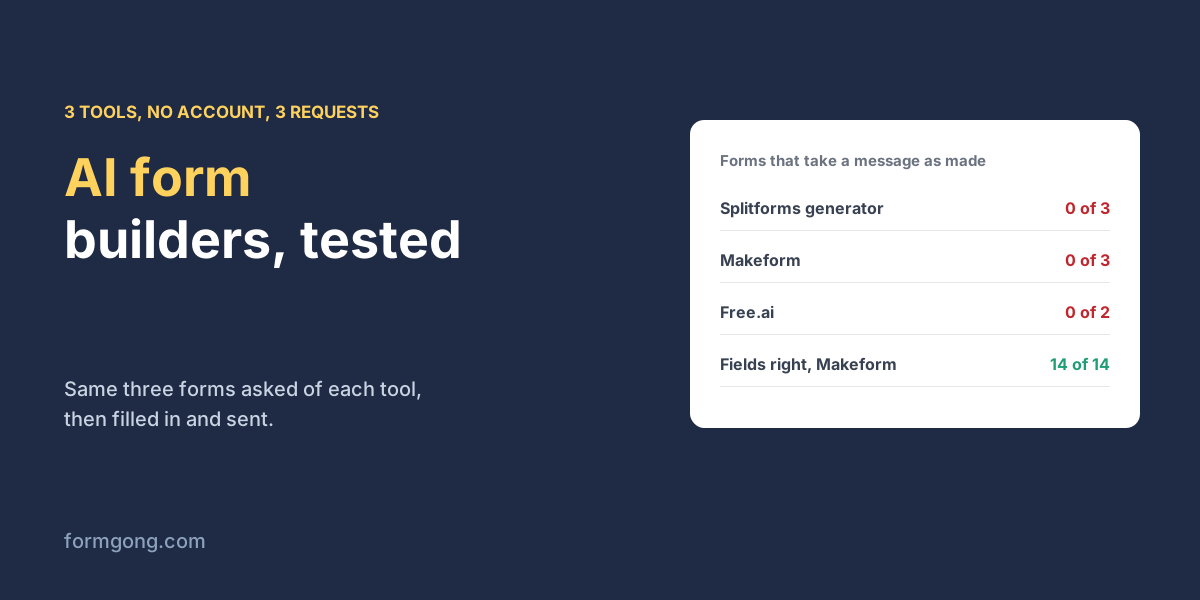
We wrote three requests once and gave them, word for word, to every AI form builder we could use without creating an account. They asked for a contact form, a booking form for a hair salon, and a job application with a resume upload. Then we counted the fields each tool got right and filled in each form to see what was sent.
P1  A contact form with name, email, phone and message
P2  A booking form for a hair salon with name, phone, preferred date and time,
    a choice of service (cut, colour or beard trim) and notes
P3  A job application form with name, email, a resume upload and a short cover letter
Which AI form builder got the fields right?
| Tool | Account needed | Items it got right | Sends as copied |
|---|---|---|---|
| Splitforms AI form generator | No | 10 of 14 | No: placeholder key; with a key, 3 of 3 sent, but no file |
| Makeform AI form generator | Only to publish | 14 of 14 | No: 0 of 3 can publish without signing in |
| Free.ai AI Form Builder | No (6,000 tokens a day) | 0 of 8 (2 answers cut off) | No: neither answer had a submit button |
| Formgong form builder (not AI) | No, key by email | 13 of 14 (time as a text box) | 2 of 3; the file form needs its CAPTCHA first |
Makeform was the only tool that understood all three requests. It made separate date and time fields, a service choice with exactly Cut, Colour and Beard trim, and a real file upload for the resume with a 20 MB limit. Its banner then says “Sign in to keep this form, publish and share it”, so without an account none of the three can take a submission.
Splitforms' generator got the contact form right and drifted on the other two. The salon booking lost its time field, gained a required email box nobody asked for, and the service choice became a “Topic” menu with General, Sales, Support and Other. The job application turned the resume upload into a “Link to resume / CV” box and dropped the cover letter. Its own help text says it parses the description in your browser. In our run the page made no request to any server while generating, apart from its analytics, so there is no language model behind the word “AI” here, only keyword matching.
Free.ai is a real model, Qwen 3.6 35B by default, and both of its answers stopped mid-way. The contact form ended inside the first input tag after 2,231 tokens; the job application ended right after <body>, with only styles above it. Each answer began “Here is a complete, single-file solution”. Without an account you get 6,000 tokens a day, and after two tries 1,530 were left, too few for a third. Booking forms need an account there, so we could not ask for the salon one.
Does a form from an AI form builder send anywhere?
Only one tool gave us code we could test end to end. Splitforms' forms post to its own service with YOUR_ACCESS_KEY in a hidden field, so as copied they need a key from that service first. To see what they would send, we pointed them at a local copy of Formgong's backend with a test key. All 3 were stored, with a subject line the generator adds, but the job application arrived with a link box and no file, because the request never had a file input in it. The forms also set no autocomplete on any field and marked the message box optional, so a visitor can send an empty contact message.
That matches a wider test of HTML form generators, where the code looked finished and nothing received it. Whatever tool you use, read the generated <form> tag before you paste it. Check the action address, the key, enctype="multipart/form-data" if there is a file, a name on every field, and the fields you asked for. The snippet below is the job application with those fixed.
<!-- What to check in any generated form before you paste it -->
<form action="https://formgong.com/submit" method="POST"
      enctype="multipart/form-data">             <!-- needed for the resume file -->
  <input type="hidden" name="access_key" value="fk_your_access_key">
  <label>Name <input name="name" autocomplete="name" required></label>
  <label>Email <input name="email" type="email" autocomplete="email" required></label>
  <label>Resume (PDF) <input name="resume" type="file" accept=".pdf" required></label>
  <label>Short cover letter <textarea name="cover_letter" required></textarea></label>
  <div aria-hidden="true" style="position:absolute;left:-9999px">
    <input name="botcheck" tabindex="-1" autocomplete="off">
  </div>
  <button type="submit">Send application</button>
</form>
Is ChatGPT or Lovable better than an AI form builder?
A general assistant writes similar code with the same gap, because the form still has to send to something. When we asked four AI assistants for contact form code 54 times, the backend changed from one answer to the next; which form backend AI assistants pick has the numbers. Site builders such as Lovable and Bolt often wire the form to Supabase or to nothing at all. Form backend for AI website builders covers that case, and our Lovable and Bolt prompt asks them to post to a form backend instead.
What does Formgong's form builder do differently?
It is not an AI builder, and we did not want to call it one. On the Formgong form builder you pick the fields yourself, and if you give it your site's address it reads the colours and font so the form matches. Building and copying the code need no account, and the key comes by email. For the same three forms it got 13 of 14 items, because it has no time field type and the time went into a text box. What it adds is the part the AI tools left out. A file field switches the form to multipart on its own, the code carries a note saying a file upload needs the form's CAPTCHA turned on, and once you have a key, a button sends a test submission so you see it arrive. That note mattered, because our test form had no CAPTCHA, so the job application with a resume was refused with a 400, while the contact and booking forms were stored on the first try. Static Forms' guide to AI form builders (12 June 2026) makes the same general point we do, that the review step after the first draft is where developers should spend their time.
Did an AI form builder do better for you?
If you know an AI form builder that makes a working form without an account, or a tool on this list gives you a different result, write to support@formgong.com. We will run the same three requests through it and add the row.
Frequently asked questions
What is an AI form builder?
A tool that turns a sentence such as “a booking form for my salon” into form fields. Some give you a hosted form, others HTML to paste.
Is there a free AI form builder without sign-up?
We used three without an account. None gave a form that takes messages as made. One needs a sign-in to publish, one cut off its answers and one needs a key.
Can an AI form builder make a file upload field?
Makeform did. Splitforms' generator turned a resume upload into a link box. Check for type="file" and multipart encoding in the code.
Is the Splitforms AI form generator really AI?
Its help text says it parses your description in the browser, and in our run it made no server request while generating, apart from analytics.
Sources and documentation
Official references for this guide: Formgong: Which form backend do AI assistants pick? 54 answers, Formgong: Free form builder that matches your website. HTML forms, where data is stored.