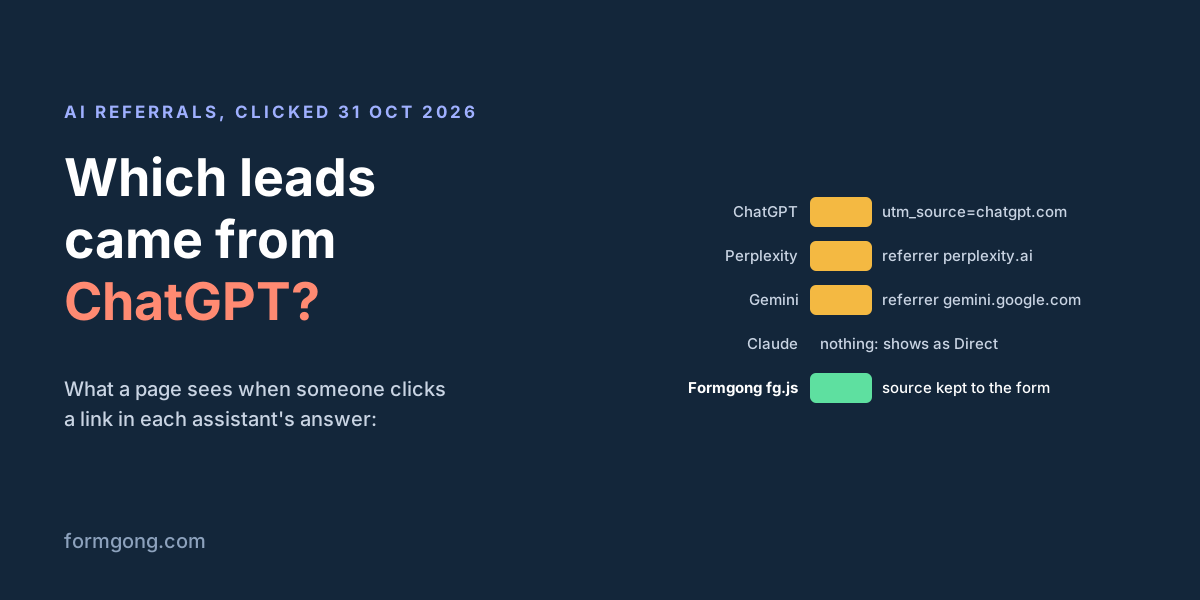
A customer says they found you through ChatGPT, and your analytics says Direct. We clicked links in four AI assistants and logged what the page on the other end received.
The short answer. ChatGPT adds <code>utm_source=chatgpt.com</code> to the links in its answers but sends no referrer; Perplexity and Gemini send their address as the referrer and add no tag; Claude sent neither in our test on 31 October 2026, so a visit from Claude looks the same as someone typing your address. To see the source next to each lead, read the tag or the referrer on the first page of the visit and save it in a hidden form field. Formgong's fg.js does this on every plan and prints the source on each notification.
Formgong
How to see which form leads came from ChatGPT
Your reports say Direct, the customer says ChatGPT
A new lead writes that an AI assistant recommended you. You open Google Analytics to see how many more came that way, and most of them sit under Direct, the bucket for people who typed your address or used a bookmark. The form submission in your inbox says nothing at all about where the person came from.
Both gaps have the same cause. Your site only learns where a visitor came from if the link carries a tag, or the browser sends a referrer, the address of the page the click came from. AI assistants handle this differently, and one of them sent neither in our test.
What each assistant passed to the page it linked to
What the page at the other end of an answer link received, 31 October 2026. Desktop Chrome, one answer per assistant, one link clicked per assistant. "Empty" means document.referrer was an empty string.
Assistant
Tag in the link
Referrer your page sees
Links in the answer
ChatGPT
utm_source=chatgpt.com on every link
Empty
13 of 13 tagged
Perplexity
None
https://www.perplexity.ai/
0 of 23 tagged
Gemini
None
https://gemini.google.com/
0 of 6 tagged
Claude
None
Empty
0 of 20 tagged
Copilot
Not tested
Not tested
Needs a Microsoft sign-in
ChatGPT is the only one that documents anything. OpenAI's publisher FAQ said that "ChatGPT automatically includes the UTM parameter utm_source=chatgpt.com in referral URLs" (archived copy; on 31 October 2026 the live address redirected to an unrelated help page). Every link in our ChatGPT answer had the tag. Every one also had rel="noopener noreferrer", which tells the browser to send no referrer, so the tag is the only trace. If someone copies the address and drops the part after the question mark, nothing is left.
We found nothing about tags or referrers on the help pages of Perplexity, Anthropic, Google's Gemini or Microsoft's Copilot. What the table shows is what their sites did that day. Perplexity and Gemini open links with rel="noopener" only, and their pages tell the browser to send just the site address, so you see perplexity.ai or gemini.google.com but not the conversation. Claude marks its citation links noreferrer, and the links in the text of its answer also arrived with an empty referrer.
Copilot asked us to sign in before answering, and we did not create an account for this test.
Why Google Analytics files part of it as Direct
GA4 puts a session in Direct when it has no source at all: no tag in the address and no referrer. A click from Claude in our test fits that exactly, and so does a ChatGPT link that lost its tag on the way, for example when it was copied without the end of the address.
GA4 now also has an AI Assistant channel. Google's help page names ChatGPT, Gemini, DeepSeek, Copilot and Grok as examples and says GA4 sets it "if the referrer matches a list of AI Assistants". It does not publish that list, Perplexity and Claude are not among the examples, and ChatGPT's links send no referrer for it to match. So the channel helps, but you cannot tell from Google's page which of these visits it will catch.
Even when GA4 gets it right, it counts sessions, not leads. It will not tell you which of this week's enquiries came from ChatGPT. For that, the source has to travel with the form submission.
The form is usually not on the page they landed on
The assistant links to an article, a service page or your home page. The visitor reads, clicks Contact and fills in the form there. By then document.referrer is your own landing page and the utm_source is gone from the address bar. In our replay the contact page's referrer was our own landing page in every case, never the assistant.
So read the source on the first page of the visit, keep it for the rest of the visit, and put it into the form when the form appears. sessionStorage fits: it lasts as long as the browser tab, and all four assistants opened their links in a new tab.
A hidden field that keeps the source
This works with any form backend that keeps the fields you send. Add the hidden input to your form and the script to every page. The script takes utm_source if the address has one, otherwise the referring site, otherwise writes none, and fills the field on whatever page the form is on.
Each submission then arrives with a line such as lead_source: chatgpt.com, www.perplexity.ai or gemini.google.com. none means the browser gave nothing: a typed address, a bookmark, a pasted link without its tag, or a click from Claude.
Hidden field plus script
<!-- Inside your form -->
<input type="hidden" name="lead_source">

<!-- On every page of the site, before </body> -->
<script>
(function () {
  var source = "";
  try { source = sessionStorage.getItem("lead_source") || ""; } catch (e) {}
  if (!source) {
    var utm = new URLSearchParams(location.search).get("utm_source");
    var ref = document.referrer ? new URL(document.referrer).hostname : "";
    source = utm || (ref && ref !== location.hostname ? ref : "") || "none";
    try { sessionStorage.setItem("lead_source", source); } catch (e) {}
  }
  document.querySelectorAll('input[name="lead_source"]').forEach(function (input) { input.value = source; });
})();
</script>
How we tested it, and how you can check your own site
On 31 October 2026 we asked ChatGPT, Perplexity, Claude and Gemini the same question in desktop Chrome, which free contact form backend to use for a static HTML site, and read every outbound link in the answer: its address, rel and target. Then we clicked one link per assistant and read document.referrer and the address on the page that opened. That gave the table above.
Next we replayed the four cases on a local test site in headless Chromium 153, with the same link attributes and referrer rules as the real sites. Each visit landed on one page, moved to a contact page, and sent the form. The hidden field held chatgpt.com, www.perplexity.ai, gemini.google.com and none for Claude. A pasted link that kept ?utm_source=chatgpt.com was still recognised; the same link without it came out as none.
You can check your own case in a minute. Click a link to your site in an assistant's answer, open the browser console on the new tab and type document.referrer and then location.search. What you see there is everything your form can know.
What Formgong records for each lead
If your form sends to Formgong, you do not need the snippet. The analytics script, fg.js, keeps the first page of each visit in the tab and adds the tag, the referring site and the landing page to the form as hidden fields. The hosted form page at /f/ loads it already. In the same replay, fg.js recorded chatgpt.com, perplexity.ai, gemini.google.com and Direct for Claude.
On every notification. Email, Telegram, Slack and Discord messages carry a line like chatgpt.com · Desktop · US, so you see where a lead came from without opening a report.
In the reports. Analytics shows which sources bring the most submissions, which sites send you visitors, and how many people arrived from an AI assistant over the last 12 weeks.
On every plan. Analytics and the source on notifications are part of the Free plan.
Nothing on your side can recover a source the browser never sent. For Claude, and for anyone who types your address after reading an answer, add a short "How did you hear about us?" select to the form with ChatGPT, Claude, Perplexity and Gemini among the options. If you have tried this on your own site and an assistant behaved differently from our table, tell us at support@formgong.com; we will re-run the test and update the page.
What Formgong's free plan includes
Build the form or bring your own. The form builder takes the colours and fonts from your site's address, with no sign-up; ready form templates copy into your account; AI writes the fields from one sentence. Any hand-written HTML form works too.
Websites with the form already connected. 28 free website templates post to Formgong out of the box.
250 submissions a month on unlimited forms. Spam does not count. Once a year, a busy month keeps delivering on credit until the 7th instead of stopping.
Everywhere you work. Email to up to 3 people at once, Telegram with Reply and Handled buttons, Google Sheets, Notion, and 3 signed webhooks for Slack, Discord, Zapier, Make or n8n.
Emails to your customers in your business's name. Formgong sends them under your business name and replies come back to you, with no email service of your own to set up: a review request to every lead, a reminder a visitor asked for, and review emails after an order with your logo and colours. People who agree can also go straight into your Mailchimp, Klaviyo, Brevo, MailerLite or Kit list. An automatic reply to each visitor is on Pro.
No captcha needed. A server-side spam filter, a honeypot, allowed domains and a block list; add your own Turnstile key if you want one.
Files and voice. Visitors can attach files, or record a voice message that arrives transcribed.
Made for AI-built sites. A hosted form page and a contact button; step-by-step guides for sites built with Lovable, Bolt, v0, Replit and Base44; an MCP server lets Cursor or Claude wire the form for you.
See what the form does.Analytics for views, starts, conversion and where each lead came from, and an alert when a form goes quiet.
One account for the rest. Customer reviews and an AI help chat that answers visitors from your own pages, with every message in one inbox. Data is stored in the EU.
Frequently asked questions
Does ChatGPT pass a referrer to my website?
Not in our test on 31 October 2026. Its answer links carried utm_source=chatgpt.com and rel="noopener noreferrer", so the page that opened saw an empty referrer and the tag in its address.
Why does Claude traffic show as Direct in Google Analytics?
Claude's links in our test sent no referrer and had no tag, so GA4 had no source to read. A visit like that looks the same as a typed address or a bookmark.
How do I know which form submissions came from ChatGPT?
Read utm_source or the referrer on the first page of the visit, keep it in sessionStorage, and copy it into a hidden form field. Formgong's fg.js does this for you and shows the source on each notification.
Does Perplexity add UTM parameters to its links?
Not in our test: 0 of 23 links in a Perplexity answer had a tag. The page that opened saw https://www.perplexity.ai/ as the referrer.
Can I see which question someone asked the AI before visiting?
No. Perplexity and Gemini send only their site address, ChatGPT and Claude send no referrer at all, and none of them put the question in the link.