What review schema is, in one product page
Review schema is a short block of JSON-LD that tells Google what is reviewed on a page, its average rating, how many people rated it and, if you like, a few of the reviews. It sits in a <script type="application/ld+json"> tag anywhere in the page and changes nothing visitors see.
On a shop, the usual shape is one Product with two properties inside it: aggregateRating for the average and review for single reviews. You can use either one alone or both. If you only want to know why stars are missing from markup you already have, read why review stars don't show in Google instead; this page is about writing the markup so it is valid from the start.
A complete example from our generator
We filled in our review schema generator for a made-up product: a tote bag rated 4.6 from 38 reviews, with two of those reviews written out. This is the markup it produced, unchanged. On 31 October 2026 Google's Rich Results Test reported "4 valid items detected" for it (one product snippet, three review snippets), and the Schema Markup Validator found 0 errors and 0 warnings.
The rating lives inside the Product, so nothing in it needs itemReviewed, and every number is a plain number with a dot. The scale is stated with bestRating and worstRating; on a 1 to 5 scale that is optional, but it costs two lines. Replace the values with your own and keep only reviews that visitors can read on the page.
<script type="application/ld+json">
{
  "@context": "https://schema.org",
  "@type": "Product",
  "name": "Waxed canvas tote, olive",
  "url": "https://shop.example.com/products/waxed-tote-olive",
  "image": "https://shop.example.com/img/waxed-tote-olive.jpg",
  "brand": {
    "@type": "Brand",
    "name": "Oakline"
  },
  "aggregateRating": {
    "@type": "AggregateRating",
    "ratingValue": 4.6,
    "reviewCount": 38,
    "bestRating": 5,
    "worstRating": 1
  },
  "review": [
    {
      "@type": "Review",
      "author": {
        "@type": "Person",
        "name": "Priya S."
      },
      "reviewRating": {
        "@type": "Rating",
        "ratingValue": 5,
        "bestRating": 5,
        "worstRating": 1
      },
      "datePublished": "2026-10-12",
      "reviewBody": "Holds a laptop and groceries, straps still look new."
    },
    {
      "@type": "Review",
      "author": {
        "@type": "Person",
        "name": "Tom H."
      },
      "reviewRating": {
        "@type": "Rating",
        "ratingValue": 4,
        "bestRating": 5,
        "worstRating": 1
      },
      "datePublished": "2026-10-19",
      "reviewBody": "Sturdy. The wax smell fades after a week."
    }
  ]
}
</script>
Required and recommended properties
Google's review snippet guide splits the properties into required and recommended. Missing a required one makes the item invalid; missing a recommended one does not.
| Property | Where it goes | Google says | What to watch |
|---|---|---|---|
name | Product (or other reviewed item) | Required | Also when the rating is nested inside it. |
aggregateRating.ratingValue | AggregateRating | Required | The average, with a dot: 4.6, not 4,6. |
reviewCount or ratingCount | AggregateRating | One of them required | Never 0. Leave the average out until there is a review. |
bestRating, worstRating | AggregateRating and Rating | Recommended | Google assumes 5 and 1 when they are missing. |
author | Review | Required | A Person or Organization with a real name, under 100 characters. |
reviewRating.ratingValue | Review | Required | Can be left out only when the review has both an author and a date. |
itemReviewed | Review or AggregateRating | Required only when not nested | One of the 17 types Google accepts. |
datePublished | Review | Recommended | ISO 8601, for example 2026-10-12. |
Google's product snippet guide adds one rule for the Product itself: it needs a name and at least one of review, aggregateRating or offers. A product page that already prints price markup through its theme meets that with offers, and the rating goes into the same Product.
Nested rating or itemReviewed
There are two ways to say what a review is about. You can nest it, as in the example above: the Review or AggregateRating sits inside the thing it rates, and Google reads the parent as the reviewed item. Or you can write a standalone Review or AggregateRating and point to the item with itemReviewed. Google requires itemReviewed only in the second case, and it must be one of 17 types: Book, Course, CreativeWorkSeason, CreativeWorkSeries, Episode, Event, Game, HowTo, LocalBusiness, MediaObject, Movie, MusicPlaylist, MusicRecording, Organization, Product, Recipe or SoftwareApplication (their schema.org subtypes count too).
For a product page, nest. We tested a standalone AggregateRating whose itemReviewed was a Product with only a name. The review snippet passed, but the Rich Results Test marked the product snippet invalid: Either "offers", "review", or "aggregateRating" should be specified. The same rating nested inside the Product passes both. Leave out itemReviewed and you get Missing field "itemReviewed"; point it at a Service and you get Invalid object type for field "itemReviewed".
Standalone markup still fits a page that is itself one review, such as a book review on a blog. This one got "1 valid item detected" in the Rich Results Test.
<script type="application/ld+json">
{
  "@context": "https://schema.org",
  "@type": "Review",
  "itemReviewed": {
    "@type": "Book",
    "name": "The Quiet Workshop"
  },
  "author": { "@type": "Person", "name": "Dana R." },
  "reviewRating": { "@type": "Rating", "ratingValue": 4 },
  "datePublished": "2026-10-20",
  "reviewBody": "Practical and short. The chapter on pricing is the best part."
}
</script>
ratingCount or reviewCount
Google requires at least one of the two on every aggregateRating, and the difference is small but real. In Google's words, ratingCount is "the total number of ratings for the item on your site". reviewCount is the number of people who left a review, with or without a rating. Schema.org defines them the same way, as counts of ratings and of reviews.
Use reviewCount when every rating comes with a written review, which is how most review apps work. Use ratingCount if people can tap a star without writing anything, and give both if your numbers differ. Either way, the count should match what the page shows next to the stars. Of the five shop pages we read, four used reviewCount and one used ratingCount; all five passed. Our generator writes reviewCount, so change the name by hand if star-only ratings are part of your number.
Do not publish a count of 0, which our generator reports as an error. Add the aggregateRating once the first review is in.
bestRating, worstRating and the scale
Google assumes a 1 to 5 scale. If yours is 1 to 5, bestRating and worstRating are optional. If it is anything else, such as a score out of 10 or 100, you must say so; Google's own example rates a book 88 with "bestRating": 100. Google's error list has a message for a value above 5 with no scale: Rating is missing required best and/or worst values.
Write decimals with a dot. Google's guide asks for 4.4 instead of 4,4, even on pages in languages that use a comma. If you show "4,4" to visitors in Microdata, put the dot version in a content attribute. In JSON-LD, just write the number.
Ratings belong on products, not on your business
Since September 2019 Google does not show stars for reviews a business controls about itself on pages marked up as LocalBusiness or Organization, and that includes reviews shown through an embedded widget. The markup can be perfectly valid and still never get stars. So do not add an aggregateRating to your home page's Organization block, and do not paste your Google or Trustpilot average into your markup either: Google's guide says "Don't aggregate reviews or ratings from other websites."
Some guides on this topic start with collecting your Google reviews and then generating rating markup from them. On your own site that breaks both rules at once. The safe place for a rating is the page of each product you sell, built from reviews collected on your site. We follow the same rule on our own pages: a Formgong public review page marks up the business as an Organization with no AggregateRating at all, and a test checks that it stays that way.
Errors you will see, and what they mean
The Rich Results Test and Search Console's Review snippets report use the same short messages. Google publishes them with a placeholder, Missing field "property name", and fills in the property when it reports one. These are the ones that come up with review markup.
| Error text | What causes it | Fix | Source |
|---|---|---|---|
| Missing field "itemReviewed" | A standalone AggregateRating or Review that does not say what it rates | Nest it inside the Product, or add itemReviewed with a @type and name | Our test |
| Invalid object type for field "itemReviewed" | The reviewed item is a type Google does not accept, such as Service | Use one of the 17 types; for things you sell, Product | Our test |
| Missing field "author" | A review with no author, or an empty name | Add author as a Person with the reviewer's name | Our test |
| Multiple reviews without aggregateRating object | Two or more reviews and no average | Add aggregateRating with the average and the count | Our test |
| Either "offers", "review", or "aggregateRating" should be specified | A Product that holds none of the three, for example one used only as itemReviewed | Nest the rating inside the Product | Our test |
| Either "ratingCount" or "reviewCount" should be specified | An average with no count | Add reviewCount (or ratingCount) | Our earlier test |
| Rating value is out of range | A value outside worstRating to bestRating, such as 0 on a 1 to 5 scale | Fix the value or set the real scale | Google's list |
| Item does not support review | Reviews on a type Google does not support | Move the review to a supported type | Google's list |
Errors make an item invalid and not eligible. Warnings, which the test calls non-critical issues, do not. Fix the errors first; warnings about missing recommended properties can wait.
Which checker catches what
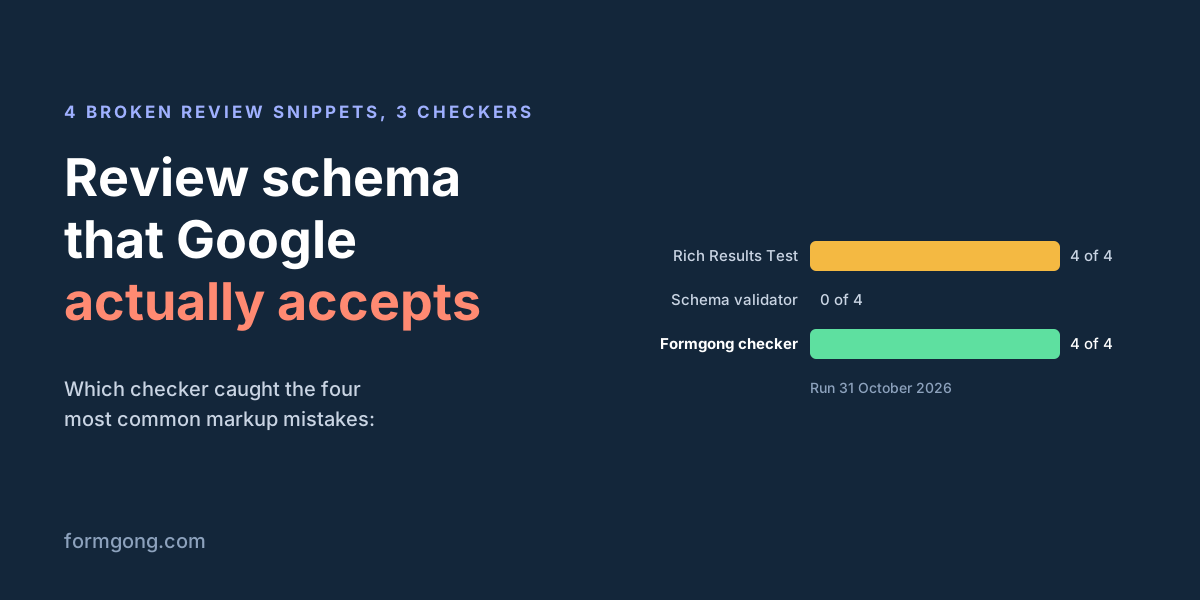
We ran four broken versions of the tote markup through three checkers on 31 October 2026: no itemReviewed, a Service as the reviewed item, two reviews with no average and one without an author, and a standalone rating pointing at a Product.
- Rich Results Test: flagged 4 of 4, each with the messages in the table above. It checks Google's required fields, so it is the one to trust before you publish.
- Schema Markup Validator: flagged 0 of 4. It checks that you used schema.org words correctly, and all four use them correctly. It did catch a misspelled type and an unknown property when we tried those, so it works; it just does not know Google's rules.
- Our generator's checker: flagged 3 of 4 on the first run. It caught the missing item, the wrong type and the missing author, but not the missing average next to two reviews or the product snippet rule. We added both rules the same day, and it now flags 4 of 4 with the same reasons Google gives. Use it while you edit, then run the Rich Results Test on the live page.
None of the three looks at your page the way a visitor does. Google also asks that the rating in the markup is visible on the page, and only you can check that.
What five shops publish through their review apps
To see what working markup looks like in the wild, we picked five public product pages of shops whose reviews come from Judge.me, Okendo or Yotpo. We read the JSON-LD in the HTML the server sends, read it again after the page ran its scripts in a headless browser, and ran each URL through the Rich Results Test.
| Shop | Review app | Rating sits on | Count property | Single reviews marked up | Rich Results Test |
|---|---|---|---|---|---|
| Jewellery store | Judge.me | Product | reviewCount | 34 of 59 | 37 valid items |
| Men's grooming store | Judge.me | Product | reviewCount | None, average only | 4 valid items |
| Outdoor clothing store | Okendo | Product | ratingCount | None, average only | 3 valid items |
| Personal care brand | Yotpo | Product | reviewCount | None, average only | 5 valid items |
| Shoe brand | Yotpo | ProductGroup (a Product with variants) | reviewCount | None, average only | 21 valid items |
All 5 of 5 passed with no errors in review snippets. All 5 put the rating on the product, not on the shop's Organization, and all 5 had it in the first HTML rather than adding it later with JavaScript, which Google's product guide recommends for Shopping. Only 1 of 5 marked up single reviews (34 of the product's 59); the other 4 gave just the average and the count. One page held two Product blocks for the same item, one from the theme and one from the review app, and the test still counted a single product snippet. One of the 34 reviews had the author name "Anonymous", and the test accepted it.
On these five pages, whether the theme or the app wrote it, the markup was right. The errors in the table above are what we saw when markup is written by hand or edited after it was generated, which is the case this page is for.
Add it to your page
Check what the page already has. View the page source and search for
application/ld+json. If your theme already prints a Product, addaggregateRatingandreviewto it instead of adding a second Product.Build the block. Open the review schema generator, pick Product, enter the name, the average and the count, and add the reviews that the page shows. It runs in your browser and needs no sign-up.
Match the page. The average and the count in the markup should be the numbers next to the stars on the page, and every review you mark up should be readable there.
Paste it. Anywhere in the page, usually before
</head>. On WordPress, use a Custom HTML block or your SEO plugin's custom code field; on Webflow, Framer or Squarespace, the page's custom code setting.Test the live URL. Run it through the Rich Results Test, fix every error, then watch the Review snippets report in Search Console.
If your reviews come from Formgong
The Formgong review widget shows your reviews but adds no markup to the page, because the same widget is used on business sites where stars are not possible. On a product page, add the markup yourself with the generator: open Fill in from your Formgong reviews, paste the site's access key and, if you show reviews per product, the product id. It loads the same approved reviews the widget shows, so the average and the count in your markup match the page.
Our Shopify theme block can add the Product markup for you, with JavaScript in the browser, on product pages that have no rating yet; the Shopify app is still waiting for its App Store listing. Stars in Google Shopping come from a separate reviews feed in Merchant Center, which this guide covers.
Tell us what you found
If the Rich Results Test shows you an error on review markup that is not in the table above, send us the message and the markup at support@formgong.com. We will add it, and fix our generator's checker if it missed the problem.
What Formgong Reviews includes for free
- Unlimited review sites and reviews. Text, photo, video and voice reviews on Free.
- A widget with no view limit. The review widget, carousel, badge and stars in product lists load as often as your pages do.
- Review emails in your store's name. Sent after each order with your logo and colours, replies to you, no email service to set up; buyers can rate inside Gmail without leaving the email, and get one reminder (how it works).
- Bring your old reviews. Import from Judge.me, Yotpo, Loox, Shopify Product Reviews, WooCommerce, Etsy or a CSV.
- You decide what shows. Approve each review or choose a publishing mode, reply in public or in private, and let shoppers ask the author a question.
- Google. A Merchant Center review feed, and product rating markup through the WordPress plugin.
- Reviews from your form. People who filled in your contact form can get a review request automatically.
- One account for the rest. Contact forms with Telegram and Google Sheets, an AI help chat, and free website templates.
Frequently asked questions
Do I need itemReviewed in review schema?
Only for a standalone Review or AggregateRating. When the rating is nested inside a Product, Google treats the Product as the reviewed item, and itemReviewed should be left out. Without it on standalone markup, the Rich Results Test reports Missing field "itemReviewed".
Should I use ratingCount or reviewCount?
Google requires at least one. reviewCount counts people who left a review; ratingCount counts all ratings, including stars without text. If every rating on your site comes with a review, use reviewCount, and make it match the number shown on the page.
Can I add aggregate rating schema to my home page or business?
You can, but Google will not show stars for it. Since September 2019, reviews a business controls about itself on LocalBusiness or Organization pages are not eligible, widgets included. Put ratings on the pages of the products you sell.
Is bestRating required in AggregateRating?
No. Google assumes 5 as the best and 1 as the worst value. Add bestRating and worstRating when your scale is different, such as out of 10 or 100, or the Rich Results Test can report the rating as out of range.
Is there a free review schema generator?
Formgong's review schema generator is free and needs no sign-up. It builds Product, SoftwareApplication, Course and 14 other types, checks the markup in your browser and can fill in the numbers from your Formgong reviews.
Sources and documentation
Official references for this guide: Google: Review snippet structured data, Google: Product snippet structured data, Search Console: Rich result error messages, Google: Making review rich results more helpful (2019), schema.org: AggregateRating, Google Rich Results Test, Schema Markup Validator. Google stars and the product reviews feed, where data is stored.