Why the form needs something in between
The HTML form has no idea what a database is. When the visitor presses Send, the browser packs the fields into a request and sends it to the URL in action. Whatever runs at that URL decides what happens next. For a database that means a script on a server that holds the database password, checks the fields and inserts a row.
The script has to live on the server for a simple reason: the database password would otherwise be in the page, and anyone could read it and write to your database. So the question “how do I connect a form to a database” is really “what receives the form”. There are three common answers, and which one fits depends on where your site is hosted.
PHP and MySQL, and the bug in most tutorials
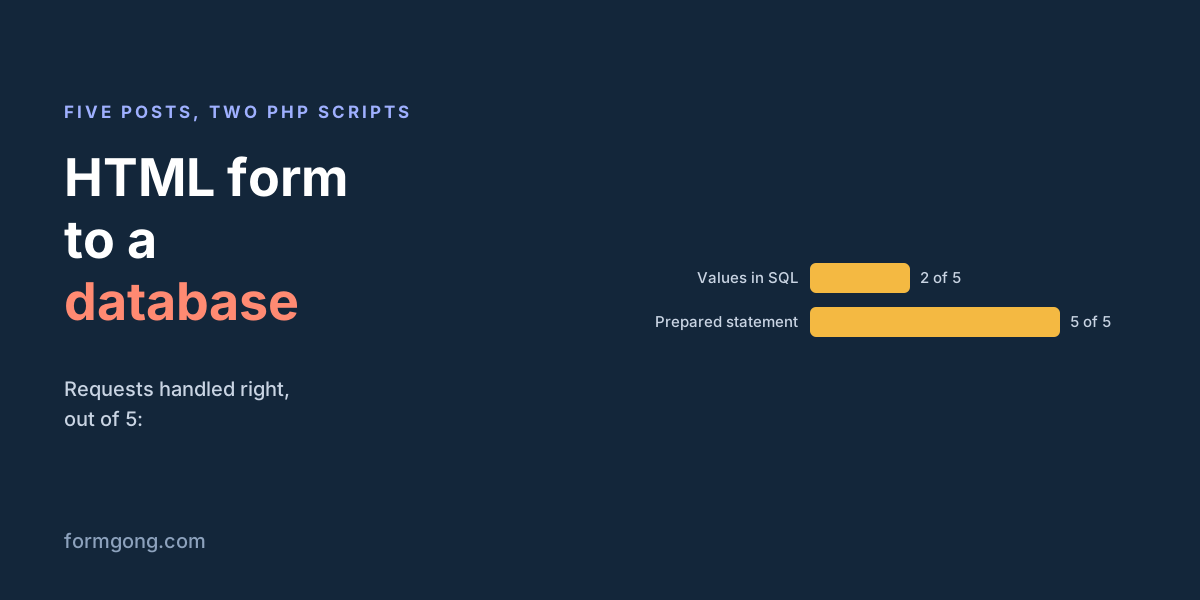
If your host runs PHP, a script of fifteen lines is enough. Most tutorials show the short version below it, where the form values are glued straight into the SQL text. We ran both against MySQL 8.0 on our server and sent each the same five requests.
| What was sent | Tutorial script (values pasted into SQL) | Prepared statement |
|---|---|---|
| A normal message | 200, saved | 303 to a thank-you page, saved |
The name Liam O'Brien | 500, nothing saved | 303, saved as typed |
| A message with SQL hidden in it | 200, and a second row appeared with the database user name and the MySQL version | 303, saved as plain text |
| A message with 👍 | 200, saved | 303, saved |
| A plain GET of the script's address | 200, and an empty row was saved | 405, nothing saved |
The tutorial version failed on an ordinary Irish surname. The apostrophe in O'Brien ended the SQL string early, MySQL refused the broken statement, and since PHP 8.1 that throws an exception, so the visitor got a blank error page and the message was lost. With a crafted message the same flaw let us add our own row containing the database user name and server version. That is SQL injection, and OWASP lists prepared statements as defence option 1 against it.
The tutorial script also saved an empty row whenever someone opened its address in a browser, and bots do that constantly. The safer script refuses anything that is not a POST, checks the fields, and sends the visitor to a thank-you page with a 303, so a page reload does not post the form twice.
// Do not use: the version many tutorials show.
$sql = "INSERT INTO messages (name, email, message)
        VALUES ('" . $_POST['name'] . "', '" . $_POST['email'] . "', '" . $_POST['message'] . "')";
$db->query($sql);
The version to use
Create the table once, with utf8mb4 so names in any language and emoji are stored correctly. In our test a 👍 went in and came back as the same four bytes.
CREATE TABLE messages (
  id INT AUTO_INCREMENT PRIMARY KEY,
  name VARCHAR(200) NOT NULL,
  email VARCHAR(254) NOT NULL,
  message TEXT NOT NULL,
  created_at TIMESTAMP DEFAULT CURRENT_TIMESTAMP
) CHARACTER SET utf8mb4;
Then point the form's action at the script. Keep the database password in an environment variable or a config file outside the web folder, not in the script itself.
<?php
if ($_SERVER['REQUEST_METHOD'] !== 'POST') { http_response_code(405); exit; }
$name = trim($_POST['name'] ?? '');
$email = trim($_POST['email'] ?? '');
$message = trim($_POST['message'] ?? '');
if ($name === '' || !filter_var($email, FILTER_VALIDATE_EMAIL) || $message === '') {
  http_response_code(422); exit('Please fill in every field.');
}
$db = new mysqli('localhost', 'forms', getenv('DB_PASSWORD'), 'forms');
$db->set_charset('utf8mb4');
$stmt = $db->prepare('INSERT INTO messages (name, email, message) VALUES (?, ?, ?)');
$stmt->bind_param('sss', $name, $email, $message);
$stmt->execute();
header('Location: /thanks.html', true, 303);
On a static site
GitHub Pages, Netlify, Vercel and Cloudflare's static hosting do not run PHP, and posting a form to them gets a 405 or a 404, as our guide to 405 Method Not Allowed on forms shows. You have two ways to add the missing server part.
The first is a serverless function on the same host, writing to a hosted database such as Supabase, Neon or Cloudflare D1. The code looks like the PHP above: read the fields, check them, insert with parameters. You also take on what comes with it: spam filtering, rate limits, a way to read the rows, and an email so you know a message arrived. A database will not tell you anything happened.
The second is a form backend that does the receiving and storing for you. If what you need is a place where every submission is kept, searchable and exportable, that is less work than a database of your own.
Storing submissions with Formgong
With Formgong the form posts to our endpoint, and every submission is stored in your dashboard inbox, where you can search it and export it as CSV. On the free plan submissions are kept for 30 days, so for a permanent record send them on. Each new submission can add a row to a Google Sheet, with your own columns, or to a Notion database. If you want it in your own database, a webhook posts each submission as JSON to your function, which then needs only the insert, not the spam checks and email. Every one of those destinations is on the free plan, and the email to you comes with it. Our guide to sending an HTML form to Google Sheets walks through the spreadsheet version.
<form action="https://formgong.com/submit" method="POST">
  <input type="hidden" name="access_key" value="fk_your_access_key">
  <input type="text" name="botcheck" style="display:none" tabindex="-1" autocomplete="off">
  <label>Name <input name="name" required></label>
  <label>Email <input type="email" name="email" required></label>
  <label>Message <textarea name="message" required></textarea></label>
  <button type="submit">Send</button>
</form>
Which route to choose
If you already have PHP hosting and want the data in MySQL, write the prepared-statement script. If the site is static and you need your own tables for an app, use a serverless function and a hosted database. If what you need is a reliable record of contact messages with an email for each one, a form backend with an export or a sheet gets you there without code to maintain.
Saving forms another way?
If you store form data in a way this page does not cover, tell us at support@formgong.com. We would like to test it and add it.
What Formgong's free plan includes
- Build the form or bring your own. The form builder takes the colours and fonts from your site's address, with no sign-up; ready form templates copy into your account; AI writes the fields from one sentence. Any hand-written HTML form works too.
- Websites with the form already connected. 28 free website templates post to Formgong out of the box.
- 250 submissions a month on unlimited forms. Spam does not count. Once a year, a busy month keeps delivering on credit until the 7th instead of stopping.
- Everywhere you work. Email to up to 3 people at once, Telegram with Reply and Handled buttons, Google Sheets, Notion, and 3 signed webhooks for Slack, Discord, Zapier, Make or n8n.
- Emails to your customers in your business's name. Formgong sends them under your business name and replies come back to you, with no email service of your own to set up: a review request to every lead, a reminder a visitor asked for, and review emails after an order with your logo and colours. People who agree can also go straight into your Mailchimp, Klaviyo, Brevo, MailerLite or Kit list. An automatic reply to each visitor is on Pro.
- No captcha needed. A server-side spam filter, a honeypot, allowed domains and a block list; add your own Turnstile key if you want one.
- Files and voice. Visitors can attach files, or record a voice message that arrives transcribed.
- Made for AI-built sites. A hosted form page and a contact button; step-by-step guides for sites built with Lovable, Bolt, v0, Replit and Base44; an MCP server lets Cursor or Claude wire the form for you.
- See what the form does. Analytics for views, starts, conversion and where each lead came from, and an alert when a form goes quiet.
- One account for the rest. Customer reviews and an AI help chat that answers visitors from your own pages, with every message in one inbox. Data is stored in the EU.
Frequently asked questions
Can an HTML form save data to a database without PHP?
Not by itself. Something on a server must receive the post: PHP, a serverless function, or a form backend. On a static site without a server, a function or a form backend is the usual choice.
How do I connect an HTML form to a MySQL database?
Point the form's action at a server script that reads the fields and inserts them with a prepared statement. Never paste the values into the SQL string: in our test that broke on the name O'Brien.
Is it safe to put the database password in JavaScript?
No. Anything in the page can be read by visitors. The password belongs on the server, in an environment variable or a config file outside the web folder.
Can I store form submissions without running a database?
Yes. A form backend keeps them for you and can add each one to a Google Sheet or a Notion database, or post it to your own database through a webhook.
Sources and documentation
Official references for this guide: OWASP: SQL Injection Prevention Cheat Sheet, PHP manual: MySQLi prepared statements, PHP manual: Backward incompatible changes in PHP 8.1, MDN: Sending form data. Webhooks, where data is stored.