What the 429 means
429 is the HTTP status for rate limiting. RFC 6585 defines it as a client that “has sent too many requests in a given amount of time”, and says the answer may carry a Retry-After header with the wait. It deliberately leaves out how the server counts: per IP address, per form, per account or per anything else is the service's choice.
So a 429 tells you two things. Your form code and the endpoint are fine, because the server answered. And this particular post was not taken. What it does not tell you is which limit you hit or for how long, unless the service says so in the body or in Retry-After.
What 30 quick posts got from 10 form backends
| Service | First 429 | Retry-After | What the 429 said | CORS header on the 429 | Documented limit |
|---|---|---|---|---|---|
| Formgong | None in 30 | Not reached | Not reached | Yes, on every answer | 20 per 10 s per IP, then 20 a minute per IP and 30 a minute per form |
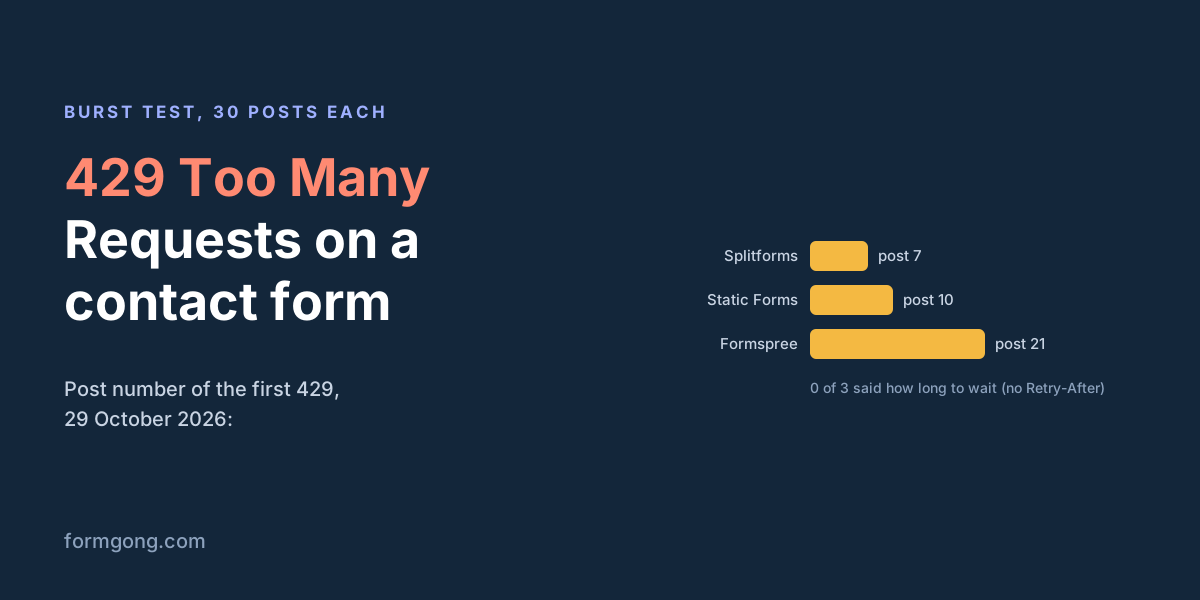
| Formspree | Post 21 | None | {"error":"Too many requests"} | Yes, your site's origin | 20 posts a minute |
| Splitforms | Post 7 | None | "code":"rate_limited", “Wait a minute and try again.” | Yes | 6 a minute and 20 per 15 minutes, per form and IP |
| Static Forms | Post 10, from its hosting firewall | None | {"error":{"code":"429","message":"Too Many Requests",…}} | None | Not readable: its docs blocked our reader |
| Forminit | None in 30 | Not reached | Not reached | Not reached | 1 per 5 s per IP |
| Formcarry | None in 30 | Not reached | Not reached | Not reached | 1 per 15 s per form and IP |
| Basin | None in 30 | Not reached | Not reached | Not reached | Not stated in the docs we read |
| Formspark | None in 30 | Not reached | Not reached | Not reached | Not stated in the docs we read |
| Web3Forms | None: all 30 got 403 (treated as a server) | Not reached | Not reached | Not reached | 429 documented, “wait for one hour” |
| FormSubmit | No answer: 521 outage on its side | Not stated in the docs we read |
Formspree and Splitforms stopped us exactly where their docs say they would. Static Forms' 429 came from Vercel, the platform it is hosted on, with the header x-vercel-mitigated: deny, so it was the hosting firewall talking and not the form service. None of the three 429 answers had a Retry-After header or any RateLimit header, so code that waits for one will not find it.
Read the “None in 30” rows carefully. We used made-up keys, so nothing was stored and nobody got an email, and a service may count only posts to a form that exists. A 429 here means the limit runs before the key is checked. No 429 says nothing about what a real form on that service does: Forminit and Formcarry document limits that our wrong-key posts never reached. FormSubmit answered every request with error 521, an outage on its side, so its row has no result. Formgong's own row shows the same thing from the inside: the per-minute limits run after the key is looked up, so a wrong key never meets them, and 30 posts in 25 seconds stayed under the 20-per-10-second brake. The contact form API page has the other answers from the same test.
Why a form backend sends 429, most likely first
- Too many posts from one IP address. This is the limit most services have, and the one you hit while testing: you press Send, change a field, press Send again. Everyone behind one office router or school network shares an address too. So does every visitor when your own server forwards the form, which is why Formcarry's docs tell you to post from the browser.
- Too many posts to one form. Some limits count all visitors together. A newsletter that sends a crowd to the contact page in the same minute, or a bot hammering the form, can use it up, and then real visitors get the 429 too.
- A firewall in front of the service. Cloudflare, Vercel and other hosts block traffic they think is a flood before the form service sees it. The body then looks unlike the service's normal errors, and it may lack CORS headers, which matters in the browser (below).
- Your page sends more than you think. A double-click on a button with no lock, Enter and a click together, or a script that retries every failure at once. Each of these doubles the count, and a retry loop on 429 keeps the limit hit for as long as it runs.
- The monthly allowance is used up. Some services answer 429 for that as well: Splitforms' docs list 429 for both cases, so read the code in the body. Waiting a minute does not help with this one; the plan or the month has to change.
To see which one you have, read the body before anything else. A service's own JSON with a code such as rate_limited is its limiter. A page from Cloudflare or Vercel is the firewall. Then count the POST requests in the browser's Network tab for one click.
Why load tests and double posts set it off
A load test fired at a form endpoint from one laptop is, to the service, one IP address posting dozens of times a minute. That is exactly what a per-IP limit exists to stop, so most of your test measures the 429 path. Spread the test across many machines and you move on to the per-form limit, which also turns away whoever was really trying to reach you during those minutes.
A load test with a made-up key, like ours, does not show where the real limit sits either, as the table above shows. If you need to know how your form behaves under a crowd, test your own page and send two or three real posts to the service, or ask the service for its numbers. It is their server, and their docs usually state the limit. Hammering a vendor's endpoint mostly tells their firewall about you.
Double posts are the everyday version of the same problem. Each extra copy counts toward the limit, so a form that sends twice per click hits a 20-a-minute limit after 10 messages. Lock the button while the request runs; our guide to duplicate form submissions counted which locks actually stop the second post.
How it shows up in fetch and in a plain form post
With fetch, a 429 does not throw. The promise resolves, res.ok is false and res.status is 429, so code that only catches errors treats it as success or as a generic failure. Check the status. The exception is a 429 without CORS headers, such as the hosting firewall's answer in our table: the browser then hides the response from your page, and you get TypeError: Failed to fetch instead of a status. Our Failed to fetch guide explains how to tell that apart from a real network error in the console.
With a plain HTML form, there is no code of yours in between. The browser goes to whatever the service sends back, which can be a raw JSON line, a text page or the service's own error page, and the visitor's message is not sent. Formgong answers a plain form's 429 with a redirect to a page that says “Too many submissions in a short time. Try again shortly.” in the visitor's language. You can change that text in the form's settings, and the per-minute limit can send visitors to your own error page instead.
Handle it in code
Three rules cover a contact form. Show the visitor a wait instead of an error. Use Retry-After when it is there and a sensible default when it is not. And do not resend the message on their behalf: the visitor clicked once, so the page should post once, and the button comes back when the wait is over. The handler below does that, and it also locks the button so a double-click cannot double the count.
const MAX_WAIT = 60; // seconds; never ask a visitor to wait longer than this

// Retry-After is either a number of seconds or an HTTP date (RFC 9110).
function retryAfterSeconds(res) {
  const value = res.headers.get("Retry-After");
  if (!value) return null;
  if (/^\d+$/.test(value.trim())) return Number(value);
  const date = Date.parse(value);
  return Number.isNaN(date) ? null : Math.max(0, Math.ceil((date - Date.now()) / 1000));
}

const form = document.querySelector("#contact");
const button = form.querySelector("button[type=submit]");
const status = form.querySelector("[role=status]");

form.addEventListener("submit", async (event) => {
  event.preventDefault();
  if (button.disabled) return;           // a second click or Enter while sending
  button.disabled = true;
  status.textContent = "Sending…";

  let res;
  try {
    res = await fetch("https://formgong.com/submit", {
      method: "POST",
      headers: { Accept: "application/json" },
      body: new FormData(form),
    });
  } catch {
    // No answer you can read: offline, blocked, or a firewall's 429 without CORS headers.
    status.textContent = "Could not reach the server. Check your connection and press Send again.";
    button.disabled = false;
    return;
  }

  if (res.status === 429) {
    const wait = Math.min(retryAfterSeconds(res) ?? MAX_WAIT, MAX_WAIT);
    status.textContent = "Too many messages right now. You can send again in " + wait + " seconds.";
    // No automatic resend: the button comes back and the visitor decides.
    setTimeout(() => { button.disabled = false; status.textContent = ""; }, wait * 1000);
    return;
  }

  const data = await res.json().catch(() => null);
  if (res.ok && data?.success !== false) {
    form.reset();
    status.textContent = "Thanks, your message was sent.";  // the button stays disabled
    return;
  }
  status.textContent = data?.message || "Something went wrong. Please try again.";
  button.disabled = false;
});
Backoff for scripts that post many submissions
// For a script or a queue that posts many submissions (an import, a backfill), not for a visitor's click.
async function postWithBackoff(url, payload, tries = 5) {
  for (let attempt = 0; attempt < tries; attempt++) {
    const res = await fetch(url, {
      method: "POST",
      headers: { "Content-Type": "application/json", Accept: "application/json" },
      body: JSON.stringify(payload),
    });
    if (res.status !== 429) return res;   // success or a real error: do not repeat it
    const header = res.headers.get("Retry-After");
    const seconds = header && /^\d+$/.test(header) ? Number(header) : 2 ** attempt * 5; // 5, 10, 20, 40 s
    // A little random jitter so parallel workers do not all come back in the same second.
    await new Promise((resolve) => setTimeout(resolve, (seconds + Math.random() * 2) * 1000));
  }
  throw new Error("Still rate limited after " + tries + " tries");
}
When retrying is safe
Repeating a post after a 429 is safe in principle, because the server said it did not take it. Formgong's /submit sends its rate_limited and limit_exceeded answers before the submission is saved, so a later retry cannot create a copy. Repeating after a timeout or a dropped connection is different: the first post may have arrived, and the retry becomes a duplicate.
Backoff belongs in scripts and queues, where nobody is waiting at a button: an import of old submissions, or a server that forwards leads. Wait the Retry-After seconds, or longer each time if there is none, with a little random jitter so parallel workers do not come back together, and give up after a few tries. Retry only on 429, never on every error. A wrong key answers 404 and will answer 404 on the fifth try as well.
The same applies the other way round. If your webhook receiver answers a form backend with 429, the backend counts it as a failed delivery and tries again later on its own schedule. Formgong's retries follow fixed waits and ignore Retry-After, as described in what happens when a form webhook fails.
How Formgong's limits work
- A burst brake first. More than 20 posts in 10 seconds from one IP address get a 429 with
Retry-After: 10, before the post is even read. - Then two per-minute limits: 20 posts a minute from one IP address, and 30 a minute to one form from everyone together. They count by the clock minute, so a refused post can go through again at the start of the next minute. This 429 carries
Retry-Afterwith the seconds left until the next minute, from 1 to 60, so your code knows exactly how long to wait. Posts already refused for one address do not use up the form's budget. - A readable answer. JSON posts get
{"success":false,"code":"rate_limited","message":"…"}, with CORS headers on every answer, so your fetch code always sees the status. - Spam does not count toward the monthly limit. It goes to the Spam folder and the sender sees the normal success answer. Only past 100 spam posts to one form in a day does the rest get a 429.
- The monthly limit rarely means 429. Over the limit, new submissions are still accepted and kept. A 429 with the code
limit_exceededcomes only when the store of held submissions is full as well.
The access key in your form is public by design, and these limits are part of why that is fine. The access key article covers what else stops someone who copies it.
Still getting 429?
Which service sent it, and what did the body say? Write to support@formgong.com with the status, the body and the headers from the Network tab. If it is a case we have not covered, we will look into it and add it here. And if something on this page sent you the wrong way, we want to hear that too.
What Formgong's free plan includes
- Build the form or bring your own. The form builder takes the colours and fonts from your site's address, with no sign-up; ready form templates copy into your account; AI writes the fields from one sentence. Any hand-written HTML form works too.
- Websites with the form already connected. 28 free website templates post to Formgong out of the box.
- 250 submissions a month on unlimited forms. Spam does not count. Once a year, a busy month keeps delivering on credit until the 7th instead of stopping.
- Everywhere you work. Email to up to 3 people at once, Telegram with Reply and Handled buttons, Google Sheets, Notion, and 3 signed webhooks for Slack, Discord, Zapier, Make or n8n.
- Emails to your customers in your business's name. Formgong sends them under your business name and replies come back to you, with no email service of your own to set up: a review request to every lead, a reminder a visitor asked for, and review emails after an order with your logo and colours. People who agree can also go straight into your Mailchimp, Klaviyo, Brevo, MailerLite or Kit list. An automatic reply to each visitor is on Pro.
- No captcha needed. A server-side spam filter, a honeypot, allowed domains and a block list; add your own Turnstile key if you want one.
- Files and voice. Visitors can attach files, or record a voice message that arrives transcribed.
- Made for AI-built sites. A hosted form page and a contact button; step-by-step guides for sites built with Lovable, Bolt, v0, Replit and Base44; an MCP server lets Cursor or Claude wire the form for you.
- See what the form does. Analytics for views, starts, conversion and where each lead came from, and an alert when a form goes quiet.
- One account for the rest. Customer reviews and an AI help chat that answers visitors from your own pages, with every message in one inbox. Data is stored in the EU.
Frequently asked questions
What does 429 Too Many Requests mean on a contact form?
The form backend refused this post because too many arrived from your IP address, or to your form, in a short time. The form itself works. Wait, then send once.
How long should I wait after a 429?
As many seconds as the Retry-After header says. If there is none, wait about a minute: most form limits count per minute. In our test on 29 October 2026, none of the three services that answered 429 sent Retry-After.
Why do I get 429 when I test my form but my visitors do not?
Testing sends many posts from one IP address in a few minutes, which is what per-IP limits catch. Your visitors each post once from their own address.
Should my form retry automatically after a 429?
Not for a visitor's click. Show the wait and let them press Send again. Automatic backoff with Retry-After belongs in scripts and queues, and only for 429, not for every error.
Does spam count toward Formgong's limits?
Not toward the monthly limit: spam goes to the Spam folder and is not counted. It does count toward the per-minute limits, and past 100 spam posts to one form in a day the rest get a 429.
Sources and documentation
Official references for this guide: RFC 6585: 429 Too Many Requests, RFC 9110: Retry-After, MDN: 429 Too Many Requests, Formspree: system limits, Splitforms docs, Forminit llms.txt, Formcarry: what every form needs, Web3Forms: API reference, Our raw test results. HTML contact form, where data is stored.