Why does a Vite contact form work in dev and fail after deploy?
A Vite site has no server of its own once it is built. vite build writes HTML, JavaScript and CSS into dist, and your host serves those files as they are. Anything that only existed while npm run dev was running is gone: the proxy in vite.config.js, and the .env.local file on your laptop. A form that leaned on either of them works on your machine and fails for visitors.
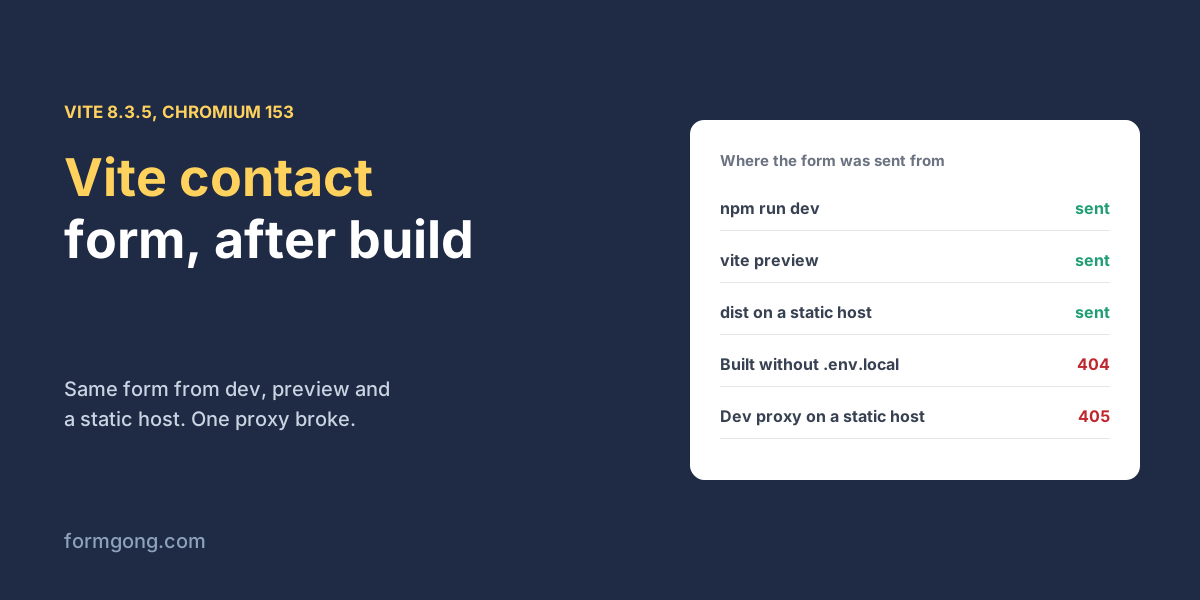
So the form has to post to something that lives elsewhere. A form backend is a hosted address that receives the submission and emails it to you. We scaffolded a fresh project with npm create vite@latest (vanilla template, Vite 8.3.5), added a contact form posting to a local copy of Formgong's backend, and sent it from every stage between dev and a static host, in Chromium 153.
How do you add a contact form to a Vite app?
Write the form in index.html with a real action and method, then let a small script send it with fetch. The real action matters more than it looks. With JavaScript switched off, our form still went through: the browser posted it on its own and the visitor landed on the thank-you page. The script only improves the happy path by keeping the visitor on your page.
The script sends new FormData(form), so every field with a name goes along without you listing them; JavaScript FormData covers what it includes. It asks for JSON with the Accept header and checks both response.ok and the success flag, because fetch does not throw on a 403 or a 404. Without that check your page would say thanks for a message that was refused. If you use React or Vue on top of Vite, the same request works inside a component; the React contact form and Vue contact form pages have ready components.
<!-- index.html -->
<form id="contact" action="https://formgong.com/submit" method="POST">
  <input type="hidden" name="access_key" value="%VITE_FORMGONG_KEY%">
  <label for="name">Name</label>
  <input id="name" name="name" autocomplete="name" required>
  <label for="email">Email</label>
  <input id="email" name="email" type="email" autocomplete="email" required>
  <label for="message">Message</label>
  <textarea id="message" name="message" required></textarea>
  <!-- Honeypot: people never see it, so it stays empty. -->
  <div aria-hidden="true" style="position:absolute;left:-9999px">
    <label>Leave this empty <input name="botcheck" tabindex="-1" autocomplete="off"></label>
  </div>
  <button type="submit">Send</button>
  <p id="status" role="status"></p>
</form>
<script type="module" src="/src/main.js"></script>
The script, src/main.js
// src/main.js
const form = document.querySelector("#contact");
const status = document.querySelector("#status");

form.addEventListener("submit", async (event) => {
  event.preventDefault();
  const button = form.querySelector("button");
  button.disabled = true;
  status.textContent = "Sending…";
  try {
    const response = await fetch(form.action, {
      method: "POST",
      headers: { Accept: "application/json" },
      body: new FormData(form),
    });
    const data = await response.json().catch(() => ({}));
    // fetch does not throw on 403 or 404, so check both.
    if (!response.ok || data.success !== true) throw new Error(data.message || "HTTP " + response.status);
    form.reset();
    status.textContent = "Thanks, your message is on its way.";
  } catch (error) {
    status.textContent = "Not sent: " + error.message;
  } finally {
    button.disabled = false;
  }
});
Where should the access key go in a Vite project?
In .env.local, under a name that starts with VITE_. Vite only exposes variables with that prefix to the browser, and it can put them straight into index.html with the %VITE_FORMGONG_KEY% syntax, so the hidden field holds the real key in the built page. After our build the key was in 2 of the 2 files in dist, the HTML and the JavaScript. A webhook secret in the same file, without the prefix, was in 0 of them.
That is fine for this key. A form key is public by design, because the browser has to send it; is it safe to put a form access key in your HTML? explains what protects the form instead. Keep anything that is a real secret out of VITE_ variables altogether.
The trap is the build on your host. .env.local is not committed, so the host builds without it unless you set the variable in its settings. We built once without the file. Vite printed a warning, “%VITE_FORMGONG_KEY% is not defined in env variables found in /index.html. Is the variable mistyped?”, finished the build anyway, and the page then sent the literal text %VITE_FORMGONG_KEY% as the key. The backend answered 404. In JavaScript the same missing variable is undefined, and a JSON body silently drops it, so that version got a 400 for a missing key. Read the build log on your host, set the variable there, and build again.
# .env.local (not committed). Only VITE_ variables reach the browser.
VITE_FORMGONG_KEY=fk_your_access_key
What happened at each stage, from dev to dist?
| Stage | What happened |
|---|---|
npm run dev, fetch with FormData | 200, stored |
| Dev server with JavaScript off | The browser posted the form itself and landed on the thank-you page; stored |
| JSON body instead of FormData | 200, stored (the browser sent a CORS check first, which passed) |
vite build + vite preview | 200, stored |
dist served by a plain static server | 200, stored |
Built without .env.local | The page sent the text %VITE_FORMGONG_KEY% as the key: 404, “That access key does not exist.” |
| Form limited to example.com, sent from localhost:5173 | 403, “This domain is not on the form’s allow list.” |
Same form with localhost added | 200 from port 5173 and from port 4173 |
A server.proxy route in vite.config.js | 200 in dev and in vite preview, 405 from the plain static server |
The proxy row is the one to remember. A server.proxy entry lets the page post to its own origin, such as /api/contact, and Vite forwards it. It worked in dev, and it kept working in vite preview, because Vite's preview server reuses the dev proxy settings unless you set others. Only the plain static server, which is what your host is, answered 405, and the visitor saw “Not sent”. If you only test with vite preview, you will not see this. A hosted form backend already accepts posts from any site, so there is no reason to proxy it.
The JSON row needed no extra work either. A JSON body makes the browser send a CORS check before the real request; the backend answered it and the post went through. FormData skips that check entirely, which is one more reason to prefer it. If a request does fail with a network error, contact form failed to fetch lists the usual causes.
How do allowed domains work with localhost?
An allow-list on the form tells the backend which sites may post to it, so a copied key is useless elsewhere. It also blocks you on your laptop. Our form limited to example.com refused the post from localhost:5173 with a 403, and the page showed the backend's own message, “This domain is not on the form’s allow list.” Adding localhost to the list fixed it.
Formgong compares host names only and ignores the port, so that one localhost entry covered the dev server on port 5173 and vite preview on port 4173 in our run. The two competitor guides we read on 3 November 2026 give the same advice in different shapes. Splitforms' Vite and React guide (updated 29 September 2026) says to add localhost:5173 to its allow-list during development, and Static Forms' Vite guide (16 September 2026) says to add your production host name and localhost while testing. The difference with Formgong is small but real: you never have to list ports, and the JSON answer carried a code and a readable message for each of the three refusals we hit, so the page in our test could show the visitor why it failed instead of a bare status number. Remove localhost again before launch if you want the list to be strict. The HTML forms docs list every field Formgong reads.
Did your Vite form behave differently?
If your Vite setup sends something we did not cover, with another template, an SSR plugin or a host that builds differently, write to support@formgong.com. We will rebuild it the same way and add the result to the table.
Frequently asked questions
Do I need a backend for a Vite contact form?
Not your own. A Vite build is static files, so post the form to a hosted form backend that receives it and emails it to you.
Why is my VITE_ key undefined after deploy?
The host built the site without it. .env.local is not committed, so set the variable in your host's build settings and build again.
Does the Vite proxy work in production?
No. server.proxy only exists in the dev server and vite preview. Our proxied form got a 405 from a plain static server.
Is it safe to put a form key in a VITE_ variable?
Yes, for a form access key, which is meant to be public. Never put a real secret in a VITE_ variable, because it ends up in the built files.
Sources and documentation
Official references for this guide: Formgong: Is it safe to put a form access key in your HTML?, Formgong: JavaScript FormData and what fetch actually sends. HTML forms, where data is stored.