How a chatbot answers from your own pages
The AI model behind the chat has never read your site. When you add your pages, the chatbot copies their text and cuts it into short passages. When a visitor asks something, it looks for the passages closest to the question and puts only those in front of the model, together with a rule: answer from these, and if they do not say it, say you don't know. People call this grounding, or retrieval.
In Formgong's help chat that looks like this. Each question is matched two ways at once, by the words in it and by its meaning, so "how much does it cost" finds a pricing page that never uses the word "cost". Up to five passages go to the model with your own facts. The first rule it gets is to answer only from them and never guess features, prices, limits or dates. After it replies, every link that is not in those passages is removed, so the bot cannot send a visitor to a page it made up. A separate safety model checks the question and the answer, and a harmful one gets a short refusal.
What the bot reads is up to you: pages from your own domain, text you paste, or a TXT, Markdown or CSV file. It reads the HTML as your server sends it and does not run JavaScript, so a site that draws its text in the browser gives it little to read. Paste the text instead (what the chat reads).
Search finds something for almost any question
We expected the search step to filter out off-topic questions. It does not. We wrote 20 questions for Formgong's own help chat, 10 that formgong.com answers and 10 it does not: a competitor's price, a chest pain question, a fake-review lawsuit, a made-up SMS feature, a request for a poem. Then we ran them through the word search the chat uses, on the same pages it reads.
19 of the 20 found passages above the bar the chat uses to count a match. The chest pain question matched a page comparing review apps on one word, "have". The poem request matched a comparison page on "write" and "about". Only "What will the weather be in Berlin tomorrow?" found nothing by its words. A question with no match at all gets "I don't know" straight away, without reaching the AI.
Searching by meaning does not draw that line either. When we tested it in October, the closest passage for questions our pages answer scored about the same as for questions on the same topic that our pages do not answer. So for almost every question, the decision to answer or say "I don't know" is made by the AI reading the passages, under its rules. So the answers are what you test.
Search does decide whether the right passage is there at all. On 36 questions our pages do answer, word search alone missed the passage with the answer for 7 of them. With words and meaning together it missed 2. A miss means the visitor gets "I don't know" for something your site does say.
What happens when the answer is not on your site
A good chatbot says so in plain words and gives the visitor a way to reach you. Formgong's help chat replies: "I couldn't find this in the site's pages, so I won't guess. You can ask the team: press Talk to a human." The visitor leaves an email, ticks consent, and the conversation comes to you as a submission of the form you choose, so it arrives the way your other messages do: inbox, email or Telegram. With no form chosen, it comes by email with Reply-To set to the visitor.
Each of those questions also goes on the bot's list of Unanswered questions (30 days). Next to a question you can type the answer once with Add as a fact, and the bot uses that fact from then on. Facts win over your pages when the two disagree, which is how you fix a page that says something outdated.
Other tools handle the same moment their own way. Tidio says Lyro forwards a question outside its knowledge to a human agent. Intercom says Fin hands off when that is the safest option, including on high-risk medical, legal or financial advice. tawk.to's sample prompt tells its bot to suggest a human agent when it does not know. If you have no live agents, check where that handoff actually goes.
When you see the same question on the list again and again, that is a page your site is missing (when the chat says it doesn't know).
How to test it before it goes on your site
Write 20 questions before you look at any answers, so you do not end up testing only what works:
- Five questions your visitors really ask, copied from your inbox, in their words.
- Five questions your pages answer, but in different words from the page: "how much is it" when the page says "pricing".
- Three questions about other companies: a competitor's price, another shop's opening hours.
- Three questions about features you do not have. Name them as if they exist: "how do I turn on your SMS campaigns?"
- Two medical, legal or money questions, even if your site has nothing to do with them.
- Two questions that have nothing to do with you: the weather, a poem.
Ask each one in a new conversation, so an earlier answer does not carry over. Mark each reply one of three ways: answered correctly with a link to the right page, said it doesn't know, or made something up. A made-up answer is anything the linked page does not say. Open the links and read them: a link to a real page is not proof that the page says what the bot claims.
Set the bar before you start. On the 10 your site does not answer, you want 10 "I don't know" replies and no made-up features or prices. On the 10 it does answer, every "I don't know" points at a page the bot cannot read or a gap in your wording, which you fix with a page or a fact. Then ask the same 20 again after every big change to your site.
In Formgong you test with Try it here on the bot's page in the dashboard. Those test messages count toward your monthly answers like any others, so 20 questions use 20 of the free 100. tawk.to says tests in its test widget use no credits, and Intercom has a testing tool where you rate each of Fin's answers.
What free plans allow
| Chatbot | Free use | When the answer is not in your content | Testing before you go live |
|---|---|---|---|
| Tidio Lyro | 50 conversations once, not every month | Forwards the question to a human agent | A 7-day trial of every plan |
| Elfsight AI Chatbot | 50 visitor messages a month, 1 chatbot, 200 widget views | Says it detects missing knowledge | Not stated |
| tawk.to AI Assist | A free plan "for sites with limited chat volume", no number given | Its sample prompt suggests contacting a human agent | A test widget; tests use no credits |
| Chatbase | No free plan, a 7-day trial | Not stated on the pages we read | Says you can run customer scenarios before going live |
| CustomGPT.ai | No free plan, a 7-day trial | Not stated on the pages we read | Not stated |
| Intercom Fin | No free plan, a 14-day trial | Hands off to your team, always on high-risk medical or legal advice | Test with real customer questions and rate each answer |
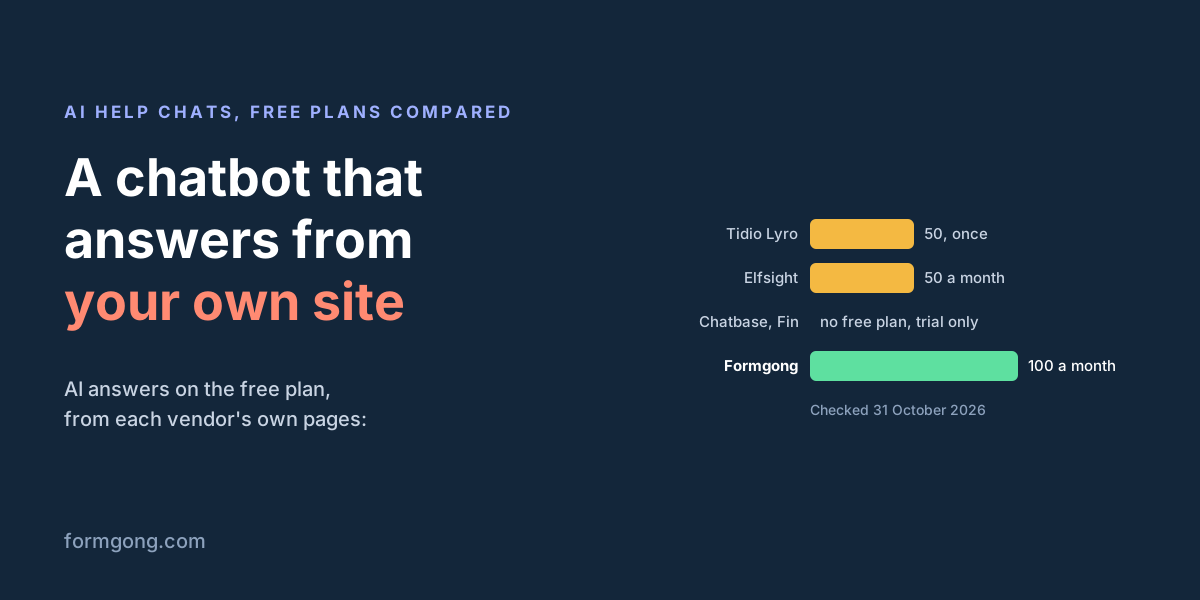
| Formgong | 100 answers a month, 1 bot, 50 pages | Says it could not find it and offers Talk to a human | Try it here in the dashboard; test messages count |
The units are not the same. Tidio counts conversations, and one conversation can hold several replies, but its free 50 come once for the life of the account. Elfsight and Formgong count each message a visitor sends. In Formgong every message counts, "I don't know" replies included, and the count starts again each calendar month. Elfsight's free plan also has 200 widget views a month, and past them the chatbot switches off until the limit resets.
If you want to try a bot on a real site for longer than a week without paying, the choice is Formgong, Elfsight or tawk.to. Chatbase, CustomGPT and Intercom Fin give you a trial, which is enough to test but not to run.
Where this kind of chatbot falls short
Answering only from your pages means the bot is only as good as your pages. If the answer to a common question lives in your head, the bot will say it does not know until you write it down.
It can still be wrong in a smaller way. The AI can read the right passage and sum it up badly, or miss a condition such as "only on yearly plans". The link under the answer helps the visitor check, and your 20-question test helps you catch it early, but no chatbot can promise it never happens.
Formgong's free chat plan has limits you should know about. It holds 50 pages, one bot, and shows a "Powered by Formgong" link in the panel. It answers and links; it does not take actions like changing an order. And there is no live agent inbox where you take over the chat while the visitor waits: questions it cannot answer come to you by email or Telegram, and you reply from there. If you need someone answering live, a tool built around live chat, like Tidio or Intercom, fits better. We also wrote about what 1-star reviews say about AI support chatbots.
Tell us what your bot got wrong
If you run these 20 questions on Formgong's help chat, or on ours at formgong.com, and it makes something up, we want to see the question and the answer. Send them to support@formgong.com. A wrong answer helps us more than a right one.
What Formgong's free plan includes
- Build the form or bring your own. The form builder takes the colours and fonts from your site's address, with no sign-up; ready form templates copy into your account; AI writes the fields from one sentence. Any hand-written HTML form works too.
- Websites with the form already connected. 28 free website templates post to Formgong out of the box.
- 250 submissions a month on unlimited forms. Spam does not count. Once a year, a busy month keeps delivering on credit until the 7th instead of stopping.
- Everywhere you work. Email to up to 3 people at once, Telegram with Reply and Handled buttons, Google Sheets, Notion, and 3 signed webhooks for Slack, Discord, Zapier, Make or n8n.
- Emails to your customers in your business's name. Formgong sends them under your business name and replies come back to you, with no email service of your own to set up: a review request to every lead, a reminder a visitor asked for, and review emails after an order with your logo and colours. People who agree can also go straight into your Mailchimp, Klaviyo, Brevo, MailerLite or Kit list. An automatic reply to each visitor is on Pro.
- No captcha needed. A server-side spam filter, a honeypot, allowed domains and a block list; add your own Turnstile key if you want one.
- Files and voice. Visitors can attach files, or record a voice message that arrives transcribed.
- Made for AI-built sites. A hosted form page and a contact button; step-by-step guides for sites built with Lovable, Bolt, v0, Replit and Base44; an MCP server lets Cursor or Claude wire the form for you.
- See what the form does. Analytics for views, starts, conversion and where each lead came from, and an alert when a form goes quiet.
- One account for the rest. Customer reviews and an AI help chat that answers visitors from your own pages, with every message in one inbox. Data is stored in the EU.
Frequently asked questions
How does an AI chatbot answer only from my website?
It copies the text of your pages into short passages, finds the ones closest to each question, and gives the AI only those with the rule to say it doesn't know when they hold no answer. Formgong also removes any link from the answer that is not in those passages.
What does the chatbot say when the answer is not on my site?
Formgong's help chat says it couldn't find this in the site's pages and won't guess, and offers Talk to a human. The visitor's email and the conversation then come to you by email or Telegram, and the question goes on your list of unanswered questions.
How do I test a website chatbot before I put it on my site?
Ask it 20 questions in new conversations: 10 your pages answer and 10 they don't, including other companies, made-up features and medical or legal questions. Count correct answers with the right link, "I don't know" replies and made-up answers, and open every link to check it.
Is there a free AI chatbot that answers from my own website?
Yes. On 31 October 2026, Formgong's free plan gave 100 answers a month from up to 50 pages, Elfsight's 50 visitor messages a month, and tawk.to had a free plan for low chat volume. Tidio gives 50 conversations once; Chatbase, CustomGPT and Intercom Fin have trials, not free plans.
Can a chatbot that answers from my pages still be wrong?
Yes. It can sum up the right page badly or miss a condition on it. A link to the source under each answer lets visitors check, and testing with your own questions catches most of it before launch.
Sources and documentation
Official references for this guide: Tidio pricing, Tidio Lyro, Elfsight AI Chatbot pricing, tawk.to pricing, tawk.to: getting started with AI Assist, Chatbase pricing, CustomGPT.ai pricing, Intercom: Fin AI Agent explained, Intercom pricing, Formgong AI help chat. Formgong AI help chat docs, where data is stored.