The email that arrives before the parcel
You set up review emails, and the first replies are not reviews. “Haven't received it yet.” “Ask me when it gets here.” Or a one-star rating with a note about shipping, on a product the buyer has never touched.
That usually means the clock starts too early. Most review apps count the days from fulfillment, which in most shops is the day the order ships, not the day it arrives. WooCommerce stores often mark an order Completed when it leaves the warehouse too. So a 5-day delay on a parcel that takes 6 days to arrive asks for a review of something still in a van.
The opposite mistake is quieter. Send the email a month later and nothing goes wrong, the buyer just does not open it. The product is no longer new to them, and your email sits among a month of other mail.
What five review apps send by default
Before picking your own numbers, it helps to see what the big review apps chose. We read the help pages of each one, not their blog posts, because the help page describes what the app does when you change nothing.
| App | First email | Counted from | Orders abroad | Time of day | Reminders |
|---|---|---|---|---|---|
| Judge.me | Not stated | Fulfillment | Own setting, no default stated | About the time the order was placed | Up to 3, default not stated |
| Yotpo | 14 days | Order processed | Not stated | Not stated | One, 5 days after the request; a second can be added |
| Okendo | Not stated | Fulfillment, or delivery with a tracking app | Own wait time, no default stated | Not stated | Not stated |
| Stamped | 14 days | Fulfillment | 21 days recommended | 10 AM to 4 PM recommended | Up to 3 follow-ups, days not stated |
| Loox | 14 days | Fulfillment | Own setting, no default stated | The buyer's local work hours | 1 day after, then 7 days after that |
| Formgong | 7 days | Order completed in your store | 7 days longer, automatic | 10:00 in your store's time zone | One, 5 days later, only for products not reviewed |
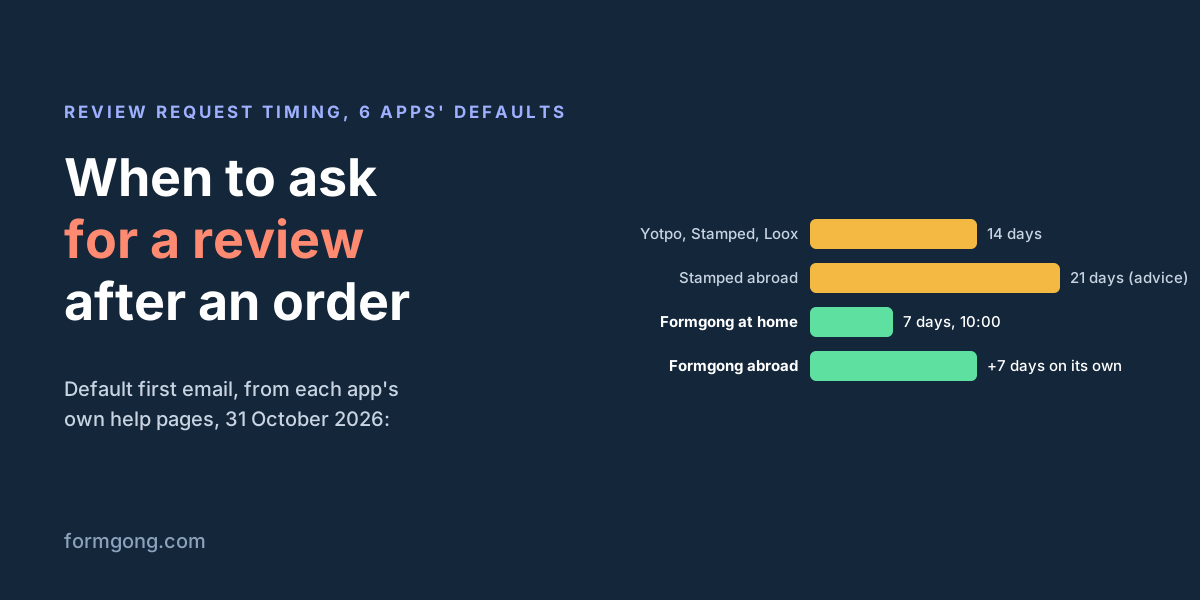
Three of the five state a default, and all three picked 14 days. Yotpo counts from when the order is processed, Stamped and Loox from fulfillment. Judge.me's settings page gives no default for normal orders, only 7 days for orders picked up in person, and Okendo leaves the wait to you when you build the sequence. Most of them can count from delivery instead, when the store knows the parcel arrived, which usually takes a tracking app.
How many days to wait
The rule is simple: the email should arrive after the parcel, and after the buyer has had a few days with the product. How many days that is depends on your shipping and on what you sell.
- Find your real delivery time. Take your last 20 orders and note the day each one shipped and the day it arrived. Use the slow end, not the average, so most buyers have the parcel when the email lands.
- Add the time to try it. A T-shirt or a mug can be judged the day it arrives, so two or three days is enough. Skincare, supplements or a mattress need a couple of weeks of use before a buyer has an opinion worth writing.
- Check what “fulfilled” means in your shop. If the order is marked done when it ships, add the delivery time to your delay. If it is marked done on delivery, you only need the time to try it.
For a shop that ships within its own country in two to four days and sells things people use straight away, seven days after fulfillment is a fair start. Fourteen, the default of three apps above, suits slower shipping or products that take longer to judge.
Orders shipped abroad
A parcel that crosses a border can take twice as long, and customs adds days nobody can predict. One delay for every order means buyers abroad get the email before their parcel, or buyers at home get it a week late.
Judge.me, Okendo, Stamped and Loox all have a separate setting for international orders. Only Stamped suggests a number on its help page: 21 days against 14 for local orders. In each of them you have to turn it on and pick the number yourself.
Formgong does this without a setting. It works out your home country from your recent orders: the country most of your buyers have, once at least 10 orders came with a country and one country has more than half of them. An order going anywhere else waits 7 days longer than your delay. A shop with too few orders, or with buyers split evenly between countries, gets no extra wait. If you set the delay to 0, to send right after the order, it stays 0 for every country.
One country needs more than a later date. Germany's Federal Court of Justice treated an emailed review request after a purchase as advertising that needs the buyer's consent (case VI ZR 225/17). Formgong has a switch that skips German buyers without a recorded yes, and new stores start with it on. This is not legal advice; if Germany is a big market for you, ask a lawyer about your checkout.
What time of day to send it
The apps disagree here more than on days. Judge.me sends at about the same time of day the order was placed, an hour when that buyer clearly had time to shop. Loox sends within the buyer's local working hours. Stamped recommends a time between 10 AM and 4 PM. Yotpo and Okendo do not say.
What matters most is that the email does not arrive at 3 AM, where it ends up under a night of newsletters by breakfast. Any daytime hour in the buyer's time zone is a reasonable choice, and the difference between 10:00 and 14:00 is small next to getting the days right.
Formgong sends at 10:00 in your store's time zone by default, and you can pick another hour or send as soon as the delay ends. The time zone comes with the orders from WooCommerce; without it the hour is in UTC. If most of your buyers live in another time zone than your store, set the hour for theirs. The email editor also has an A/B test that can send half of the emails at a different hour, so you can compare on your own orders.
One reminder or more
Many buyers miss the first email, so a reminder is worth sending. The question is how many. Loox recommends two: the first a day after the request, the second a week after that. Judge.me and Stamped let you add up to three. Yotpo sends one five days after the request, and you can add a second one later.
We chose one. A second and third email about the same order brings in some more reviews, but it also brings unsubscribes and spam complaints. A complaint does not only lose that buyer. It counts against the address your emails come from, and that decides whether the next email lands in the inbox at all. We have not measured where that line is for every shop, so if you run more reminders in another app and they work for you, that is a fair choice too.
A reminder should also know what already happened. Formgong's reminder goes 5 days after the first email by default, asks only about the products that still have no review, and is skipped when the buyer has reviewed them all. A refund or a cancellation stops a waiting email.
Repeat buyers need one more rule. Someone who orders every week should not get a review request every week. Formgong sends a buyer at most one first email per 14 days from the same store. A later order's email is not dropped; it waits until those 14 days have passed.
What to put in the email
Timing gets the email opened. What is inside decides whether the buyer reviews. A few things matter more than the wording:
- Your store as the sender. The buyer should recognise the name in their inbox at once. A review app's name there looks like a stranger asking.
- The products, with pictures. One block per product from the order, so the buyer knows exactly what they are rating, and one page for the whole order rather than an email per item.
- Stars they can tap in the email. Picking a rating with one tap is a much smaller ask than following a link and finding a form.
- A short, plain text. Thank them for the order and ask how it is going. Leave out the newsletter and the sale banner.
- Any reward stated plainly. If you give a discount for a review, say it comes with any rating. In the US the FTC allows rewards for reviews only when they do not depend on the review being positive.
- A way out. A link to stop review emails from your store, so an unhappy buyer clicks that instead of “report spam”.
How Formgong sends review emails
Formgong's review emails follow the timing above out of the box: 7 days after the order is completed, at 10:00 store time, one reminder 5 days later, 7 days more for orders abroad, and one first email per buyer per 14 days. You can set the delay from 0 to 60 days and the reminder from 1 to 30.
- Your store's name on every plan. The email comes from your store's name and replies go to your address, Free included. There is no email service to set up, or you can send through your own Klaviyo, SendGrid, Mailgun, Postmark or Brevo.
- Rating inside Gmail. In Gmail the buyer picks the stars, writes the review and sends it without leaving the email. Apple Mail, Yahoo and Thunderbird show a form too; Outlook gets five star links that open the review page with that rating picked.
- Verified reviews. Each email opens one page for the whole order, up to 6 products, and reviews sent from it are marked “Verified buyer”. The link works for 90 days.
- A coupon for any rating. With the WooCommerce plugin, the store creates a single-use coupon for each verified review, whatever the rating, and the review is labelled as rewarded.
Orders reach Formgong from the free WooCommerce plugin, from any shop through the orders API, from Zapier, Make or n8n, or from a CSV of past orders from the last 90 days. Shopify and Wix stores cannot send orders directly yet, so use Zapier or the API there. The setup is in the review emails guide, and the WooCommerce version step by step in WooCommerce review reminder emails.
What timing works for your shop?
If you have tried different delays or reminder counts and seen a difference, or your buyers abroad still get the email too early, tell us at support@formgong.com. We will add what you found to this page.
What Formgong Reviews includes for free
- Unlimited review sites and reviews. Text, photo, video and voice reviews on Free.
- A widget with no view limit. The review widget, carousel, badge and stars in product lists load as often as your pages do.
- Review emails in your store's name. Sent after each order with your logo and colours, replies to you, no email service to set up; buyers can rate inside Gmail without leaving the email, and get one reminder (how it works).
- Bring your old reviews. Import from Judge.me, Yotpo, Loox, Shopify Product Reviews, WooCommerce, Etsy or a CSV.
- You decide what shows. Approve each review or choose a publishing mode, reply in public or in private, and let shoppers ask the author a question.
- Google. A Merchant Center review feed, and product rating markup through the WordPress plugin.
- Reviews from your form. People who filled in your contact form can get a review request automatically.
- One account for the rest. Contact forms with Telegram and Google Sheets, an AI help chat, and free website templates.
Frequently asked questions
How many days after delivery should I send a review request?
Two or three days after delivery for things people judge at once, like clothes, and a week or two for products that need use, like skincare. If your shop counts from shipping, add your usual delivery time on top.
Should I send a reminder for a review request email?
Yes, one. Many buyers miss the first email. Send it about five days later, only about the products still without a review, and stop there to keep spam complaints low.
What time of day should I send review request emails?
Any daytime hour in the buyer's time zone. Judge.me sends at about the time the order was placed, Loox within the buyer's working hours, and Formgong at 10:00 store time by default.
When should I ask international customers for a review?
About a week later than local buyers, because delivery takes longer. Stamped recommends 21 days for international orders against 14 for local ones. Formgong adds 7 days to orders shipped outside your home country on its own (checked 31 October 2026).
What should a review request email include?
Your store's name as the sender, a picture of each product, stars the buyer can tap in the email, a short thank-you, and a link to stop review emails. If there is a reward, say it comes with any rating.
Sources and documentation
Official references for this guide: Judge.me: configuring review request settings, Judge.me: review request reminders, Yotpo: creating a review request, Yotpo: review request emails FAQ, Okendo: creating and starting sequences, Stamped: delay interval and send time, Stamped: email sequence, Loox: review request email timing, Loox: review request reminder emails, FTC: Consumer Reviews and Testimonials Rule, questions and answers. Formgong review emails guide, where data is stored.