What the EU rule says
The rule is one paragraph in the Unfair Commercial Practices Directive. The Omnibus Directive, (EU) 2019/2161, added it as Article 7(6), and EU countries have applied it since 28 May 2022.
It says that when you give access to consumer reviews of products, information about "whether and how" you make sure they come from people who actually used or bought the product counts as material. Material means a shopper needs it to decide. Leaving it out can make your page misleading under Article 7.
Recital 47 of the Directive explains the idea. If you do check, say how, and say how reviews are handled: for example whether all reviews are posted, positive or negative, and whether any were sponsored.
The European Commission's 2021 guidance on the Directive spells out what the information should cover. It names four things: whether all reviews are published, how they are sourced, how the average score is calculated, and whether sponsored reviews or contracts with traders affect them. The text must be clear, and it must sit where the reviews are, or behind a clearly visible link there.
The rule covers reviews of your shop too, not only of products, when they rate things like quality, reliability or delivery speed. In Germany it is § 5b(3) of the UWG, in almost the same words. Other EU countries have their own laws that carry the same text.
What is banned outright
Annex I of the Directive lists practices that are unfair in every case, with no test of whether a shopper was misled. Two points are about reviews.
Point 23b. You may not say that reviews come from people who used or bought the product unless you take "reasonable and proportionate steps" to check that they do. The guidance adds that the claim does not have to be written in those words. A heading like "Customer reviews" can already read that way to an average shopper.
Point 23c. You may not write fake reviews, pay someone else to write them, or misrepresent reviews to sell more. The Directive's own example of misrepresenting is "publishing only positive reviews and deleting the negative ones". The guidance adds more: handing customers a pre-filled positive review, pushing a customer during moderation to change or withdraw a bad review, and showing an average built on criteria you do not explain.
Removing fake reviews is still allowed, negative ones included. The guidance says so in as many words. What you cannot do is remove real bad reviews because they are bad. We wrote more on that in how to respond to negative reviews.
You do not have to verify every review
The rule asks you to tell the truth about your checks. It does not make checks compulsory. "Whether and how" leaves room for the answer "we do not check". If that is your answer, say so, and do not call the reviews verified.
Some guides go further than the law. Judge.me's guide to the EU rules says "all displayed reviews must come from genuine orders" (judge.me, updated 2 July 2026). Showing only verified reviews is a safe way to run a shop, and it is one valid choice. The Directive's text does not demand it.
How much checking is enough depends on you. The guidance says the steps should fit your business model, your size and the risk of fraud. A large platform is expected to do more than a small shop. The steps should also not make it so hard to post that real buyers give up. The examples it gives include asking for an order or booking number, email verification, clear rules against fake and undisclosed sponsored reviews, and a way to handle complaints about suspicious reviews.
A "verified" badge is not the same thing as this notice. Trustindex's "Verified by Trustindex" badge, for example, is for businesses with a 4.5+ rating over the past 12 months. Its checkmark on a review confirms the platform the review came from, such as Google (trustindex.io). Neither tells a shopper whether the reviewer bought from you, so you still need the notice.
How many big sites got it wrong
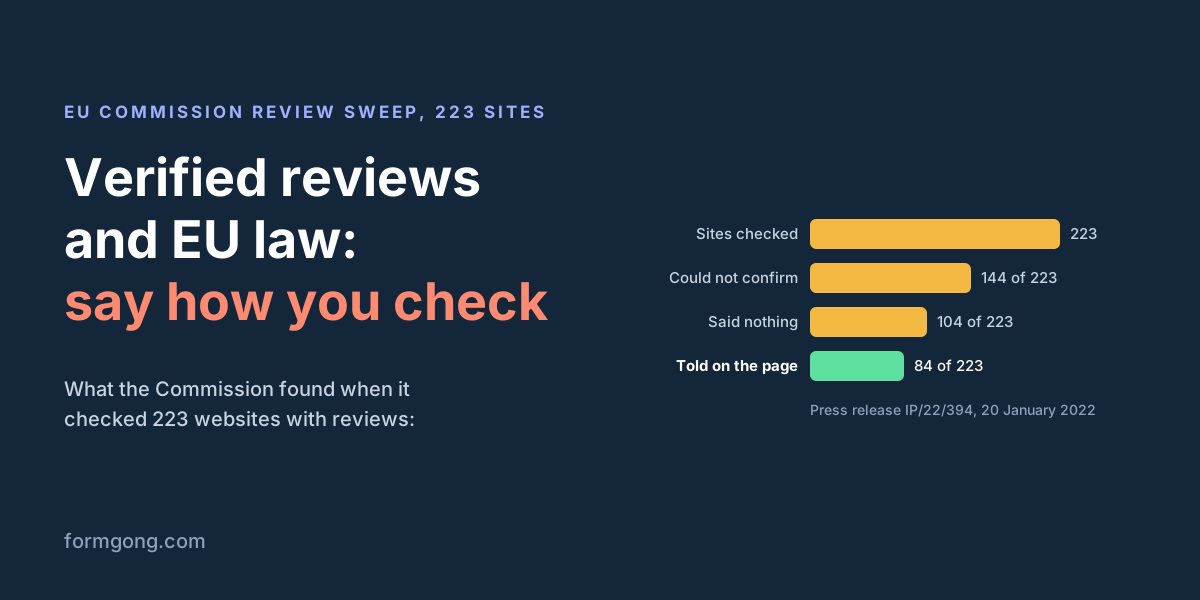
In a sweep published on 20 January 2022, the Commission and consumer authorities of 26 EU countries, Iceland and Norway checked 223 major websites: online shops, marketplaces, booking sites, search engines and comparison sites. This was just before the new rule applied.
- On 144 of the 223, authorities could not confirm the site did enough to make sure reviews came from real users.
- 104 of the 223 did not tell shoppers how reviews were collected and processed.
- Only 84 of the 223 had that information on the review page itself. The rest put it in small print, such as their terms.
- 118 of the 223 said nothing about how fake reviews were prevented.
- 176 of the 223 did not say whether rewarded reviews were banned, or how they were marked.
The authorities concluded that at least 55% of the sites potentially broke the Directive, and they had doubts about another 18%. These were large sites, many with their own legal teams. A small shop that writes one honest paragraph is ahead of most of them.
Three notices you can copy
Pick the one that matches what you really do, fill in the brackets and delete the lines that do not apply. Each one answers the questions the guidance lists: whether you check, how, what you publish, how the average is worked out and whether any review was rewarded.
They are a starting point, not legal advice. If your shop has unusual cases, such as reviews bought from an agency in the past, ask a lawyer in your country.
Notice 1: every review is from a buyer
Use this if you only publish reviews that came through an order, for example from a review email after each purchase.
How we check reviews

Every review on this page comes from a customer who bought the product from us. After an order arrives, we email the buyer a personal link. The link works only for the products in that order. Reviews sent through it show "Verified buyer". We do not publish reviews sent any other way.

We publish positive and negative reviews alike. We remove a review only if it is spam, abusive, shares someone's personal details or is not about the product. We never change what a customer wrote.

[If you give coupons: We send a coupon for every verified review, whatever the rating. Those reviews say "Received a store coupon for reviewing".]

The star rating is the average of every published review of the product.

Questions about a review? Write to [your email].
Notice 2: verified and other reviews together
This is the most common case. Some reviews come from order emails and are marked, others come from a form on your site, and some may be old reviews you brought from another app.
How we check reviews

Reviews marked "Verified buyer" come from customers who bought the product from us. After an order arrives, we email the buyer a personal link that works only for the products in that order.

Reviews without that mark were sent through the review form on our website. We cannot confirm that their authors bought the product.

[If you moved from another app: Reviews from before [month, year] come from [old app]. They show "Verified buyer" only where [old app] had confirmed the order.]

Every new review passes a spam check. [We read each one before it goes live.] We publish positive and negative reviews alike, and we remove a review only if it is spam, abusive, shares someone's personal details or is not about the product.

[If you give coupons: Reviews marked "Received a store coupon for reviewing" earned the buyer a coupon, whatever the rating.]

The star rating is the average of every published review of the product, marked or not.

Questions about a review? Write to [your email].
Notice 3: you do not check reviews
Use this if anyone can leave a review and you have no way to match it to an order. It is honest, and that is all the rule asks. Call the section "Reviews" rather than "Verified customer reviews".
About these reviews

We do not check whether the people who write reviews here bought or used the product. Anyone can send one through the form on this page.

We remove spam and reviews that are abusive, share someone's personal details or are not about the product. We publish all the others, whatever the rating.

The star rating is the average of every published review of the product.

Questions about a review? Write to [your email].
Where to put the notice
The guidance asks for the information on the same screen as the reviews, or behind a clearly visible link there. The sweep counted a mention only in your terms as small print. So put one short sentence and a link right above the reviews, and the full notice on its own page.
Formgong's review widget does not have a field for this text. Add it in your own page, next to the widget code, like this:
<!-- Right above the reviews: the short version and a link to the full notice -->
<p class="review-note">Reviews marked "Verified buyer" come from customers who ordered from us.
  <a href="/how-we-check-reviews">How we check reviews</a></p>
<div data-formgong-reviews="fk_your_access_key" data-product="blue-teapot"></div>
<script src="https://formgong.com/reviews.js" defer></script>
What the rule asks and how Formgong covers it
| What the rule asks | What your notice shows | How Formgong covers it |
|---|---|---|
| Say whether you check that reviews come from buyers (Art. 7(6)) | One plain sentence: yes, for some, or no | Reviews sent through the link in a review email carry "Verified buyer". Other reviews carry no such label |
| Say how you check (recital 47) | What you ask for or match, such as the order | The link is made for one order, works for 90 days and only for that order's products, one verified review per product |
| Say whether every review is published (guidance) | What you publish and what you remove | You approve each review, publish right away, or publish bare star ratings at once. Every star value goes the same way |
| Say where reviews come from (guidance) | Your site, an email, an old app | Imported reviews keep "Verified buyer" only when the file says the old app verified them |
| Say how the average is worked out (guidance) | Which reviews count | The average counts every published review from your site and your imports. Marketplace reviews show in their own list |
| Say if reviews were sponsored or rewarded (recital 47) | Which reviews got a reward | With review coupons on, those reviews show "Received a store coupon for reviewing", whatever the stars |
| Put it where the reviews are (guidance) | Next to the reviews, or a clear link there | The widget has no notice field. Add the text or a link in your page, right above the widget |
| Never call a review verified without a check (Annex I 23b) | The label only on checked reviews | There is no button to set the label by hand |
A few details behind the table. The "Verified buyer" label is set in only two ways: a review sent from the order link, or an imported review whose file says it was verified. You cannot tick it by hand. Order data reaches Formgong from the WooCommerce plugin, the orders API, Zapier, Make or n8n, or a CSV upload. The order number shows only in your dashboard, never on the widget.
A review sent from your site form shows no label. If the reviewer later opens the edit link Formgong emailed them, it shows "Email confirmed", which is not a purchase check. Both labels are explained in review labels, and the publishing modes in review moderation.
Every new review goes through a spam check. A review with photos or a video waits until the files are checked. On "publish right away", one visitor can publish three reviews a day, and the rest wait for you. Formgong stores its data in the EU, review photos and videos included.
Tell us what you would add
Do you run an EU shop and already show a notice like this? We would like to see how you worded it, and whether shoppers or an authority ever asked about it. Write to support@formgong.com, and we will add useful examples to this page.
What Formgong Reviews includes for free
- Unlimited review sites and reviews. Text, photo, video and voice reviews on Free.
- A widget with no view limit. The review widget, carousel, badge and stars in product lists load as often as your pages do.
- Review emails in your store's name. Sent after each order with your logo and colours, replies to you, no email service to set up; buyers can rate inside Gmail without leaving the email, and get one reminder (how it works).
- Bring your old reviews. Import from Judge.me, Yotpo, Loox, Shopify Product Reviews, WooCommerce, Etsy or a CSV.
- You decide what shows. Approve each review or choose a publishing mode, reply in public or in private, and let shoppers ask the author a question.
- Google. A Merchant Center review feed, and product rating markup through the WordPress plugin.
- Reviews from your form. People who filled in your contact form can get a review request automatically.
- One account for the rest. Contact forms with Telegram and Google Sheets, an AI help chat, and free website templates.
Frequently asked questions
Do EU shops have to verify customer reviews?
No. They have to say whether they check that reviews come from people who used or bought the product, and how. If you do not check, say so, and do not call the reviews verified. The rule is Article 7(6) of the Unfair Commercial Practices Directive, in force since 28 May 2022.
What should a "how we check reviews" notice say?
Whether you check that reviewers bought the product and how, whether you publish every review or what you remove, where the reviews come from, how the average is worked out, and whether any review was sponsored or rewarded.
Can I show only verified reviews?
Yes, as long as you say so and apply it to good and bad reviews alike. The Directive does not require it; it is one honest way to meet the rule.
Can I hide negative reviews on my EU shop?
Not because they are negative. Publishing only positive reviews and deleting the negative ones is banned in every case under Annex I, point 23c. You may remove fake reviews and reviews that break your published rules, whatever their rating.
Does the rule cover reviews of my shop, not just my products?
Yes, when they rate things like quality, reliability or delivery speed, according to the Commission's 2021 guidance. Reviews about topics like working conditions or taxes are likely outside it.
Sources and documentation
Official references for this guide: Directive (EU) 2019/2161 (EUR-Lex), Commission guidance on the UCPD, 2021/C 526/01 (EUR-Lex), Commission press release IP/22/394: sweep of 223 websites, Germany: § 5b UWG, Formgong review labels. Formgong Reviews docs, where data is stored.