Get started with Formgong Reviews
Last updated
Customers leave a star rating and a review on a page Formgong hosts for your site. You approve what goes public, and one line of code shows the approved reviews on your site. Everything below is in the dashboard under Reviews.
- A customer writes a reviewOn your review page, from the widget's “Write a review” link, or from a review email.
- It waits for youOr goes public at once, if your publishing mode allows it.
- You approve itOn the Reviews tab: Approve, or Hide with a reason.
- It shows on your siteIn the widget, the rating badge and the stars in product lists.
Turn on reviews for a site
- Sign in and open Reviews. Press Add reviews to a site, type the website address (for example
example.com) and an optional site name, and press Continue. - The Widget tab opens with four steps. Collecting gives you the review link
https://formgong.com/review/<key>, which you can send to customers by email or messenger, and a switch for the “Write a review” link in the widget. - Publishing sets how reviews go public (see Moderate reviews), and the extras: replies, the “Helpful” button, rude-word masking, how names are shown and Q&A.
- Add to site gives you the embed code, with notes for HTML, WordPress, Wix, Webflow, Tilda, Shopify and Framer. See The reviews widget, and the step-by-step guide for Shopify, WordPress and WooCommerce, Wix, Webflow, Framer, Squarespace or plain HTML.
- Check takes the address of the page where you put the widget and tells you whether the code is there. Open the review page lets you leave yourself a test review; it waits under Waiting, and you can hide it afterwards.
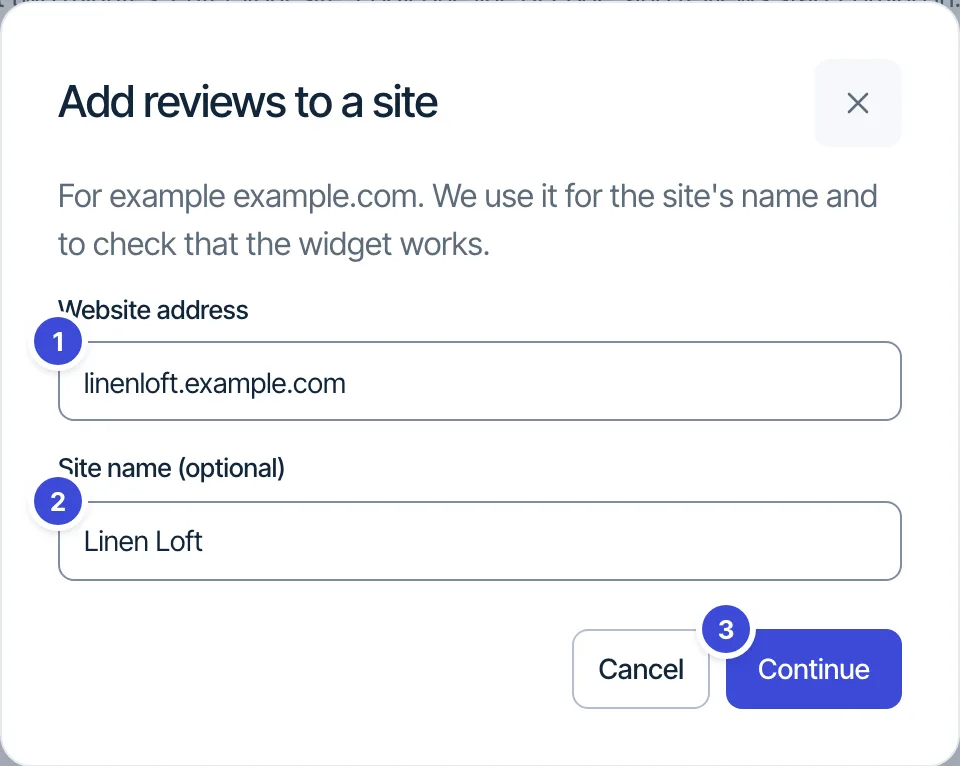
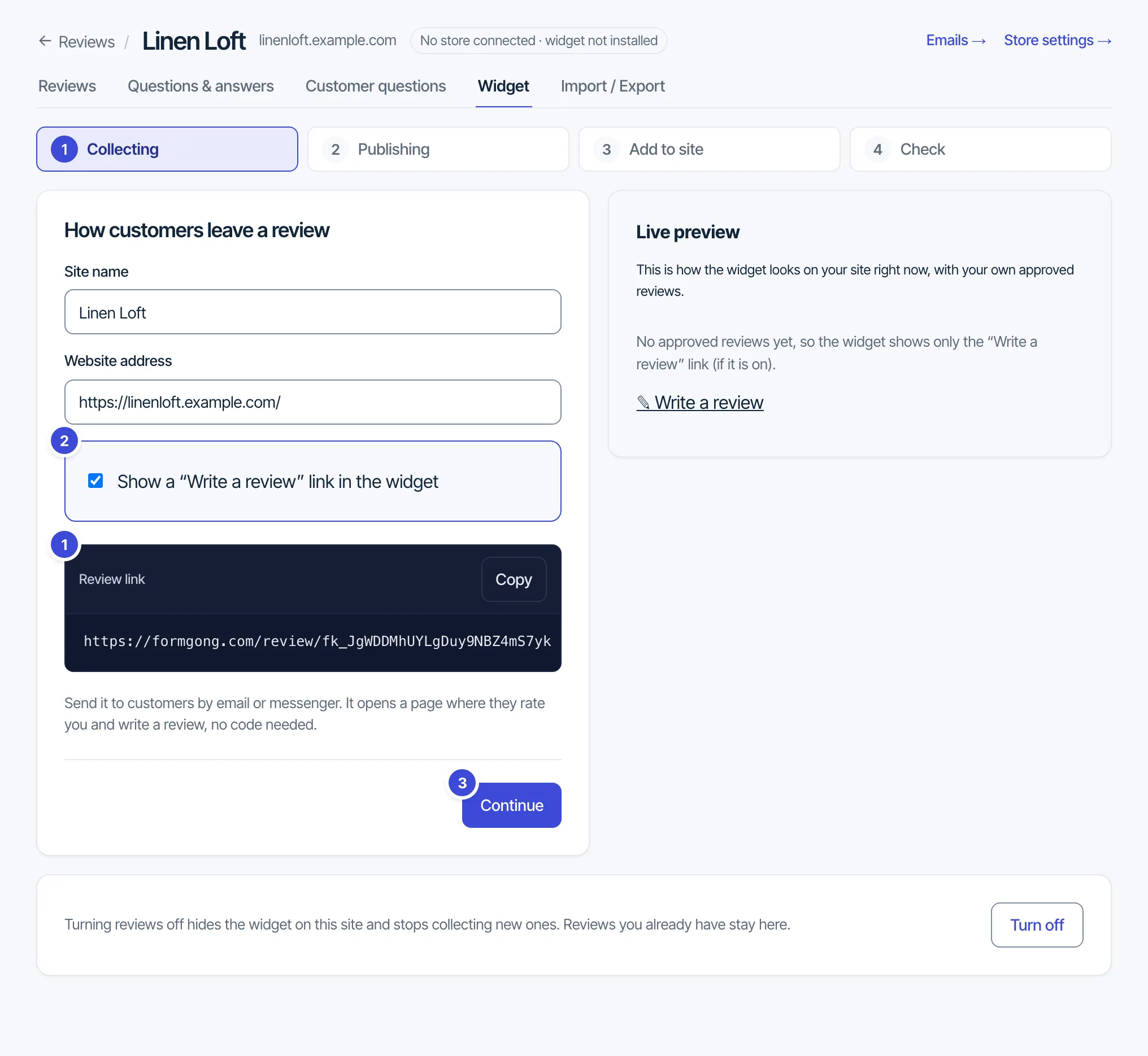
Each site gets its own key starting with fk_. The key is public, like a form access key. You can add as many sites as you like on every plan. To collect reviews with a Formgong form you already have, pick it under Collect reviews with on the Reviews page and press Turn on. Turn off on the Widget tab hides the widget and stops new reviews; the reviews you have stay in the dashboard.
See it live: Glyna is a demo WooCommerce store connected to Formgong. Its product pages show the review widget in the Reviews tab, and a demo order (nothing is charged) gets a review email from Formgong.
The five tabs of a site
- Reviews: approve, hide or delete reviews, and reply to them. See Moderate reviews.
- Questions & answers: questions shoppers asked reviewers, with the answers the reviewers chose to publish. See Questions on reviews.
- Customer questions: short questions added to your review form, such as fit or size. See Questions on reviews.
- Widget: the four steps above. Come back to them to change any setting.
- Import / Export: reviews from another app, and a CSV of yours. See Import and export reviews.
Emails → and Store settings → at the top of a site's page lead to review emails and the store's settings.
Shopify and Wix apps, or the plain widget
The plain widget works on any site, Shopify and Wix included: paste it into a Custom Liquid section on Shopify or an Embed HTML element on Wix. The Formgong Shopify app adds theme blocks (reviews, star badge, stars on product cards), product ids filled in by Shopify, the Google feed with Shopify's barcodes, and moderation inside Shopify admin. The Wix app adds a product-page reviews plugin. Both are waiting for their store listings (the Shopify App Store review, and Wix, which has paused new app submissions), so for now use the widget.
Plans
- Reviews Free, on every account: unlimited review sites and reviews, all moderation modes except AI, the widget with carousel, filters, badge and list stars, photo and video reviews, Q&A, customer questions, import and export. A small “Formgong Reviews” link with the Formgong mark signs the widget; when the site's public review page is on, it reads “All reviews on Formgong Reviews” and opens that page.
- Pro (Formgong Pro; the earlier Reviews Pro and Reviews Plus plans include the same): everything in Free plus the AI features (Automatic (AI) moderation, AI summaries, automatic translation, AI reply drafts and mood tags), and no Formgong link.
- Until 31 December 2026, an account that adds its first review site gets every Reviews feature free for 6 months (AI summaries for up to 50 products). After that it is on Reviews Free again, and nothing is deleted.
Plan details and prices are on the pricing page. Reviews never count toward the monthly form submission limit.
Questions: support@formgong.com.
Reviews guides
Widget
A div and a script show approved reviews, a carousel, a badge or stars.
Moderation
Choose how reviews go public. Approve, hide or delete them.
Photos and video
What customers can attach, when files go public, and storage.
Labels, edits and names
Verified buyer, reviewers editing their own review, and how names show.
Questions
Shoppers ask reviewers by email, and your form asks about fit or size.
Import and export
Bring reviews from Judge.me, Yotpo, Loox, Shopify or a CSV, and export yours.
AI features
Summaries, translation, reply drafts, mood tags and AI moderation.
Google stars
Product structured data and the Merchant Center reviews feed.
Review emails
Email each buyer a review request a few days after the order.
Store connection
Send orders to Formgong with a store token, the API or a CSV.