Connect your store to Formgong
Last updated
Formgong needs your orders to send review emails. A store sends each completed order with a store token. This page covers the token, the API, the CSV of past orders and the store settings.
- Your store or toolThe WooCommerce plugin, your own code, Zapier, Make or n8n, or a CSV of past orders.
- POST /api/ordersOne call per completed order, with a store token (
fgp_…). - The email is scheduledThe answer says when it goes out (
dueAt). - A refund cancels it
POST /api/orders/cancelstops a waiting email.
Pick your platform
Open Settings → Sites and your store. Under Connection, pick where the store runs. You can use more than one.
- WooCommerce: the Formgong WordPress plugin, version 1.3.1 or later. In WordPress open Settings → Formgong. Under Review emails, paste the site's reviews key and a store token, and turn the emails on. See WooCommerce.
- Shopify: not available yet. It starts once Shopify approves the Formgong app's access to order data; then the app sends each fulfilled order by itself, after you turn review emails on. Until then, send Shopify orders through Zapier or the API.
- Wix: not available yet, because Wix has paused new app submissions. Send Wix orders through Zapier or the API.
- Any platform (API): BigCommerce, Ecwid, Squarespace, PrestaShop, Magento or your own code calls
POST /api/orders. - Zapier, Make or n8n: the same call from Webhooks by Zapier (POST), Make's HTTP module or n8n's HTTP Request node, triggered by a new paid or completed order.
- CSV upload: past orders from the last 90 days.
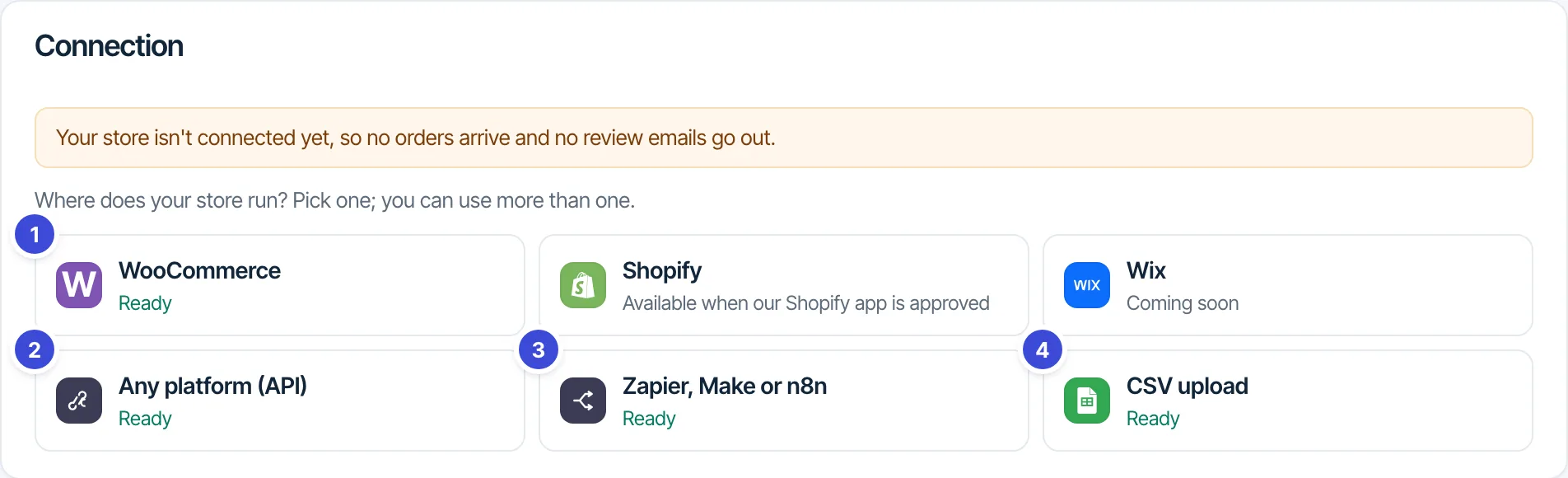
Once orders arrive, the Connection row shows the platform, when it connected and how many orders came in.
Store token
On the WooCommerce, API or Zapier card, press Create a store token. It starts with fgp_, and it is shown once, so copy it right away. Your account email must be confirmed.
- A store token can only send and cancel orders. It cannot read your forms, reviews or submissions, and it does not work for MCP.
- It never expires. Revoke it under Settings → Integrations & API → API tokens, where store tokens show an
orders:writebadge. - An account can have 10 tokens at a time, store tokens and API tokens together.
- Keep it on your server or in the automation tool. Never put it in a web page.
Send an order: POST /api/orders
Send one request per completed order, with the token in the Authorization header and a JSON body:
curl -X POST https://formgong.com/api/orders \
  -H "Authorization: Bearer fgp_YOUR_STORE_TOKEN" \
  -H "Content-Type: application/json" \
  -d '{
  "site": "fk_your_reviews_key",
  "order_id": "1001",
  "email": "buyer@example.com",
  "first_name": "Emma",
  "lang": "en",
  "completed_at": "2026-10-22T10:00:00Z",
  "country": "DE",
  "marketing_consent": true,
  "items": [
    { "product_id": "42", "name": "Linen apron",
      "url": "https://shop.example.com/apron", "image": "https://shop.example.com/apron.jpg" }
  ]
}'
The answer:
{"status":"scheduled","dueAt":"2026-10-29T08:00:00.000Z"}The smallest valid body:
{
  "site": "fk_your_reviews_key",
  "order_id": "1002",
  "email": "buyer@example.com",
  "items": [{ "product_id": "7", "name": "Mug" }]
}
Fields:
site(required): the review site's key,fk_…. The site must belong to the token's account and have reviews on.order_id(required): your order number, up to 40 characters.email(required): the buyer's email.items(required): the products, each withproduct_idandname(up to 80 characters each), and optionalurlandimage(https only). Use the sameproduct_idas in your reviews widget'sdata-product. Up to 6 products per email; a repeatedproduct_idis dropped.first_name: used in the greeting.lang: the email language, one of uk, en, pl, tr, ar, he, es, fr, pt, hi, ja, de. Anything else, such asen-US, gets the site's default language.completed_at: when the order was completed, as an ISO date. Without it, now. A date older than 30 days counts as 30 days ago; use the CSV for older orders.country: the billing country, two letters. Used for the Germany switch and the recommendations consent rule.marketing_consent:trueorfalsewhen your shop asked the buyer.source:"zapier","make"or"n8n"when an automation tool sends the order, so the Connection row says so.
Answers:
{"status":"scheduled","dueAt":"…"}: the email is waiting;dueAtis when it goes out.{"status":"duplicate"}: thisorder_idwas already sent for this site. Retries are safe.{"status":"off"}: review emails are off for this site.{"status":"skipped","reason":"de_no_consent"}: a buyer in Germany without consent while the Germany switch is on.- 400
{"error":"invalid","field":"email"}(ororder_id,items), and 400{"error":"bad_json"}when the body is not a JSON object. - 401
{"error":"unauthorized"}: no token, or a wrong one. - 404
{"error":"unknown_site"}: the key is not a review site of this account. - 429
{"error":"rate_limited"}: more than 1,000 calls an hour with one token.
The WooCommerce plugin calls /api/woocommerce/orders, which is the same endpoint with the same answers.
Refunds and cancellations: POST /api/orders/cancel
When an order is refunded or cancelled before its email goes out, cancel it. The waiting reminder is cancelled too.
curl -X POST https://formgong.com/api/orders/cancel \
  -H "Authorization: Bearer fgp_YOUR_STORE_TOKEN" \
  -H "Content-Type: application/json" \
  -d '{ "site": "fk_your_reviews_key", "order_id": "1001", "reason": "refunded" }'
reason is "refunded" or "cancelled". The answer is {"status":"cancelled"}, or {"status":"not_waiting"} when nothing was waiting.
Upload past orders (CSV)
On the CSV upload card, choose the file and press Check the file. Formgong shows how many orders it can schedule and which rows it cannot read. Then press Schedule … review emails.
order_id,email,order_date,product_id,product_name,first_name,country,consent
1001,emma@example.com,2026-10-01,42,Linen apron,Emma,GB,yes
1001,emma@example.com,2026-10-01,7,Mug,Emma,GB,yes
1002,max@example.de,2026-10-03,42,Linen apron,Max,DE,no- Required columns:
order_id,email,order_date(YYYY-MM-DD),product_id,product_name. - Optional:
first_name,product_url,product_image,country,consent(yes or no),lang. - One row per product. Rows with the same
order_idbecome one order. If one row of an order is wrong, the whole order is left out. - Orders older than 90 days are refused: a review request months later reads as spam.
- Up to 512 KB and 1,000 orders per file, 3 imports a day per store. Orders Formgong already has are counted and skipped.
- The emails follow your delay and send hour, but never in the past: an old order goes out at the next send hour. Daily limits, unsubscribes and the Germany switch apply as usual.
Store settings
Settings → Sites → your site has four parts:
- Connection: the platforms above and the store token.
- Brand: this store's own name, logo, colour, font and reply-to. An empty field uses the Brand kit.
- Google reviews feed: the feed address for Google Merchant Center, for Shopify and WooCommerce stores. See Google stars and the product reviews feed.
- Store address: your postal address for the email footer. The Recommended products block needs it.
Brand kit
Settings → Brand kit is your default look for every store's emails: company or store name, logo address (https), accent colour, font and the address replies go to. Fonts are the ones every mail app has: System font, Arial, Verdana, Trebuchet MS, Tahoma, Georgia and Times New Roman. Review emails, reminders and coupon emails use it. A store's own value wins over the kit; Use the Brand kit on the store resets it.
Detect from my website fills the kit for you. Formgong reads your home page and one stylesheet over HTTPS and suggests a name, a logo, an accent colour, the nearest email-safe font and a reply-to address on your own domain. Nothing is saved until you press Apply selected. You can run it 10 times a day.
Questions: support@formgong.com.