Why does Gmail put my self-hosted mail in spam when everything passes?
You run your own mail server on a VPS, and the DNS work is done. SPF, DKIM, DMARC and reverse DNS are all in place, and mail-tester gives you 10 out of 10. Gmail's "Show original" says spf=pass, dkim=pass and dmarc=pass. And the message still lands in Spam, with a grey banner that says "This message is similar to messages that were identified as spam in the past."
We had exactly that. Since mid-October part of Formgong's mail has gone out from our own server: Stalwart on one Contabo IP address, sending as mail.formgong.com, about two weeks old when we ran the test and sending around 5 to 10 messages a day. Every check we knew of passed. Most of the mail went to Spam anyway, so we stopped guessing and measured it.
If your SPF or DKIM actually fail, or your form sends "from" the visitor's address, start with our guide to contact form emails going to spam. That one covers the records. This page is for the case where the records are already right.
How did we test it?
We wrote the plan down before the first send, including what result would count for what. Then we sent three kinds of message to five Gmail inboxes, which we call u1 to u5, in two rounds: the evening of 2 November and the morning of 3 November 2026. The order inside each round was random, with at least four minutes between two messages to the same inbox.
The first message was our usual form notification, sent from our own server. The second came from the same server and address, but it was a two-sentence plain-text note with no links and no HTML. The third was the same form notification as the first, sent through UniOne, the email provider Formgong uses. That makes 3 messages × 5 inboxes × 2 rounds, 30 sends in all. During the run nobody marked a message as not spam or replied to one, because that teaches Gmail something and would have changed the later results.
The bars were set in advance. If our server reached the inbox 2 times in 10 or fewer, that would confirm the spam problem. The provider had to reach it 8 times in 10 or more. And if the plain note did no better than 2 in 10 either, the cause would be the sender. Had the plain note reached the inbox 5 times or more while the notification stayed low, we would have had to say the content mattered.
What happened to the 30 emails?
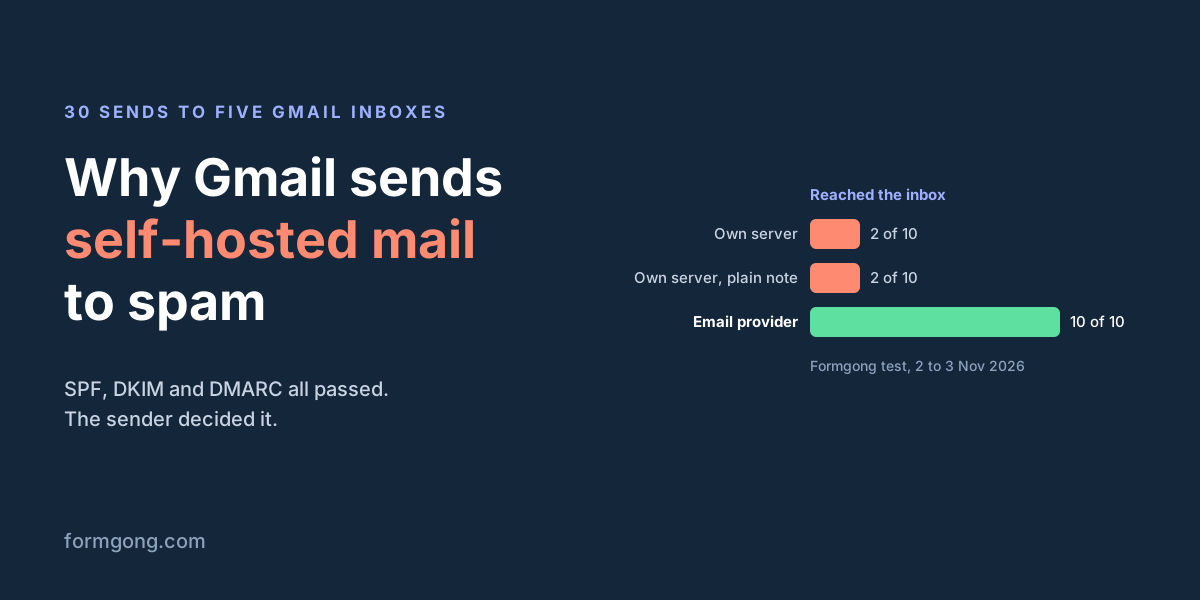
Our server's notification reached the inbox 2 times out of 10. The plain note did exactly as badly, 2 out of 10. The same notification through the email provider reached the inbox 10 out of 10. No send failed and no message went missing, so all 30 count.
| Inbox | Own server, form notification | Own server, plain note | Email provider, form notification |
|---|---|---|---|
| u1 | Spam / Spam | Spam / Spam | Inbox / Inbox |
| u2 | Spam / Spam | Spam / Spam | Inbox / Inbox |
| u3 | Spam / Spam | Spam / Spam | Inbox / Inbox |
| u4 | Spam / Spam | Spam / Spam | Inbox / Inbox |
| u5 | Inbox / Inbox | Inbox / Inbox | Inbox / Inbox |
| Total in Inbox | 2 of 10 | 2 of 10 | 10 of 10 |
Every one of the 16 Spam copies carried the same reason from Gmail, the "similar to messages that were identified as spam in the past" banner, in English or in the Ukrainian interface. No other reason appeared. All three bars held, so the answer we wrote down in advance stands. Gmail was judging the sender.
Is it my email content or my server?
In our test it was the server. A plain note of two sentences, with no links and no HTML, has almost nothing a content filter could object to. It still went to Spam in the same inboxes, the same number of times, as the full notification with its links and footer.
That matters because rewriting the email is usually the first thing people try. People strip out links and switch to plain text, and nothing changes. If your plain test message also lands in Spam, editing the copy will not help, because the filter is looking at who sent it.
The notification itself was fine. Sent through the provider, the very same template reached all five inboxes in both rounds.
Why did one inbox accept our server's mail?
All four Inbox results for our own server came from one inbox, u5, in both rounds and for both kinds of message. Before the test, u5 already held 13 messages connected to Formgong, several of them in the inbox. The other four inboxes had between 2 and 5 such messages each, some already in Spam. Those four put our server's mail in Spam 16 times out of 16.
So "2 of 10" hides the pattern. Read it as "Spam, unless this inbox already knows you". Our main company inbox, which has years of mail from us and was not part of the test, had 40 of 41 of our server's routine check messages in the inbox.
For you, that means a test sent to your own Gmail account can mislead you. If you have been mailing yourself from the server for weeks, your inbox has learned to trust it. Your customers' inboxes have not. Send your test to a Gmail address that has never heard from you.
Why don't Postmaster Tools or blocklists show the problem?
Google Postmaster Tools showed nothing wrong for mail.formgong.com. User-reported spam was 0.00% every day from 26 October to 1 November, SPF and DMARC passed 100% of the time, and DKIM passed 100% from 28 October. That spam rate only counts messages people report themselves, so it cannot see what Gmail's filter puts in Spam on its own. The current version of Postmaster Tools has no domain or IP reputation view, and its compliance page said "No data was found for this domain". Its form for reporting a delivery problem would not accept our domain, because at our volume it does not yet meet the sender requirements the form checks.
Blocklists were clean too. Our address was on none of Spamhaus ZEN, Barracuda or SpamCop. We also checked 500 random addresses in each of four hosting networks against those lists. In Contabo's network 19 of 500 were listed, in Kamatera's 20, in Hostinger's 10 and in OVH's 9. So roughly 1 in 25 neighbours at the first two and 1 in 50 at the other two. That tells you how noisy a network is. It does not tell you how Gmail weighs it, and Gmail does not publish that.
When every dashboard is green and mail still goes to Spam, the dashboards are not measuring the thing that is hurting you. Gmail's view of a new sender with little history is not shown anywhere you can read it.
What actually helps a new mail server reach the inbox?
Keep the authentication right anyway. Passing SPF, DKIM and DMARC did not get us into the inbox, but failing them would keep you out for good, and Gmail requires SPF or DKIM from every sender.
Give the server time and real mail. A sender with a few messages a day has almost no history for Gmail to judge, and our results only turned positive in the one inbox with a record of wanted mail from us. Send steady, low-risk mail that people expect, at a pace that grows slowly. We have not measured how long this takes, so be suspicious of anyone who promises a number of days.
Do not use the new server for first contact with strangers. A welcome email, a password reset or a form notification to a customer's address is exactly the mail that has to arrive, and it is the mail most likely to hit an inbox that has never seen you. Route that through an established provider while your own server builds a record with people who already know you.
Ask for help where the people who run mail systems talk. The mailop mailing list exists for this kind of question, and we posted our numbers there on 2 November; at the time of writing the post had not appeared on the list and had no reply. Google's delivery report form in Postmaster Tools is the other channel, but as described above, it accepts reports only from domains that already meet its sender requirements.
If the mail your server sends is form notifications and nothing else, ask whether you need the server at all. A form without a backend of your own can post to a service that already sends from an established address.
Does the hosting provider matter for a mail server?
First it decides whether you can send at all. Mail between servers travels over port 25, and many hosts close it. Google Cloud blocks outbound port 25. AWS restricts it on EC2 and lifts the limit when you ask. Hetzner opens it for cloud servers only on request once the account is about a month old. Home connections are usually on Spamhaus's PBL, a list of addresses that should not send mail directly, and Cloudflare Workers cannot open connections to port 25 at all. If your PHP or Node mail simply never leaves the server, our guides on PHP mail() not sending and PHPMailer failing on a live server walk through the blocked-port case.
Once the port is open, the network's neighbours are the next thing you inherit. Our scan found about twice as many listed addresses at Contabo and Kamatera as at OVH and Hostinger. Your own address can be clean, as ours was, and the test above still shows Spam, so a cleaner network is no guarantee. It is one less thing working against you.
What can't this test tell you?
The five inboxes belong to one person, and Gmail may link accounts that are signed in together. They are not five strangers. Each inbox also gave the same answer in both rounds, so the two rounds are not independent draws.
The IP address and the domain changed together. Our server sends from its own IP as mail.formgong.com; the provider sends from its shared addresses as formgong.com. The test cannot say which of the two Gmail distrusts. Separating them needs a run where our server signs as formgong.com, which we have not done yet.
All five inboxes had some Formgong mail before the test, and they are the same inboxes as an earlier trial run on 1 November that gave us the idea in the first place. So this is a repeat on inboxes with a known history, not a test on fresh ones.
The run did not go exactly to plan. In round 1 the second batch went out 2 minutes 44 seconds after the first instead of the planned 4 minutes, and the third batch went out late and in two parts. We did not copy Gmail's authentication results from "Show original" during these two rounds; the evidence that authentication passed comes from the 1 November trial and from Postmaster Tools. Opening the Spam copies to read Gmail's reason marked them as read. In the blocklist scan, about ten single lookups timed out and count as not listed, and 500 addresses per network from one evening is a small sample.
What did we decide for our own mail?
Customer mail at Formgong, form notifications included, goes through UniOne first. Our own server sends to our own mailboxes and to a short list of inboxes that already know us, and it sends product news to people who signed up for it. It also takes over when the provider fails to send a message. The rest of the time it builds history slowly on mail where a copy in Spam costs nothing.
If you collect submissions with Formgong, you do not need a mail server of your own for this. Point the form at Formgong as in the HTML form setup guide, and the notifications go out through the provider described above. Every submission is also kept in your dashboard, so a misfiled email is never the only copy. If something still does not arrive, the guide to submissions not arriving covers the checks on our side.
Has your mail server got out of Gmail's spam folder?
If your own server went from Spam to Inbox at Gmail, we would like to know what changed and how long it took. Write to support@formgong.com.
Frequently asked questions
Why does Gmail send my self-hosted email to spam if SPF, DKIM and DMARC pass?
Because Gmail does not know the sender yet. Authentication proves who sent the message, not that people want it. In our test our own server reached the inbox 2 of 10 times with every check passing, while the same email through an established provider reached it 10 of 10 times.
Will changing the email text get it out of spam?
Not when the sender is the problem. A two-sentence plain-text note with no links from our server landed in Spam as often as the full notification: 2 of 10 reached the inbox in both cases.
Why do my test emails reach my own inbox but not my customers'?
Your own inbox has a history with your server. In our test, the one inbox with the most earlier mail from us got our server's mail in the inbox every time, and the other four put it in Spam 16 of 16 times.
Does Google Postmaster Tools show a bad sender reputation?
It did not for us. It showed 0.00% user-reported spam and 100% passing authentication. That spam rate counts only user reports, and the current version has no reputation view.
Sources and documentation
Official references for this guide: Formgong: Contact form emails going to spam, Formgong: Form submissions not arriving. HTML contact form, where data is stored.