The review is usually the second complaint
A 1-star review feels like an attack out of nowhere. Most of the time it is not. On 31 October 2026 we read the 10 newest 1 and 2-star Trustpilot reviews of five large online stores, two per store, skipping anything less than two weeks old so each store had time to answer. Eight of the 10 reviewers said they had already contacted the store about the problem before they wrote the review. One said the shop never told them items had sold out. Others wrote about a support agent who did not listen, a refund that never came, and a claim turned down as wear and tear.
So by the time you read the review, the customer has usually tried the quiet way and given up. Your reply is the first answer some of them get. It is also the only part of the story the next shopper hears from you.
The complaints were ordinary. Three were about a late, incomplete or unannounced order, three about money that had not come back, two about a product that wore out, one about a used item sent as new and one about a rude agent.
How often big stores reply
Of those 10 reviews, 2 had a public reply, both from Gymshark. Both said sorry and that the feedback had been passed to the team. Neither mentioned what the reviewer had actually complained about, and neither offered a next step or a way to get in touch. The other eight got no reply at all.
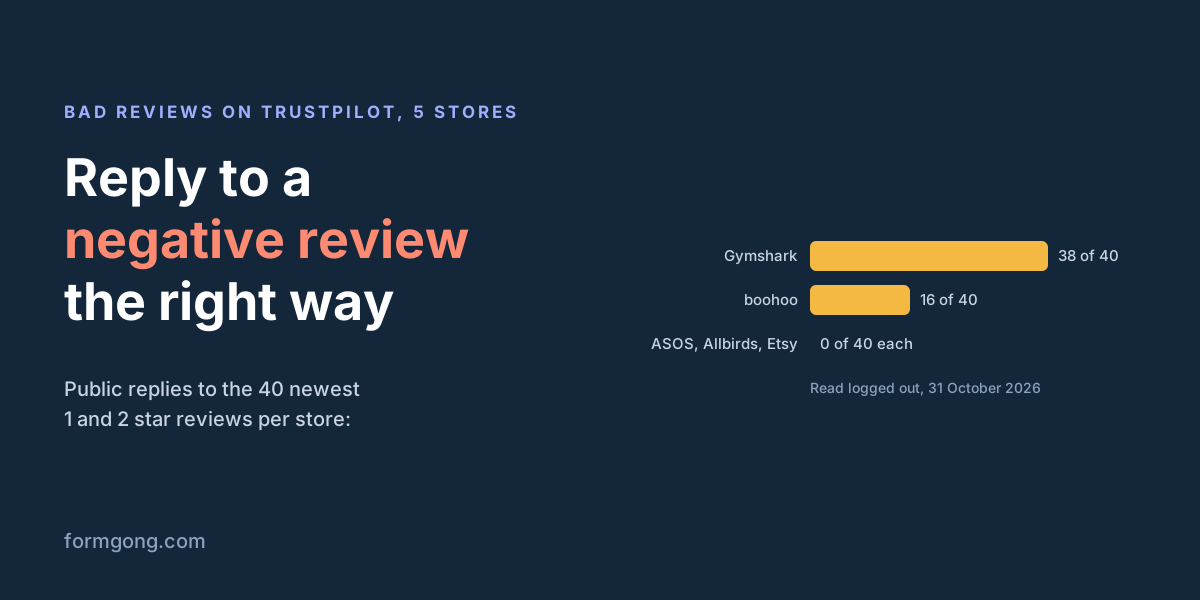
Ten reviews is a small sample, so we then looked at 40 low reviews per store, again at least two weeks old:
| Store | Got a public reply | What the replies looked like |
|---|---|---|
| Gymshark | 38 of 40 | 33 of the 38 replies say sorry; 16 say the feedback went to the team |
| boohoo | 16 of 40 | 5 of the 16 replies say sorry |
| ASOS | 0 of 40 | No public reply |
| Allbirds | 0 of 40 | No public reply |
| Etsy | 0 of 40 | No public reply |
Whether a bad review gets an answer depends on the store far more than on the review. Three of the five stores answered none of the 40, and Gymshark answered nearly all. A store that does not reply on Trustpilot may still answer by email, which we cannot see. A shopper reading the page cannot see it either.
What to say
Google's own tips for Business Profile replies are short and match what works anywhere. Keep the reply short and polite. Address the reviewer by name and sign with yours. Apologise when you got it wrong, admit the mistake, but do not take the blame for things outside your control, and explain what you can and cannot do. For anything complicated, ask the person to contact you by phone or email.
In practice that means a reply of three to five sentences. Name the actual problem, so the reader can see you read the review and did not paste a stock answer. Say what you did, not what you will "look into": "we sent a new pair today" beats "your feedback has been shared with the relevant teams", which is close to word for word what one of the replies in our sample said. Then give one direct way to reach a person, ideally an email address that a human reads.
Reply soon. Google notifies the reviewer when you reply, and the reviewer can still change the review after reading it. Google's tips add that a caring reply may even lead the customer to update their review.
What not to say
Do not argue the facts in public, even when the customer is wrong. An argument under a review helps nobody who reads it. If the reviewer got something wrong, say what you can check ("I couldn't find an order under this name") and move the rest to email.
Leave out anything private. Google's tips say never to share a reviewer's private information, and that includes their order number, address and what they bought if they did not say it themselves. It also means no hints about the customer's history with you.
Do not offer a refund, a discount or a gift in return for changing or deleting the review. Google treats incentives to post, change or remove reviews as fake and misleading content and strictly prohibits them. Fixing the problem is fine; making the fix depend on the review is not. In the US, threatening a reviewer with legal action you have no real ground for, or publicly accusing them of something you know is false, in order to get a review taken down is itself a violation of the FTC's rule on consumer reviews (16 CFR 465.7).
And do not paste the same reply under every review. If forty replies say the same thing, readers stop reading them.
When to reply privately
Take it private when solving the problem needs details that should not be public: an order number, an address, a payment, a medical or legal matter, or a long back-and-forth. A reply on Google is always public, so there you post a short public reply and ask the reviewer to email or call you. On your own site you may be able to reply privately straight away, by email, without anything appearing under the review.
Still post something public on a review you are handling in private. A visible "we're sorting this out by email" tells the next reader you answered. Once the problem is solved, it is fine to ask the customer whether they would like to update their review. The FTC's questions and answers on its rule say asking satisfied customers to update a review is not prohibited. Ask once, without conditions, and accept no for an answer.
Reply when you got it wrong
Use this when the review is fair. Say what went wrong in the reviewer's words and what you have already done. Leave out the order number.
Hi [first name], thank you for telling us, and I'm sorry.
You ordered [item] and it arrived [late / damaged / not at all]. That one is on us.
We have [sent a new one / refunded the delivery] today.
If anything is still wrong, write to me at [email] and I'll deal with it myself.
[Your name], [Business name]
Reply when you can't find the customer
Use this when the review may be fake or meant for another business, but you cannot be sure. It asks for details instead of accusing anyone. If it turns out to be a fake, report it, as described below.
Hi [first name], I'm sorry this went badly.
I couldn't find an order under this name, so I may be looking in the wrong place.
Could you email me at [email] with the date or the order number?
I'd like to find out what happened and put it right.
[Your name], [Business name]
Reply when your answer is still no
Use this when you followed your policy and the customer is unhappy with it. Explain the limit without defending yourself, and leave one door open.
Hi [first name], thanks for the honest review. I'm sorry the [product] didn't last.
Our guarantee covers [what it covers] for [how long], so we couldn't replace them this time.
I know that isn't the answer you wanted.
If you reply to our last email with a photo, I'll look at it again myself.
[Your name], [Business name]
When you may report or remove a review
Disliking a review is not a reason to remove it, on Google or on your own site. The rules on both sides allow it for a short list of reasons, and the list does not depend on the star rating.
On Google. You can report any review, but Google removes only those that break its policies, and its help page tells businesses not to report a review just because they disagree with it. The policy covers fake engagement (content "not based on a real experience"), reviews from someone with a conflict of interest, such as a current or former employee, harassment, hate speech, someone's personal information, obscene content, advertising and reviews that are off-topic. To report one, open your Business Profile, select Read reviews, then Report next to the review, and pick the reason. The Reviews Management Tool shows the status, and if Google finds no violation you get one appeal.
On your own site in the US. The FTC's 2024 rule on consumer reviews (16 CFR 465.7) bans hiding reviews because of their rating or negative tone while making the rest look like all of your reviews. The exceptions are reviews with confidential business or financial information, defamatory, harassing, abusive, obscene or discriminatory content, someone else's personal information, content that is clearly false, reviews you reasonably believe are fake, and reviews unrelated to what you sell. The rule applies the same standard to good and bad reviews. On the "clearly false" exception, the FTC's business guidance adds that it is "unlikely that a consumer's assessment or opinion with which you disagree" meets that bar.
In the EU. The Omnibus Directive (EU) 2019/2161 added misrepresenting consumer reviews to the list of practices that are always unfair. The European Commission's guidance gives, as the first example of a banned practice, "publishing only positive reviews and deleting the negative ones". Shops that show reviews must also say whether and how they check that reviews come from real customers.
None of this stops you from answering. A rude review about your business is usually still a real experience; on your own site you can mask the swear words and reply, which is better than hiding it.
Why hiding the bad ones backfires
The legal risk is the obvious reason, but not the only one. A product page with 40 five-star reviews and nothing else can look filtered. Shoppers who want the bad news go and find it on Google or Trustpilot instead, where you do not control the layout and may not have replied.
A hidden review also cannot carry your reply. Look at the table above: the stores that answered nobody left eight of ten complaints standing alone. A visible 1-star review with a calm, specific answer under it shows the next buyer what happens when something goes wrong, and that is often the question they came to the reviews to answer.
How Formgong handles bad reviews
Formgong collects reviews from your own customers and shows them on your site, so the rules for your own site apply. Here is what that looks like in the dashboard:
- Replies, public or private. Every review has a reply box. A public reply shows under the review on your widget, and the reviewer can get an email about it. A private reply goes to the reviewer by email, to your form's webhooks, or is saved as a note only, whichever you choose for the form. Both are on every plan. Reply emails share the daily limit of automatic emails, and one reviewer gets at most three a day.
- No switch to show only 4 and 5 stars. You approve each review, publish every review at once, or publish star ratings without text at once while written reviews wait for you. On Pro, or during the Reviews promo, an AI check can publish reviews for you; it reads the text without the star rating, so a fair 1-star review passes like a 5-star one. See Moderate reviews.
- Hiding needs a reason. The list is the same for good and bad reviews: Spam or fake; Duplicate; Not about your business; Personal data; Threats, hate or harassment; Test. You can delete only reviews you hid as test, spam or fake, or duplicate.
- Visitors can report a review. Under each review a Report link asks for one of four reasons: Spam or fake; Threats, hate or harassment; Personal data; Not about this business. The review stays published and you see the report count next to it.
- Rude words are masked, not hidden. Swear words show as their first letter and stars on your site, on by default. You see the original.
- The customer can update the review. A reviewer who left an email address gets a link to edit or delete their own review. You cannot change their words yourself.
- AI help with the reply, on Pro. Draft a reply writes a friendly or formal draft into the reply box from the rating and text only; nothing is published until you edit and save it. Mood tags mark each review as praise, neutral or complaint so you can sort complaints first. Both are on Pro, or during the Reviews promo (AI features).
How do you answer yours?
If you have a reply that turned a 1-star review around, or a case these templates do not fit, send it to support@formgong.com. We will add the useful ones to this page, without your customer's name.
What Formgong Reviews includes for free
- Unlimited review sites and reviews. Text, photo, video and voice reviews on Free.
- A widget with no view limit. The review widget, carousel, badge and stars in product lists load as often as your pages do.
- Review emails in your store's name. Sent after each order with your logo and colours, replies to you, no email service to set up; buyers can rate inside Gmail without leaving the email, and get one reminder (how it works).
- Bring your old reviews. Import from Judge.me, Yotpo, Loox, Shopify Product Reviews, WooCommerce, Etsy or a CSV.
- You decide what shows. Approve each review or choose a publishing mode, reply in public or in private, and let shoppers ask the author a question.
- Google. A Merchant Center review feed, and product rating markup through the WordPress plugin.
- Reviews from your form. People who filled in your contact form can get a review request automatically.
- One account for the rest. Contact forms with Telegram and Google Sheets, an AI help chat, and free website templates.
Frequently asked questions
Should I reply to every negative review?
Yes, if it is a real customer. A short, specific public reply shows the next reader what happens when something goes wrong. If the review looks fake, reply asking for details and report it.
Can I ask a customer to remove a bad review?
You can fix the problem and then ask once whether they would like to update their review. Do not offer a refund, discount or gift in return: Google prohibits incentives to change or remove reviews.
Can I delete negative reviews from my own website?
Not because they are negative. In the US the FTC rule (16 CFR 465.7) allows hiding reviews only for reasons such as fake, abusive, unrelated or containing personal data, applied the same way to good and bad reviews. EU law bans showing only the positive ones.
How do I get a Google review removed?
Report it from your Business Profile under Read reviews. Google removes it only if it breaks its policies, for example fake engagement, a conflict of interest, harassment or personal information. If Google finds no violation, you get one appeal in the Reviews Management Tool.
Should I reply to a negative review in public or in private?
Both, when you need private details. Post a short public reply so readers see you answered, then handle order numbers, refunds and addresses by email.
Sources and documentation
Official references for this guide: Google: read and reply to reviews, Google: tips to get more reviews (replies), Google: report inappropriate reviews, Google Maps: prohibited and restricted content, FTC: Consumer Review Fairness Act, FTC: consumer reviews rule Q&A, 16 CFR 465.7 Review suppression, European Commission UCPD guidance, 4.2.4, Formgong: moderate reviews. Moderate reviews, where data is stored.