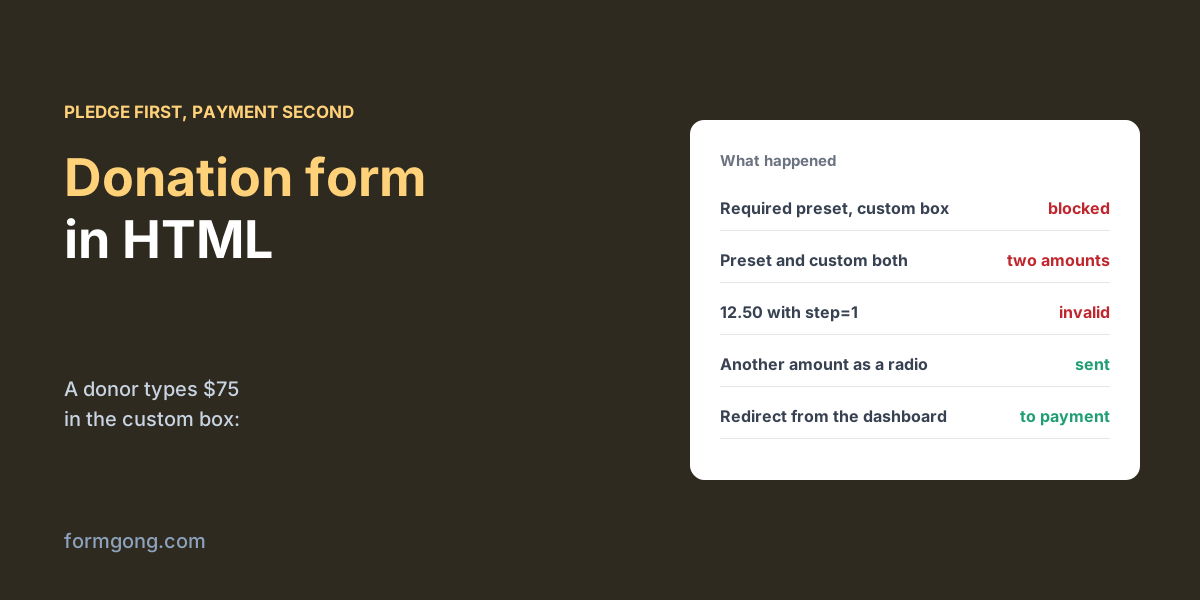
Why did the donor's custom amount not go through?
A donor wants to give $75. Your form offers $25, $50, $100 and $250, plus a box for a custom amount, so they type 75 and press the button. The browser tells them to pick one of the options. Some will pick $50 to get past it, some will give up, and you never hear about either.
That is what happened when we filled in the form from Splitforms' “Donation Form in HTML — Working Code for Nonprofits” (last reviewed 1 November 2026), unchanged apart from where it posts. The first preset carries required, which makes the whole radio group required, and the custom box sits outside the group. We tested it and our own version on 3 November 2026 in Chromium 153, Firefox 155 and WebKit 26.6, posting to a local copy of Formgong, a form backend that sends each submission to your email or Telegram.
What should a donation form ask for?
As little as you need to thank the donor and match the payment later. That is the amount, how often, the donor's name and email, and whether they want their name kept off any public list. Ask for an address only if you must post a receipt, and never ask for card details in your own form. A payment provider's hosted page handles the card, so the card number never passes through your site or your form backend.
Give the amount its own fieldset and legend, so a screen reader hears “How much would you like to give?” before “$25”, and make “Another amount” one of the radio buttons rather than a box beside them. Then picking it and typing a number is one choice, not two that can disagree. Our HTML radio button article shows why one required covers the whole group.
How do you handle a custom donation amount?
| What the donor did | What happened |
|---|---|
| Splitforms' markup: no preset picked, $75 typed in Custom amount | Not sent. The browser asked the donor to pick one of the presets |
| Splitforms' markup: $50 picked and $75 typed | Sent with both, amount=50 and amount_custom=75 |
| Splitforms' markup: 12.50 typed in the custom box | Invalid: the box has step="1", so the browser offered 12 or 13 |
| Our form: Another amount, $75 | Sent: amount=other, other_amount=75 |
| Our form: $75 typed, then $50 picked instead | Sent amount=50 only; the stale 75 was switched off |
| Our form: Another amount, box left empty | Not sent. The browser asked for the amount |
| Our form: Another amount, 12.50 | Sent: other_amount=12.50 |
The second row is the quiet one. Both amounts reached the inbox, and whoever reads it has to guess whether the donor meant $50 or $75. In our form the amount box is switched off unless “Another amount” is picked, and a switched-off field is never sent, so the request always carries one amount. It also becomes required only when it is switched on, which is what stopped the empty case in the sixth row.
Use step="0.01" for money. With step="1", a donor typing 12.50 is told the value is invalid. On the server, Formgong's number check refused fifty and accepted both 12.50 and 12,50, because comma decimals are normal in much of Europe.
Where does the payment fit in a donation form?
After the pledge is recorded, on a page your payment provider hosts. Doing it in that order means you have the donor's details even if they close the payment tab, so you can follow up once. There are two ways to hand over, and we measured both.
| Hand-off | Where the donor landed |
|---|---|
Hidden redirect field to a page on the same site | The donor landed on that page |
Hidden redirect field to another site | Ignored. The donor landed on Formgong's thank-you page |
| Redirect set in the form's dashboard settings, another site | The donor landed on that page |
| A script posts first, then opens the payment page with the pledge id | The donor landed on pay.html?pledge=…&amount=50 |
A script posts other_amount=fifty | Refused with 422, field other_amount, code number |
The simplest is a redirect set in the form's dashboard settings to your provider's donation page, which worked to another site. A hidden redirect field in the page itself only works to your own site; Formgong ignores one that points elsewhere, so nobody can use your form to bounce visitors to a page you did not choose. If the payment page needs the amount, post with a script as in the code below, and open the payment page only after Formgong answers that the pledge is stored. The thank-you page guide covers redirects in more detail.
<form id="pledge" action="https://formgong.com/submit" method="POST">
  <input type="hidden" name="access_key" value="YOUR_ACCESS_KEY">
  <input type="hidden" name="_subject" value="New pledge">
  <fieldset>
    <legend>How much would you like to give?</legend>
    <label><input type="radio" name="amount" value="25" required> $25</label>
    <label><input type="radio" name="amount" value="50"> $50</label>
    <label><input type="radio" name="amount" value="100"> $100</label>
    <label><input type="radio" name="amount" value="other"> Another amount</label>
    <label for="other_amount">Amount in dollars</label>
    <input id="other_amount" name="other_amount" type="number" min="1" step="0.01" inputmode="decimal" disabled>
  </fieldset>
  <fieldset>
    <legend>How often?</legend>
    <label><input type="radio" name="frequency" value="once" checked> Once</label>
    <label><input type="radio" name="frequency" value="monthly"> Every month</label>
  </fieldset>
  <label for="name">Full name</label>
  <input id="name" name="name" autocomplete="name" required>
  <label for="email">Email</label>
  <input id="email" name="email" type="email" autocomplete="email" required>
  <label><input type="checkbox" name="anonymous" value="yes"> Leave my name off the supporters list</label>
  <button>Continue to payment</button>
</form>

<script>
  const form = document.getElementById("pledge");
  const other = document.getElementById("other_amount");
  // "Another amount" switches the box on and makes it required.
  // A preset switches it off again, so a stale number is not sent.
  form.addEventListener("change", (event) => {
    if (event.target.name !== "amount") return;
    other.disabled = event.target.value !== "other";
    other.required = !other.disabled;
    if (!other.disabled) other.focus();
  });

  // Record the pledge first; only a stored pledge goes on to payment.
  form.addEventListener("submit", async (event) => {
    event.preventDefault();
    const response = await fetch(form.action, {
      method: "POST",
      body: new FormData(form),
      headers: { Accept: "application/json" },
    });
    const data = await response.json();
    if (!response.ok) { alert(data.message); return; }
    const amount = form.elements.amount.value === "other" ? other.value : form.elements.amount.value;
    // Your payment provider's hosted page, with the amount and the pledge id.
    location.href = "https://example.org/give/pay?amount=" + encodeURIComponent(amount)
      + "&pledge=" + encodeURIComponent(data.id);
  });
</script>
Can Formgong take donations?
No, and you should know that before you build on it. Formgong stores the pledge and sends it to your inbox or Telegram, and its field checks can refuse a post with a missing name or an amount that is not a number. Charging the card, monthly payments and tax receipts all stay with your payment provider. Splitforms does more here. Its donation guide describes a paid-plan option that opens Stripe Checkout on your own Stripe account for one-time gifts, and says it does not handle monthly ones. Static Forms' “Mastering Online Donation Request Forms” (7 May 2026) describes the same split we recommend, with card details tokenised by the payment provider so raw card data never reaches the form backend. If you want the payment taken in the same step as the form, a service with a payment integration fits better. If you already have a provider's donation page and want the pledge recorded first, the form above does that; the HTML forms docs list the fields Formgong reads.
Did your donation form behave differently?
If donors hit a problem with amounts or the hand-off that we did not test, write to support@formgong.com. We will try your form and add the case here.
Frequently asked questions
Can a donation form take card payments directly?
It should not. Record the pledge in your form, then send the donor to a page your payment provider hosts, so card details never touch your site.
How do I add a custom amount to a donation form?
Make Another amount one of the radio buttons and switch a number box on only when it is picked. Then exactly one amount is sent.
Which step should a donation amount field use?
step="0.01". With step="1", the browser refused 12.50 in all three browsers we tested.
Does Formgong process donations?
No. Formgong records the pledge and can redirect the donor to your provider's payment page, but it does not charge cards or set up monthly payments.
Sources and documentation
Official references for this guide: Formgong: HTML radio button groups and what they send, Formgong: HTML fieldset and legend, and what disabled leaves out. HTML forms, where data is stored.