React Hook Form watch vs useWatch, and what gets sent
Six ways to read one field in React Hook Form, counted render by render, plus the conditional field that disappears from the screen but not from the submission.
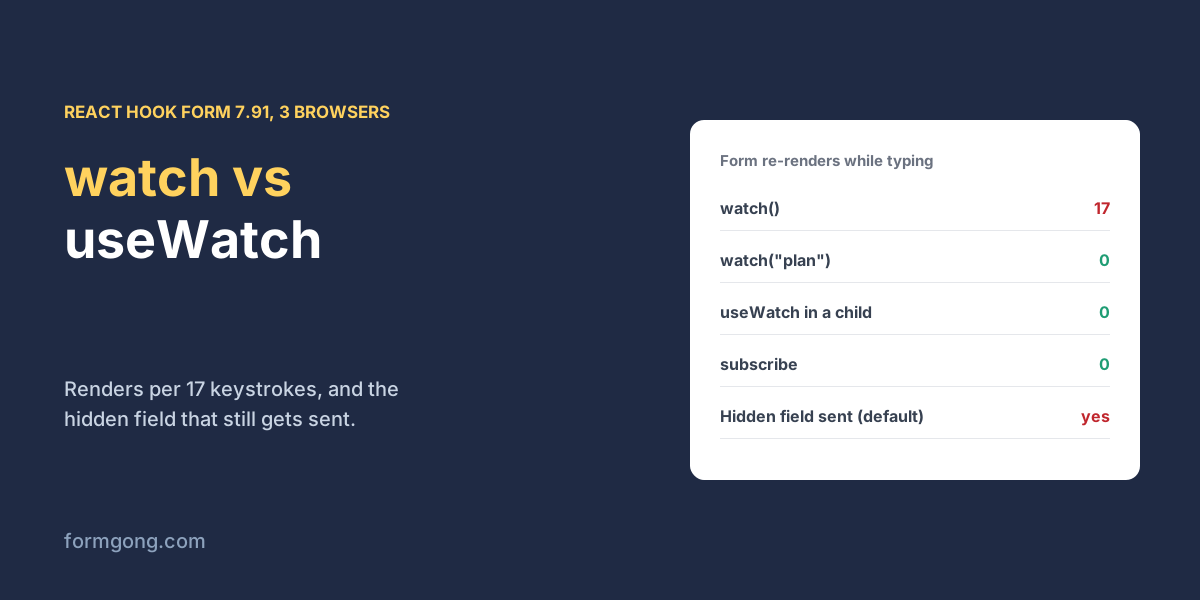
The short answer. Use watch("field") or useWatch to show or hide fields, and never getValues. In our test with React Hook Form 7.91.0 on 3 November 2026, watch() with no argument re-rendered the whole form 17 times for 17 keystrokes in an unrelated box, while watch("plan") and useWatch re-rendered it 0 times. A field you hide is still sent unless you set shouldUnregister, and in 4 of the 5 setups that showed it, the hidden company name went out with the form.
Formgong
React Hook Form watch vs useWatch, and what gets sent
Why does watch make a React Hook Form slow or send odd data?
You add a “Company” box that should only appear when someone picks the Business plan. You reach for watch, it works, and you move on. Two things can go wrong from there. The form may re-render on every keystroke anywhere in it, which you only notice once it has thirty fields and a date picker. And a visitor who picks Business, types a company, then switches back to Personal still sends you that company name, because the box left the screen and the value stayed in the form.
We built one small quote form in React 19.3.1 with React Hook Form 7.91.0, both from npm, and read the plan menu in six different ways. A counter in each component recorded every render. The form posted to a local copy of Formgong's backend, so we could see exactly which keys arrived. Each setup ran in Chromium, Firefox and WebKit, twice, and the numbers did not change between browsers or runs.
How many re-renders does watch cause?
React Hook Form 7.91.0, React 19.3.1, production build. Form re-renders for 17 keystrokes in the message box and for one change of the plan menu; then whether a company typed under Business was still sent after switching back to Personal. Same numbers in Chromium, Firefox and WebKit, two runs each, 3 November 2026.
How the form reads “plan”
Renders while typing
Renders on a plan change
Company field appears
Hidden company still sent
watch() in the form
17
1
Yes
Yes, “Northwind”
watch("plan") in the form
0
1
Yes
Yes, “Northwind”
getValues("plan") in the form
0
0
Never
Empty string
useWatch in a child
0
0 (child: 1)
Yes
Yes, “Northwind”
useWatch + shouldUnregister: true
0
0 (child: 1)
Yes
No, key absent
subscribe + one state value
0
1
Yes
Yes, “Northwind”
The first two rows are the ones people mix up. watch() with no argument subscribes the form to every field, so each keystroke in the message box re-rendered the whole form, 17 renders for 17 keys. watch("plan") with a name re-rendered it 0 times for the same typing and once when the plan changed. In this version, naming the field is enough to keep typing elsewhere from re-rendering the form. Watching everything is what costs you. Splitforms' guide to watch and setValue (15 May 2026) has a code comment on watch("plan") saying the entire form re-renders on every form change; we did not see that in 7.91.0, and the same guide's own tips tell you to pass a field name to watch, which is what we measured paying off.
useWatch in a child component moved even the plan-change render out of the form. The form rendered 0 times and only the small company component rendered once. That is the reason to use it in a big form with expensive siblings, such as a rich text editor or a date picker, that you do not want to redraw when one menu changes. subscribe, which 7.91.0 has, runs a callback without any render at all; we stored one value in state from it, so it rendered exactly when the plan changed.
Can you use getValues instead of watch?
Not to show or hide anything. getValues reads the current value once and does not subscribe, so nothing tells React to draw the form again. In our test the company box never appeared, in 3 of 3 browsers, whether the visitor picked Business in the menu or a button called setValue("plan", "business"). The menu showed Business and the form underneath did not change.
Keep getValues for event handlers, such as reading a value when a button is clicked, where you already have a reason to act. For anything the visitor sees change, use a subscription such as watch("name"), useWatch or subscribe.
Does setValue update what watch returns?
Yes. We pressed a button that called setValue("plan", "business") with no options. In 5 of the 6 setups the company box appeared straight away, with the same render counts as picking Business by hand, which meant one form render with watch or subscribe and one child render with useWatch. The sixth was getValues, for the reason above.
What setValue does not do by default is validate or mark the field as changed. The same Splitforms guide points to the shouldValidate, shouldDirty and shouldTouch options for that, which matches the React Hook Form docs. If an error message under the field should disappear when your code fills it in, pass shouldValidate: true. Our form had no rules, so we did not measure that part.
Are hidden conditional fields still submitted?
By default, yes. In every setup that showed the company box, we typed “Northwind”, switched the plan back to Personal, and the box disappeared. Then we pressed Send. With watch(), watch("plan"), useWatch and subscribe, the data handleSubmit passed on still held company: "Northwind", and the backend stored it. That is 4 of the 5 setups that showed the field, in all 3 browsers. Only the form created with shouldUnregister: true left the key out entirely.
This is React Hook Form keeping its values by design, so a field that unmounts and comes back still holds what was typed. It is helpful in a multi-step form and a nuisance in a quote form, where you now get a company name from someone who chose Personal. You have three ways out. Set shouldUnregister: true on the form, call unregister("company") when the plan changes, or drop the key in your submit handler. The first is the least code, as in the component below. If you also check the data on a server, the server-side form validation test shows what a server can still catch, and Zod form validation covers sharing one schema between both sides.
QuoteForm.jsx
import { useForm, useWatch } from "react-hook-form";

// Only this small component re-renders when the plan changes.
function CompanyField({ control, register }) {
  const plan = useWatch({ control, name: "plan" });
  return plan === "business" ? (
    <label>Company <input {...register("company")} /></label>
  ) : null;
}

export function QuoteForm() {
  const { register, handleSubmit, control } = useForm({
    defaultValues: { plan: "personal", company: "", email: "", message: "" },
    // A field that is no longer on screen is no longer sent.
    shouldUnregister: true,
  });

  async function send(data) {
    const response = await fetch("https://formgong.com/submit", {
      method: "POST",
      headers: { "Content-Type": "application/json", Accept: "application/json" },
      body: JSON.stringify({ access_key: "fk_your_access_key", ...data }),
    });
    const result = await response.json().catch(() => ({}));
    if (!response.ok || !result.success) throw new Error(result.message || "Not sent");
  }

  return (
    <form onSubmit={handleSubmit(send)}>
      <label>Plan
        <select {...register("plan")}>
          <option value="personal">Personal</option>
          <option value="business">Business</option>
        </select>
      </label>
      <CompanyField control={control} register={register} />
      <label>Email <input type="email" {...register("email")} /></label>
      <label>Message <textarea {...register("message")} /></label>
      <button type="submit">Send</button>
    </form>
  );
}
Which form backend handles this better?
We do not have an edge here, and neither do the two guides we compared on 3 November 2026. A form backend stores what your handler sends. Formgong keeps every key of a JSON body as it arrives, which is how “Northwind” reached our test backend, and it skips only keys whose value is null. Splitforms' guide does not say whether hidden fields are submitted. Web3Forms' article on watch and setValue, from 17 June 2022, builds a hidden subject line from the name field with watch and setValue; its first snippet lists userName as the effect's dependency, a name it never defines, while the full code further down uses watchName. Copy the full version if you use that pattern. Whichever backend you use, the fix belongs in your form. If you want a React form without a library at all, React form validation without a library has a tested component, and the React contact form page shows how to connect it to Formgong.
Did watch behave differently in your form?
If your React Hook Form version renders differently, or a hidden field misbehaves in a way we did not cover, write to support@formgong.com with the component. We will run it through the same test and update the table.
Frequently asked questions
What is the difference between watch and useWatch?
watch re-renders the component that called useForm. useWatch re-renders only the component it sits in. In our test useWatch kept the form at 0 renders when the plan changed.
Does watch re-render on every keystroke?
watch() with no argument does, 17 renders for 17 keystrokes in our test. watch("plan") re-rendered 0 times while typing in another field in React Hook Form 7.91.0.
Why does my hidden field still submit?
React Hook Form keeps values of fields that unmount. Set shouldUnregister: true, call unregister, or remove the key before sending.
Can I use getValues to show a field conditionally?
No. getValues does not subscribe, so the form never re-renders. In our test the conditional field never appeared.