First check: two submissions, or two messages?
Open the list of submissions wherever your form saves them, your form service's inbox or your own database. If you see two entries with the same text a second or less apart, the page posted twice, and the rest of this article is about that.
If there is one entry and you still got two emails or two Telegram messages, the form is fine and the copy comes from further down. Usually the form is connected to two places that both notify you: a private chat and a group, or Formgong's Telegram alert plus a Zapier or n8n step that posts to the same chat. That is covered in the Telegram section below.
What we measured
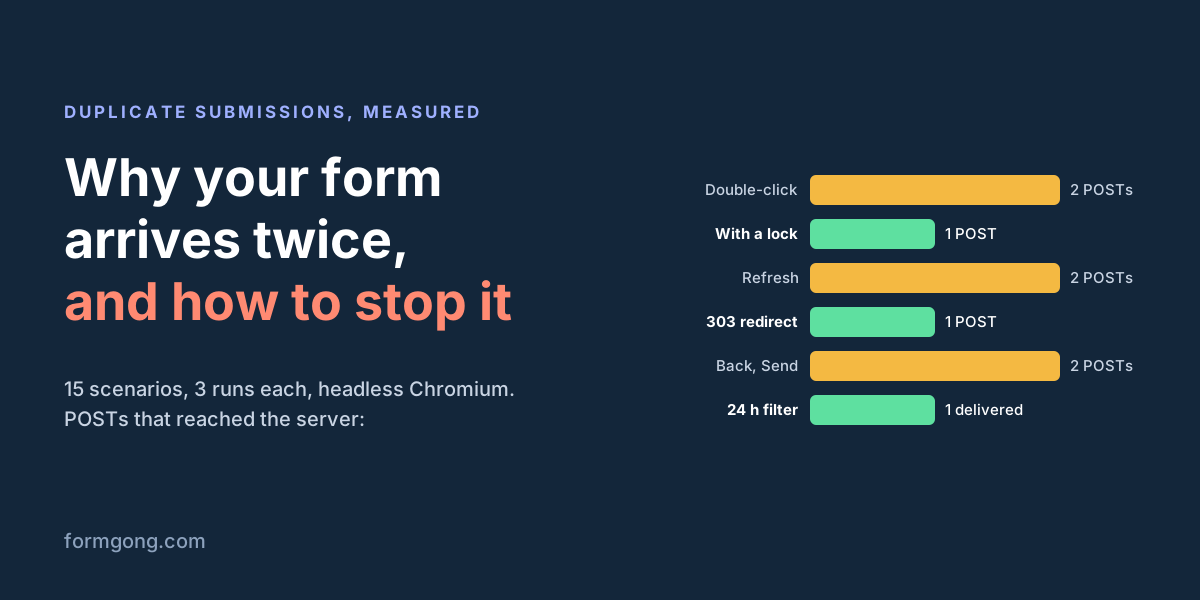
We built a small local server that logs every POST it receives, then pressed Send the ways real visitors do: a double-click, Enter followed by a click, a refresh on the thank-you page, the Back button. Here is how many requests reached the server each time.
| What the visitor did | POSTs | What happened |
|---|---|---|
| Plain HTML form, the server answers with a page. Send, then refresh | 2 | Refresh sent the POST again |
| Same form. Send, go Back, press Send again | 2 | The form still looked unsent |
| Same form, the server answers with a 303 redirect. Send, then refresh | 1 | Refresh only reloaded the thank-you page |
| fetch() form with no lock. Double-click | 2 | Both clicks posted, 1 ms apart |
| fetch() form with no lock. Two clicks 150 ms apart | 2 | |
| fetch() form with no lock. Enter in a field and a click at once | 2 | |
| Lock that turns the button back on when the request ends. Two clicks 150 ms apart | 2 | The first answer came back before the second click |
| Same lock. Double-click, or Enter and a click | 1 | |
| Button stays disabled after a success. Double-click, two clicks 150 ms apart, Enter and a click | 1 | One POST in each case |
| Button stays disabled. Reload the page, send the same text again | 2 | A new page has a new lock |
| Slow server, the script times out and retries | 2 | With a submission id the server could tell the second one was a repeat |
Two things in the table surprised us. A lock that switches the button back on as soon as the request ends still let a second click through, because our server answered in 50 ms and the second click came 150 ms after the first. And no lock in the page helps once the visitor reloads it: the new page starts with a fresh lock and an active button.
About the refresh rows: headless Chromium sent the POST again on reload without asking. Desktop Chrome first shows a "Confirm Form Resubmission" dialog, and a visitor who clicks Continue sends the same POST again.
You can watch it happen in a minute with the server below. Click the plain button, then refresh: the terminal prints a second POST. Double-click the fetch button: two more.
// count-posts.mjs: run with `node count-posts.mjs`, open http://localhost:8080 and watch the terminal
import http from "node:http";

let posts = 0;
const page = `<form method="POST" action="/save">
  <input name="email" value="ann@example.com"> <button>Send (plain HTML)</button>
</form>
<form id="js" action="/save">
  <input name="email" value="ann@example.com"> <button>Send (fetch)</button>
</form>
<script>
  document.querySelector("#js").addEventListener("submit", (event) => {
    event.preventDefault();
    fetch("/save", { method: "POST", body: new FormData(event.target) }); // no lock: every click posts
  });
</script>`;

http.createServer((req, res) => {
  res.setHeader("content-type", "text/html; charset=utf-8");
  if (req.method !== "POST") return res.end(page);
  console.log(`POST #${++posts} ${new Date().toISOString()}`);
  res.end("Thanks! Now press refresh."); // a page, not a redirect: refresh posts again
}).listen(8080);
Double-click and Enter: lock the form while it sends
A double-click is two clicks, and each click on an active submit button starts its own request. Enter in a text field submits the form too, so Enter followed by a click on Send does the same thing. The fix is a flag the submit handler checks before it does anything, plus a disabled button so the visitor can see the click worked.
Put this in the form's submit event, not in a click handler on the button. The submit event fires after the browser's own checks such as required pass, and it also fires for Enter. Read the fields with new FormData(form) before you disable anything, because disabled fields are left out of the data.
Keep the button disabled after a success. In our test, turning it back on when the request ended let a second click through. If the visitor may need to send another message, clear the form with form.reset(), so a stray click finds empty required fields and nothing is sent.
const form = document.querySelector("#contact");
let sending = false;

form.addEventListener("submit", async (event) => {
  event.preventDefault();          // the script sends the form, so the browser must not
  if (sending) return;             // a second click or Enter while sending does nothing
  sending = true;
  const button = form.querySelector("button[type=submit]");
  const data = new FormData(form); // read the fields before you disable anything
  button.disabled = true;
  button.textContent = "Sending…";
  try {
    const response = await fetch(form.action, { method: "POST", body: data, headers: { Accept: "application/json" } });
    if (!response.ok) throw new Error(String(response.status));
    button.textContent = "Sent";   // success: leave the button disabled
  } catch {
    sending = false;               // only a failure lets the visitor try again
    button.disabled = false;
    button.textContent = "Send";
  }
});
Refresh and Back: answer the POST with a redirect
When a form posts the old way, without JavaScript, the browser shows whatever page the server sends back. That page is the result of a POST, so refreshing it means sending the POST again. The fix is called Post/Redirect/Get: the server saves the message and answers 303 See Other with a Location header, and the browser then loads the thank-you page with a plain GET. A refresh repeats only the GET. In our test the redirect brought the refresh case from two POSTs down to one.
Use 303 for this. 307 and 308 keep the POST and send it again to the new address. The thank-you page guide has the full detail on redirects and status codes.
If your form posts to Formgong, this part is already done. Formgong answers every plain HTML post with a 303: to your own thank-you page when you set _redirect, otherwise to its own confirmation page. Forms that send with fetch() and Accept: application/json get JSON instead, and never leave the page.
The redirect does not stop the Back button case. A visitor who goes back sees the form with their text still in it, and pressing Send there is a new, deliberate submit. Only the server can tell it is the same message.
<form action="https://formgong.com/submit" method="POST">
  <input type="hidden" name="access_key" value="fk_your_access_key">
  <!-- after saving, Formgong answers 303 and the browser opens this page with a GET -->
  <input type="hidden" name="_redirect" value="https://www.example.com/thank-you">
  <input type="email" name="email" required>
  <textarea name="message" required></textarea>
  <button type="submit">Send</button>
</form>
Retries: give each form fill an id
A script that times out and tries again can send a message the server already saved. The first request reached the server but the answer was slow, so the page never saw it. In our test, a client with a 400 ms timeout talking to a server that took 900 ms sent two POSTs for one click.
Browsers can repeat a POST on their own, too. When we cut the connection mid-request in an earlier test, Chrome sent the same POST twice and Firefox ten times, while the page's code saw a single error (our write-up of that test). A page that shows "Sending failed" while the message did arrive makes people send it again, which is the case in contact form "Failed to fetch".
The fix for retries is an id created once per form fill and sent with every attempt. Payment APIs call it an idempotency key. The server stores the id in a unique column and does the work only the first time it sees it. A repeat gets the same success answer, so the visitor is not told something failed.
This only works if your server stores and checks the id. Formgong's /submit does not read a client id, so do not add a random hidden field to a Formgong form: it would be saved as one of the answers, and because it changes on every page load it would make two copies of the same message look different to the duplicate filter in the next section.
Site builders that send leads to Formgong by webhook are a different path, and there Formgong does use the platform's id. A Tilda lead's tranid, a Webflow submission's id, Framer's Framer-Webhook-Submission-Id header, or an Idempotency-Key header from any other sender is stored once. A retry with the same id gets a 200 answer and is not saved or delivered again. The Tilda guide shows the setup.
// In the page: one id per filled-in form, reused if the script retries
form.elements.submission_id.value = crypto.randomUUID();

// On your own server (Node, any database with a unique column)
app.post("/contact", async (req, res) => {
  const result = await db.run(
    "INSERT INTO submissions (submission_id, data) VALUES (?, ?) ON CONFLICT (submission_id) DO NOTHING",
    [req.body.submission_id, JSON.stringify(req.body)],
  );
  if (result.changes === 1) await notify(req.body); // only the first copy sends email or Telegram
  res.redirect(303, "/thanks");                     // a repeat gets the same answer, so the visitor sees success
});
What a server-side duplicate filter adds
Each fix in the page covers one cause. A reload, the Back button, a second tab, or a visitor who is not sure the first message went through all get past them, because each of these is a new submit from the browser's point of view. A filter on the server that looks at the content is the only thing that sees every copy. In our table, a check on the same content caught the second copy in every row with two POSTs.
In Formgong it is one switch per form. Open the form's settings, go to Protection, and under Filters turn on "Treat the same submission sent again within 24 hours as spam". From then on, when the same content reaches the same form within a day, the copy:
- goes to the form's Spam tab with the reason "Same submission sent again", where you can restore it;
- is not delivered to any channel, email and Telegram included;
- does not count toward your monthly submissions.
The visitor sees the usual thank-you message either way. The check compares what the visitor typed in every field after lowercasing it and collapsing extra spaces. Hidden fields such as the page address or UTM tags are left out, so the same message sent from another page still counts as a repeat. A message with any word changed is a new submission.
The switch is off until you turn it on, on every plan including Free. Leave it off on forms where two different people can honestly send identical answers on the same day, such as a one-question poll or an RSVP form with only a yes or no choice.
Two Telegram messages for one lead
If the same lead shows up twice in Telegram, start with the check at the top of this article. Two entries in your Formgong inbox mean the page posted twice, and the fixes above apply. Our Telegram form guide walks through the two causes we see most there: a double-click on a script-sent form, and a submit handler without event.preventDefault() that lets the browser post a second time.
One entry and two messages means two senders. Formgong connects a chat to a form only once, so the same chat cannot get the same submission twice from one connection. A private chat and a group connected to the same form each get their own message, which is by design. A second bot, or an n8n or Zapier step that also posts to the chat, sends its own copy.
Each Formgong message in Telegram has Reply, Mark handled and Mark as spam buttons. When a copy slips through, mark it as spam from the chat and mark the real one handled, without opening the dashboard.
Duplicates in your CRM or spreadsheet
Webhooks are retried when the receiver does not answer in time or answers with an error. Formgong tries a webhook up to five times, and every attempt carries the same submission.id. If your Zapier, Make, n8n or own endpoint saves a row before it answers and then fails, the next attempt adds a second row. Store submission.id in a unique column and skip ids you already have. The webhook signature guide shows where that check goes.
How to test your form for duplicates
- Open DevTools, go to the Network tab, and double-click Send. You should see one POST.
- Click in a text field, press Enter and click Send right after. One POST.
- Set the network to a slow profile and send again. The button should stay disabled the whole time.
- After a plain HTML send, refresh the thank-you page. No resubmission dialog and no new entry in your inbox.
- With the duplicate filter on, reload the form and send the same text again. The second copy should land in Spam, not in your email.
Run these on the published site, not only on localhost, where the server answers so fast that a second click may never land in time.
What Formgong's free plan includes
- Build the form or bring your own. The form builder takes the colours and fonts from your site's address, with no sign-up; ready form templates copy into your account; AI writes the fields from one sentence. Any hand-written HTML form works too.
- Websites with the form already connected. 28 free website templates post to Formgong out of the box.
- 250 submissions a month on unlimited forms. Spam does not count. Once a year, a busy month keeps delivering on credit until the 7th instead of stopping.
- Everywhere you work. Email to up to 3 people at once, Telegram with Reply and Handled buttons, Google Sheets, Notion, and 3 signed webhooks for Slack, Discord, Zapier, Make or n8n.
- Emails to your customers in your business's name. Formgong sends them under your business name and replies come back to you, with no email service of your own to set up: a review request to every lead, a reminder a visitor asked for, and review emails after an order with your logo and colours. People who agree can also go straight into your Mailchimp, Klaviyo, Brevo, MailerLite or Kit list. An automatic reply to each visitor is on Pro.
- No captcha needed. A server-side spam filter, a honeypot, allowed domains and a block list; add your own Turnstile key if you want one.
- Files and voice. Visitors can attach files, or record a voice message that arrives transcribed.
- Made for AI-built sites. A hosted form page and a contact button; step-by-step guides for sites built with Lovable, Bolt, v0, Replit and Base44; an MCP server lets Cursor or Claude wire the form for you.
- See what the form does. Analytics for views, starts, conversion and where each lead came from, and an alert when a form goes quiet.
- One account for the rest. Customer reviews and an AI help chat that answers visitors from your own pages, with every message in one inbox. Data is stored in the EU.
Frequently asked questions
Why is my form submitted twice?
The browser almost always sent it twice. Usually a second click or Enter landed while the first request was still running, or the visitor refreshed a page that answered the POST directly.
Does disabling the submit button stop duplicate submissions?
It stops double-clicks and Enter plus a click, if you lock the form in the submit handler and keep the button disabled after a success. It does not stop a reload or a second tab, because each of those starts a new page with a new button.
How do I stop a form from resubmitting on refresh?
Answer the POST with a 303 See Other redirect to a thank-you page instead of returning a page. The browser then loads the thank-you page with a GET, and a refresh repeats only that GET.
Why do I get the same form submission twice in Telegram?
If your inbox shows two entries, the page posted the form twice; lock the button and turn on the duplicate filter. If the inbox shows one entry, a second sender is posting to the chat, such as another bot or an n8n or Zapier step.
Does Formgong remove duplicate submissions?
Yes, when you turn on the duplicate filter in the form's Protection settings, on every plan including Free. The same content sent again to the same form within 24 hours goes to Spam: kept and restorable, but not delivered and not counted.
Sources and documentation
Official references for this guide: RFC 9110: idempotent methods, RFC 9110: 303 See Other, MDN: HTMLFormElement submit event, MDN: Crypto.randomUUID(), IETF draft: the Idempotency-Key header, Stripe: idempotent requests, Tilda: form data via webhook, Framer: form webhook setup, Webflow: form_submission webhook, Why the same person sends your contact form twice, Formgong Telegram integration. Form submissions not arriving, where data is stored.