The addresses are in your inbox, not in your list
People write to you through the contact form. Some of them would like your newsletter too, and some only want an answer to one question. You copy a few addresses into Mailchimp by hand when you remember, and the rest stay in your inbox.
You cannot simply add everyone who wrote. A person who asked about delivery times did not agree to marketing email, and in the EU and the UK that agreement has to come first. So the form needs a way for people to say yes, and the connection to your list has to respect the answer.
Only add the people who said yes
The European Data Protection Board, which publishes the EU's guidance on the GDPR, is direct about checkboxes: "The use of pre-ticked opt-in boxes is invalid under the GDPR" (Guidelines 05/2020, paragraph 79). So the newsletter box starts unticked, and the person ticks it themselves.
It also has to be its own box. Sending the message or accepting your terms does not count as agreeing to marketing (paragraph 81). And do not make the box required: if nobody can ask you a question without joining your list, the yes means nothing.
You also have to be able to show that a person agreed (GDPR Article 7(1), paragraph 104 of the same guidelines). The submission with the ticked box is one record. A confirmation click in your email tool is a second one, which is one reason to keep double opt-in on.
A contact form with a newsletter checkbox
This is a normal contact form with one extra checkbox. The box is called newsletter and sends yes when ticked. An unticked checkbox sends nothing at all, so the field is simply missing from the submission. Replace the access key with the one from your Formgong dashboard.
<form action="https://formgong.com/submit" method="POST">
  <input type="hidden" name="access_key" value="fk_your_access_key">

  <label>First name <input type="text" name="first_name" autocomplete="given-name"></label>
  <label>Email <input type="email" name="email" required autocomplete="email"></label>
  <label>Message <textarea name="message" required></textarea></label>

  <!-- Not ticked by default and not required. Only people who tick it go to your list. -->
  <label>
    <input type="checkbox" name="newsletter" value="yes">
    Send me news and offers by email. I can unsubscribe at any time.
  </label>

  <button type="submit">Send</button>
</form>
Pending or subscribed: double opt-in in Mailchimp
Mailchimp gives a contact one of several statuses. Two matter here:
- pending: Mailchimp sends the person a confirmation email. After they click the link, they become a subscribed contact. Until then they are not one.
- subscribed: the person is on the list at once, with no email to confirm.
Double opt-in also stops people signing up an address that is not theirs, which matters on a public form. If your Mailchimp audience uses double opt-in, send new people as pending. Mailchimp's own API guide warns that sending subscribed on such an audience "skips the confirmation email" (Mailchimp).
In Formgong, double opt-in is on by default for Mailchimp and Brevo, where the request itself can ask for it. Klaviyo, MailerLite and Kit keep it as a setting in your own account, and the settings panel tells you where to find it.
Exactly what Formgong sends to each service
We read the request code for each of the five services. For a person who ticked the box, this is what leaves Formgong, with your API key:
| Service | Request | Status of a new contact | Name fields | Double opt-in decided by |
|---|---|---|---|---|
| Mailchimp | PUT /3.0/lists/{audience}/members/{md5 of the email} | pending by default, or subscribed with double opt-in off. Sent as status_if_new, so it only applies to new people | FNAME, LNAME | The switch in Formgong, on by default |
| Klaviyo | POST /api/profile-import (only when there is a name), then POST /api/profile-subscription-bulk-create-jobs | Email marketing consent SUBSCRIBED, source "Formgong form" | first_name, last_name | The list's own Opt-in process setting |
| Brevo | POST /v3/contacts/doubleOptinConfirmation, or POST /v3/contacts with updateEnabled when double opt-in is off | Added to the list after the confirmation click (or at once with double opt-in off) | FIRSTNAME, LASTNAME | The switch in Formgong, on by default; needs a double opt-in template in Brevo |
| MailerLite | POST /api/subscribers with the group | No status sent | name, last_name | Your account's "Double opt-in for API and integrations" setting |
| Kit | POST /v4/subscribers, then /v4/forms/{id}/subscribers or /v4/tags/{id}/subscribers | inactive when you pick a Kit form, active when you pick a tag | first_name only | The Kit form's own setting; a tag never asks |
Only the email address and the name fields you map are sent. The message, a phone number and the checkbox itself stay in Formgong. A name goes only when the form has one, so an empty field never wipes a name the list already holds.
Formgong does not add Mailchimp tags or groups. In Kit you can pick a tag as the destination. If you need a Mailchimp tag per form, a webhook to Zapier, Make or n8n can do that step instead.
When the same person writes twice
Mailchimp has two ways to add a contact. A POST creates one and fails if the address is already in the audience. A PUT to the contact's own address adds or updates. The address in that URL is the MD5 hash of the lowercase email, so Alex@Example.com and alex@example.com are the same person.
Formgong uses the PUT, and the status goes in status_if_new, which Mailchimp applies only to people who are not on the list yet. So a person who writes three times is one contact. A confirmed contact is not asked to confirm again, and a person who unsubscribed stays unsubscribed even if they tick the box on a later message.
The other four services also get add-or-update calls, and they treat a returning person a little differently:
- MailerLite and Kit keep the status the person already has. Formgong sends MailerLite no status, and Kit's API says updating the state of an existing subscriber this way "is not supported".
- Brevo updates the name (
updateEnabled) and Formgong sends nothing about unsubscribes. - Klaviyo treats a new tick as a new sign-up: its subscribe API removes an earlier unsubscribe, or a spam report, from that profile (Klaviyo). If you connect Klaviyo yourself, check the profile first. Formgong does: before it subscribes anyone on Klaviyo, Brevo or Kit, it looks the person up, and skips them if they unsubscribed or are blocked. If the list uses double opt-in, a new person gets a confirmation email first.
Not every form service does it this way. Formspree's Mailchimp plugin says "Multiple submissions with the same email will be ignored", so a name sent the second time is not added (Formspree).
What happens when the box is not ticked
The message reaches you as usual, by email, Telegram or wherever the form sends it. Only the list step is left out.
Formgong decides when the submission arrives. The box counts as ticked when the field is there and its value is not empty, 0, no, false, off, none or unchecked. If it is not ticked, nothing is sent to your email service at all. The submission shows as Skipped, with the reason, on the Email lists panel and on the submission page. The rule is checked again just before sending, so if you change it in between, the new rule holds.
A few other submissions are never added, ticked or not:
- spam, and submissions held back until you release them;
- imported submissions;
- tests: the installation test, and any submission sent with your own account email;
- an address that is not valid, or a known misspelling of a big provider such as
gmial.com.
That third point catches people out. If you test the form with your own address, it will be skipped on purpose. Test with a second address.
For a form whose only job is signing people up, there is a second rule, Everyone who sends the form. Make the purpose clear next to the button, and keep the checkbox rule on contact and order forms.
When Mailchimp says no
A timeout, a server error or a rate limit is tried again, up to 5 times over about 43 minutes. An answer that says the request itself is wrong, such as a revoked key, a deleted list or an address the service refuses, is not retried. Either way the submission is marked Failed with the service's own words, and you get one alert by email or Telegram, at most once a day for that form. After you fix the cause, Retry delivery sends it again.
Connect a form in Formgong
- Add the checkbox to your form, as in the code above, and send one test with a second email address so Formgong sees the field.
- In the dashboard, open the form, then Settings → Email lists.
- Pick the service and paste an API key from that account. Formgong makes one request to check the key, then stores it encrypted and shows only its last four characters.
- Choose the list, the email field and, if you want names, the name fields. Kit keeps a first name only.
- Leave Only when this checkbox is ticked selected, type
newsletteras the field, and save. Formgong suggests the field from your recent submissions. - Press Check connection, then send a real test and look for the person in your list. With double opt-in they appear once they confirm.
One list per form. Where to find the key in each service is in the Email lists guide.
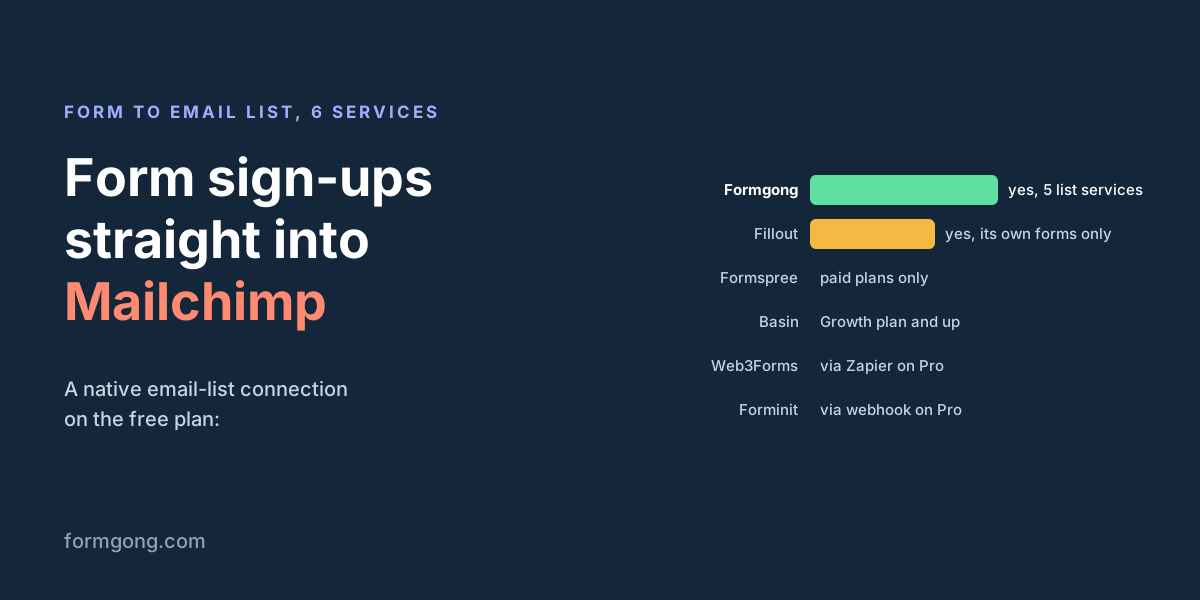
Which form services do this on a free plan
| Form service | Email lists it connects to | On the free plan | Consent checkbox | Double opt-in |
|---|---|---|---|---|
| Formgong | Mailchimp, Klaviyo, Brevo, MailerLite, Kit | Yes, every plan | Built in: adds only people who ticked the box you name (the default) | On by default for Mailchimp and Brevo; the list's own setting for the others |
| Formspree | Mailchimp, Klaviyo, Kit, MailerLite and others, as plugins | No, Professional and Business plans | Optional _optin checkbox | Not stated |
| Basin | Mailchimp | No, Growth plan and above | Not stated (you can map Mailchimp marketing permissions) | Follows the Mailchimp list's setting |
| Fillout | Mailchimp, Klaviyo, Brevo, for forms built in Fillout | Mailchimp is listed among the integrations on Free | Run the integration only when a condition is met | Not stated |
| Web3Forms | None built in; a webhook to Zapier | No, webhooks are a Pro feature | Up to you, in Zapier | Up to you, in Zapier |
| Forminit | None built in; Zapier or a webhook | No, Pro and higher | Up to you, in Zapier | Up to you, in Zapier |
Fillout is a form builder, so its integrations work on forms you build in Fillout, not on your own HTML form. On Basin's free plan the route is Zapier, and Web3Forms and Forminit send everything to email tools through Zapier or a webhook on a paid plan. A Zapier step to Mailchimp can do everything above, but the consent check, the status and the duplicate handling are then yours to set up.
Tell us what is missing
Do you need tags, a second list, or a service we did not cover? Write to support@formgong.com and tell us how you use your list. If a fact in the table above has changed, tell us too, and we will check it and correct this page.
What Formgong's free plan includes
- Build the form or bring your own. The form builder takes the colours and fonts from your site's address, with no sign-up; ready form templates copy into your account; AI writes the fields from one sentence. Any hand-written HTML form works too.
- Websites with the form already connected. 28 free website templates post to Formgong out of the box.
- 250 submissions a month on unlimited forms. Spam does not count. Once a year, a busy month keeps delivering on credit until the 7th instead of stopping.
- Everywhere you work. Email to up to 3 people at once, Telegram with Reply and Handled buttons, Google Sheets, Notion, and 3 signed webhooks for Slack, Discord, Zapier, Make or n8n.
- Emails to your customers in your business's name. Formgong sends them under your business name and replies come back to you, with no email service of your own to set up: a review request to every lead, a reminder a visitor asked for, and review emails after an order with your logo and colours. People who agree can also go straight into your Mailchimp, Klaviyo, Brevo, MailerLite or Kit list. An automatic reply to each visitor is on Pro.
- No captcha needed. A server-side spam filter, a honeypot, allowed domains and a block list; add your own Turnstile key if you want one.
- Files and voice. Visitors can attach files, or record a voice message that arrives transcribed.
- Made for AI-built sites. A hosted form page and a contact button; step-by-step guides for sites built with Lovable, Bolt, v0, Replit and Base44; an MCP server lets Cursor or Claude wire the form for you.
- See what the form does. Analytics for views, starts, conversion and where each lead came from, and an alert when a form goes quiet.
- One account for the rest. Customer reviews and an AI help chat that answers visitors from your own pages, with every message in one inbox. Data is stored in the EU.
Frequently asked questions
Can I send contact form submissions to Mailchimp without Zapier?
Yes, if your form service connects to Mailchimp itself. Formgong does on every plan; Formspree and Basin do on paid plans. Otherwise a webhook to Zapier or Make can add the contact.
Is a pre-ticked newsletter checkbox allowed?
Not for people in the EU. The European Data Protection Board says pre-ticked opt-in boxes are invalid under the GDPR. Leave the box unticked and add only the people who tick it.
Do I need double opt-in?
The GDPR does not name it, but you must be able to show that a person agreed, and a confirmation click is good proof. It also stops people signing up someone else's address. Mailchimp calls an unconfirmed contact pending.
What happens if the same person sends my form twice?
With an add-or-update call, such as Mailchimp's PUT to the member, they stay one contact. Formgong uses add-or-update calls for all five services. An existing person keeps their status in all five, and someone who unsubscribed stays unsubscribed: on Klaviyo, Brevo and Kit, Formgong checks before it subscribes anyone.
Does Formgong add tags in Mailchimp?
No. It sends the email address, the status for new people and the first and last name. In Kit you can choose a tag as the destination; for Mailchimp tags, use a webhook to Zapier, Make or n8n.
Sources and documentation
Official references for this guide: Mailchimp API: add or update list member, Mailchimp: add and update contacts (guide), Mailchimp: merge fields, Mailchimp: about double opt-in, EDPB Guidelines 05/2020 on consent, Formspree: Mailchimp plugin, Basin: Mailchimp integration, Fillout: connect your form to Mailchimp, Fillout pricing, Web3Forms: webhooks, Forminit docs, Klaviyo API: bulk subscribe profiles, Kit API: create a subscriber. Formgong Email lists guide, where data is stored.