What problem does social proof solve on a Shopify store?
A shopper lands on your product page from an ad or a search. They have never heard of your shop, and the page cannot answer the question they actually have: did other people buy this, and was it fine? Social proof is any answer to that question that comes from someone other than you.
The useful kind can be checked. A review with a name, a date and a complaint about the colour being a shade darker is believable because it is specific. A counter saying “27 people are looking at this right now” cannot be checked by anyone, and a shopper has no way to tell whether it is true.
What social proof can you show on Shopify?
Start with product reviews, because they answer the question for the exact item on the screen. Put the star rating under the product title, next to the price, and the full reviews lower on the page. Add stars to the product cards in collection lists too, so the proof is there while shoppers compare.
Photos from buyers come next. A customer's picture of the bed in a real living room says more about the size than your studio shot. After that, use what you genuinely have: a store-wide rating badge once you have enough reviews to make one, answers to questions people asked about the product, and press or partner logos only if those mentions happened. Judge.me's social proof tips, updated on 2 July 2026, also suggest putting proof on category pages and on the thank-you page, where it reassures someone who has just paid.
What does real review proof look like on the page?
We opened our Shopify test store in the theme editor's preview and looked at two products, one with four sample reviews and one with none. The same blocks run on live stores; only the reviews on a test store are samples.
| Where | What the shopper sees |
|---|---|
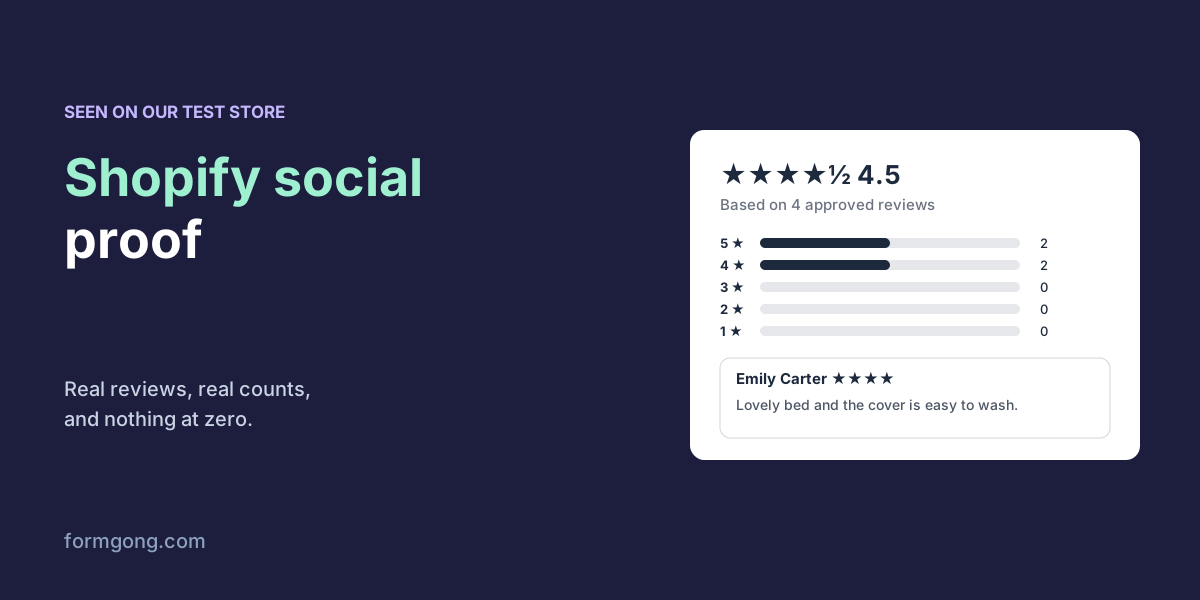
| Review block on a product with 4 reviews | ★★★★½ 4.5, “Based on 4 approved reviews”, a bar per star (2, 2, 0, 0, 0), a “Write a review” button |
| Review cards | Name, stars, date and text; one 4-star rating with no text shows as “Anonymous” |
| Star badge block | ★★★★½ (4) |
| Review block on a product with no reviews | The heading and a “Write a review” button. No stars, no “0 reviews” |
| Collection list on our WooCommerce demo | Stars and “(1)” on the 1 product with a review, nothing on the other 3 |
Two things to notice. The numbers say what they count, “4 approved reviews” rather than a vague “4.5 stars”, and the bars show that the rating is two fours and two fives, not four perfect scores. And a product with no reviews does not show five empty stars or “0 reviews”, which reads as a warning. It shows a way to leave the first one. Our guide on how to show reviews on Shopify walks through adding these blocks to a theme.
Do “people are viewing this” pop-ups help?
Yotpo's social proof guide, updated in November 2025, lists “X people are viewing this” notifications and low-stock indicators among its tactics, and it does warn that shoppers can tell when the numbers are fake and that a new store with little traffic should not inflate them. Loox's ten strategies show a “24 other people” viewing message as a way to create urgency, with no such caveat. A shopper who sees the same “24 people” on every product, every day, draws the obvious conclusion.
The FTC's rule on reviews and testimonials, in force since 21 October 2024, deals with fake reviews and with buying fake social media followers or views. Its staff Q&A, which we read on 3 November 2026, does not say whether an invented viewer counter falls under it, so we will not tell you it does. We will tell you that it is a number you made up, on a page that is trying to earn trust. If you want movement on the page, show a recent real review instead, whatever its stars.
How much does social proof slow your store down?
Every review app, badge and pop-up is another script your shoppers download before the page settles. None of the three competitor guides we read, from Judge.me, Yotpo and Loox, mentions page speed at all. It matters most on phones with a weak connection.
Check what yours costs. Open the product page in Chrome, press F12, go to the Network tab, reload and filter by the app's domain. The transfer size column tells you what each script weighs. For comparison, Formgong's review blocks on a Shopify product page load one script of about 13 KB and a stylesheet of about 4 KB compressed, measured on the files we ship, and the reviews themselves arrive as a small JSON answer.
What if you don't have reviews yet?
Then the first job is to collect them, not to decorate the page. Ask every buyer once, about a week after delivery, and remind them once; our guide on how to get more customer reviews covers the timing and wording. If you have reviews in another app, bring them over instead of starting from zero. The import docs cover Judge.me, Yotpo, Loox and Shopify Product Reviews.
While the count is low, leave the store-wide badge off. “5.0 from 2 reviews” says little, and the product pages with their first reviews already say what the badge would.
How does Formgong keep social proof honest?
Every proof element Formgong draws is built from reviews you have approved and from nothing else. On Shopify that means the review block, the star badge and the stars in collection lists, and other site builders also get a review pop-up. None of them shows a star or a count while a product has no approved review. The pop-up shows the newest written reviews whatever their stars, rather than only the five-star ones, and a review that earned a coupon says so under it. There is no viewer counter and no “someone just bought this” message to switch on. Reviews that other shops share for the same product appear in their own labelled list and never in your rating or count.
That is a narrower set of tricks than Yotpo's or Loox's guides recommend, on purpose. The Shopify reviews docs show how to add each block, and the review widget page shows the same elements for other site builders.
What social proof works in your shop?
If one of these blocks behaves differently in your theme, or you have measured what social proof does for your store, tell us at support@formgong.com. We will check it on our test store and add it here.
Frequently asked questions
What is social proof on Shopify?
Anything that shows a shopper other people bought the product and were happy with it: ratings, reviews, buyer photos and real press mentions.
Where should star ratings go on a Shopify product page?
Under the product title, next to the price, with the full reviews lower on the page and stars on collection cards.
Are fake viewer counters legal?
The FTC's Q&A on its reviews rule does not address them. They are still invented numbers that no shopper can check.
Should I show a rating badge with only a few reviews?
Usually not. Collect reviews first and let each product page show its own; add a store-wide badge once the count means something.
Sources and documentation
Official references for this guide: Formgong: How to show reviews on Shopify. Reviews on Shopify, where data is stored.