Why is my Tailwind form red before anyone types?
You add invalid:border-red-600 to each input, reload the page, and the whole form is red. Every required field is empty, an empty required field is invalid, and Tailwind's invalid: variant applies the moment the page loads. Your visitor is told they got it wrong before they have done anything.
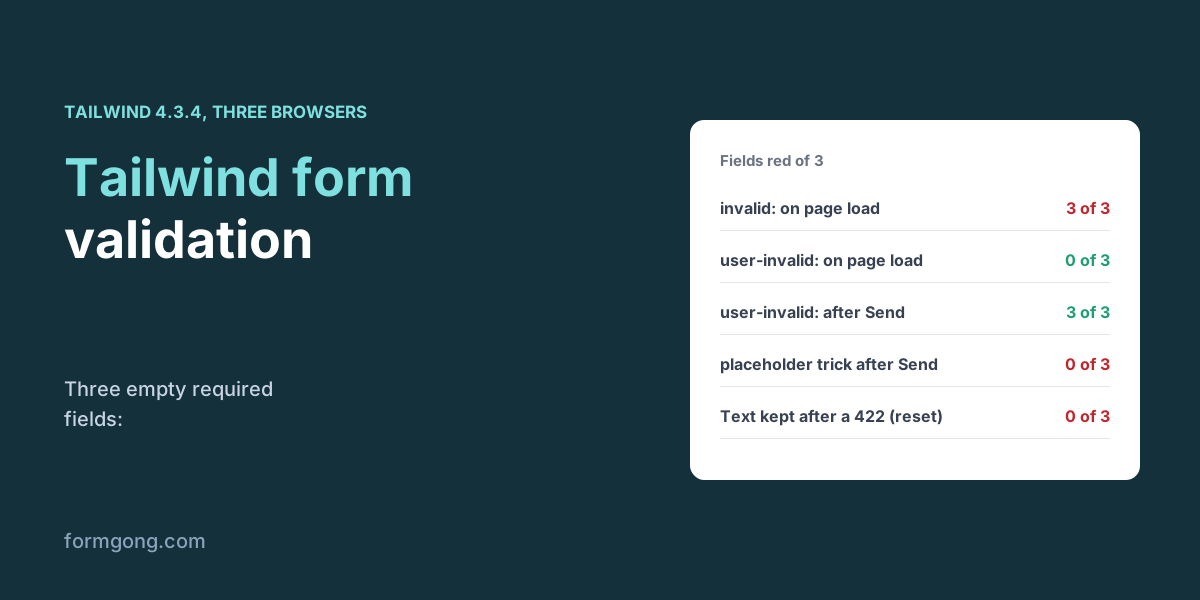
Tailwind has no validation of its own. Its variants only style what the browser decides, so the fix is choosing a variant that matches when the browser should speak up. We built the same three-field contact form four ways with Tailwind 4.3.4 and checked each field's computed colour on 3 November 2026 in Chromium 153, Firefox 155 and WebKit 26.6.
Which Tailwind variant should you use for form errors?
| Pattern | What the visitor saw |
|---|---|
invalid:border-red-600 | 3 of 3 fields red on load, before anyone typed |
invalid:[&:not(:placeholder-shown)] with placeholder=" " | 0 red on load, 1 after a wrong name. After Send on the empty form, 0 of 3 red and 0 messages |
user-invalid:border-red-600 and peer-user-invalid:block | 0 red on load, 1 after a wrong name. After Send on the empty form, 3 of 3 red |
[.validated_&]:invalid:, the class added to the form by a script | 0 red on load and after a wrong name. After Send, 3 of 3 red and 3 of 3 messages |
user-invalid: is the one that behaves the way people expect. It maps to the browser's :user-invalid, which stays quiet until the visitor has changed a field or tried to send the form. Nothing is red on load, a field turns red when the visitor leaves it with a wrong value, and every field that is still wrong turns red when they press Send.
The placeholder trick in the second row is common in tutorials, including Splitforms' “Tailwind CSS Form Validation — Working Code” (last reviewed 15 May 2026). It also stays quiet on load, but it hides every empty field for good. An empty field shows its placeholder, so after Send on the empty form not one of the three was marked. The browser's own bubble still stopped the post, so no blank message got through, but your styled messages never appeared.
One difference between engines showed up. In WebKit, the field border followed user-invalid: exactly, but the message next to it, styled with peer-user-invalid:, lagged behind. It stayed hidden after the wrong name and showed for 2 of 3 fields after the empty submit. We tested Playwright's WebKit build, not Safari itself, but if many of your visitors use Safari, drive the messages from a class your script adds, as in the fourth row, which showed 3 of 3 messages in every browser.
How does the validated-class pattern work?
The fourth row is from Web3Forms' “How to Add Form Validation to Your Tailwind CSS Contact Form” (14 May 2024). The form gets novalidate, a script adds a validated class to it on submit, and arbitrary variants such as [.validated_&]:invalid:border-pink-600 style only fields inside a form with that class. It worked in Tailwind 4.3.4 in all three browsers. It costs a few lines of script, and it gives you full control of when errors appear, which is why it was the most reliable way to show the messages.
The validation itself is still the browser's. To see what checkValidity() and the validity flags report, read our JavaScript form validation article; the Bootstrap form validation article covers the same ideas with Bootstrap's classes.
What happens when the server refuses a field?
We filled the form correctly for the browser, with grace@localhost as the email, and sent it to a local copy of Formgong, a form backend that sends each submission to your email or Telegram. Its email check wants a dot in the domain, so it answered 422 and named the email field. Web3Forms' full script, pointed at the same address, showed the server's message and then cleared the form, because its last step calls form.reset() after every answer, not only after a successful one. In 3 of 3 browsers the visitor was left with 0 of 3 fields still filled and a message asking them to fix a field they now had to type again from scratch.
The script below resets only on success. On the same 422 it kept 3 of 3 fields and marked the email field with setCustomValidity(), so user-invalid: painted it red in all three browsers. Our article on server-side form validation explains why a server finds problems the browser missed.
<form id="contact" action="https://formgong.com/submit" method="POST" class="grid max-w-md gap-4">
  <input type="hidden" name="access_key" value="YOUR_ACCESS_KEY">
  <div>
    <label for="name" class="block text-sm font-medium">Name</label>
    <input id="name" name="name" required minlength="2" autocomplete="name"
      class="peer w-full rounded-lg border-2 border-gray-300 px-3 py-2 user-invalid:border-red-600">
    <p class="mt-1 hidden text-sm text-red-600 peer-user-invalid:block">Please enter your name.</p>
  </div>
  <div>
    <label for="email" class="block text-sm font-medium">Email</label>
    <input id="email" name="email" type="email" required autocomplete="email"
      class="peer w-full rounded-lg border-2 border-gray-300 px-3 py-2 user-invalid:border-red-600">
    <p class="mt-1 hidden text-sm text-red-600 peer-user-invalid:block">Please enter a valid email address.</p>
  </div>
  <div>
    <label for="message" class="block text-sm font-medium">Message</label>
    <textarea id="message" name="message" required
      class="peer w-full rounded-lg border-2 border-gray-300 px-3 py-2 user-invalid:border-red-600"></textarea>
    <p class="mt-1 hidden text-sm text-red-600 peer-user-invalid:block">Please write a message.</p>
  </div>
  <button class="rounded-lg bg-gray-900 px-4 py-2 text-white">Send</button>
  <p id="status" role="status"></p>
</form>

<script>
  const form = document.getElementById("contact");
  const status = document.getElementById("status");
  form.addEventListener("submit", async (event) => {
    event.preventDefault();          // the browser has already checked the fields
    const response = await fetch(form.action, {
      method: "POST",
      body: new FormData(form),
      headers: { Accept: "application/json" },
    });
    const data = await response.json();
    if (response.ok) { form.reset(); status.textContent = "Thanks, we will reply soon."; return; }
    // Keep what the visitor typed; mark the fields the server refused.
    for (const error of data.errors ?? []) {
      const field = form.elements[error.field];
      if (!field) continue;
      field.setCustomValidity("Please check this field.");
      field.addEventListener("input", () => field.setCustomValidity(""), { once: true });
    }
    status.textContent = data.message;
  });
</script>
What does Formgong add to Tailwind validation?
A server answer your script can put on the right field. With field checks on, under Settings, then Protection, then Field checks, Formgong refuses a post that breaks a rule with a 422 that lists each field and the reason, for required fields and for email, URL, number, date and phone values. The script above uses that list to mark fields and keep the visitor's text. We cannot say how Web3Forms' own endpoint answers a bad field, because we only ran its script, but the reset in that script would wipe the form whatever the answer said. Formgong's checks do not cover minimum length or a list of allowed values, so keep those in the browser. If you want a form to start from, the Tailwind contact form template and the Tailwind form generator both post to Formgong, and the HTML forms docs list the fields it reads.
Did Tailwind validation behave differently for you?
If a variant behaved differently in your browser or Tailwind version, write to support@formgong.com. We will rerun the test and add your case to the table.
Frequently asked questions
Why are my Tailwind form fields red on page load?
invalid: applies as soon as a required field is empty, which is on load. Use user-invalid:, which waits until the visitor has interacted or tried to send.
Does Tailwind have form validation?
No. Tailwind's variants style what the browser decides through required, type, minlength and pattern. The checking is the browser's.
Does the placeholder-shown trick mark empty fields?
No. An empty field shows its placeholder, so after an empty submit 0 of 3 fields were marked in our test.
Should I reset the form after a failed submit?
No. Reset only after a successful answer. A script that reset on every answer left 0 of 3 fields filled after a server error.
Sources and documentation
Official references for this guide: Formgong: JavaScript form validation without a library, Formgong: Tailwind contact form template. HTML forms, where data is stored.