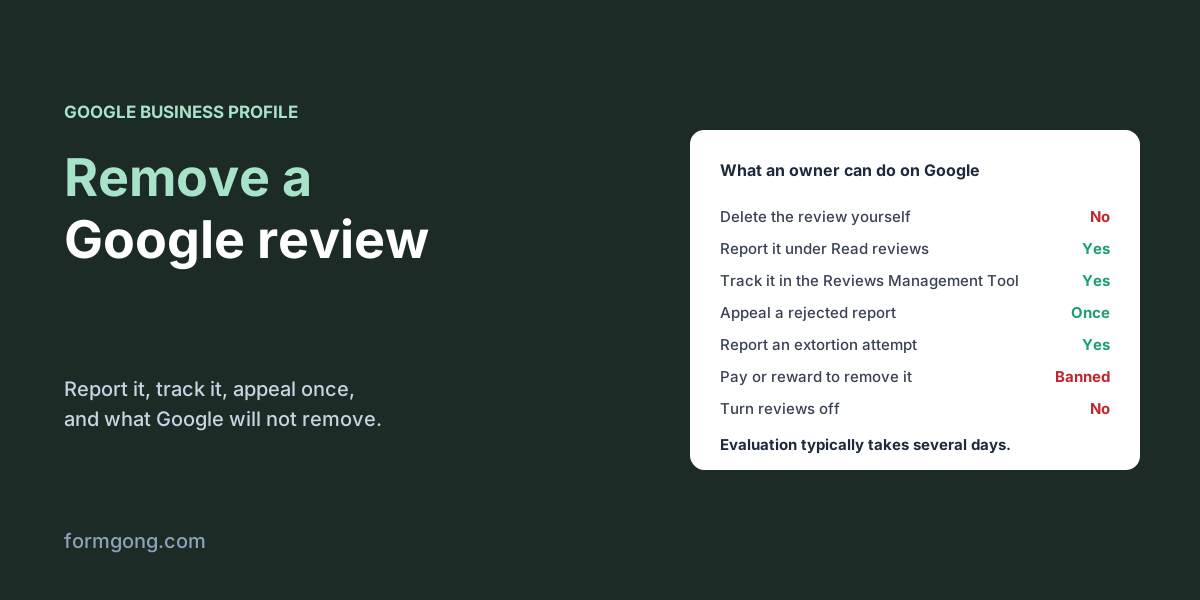
There is no delete button for reviews on your own Google profile. What you can do is report a review that breaks Google's rules, appeal once, and answer the rest.
The short answer. You cannot delete a Google review yourself. You can report it from your Business Profile, and Google removes it only if it breaks its content policy, for example a fake review, a conflict of interest, harassment or personal information. Evaluation typically takes several days, and if Google finds no violation you can appeal once.
Formgong
How to remove a Google review from your business
Can a business delete a Google review?
No. On your own Business Profile you can read reviews, reply to them and report them, and that is all. Only two people can make a review disappear: the person who wrote it, by editing or deleting it, and Google, when the review breaks its rules.
That rules out the review you simply think is unfair. Google's help page on reporting reviews, read on 6 November 2026, says not to report a review just because you disagree with it or dislike it, and that Google "doesn't get involved" in disputes between businesses and customers. A one-star review about slow service is, as far as Google is concerned, a customer's opinion. You answer it; you don't remove it.
How do you delete a Google review you wrote yourself?
If the review is your own, on someone else's business, you can take it down at any time. Google Maps help, read on 7 November 2026, gives these steps on a computer:
Open Google Maps and select the Menu button at the top left.
Select Your contributions, then Reviews.
Next to the review, select More, then Delete review or Edit review.
The help page also says an edited review shows the date of its last edit, not the date you first posted it. This is also the answer to give a customer who asks how to take back a review they regret: only they can do it, from their own account.
Which Google reviews can be removed?
The ones that break Google's content policy for Maps. These are the parts that matter most to a business:
Reviews Google may take down, from its content policy and Business Profile help, read on 6 November 2026.
What is wrong with the review
Example
Where to report it
Not a real experience
Someone who was never a customer, the same person under several accounts, a paid review
Report in your Business Profile
Conflict of interest
A former employee, a competitor, a relative of the owner
Report in your Business Profile
Harassment, hate or threats
Threats against a member of staff, slurs
Report in your Business Profile
Offensive content
An accusation of a crime or of unethical behaviour with nothing to back it
Report in your Business Profile
Personal information
A staff member's full name, phone number or photo posted without consent
Report in your Business Profile
Profanity or obscenity
Swearing used to attack or to make a complaint louder
Report in your Business Profile
A demand for money
A wave of 1-star reviews, then a message asking you to pay to make them go away
Google's merchant extortion report form
Unlawful content
A statement you believe is defamatory under your country's law
A legal removal request to Google
Two lines in that policy are worth reading before you report. The policy allows "content that describes negative experiences in a respectful manner", so politeness counts in the reviewer's favour. And among offensive content it lists "unsubstantiated allegations of unethical behavior or criminal wrongdoing". A review that says your staff stole from a customer, with nothing to show for it, is a fair report. A review that says your prices are a rip-off is an opinion.
Google also removes reviews on its own. The same help page says automated spam detection removes reviews it finds to be spam, and that it occasionally removes legitimate ones by mistake; if that happens to a real review, contact Google support.
How do you report a Google review?
From your Business Profile:
Open your Business Profile and select Read reviews.
Next to the review, select Report.
Pick the reason that fits, for example spam or profanity, and select Send report.
Pick the reason that matches the policy, not the one that sounds most serious. A review from a former employee is a conflict of interest, not harassment.
You can also start the report in Google's Reviews Management Tool: choose your business, select Report a new review for removal, then Report next to the review, pick the reason and select Submit. It ends in the same place as the report from your profile.
Google's help page says evaluation typically takes several days. To follow it, open the Reviews Management Tool, choose your business and check the reviews you reported. You will see one of three statuses: Decision pending, Report reviewed with no policy violation, or Escalated, which means the answer will come by email.
What if Google says the review breaks no rules?
You get one appeal per review. In the Reviews Management Tool, select Appeal eligible reviews, pick the review (up to 10 at a time), fill in the form and submit it. Google emails you the result: the review is removed if it breaks the policy and stays if it does not.
Other pages on this topic quote waiting times from three days to two weeks. Google's own help, read again on 7 November 2026, gives no number beyond "several days", so treat any fixed figure as a guess.
Use the appeal to add what the first report could not show. If the reviewer was never a customer, say how you checked: no booking under that name, no order, no visit on that date. If it is a former employee, say when they left. "This review is false" with nothing behind it gives Google nothing to check.
Once the appeal is spent, the review stays. What is left is your reply, which the next customer reads right under the review. Our guide to responding to negative reviews has wording for the usual cases.
What if someone asks for money to remove reviews?
This is a known scam with its own route. Google's help page on extortion describes it as a sudden run of 1 and 2-star reviews followed by a demand for money, goods or services to take them down. Google's advice is not to engage and not to pay, since paying can encourage more attempts and does not guarantee the reviews are removed.
Collect the evidence at once: screenshots of every message with the date, time and sender, links to each suspicious review, and when the reviews started. Then send it through Google's merchant extortion report form, which the help page links to. That form is only for extortion; ordinary fake or spam reviews still go through Report.
Can you ask Google to remove a defamatory review?
Yes, through a separate process. Google's legal help page lets you report content you believe breaks the law or your rights, and asks you to flag the content in the product first. The request needs the exact link to the review, not to your profile, and an explanation of what is unlawful and why. You get a reference number by email.
This is a legal claim, not a policy report, so it is worth talking to a lawyer before you file one, especially if you are thinking about suing the reviewer. In the US, threatening a reviewer with a claim you have no real grounds for can itself break the FTC's rule on consumer reviews.
What can't you do about a Google review?
Some things owners try do not work, or make things worse.
You cannot pay or reward the customer to delete or change it. Google's policy bans offering incentives "in exchange for posting any review or revision or removal of a negative review". Fixing their problem is fine; tying the fix to the review is not. You can, after fixing it, mention that they are welcome to update the review. Google's help on managing reviews says reviewers are told when you reply and can still change their review afterwards.
You cannot switch reviews off. Google decides where reviews are available, by country and business category, and its help pages describe no switch for owners. The changes they do describe are Google's own, such as removing reviews from schools that teach children aged 6 to 18.
You cannot start a fresh profile to escape old reviews. Google's help says a new owner who keeps the same name keeps the reviews, and tells you not to create a new profile because of a change of owner or address. What the same page suggests instead is replying to the older reviews to explain what has changed.
You cannot pay Google, or anyone else, to take a review down. None of Google's help pages on reviews describes a paid route. A company that promises guaranteed removal can only file the same report and the same appeal you can, and if it offers to post reviews to push the bad one down, those are fake reviews under the same policy.
And you cannot bury the review under reviews from staff and family. Those are conflict-of-interest reviews, and the policy removes them too.
Can Formgong remove or hide Google reviews?
No. Formgong does not connect to your Google Business Profile, does not read your Google reviews and does not show them in its widget, so it cannot hide or remove them either. Everything above happens in Google's own tools.
Where Formgong helps is the reviews on your own website. There you are the one deciding, and the dashboard asks for a reason before you hide a review: spam or fake, a duplicate, not about your business, personal data, threats or harassment, or a test. The list is the same for a 1-star review as for a 5-star one, and an honest bad review is not on it. And our free Google review link generator makes a link and QR code you can send to customers, so more of the people who were actually there leave a review. The moderation docs explain each option.
Did your report work?
If you have reported a Google review and it came back removed, or came back with no violation and you appealed, tell us what happened at support@formgong.com. We would like to add real outcomes to this page.
Frequently asked questions
Can I delete a bad Google review of my business?
No. Only the reviewer can delete it, or Google if it breaks the content policy. You can report it from your Business Profile.
How long does Google take to remove a reported review?
Several days, by Google's own help page, and it gives no firmer number. You can watch the status in the Reviews Management Tool.
What happens if Google rejects my report?
You get one appeal per review, sent from the Reviews Management Tool, with up to 10 reviews in one go. The answer comes by email, and after that the review stays or goes for good.
Can I pay a customer to remove a negative review?
No. Google's policy bans incentives for removing or changing a negative review, and such reviews can be removed from your profile.