PHP mail() not sending email, even when it returns true
We ran the same mail() call three times on PHP 8.3 and read six providers' DMARC records. Why true means so little, and what to use instead.
The short answer. PHP's mail() returns true as soon as the server's local mail program accepts the message, not when it reaches the inbox. It returns false when there is no mail program at all. When it returns true and nothing arrives, the message usually carries a From address the server may not send for, such as the visitor's Gmail or Yahoo address, or the server's own hostname with no SPF or DKIM, so the receiving side drops it or files it as spam. Send through an authenticated SMTP account on your own domain, with the visitor in Reply-To, or post the form to a form backend.
Formgong
PHP mail() not sending email, even when it returns true
What true really means
You submit your contact form, the PHP script says “Thanks, your message was sent”, and your inbox stays empty. The script reported all it knew, and it knows very little about what happens to the email.
mail() does not send email over the internet. It hands the message to a program on the same server, normally whatever sits at /usr/sbin/sendmail, and returns. The PHP manual says it returns true “if the mail was successfully accepted for delivery”, and then adds that this “does NOT mean the mail will actually reach the intended destination.” Everything that can go wrong after the handoff, from a blocked port to a spam filter, is invisible to your script.
What we saw in a clean container
To see each case on its own, we ran one typical contact-form handler three times in throwaway PHP 8.3 containers on our own server. Mail went to a test mail server that accepts everything and prints what it got, so nothing reached a real inbox.
The same mail() call on PHP 8.3 in a fresh container, 1 November 2026. In runs 2 and 3 a local mail program (msmtp) handed the message to a test mail server that accepted everything.
Run
What mail() returned
What happened
1. Stock image, no mail program
false
The shell printed sh: 1: /usr/sbin/sendmail: not found. PHP itself raised no error you could read with error_get_last().
2. Mail program, no From header
true
The message left as From: root@web01.host.example, the server's own name, with the same envelope sender.
3. From set to the visitor's Gmail address
true
The header said From: visitor@gmail.com while the envelope still said root@web01.host.example. Setting -f in the fifth argument did not change it, because this mail program was set to choose the sender itself.
Run 1 is the classic “works on my host, not on my VPS” case. Many Docker images and fresh cloud servers have no mail program, so mail() returns false and the only clue goes to the server's error output, not to PHP. If you see false, run php -r 'var_dump(ini_get("sendmail_path"));' and check that the program it names exists.
Runs 2 and 3 are where people get confused. Both returned true, and both messages were addressed correctly. Whether they would arrive depends on what a real receiving server thinks of the sender, which the next two sections cover.
The From header that gets mail refused
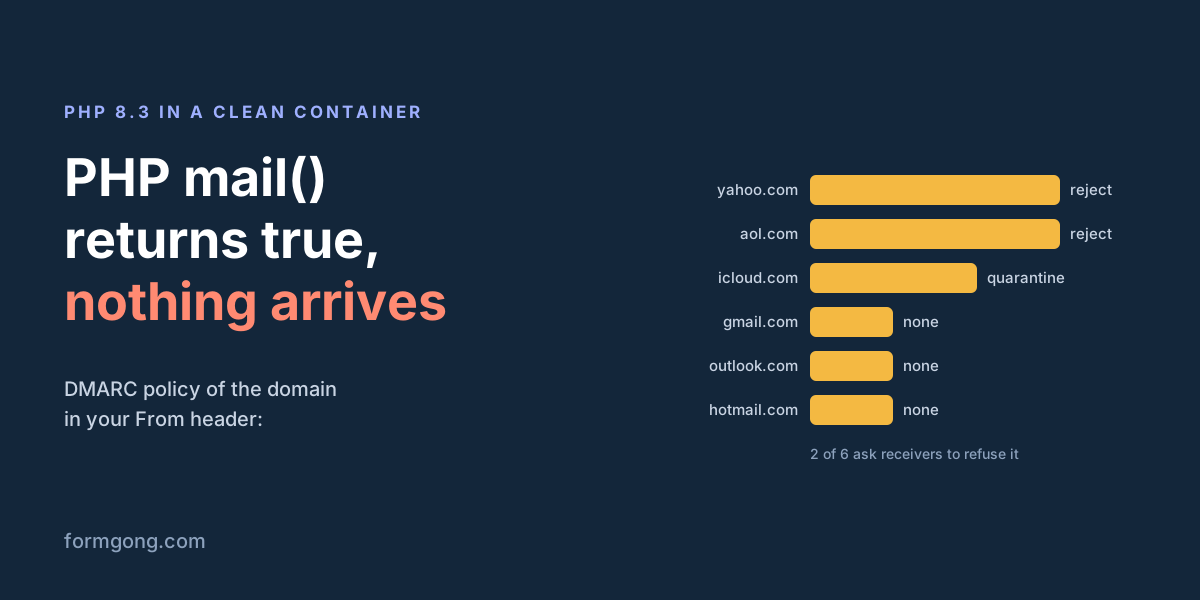
Most contact form tutorials set the From header to the address the visitor typed, so you can hit Reply. That means your server claims to be Gmail, Yahoo or iCloud. Those providers publish a DMARC record that tells everyone else what to do with mail that claims their name but was not sent by them:
DMARC policy published by six large mailbox providers, read with dig TXT _dmarc.<domain> on 1 November 2026. It tells receiving servers what to do with mail that claims to be from that domain but was not sent by it.
Domain in your From header
Policy (p=)
What that means for your form email
yahoo.com
reject
Receivers that check DMARC should refuse it
aol.com
reject
Same as Yahoo
icloud.com
quarantine
Spam folder at best
gmail.com
none
No instruction, so the receiver judges it alone, often as spam
outlook.com
none
Same as Gmail
hotmail.com
none
Same as Gmail
So 2 of these 6 domains ask receivers to refuse the message outright, 1 asks for the spam folder, and 3 leave it to the receiver. A form that sets From to the visitor's address works for some visitors and fails silently for others, which is the hardest kind of bug to notice. Put your own address in From and the visitor's address in Reply-To. Reply still goes to the visitor.
The server name nobody vouches for
Even with From fixed, look at the envelope sender in our runs: root@web01.host.example. That is the server's hostname, and on a real host it is a name like server123.hosting-company.net. Receivers check whether that domain allows your server to send mail (SPF) or signed the message (DKIM).
Since February 2024, Gmail has required this from everyone. Its sender guidelines list “All senders: SPF or DKIM”, and messages that fail can be rate-limited, blocked or marked as spam. A bare mail() call on a shared or rented server usually has neither for your domain. The fifth argument, -fyou@yourdomain.com, sets the envelope sender on many mail programs, but in our run 3 the mail program was set to pick the sender itself and ignored it. Check with your host what yours does, and that your domain's SPF record includes the server.
Port 25 may be closed
If the server sends mail on its own rather than through a relay, it connects to the receiver on port 25. Big cloud providers block that by default. AWS says traffic over port 25 “is blocked to public IPv4 addresses” unless you ask for the restriction to be removed. Google Cloud says connections to port 25 outside your network are blocked “due to the risk of abuse.”
From our own server both Gmail's mail server on port 25 and smtp.gmail.com on 587 answered with a greeting, so not every provider blocks it. To test yours, run nc -vz gmail-smtp-in.l.google.com 25 on the server. A timeout means the message from mail() will sit in a local queue and never leave.
The fix: send through SMTP with a login
The dependable way to send from PHP is to skip the local mail program and log in to a real mail account on your own domain, through your email host or a sending service. PHPMailer is the usual library. With new PHPMailer(true) it throws an exception that names the real problem, such as a wrong password or a blocked port, instead of a bare false.
Two details matter as much as the login. From is your own address and Reply-To is the visitor's, for the DMARC reason above. And the visitor's input never goes into a header without checking: a new line typed into the email field can add extra headers. filter_var(..., FILTER_VALIDATE_EMAIL) rejects that.
<?php
use PHPMailer\PHPMailer\PHPMailer;
require __DIR__ . '/vendor/autoload.php';

$name = trim($_POST['name'] ?? '');
$email = filter_var($_POST['email'] ?? '', FILTER_VALIDATE_EMAIL);
$message = trim($_POST['message'] ?? '');
if (!$email || $message === '') { http_response_code(422); exit('Please fill in your email and message.'); }

$mail = new PHPMailer(true);              // throws an exception with the real reason
$mail->isSMTP();                          // talk to a mail server, not the local mail program
$mail->Host = 'smtp.your-provider.com';
$mail->SMTPAuth = true;
$mail->Username = 'forms@yourdomain.com';
$mail->Password = getenv('SMTP_PASSWORD');
$mail->SMTPSecure = PHPMailer::ENCRYPTION_STARTTLS;
$mail->Port = 587;
$mail->setFrom('forms@yourdomain.com', 'Website form');   // your own domain, never the visitor's
$mail->addAddress('you@yourdomain.com');
$mail->addReplyTo($email, $name);                           // so Reply goes to the visitor
$mail->Subject = 'New contact form message';
$mail->Body = "From: $name <$email>\n\n$message";
$mail->send();
echo 'Thanks, your message was sent.';
Or skip the PHP part
If PHP is only there to email you the form, you can drop the script. Point the form's action at a form backend and it sends the email from its own authenticated domain, with the visitor's address as Reply-To. That also works on hosts with no PHP at all, such as GitHub Pages, Netlify or Cloudflare Pages.
With Formgong the form below is the whole job. The email comes from formgong.com, whose SPF record lists the services that send for it. Each message is also kept in an inbox you can search, unless you choose deliver-only, so an email that goes missing is not a lost lead. WordPress sites are a separate case: plugins such as Contact Form 7 still use the server's mail, and our Contact Form 7 error guide covers that path.
When mail() fails, work through it in this order. If it returns false, the server has no working mail program, so install or configure one, or move to SMTP. If it returns true, read the server's mail log (often /var/log/mail.log, or ask your host) to see whether the message left at all. If it left, check that From is your own domain, that the domain's SPF includes the sending server, and look in the spam folder of a test Gmail account. If all of that is fine and it still fails, switch to authenticated SMTP and read the exception it gives you.
Still nothing in the inbox?
If your host does something we did not cover here, such as a mail limit per hour or a sender it rewrites, write to support@formgong.com with what you see in the mail log. We will test it and add it to this guide.
What Formgong's free plan includes
Build the form or bring your own. The form builder takes the colours and fonts from your site's address, with no sign-up; ready form templates copy into your account; AI writes the fields from one sentence. Any hand-written HTML form works too.
Websites with the form already connected. 28 free website templates post to Formgong out of the box.
250 submissions a month on unlimited forms. Spam does not count. Once a year, a busy month keeps delivering on credit until the 7th instead of stopping.
Everywhere you work. Email to up to 3 people at once, Telegram with Reply and Handled buttons, Google Sheets, Notion, and 3 signed webhooks for Slack, Discord, Zapier, Make or n8n.
Emails to your customers in your business's name. Formgong sends them under your business name and replies come back to you, with no email service of your own to set up: a review request to every lead, a reminder a visitor asked for, and review emails after an order with your logo and colours. People who agree can also go straight into your Mailchimp, Klaviyo, Brevo, MailerLite or Kit list. An automatic reply to each visitor is on Pro.
No captcha needed. A server-side spam filter, a honeypot, allowed domains and a block list; add your own Turnstile key if you want one.
Files and voice. Visitors can attach files, or record a voice message that arrives transcribed.
Made for AI-built sites. A hosted form page and a contact button; step-by-step guides for sites built with Lovable, Bolt, v0, Replit and Base44; an MCP server lets Cursor or Claude wire the form for you.
See what the form does.Analytics for views, starts, conversion and where each lead came from, and an alert when a form goes quiet.
One account for the rest. Customer reviews and an AI help chat that answers visitors from your own pages, with every message in one inbox. Data is stored in the EU.
Frequently asked questions
Why does PHP mail() return true but no email arrives?
true only means the server's local mail program accepted the message. It can still be refused or filtered later, most often because From is the visitor's address or the server's hostname has no SPF or DKIM for your domain.
Why does PHP mail() return false?
Usually because there is no mail program at the path in sendmail_path. In our test on a stock PHP 8.3 image, mail() returned false and the shell printed /usr/sbin/sendmail: not found.
Should the From header be the visitor's email address?
No. Put your own domain in From and the visitor's address in Reply-To. Yahoo and AOL publish a DMARC reject policy, so mail claiming their addresses from your server should be refused.
What should I use instead of PHP mail()?
An authenticated SMTP login on your own domain, for example with PHPMailer, which also reports the real error. Or post the form to a form backend and drop the PHP script.
Sources and documentation
Official references for this guide: PHP manual: mail(), Google Workspace Admin Help: Email sender guidelines, Amazon EC2: Restriction on email sent using port 25, Google Cloud: Sending email from an instance, PHPMailer on GitHub. Add a form to an HTML site, where data is stored.