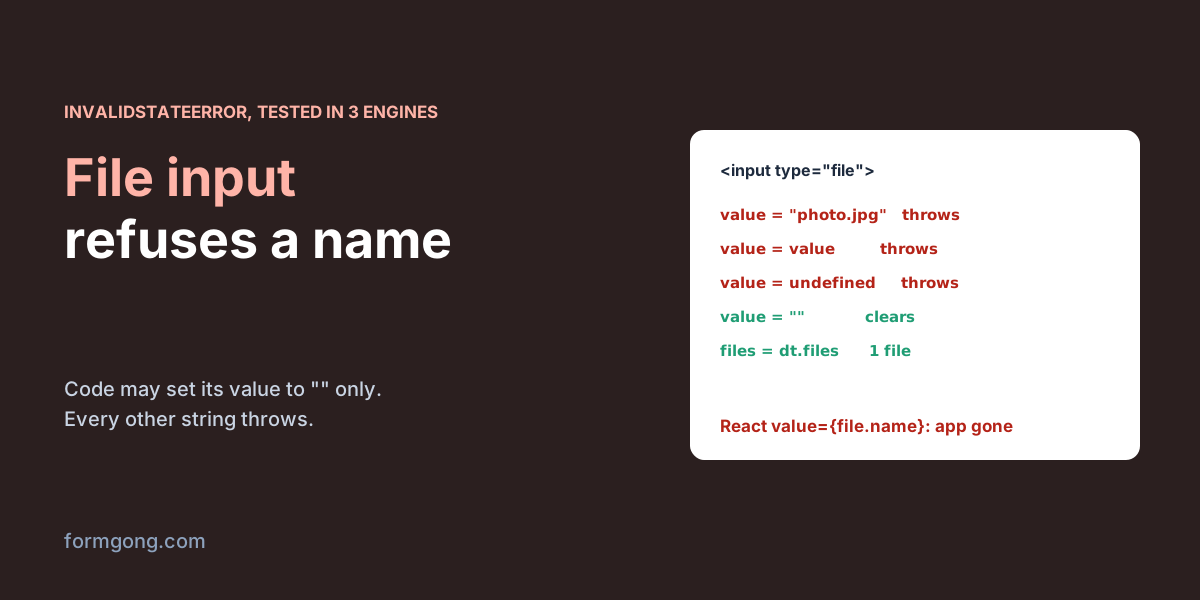
What does the error mean?
A file input does not hold text the way a text field does. Reading its value gives you C:\fakepath\ followed by the name of the first chosen file, on every system, macOS and Linux included. Writing to it is allowed for one string only, the empty one, and that clears the choice. Anything else makes the browser throw a DOMException named InvalidStateError, and Chrome prints it as Failed to set the 'value' property on 'HTMLInputElement': This input element accepts a filename, which may only be programmatically set to the empty string.
The rule exists for privacy and safety. If a script could write a path into a file input and submit the form, any page could upload files from a visitor's disk without asking. So a file only gets into the input when the visitor picks or drops it, or when the page hands over a File object it already has. A path or a file name is never enough.
Firefox and WebKit, the engine behind Safari, throw the same InvalidStateError with other words. In our run Firefox 155 said “An attempt was made to use an object that is not, or is no longer, usable”, and WebKit 26.6 said “The object is in an invalid state.” If you came here from one of those messages, it is the same bug.
Which code throws? Our test
We first hit the error on 13 November 2026 in Chrome 156, typing into the console on our own site. Then we wrote 26 small cases and ran each one in Playwright 1.63 with Chromium 153, Firefox 155 and WebKit 26.6. Where a case needed a chosen file, Playwright handed the input a real file from disk, the way the file picker does. The three engines agreed on every case, and 15 of them are in the table.
| # | What the code did to <input type="file"> | Result |
|---|---|---|
| 1 | input.value = "C:\\fakepath\\photo.jpg" | Throws |
| 2 | input.value = "photo.jpg" | Throws |
| 3 | After a file was picked: input.value = input.value | Throws, the file stays chosen |
| 4 | input.value = undefined | Throws |
| 5 | input.value = null | Clears the input, no error |
| 6 | input.value = "" | Clears the input, no error |
| 7 | form.reset() | Clears the input, no error |
| 8 | input.setAttribute("value", "photo.jpg") or input.defaultValue = "photo.jpg" | No error, no file, value stays empty |
| 9 | input.files = dataTransfer.files with one File | 1 file, value reads C:\fakepath\photo.txt |
| 10 | input.files = null after that | No error, the file stays |
| 11 | jQuery 3.7.1: $(input).val("photo.jpg") | Throws (.val("") clears) |
| 12 | React 19.2: value={file.name} on the input, then a file is picked | Throws, the whole app unmounts |
| 13 | React 19.2: value={event.target.value} | No error |
| 14 | Vue 3.5: :value="name", then a file is picked | Throws during the update |
| 15 | Vue 3.5: v-model on the input | Compiler warning, the input works unbound |
Row 3 caught us out. Writing back the exact string the input already holds still throws, so input.value = input.value is not the harmless no-op it looks like. undefined throws because the browser turns it into the text “undefined”, while null becomes an empty string and clears the input. And input.files = null does nothing at all: no error, and the file stays chosen.
Cause 1: a loop that writes every field of the form
In plain JavaScript, look for a loop first. A script walks form.elements to save a draft and put it back, to trim spaces before sending, or to fill the form from an API response. The file input is one of those elements, so it gets written too.
Two things make it easy to miss. The trim loop (el.value = el.value.trim()) throws only after the visitor has chosen a file. With nothing chosen the value is "", and writing "" is allowed, so in our run the same loop passed with no file and threw with one. Every quick test without an attachment works, and the form breaks for the person who attaches their invoice.
The other thing is that the error stops the loop where it is. In our restore case the file input came before a Name field. The loop died on the file input, and Name kept the text it had before the restore, with no sign that anything was skipped. Skip file inputs in both directions, as below. If you need the whole form as data, new FormData(form) reads files as File objects and never touches value.
// Save a draft of the form and put it back later.
// File inputs are skipped both ways: their value reads as C:\fakepath\<name>
// and code may only set it to "".
function saveDraft(form) {
  const draft = {};
  for (const el of form.elements) {
    if (!el.name || el.type === "file") continue;
    draft[el.name] = el.value;
  }
  localStorage.setItem("draft", JSON.stringify(draft));
}

function restoreDraft(form) {
  const draft = JSON.parse(localStorage.getItem("draft") || "{}");
  for (const el of form.elements) {
    if (el.type === "file" || !(el.name in draft)) continue;
    el.value = draft[el.name];
  }
}
Cause 2: a controlled file input in React
In React you give most inputs a value and an onChange, and a file input looks like it should work the same way. It throws as soon as the state holds anything other than the string the input already has. In our test we stored file.name in state and passed it back as value. The next render threw, and because the app had no error boundary, React 19 unmounted the whole root. The form vanished from the page, and the console said “An error occurred in the <input> component”. Storing the File object instead did exactly the same.
Storing event.target.value did not throw. React compares the new value with the one already in the DOM and skips the write when they match, so this version works only because nothing ever writes. Set that state to anything else, for example a file name after an upload, and the page goes blank again.
Leave the file input uncontrolled. Keep the File in state from onChange, and clear the input through a ref with value = "". Changing the input's key also clears it: React throws the old element away and renders an empty one, which in our test went from 1 file to 0.
import { useRef, useState } from "react";

function Attachment() {
  const [file, setFile] = useState(null);
  const inputRef = useRef(null);

  function clear() {
    inputRef.current.value = ""; // clears the chosen file
    setFile(null);
  }

  return (
    <>
      {/* No value prop: the browser owns a file input's value. */}
      <input
        type="file"
        name="attachment"
        ref={inputRef}
        onChange={(event) => setFile(event.target.files[0] ?? null)}
      />
      {file && <button type="button" onClick={clear}>Remove {file.name}</button>}
    </>
  );
}
Cause 3: Vue bindings and jQuery .val()
Vue catches the obvious mistake for you. Put v-model on a file input and the template compiler warns “v-model cannot be used on file inputs since they are read-only”. In our test the input still rendered and took a file; Vue just left it unbound. A :value binding gets no warning. When the bound value changed after a file was picked, Vue wrote it to the input, the browser threw, Vue logged “Unhandled error during execution of component update”, and the text next to the input stopped updating. Listen to @change and read $event.target.files instead.
jQuery has no special handling here. .val("photo.jpg") writes the DOM value and throws the same error in all three engines, and .val("") clears the input. Look for code that fills a form from an object, such as $.each(data, (name, v) => $("[name=" + name + "]").val(v)). As soon as the object has a key with the same name as your file field, that line throws.
Can you put a file into the input from code?
Yes, if the page already holds the file as a File object. Build a DataTransfer, add the files to it and assign its files to the input. In our test the input then held 1 file and its value read C:\fakepath\photo.txt, in all three engines. Drop zones, image croppers and “remove this file” buttons use the same trick to put a changed list back into a normal input, so the form still posts it.
What no code can do is name a file on the visitor's disk. There is no API that turns a path into a File. On an edit page, show the file you already stored on your server next to an empty file input, and keep the old file when the visitor does not pick a new one. Our guide to the HTML file input covers the rest of the element.
// Put File objects you already hold (from a drop zone, an image cropper,
// another input) into a normal file input, so the form posts them.
function setFiles(input, files) {
  const list = new DataTransfer();
  for (const file of files) list.items.add(file);
  input.files = list.files;
}
Sending the file with a Formgong form
A Formgong form takes a file through an ordinary <input type="file" name="attachment"> inside a form with method="POST" and enctype="multipart/form-data". Nothing in it writes to the file input's value. If you send with fetch, pass new FormData(form) as the body, and after a successful answer call form.reset(), which clears the file along with the text fields. A post with a file also needs Cloudflare Turnstile on the form.
The full setup, with file types and size limits, is in contact form with file upload and the HTML form docs. Resetting a form after submit covers the reset step in more detail.
<form id="upload" action="https://formgong.com/submit" method="POST" enctype="multipart/form-data">
  <input type="hidden" name="access_key" value="fk_your_access_key">
  <label>Email <input type="email" name="email" required></label>
  <label>File <input type="file" name="attachment" accept=".pdf,.png,.jpg,.jpeg"></label>
  <div class="cf-turnstile" data-sitekey="YOUR_TURNSTILE_SITE_KEY"></div>
  <button type="submit">Send</button>
</form>
<script src="https://challenges.cloudflare.com/turnstile/v0/api.js" async defer></script>
<script>
  const form = document.getElementById("upload");
  form.addEventListener("submit", async (event) => {
    event.preventDefault();
    const response = await fetch(form.action, {
      method: "POST",
      body: new FormData(form), // the file goes in as a File, value is never touched
      headers: { Accept: "application/json" },
    });
    if (response.ok) {
      form.reset(); // clears the file input along with the text fields
      turnstile.reset();
    }
  });
</script>
Did the error come from somewhere else?
If a library, page builder or upload widget that is not in our table threw this error for you, tell us at support@formgong.com with its name and version. We will run it the same way and add a row.
Frequently asked questions
Can JavaScript set the value of a file input?
Only to an empty string, which clears it. Any other string throws InvalidStateError in Chrome, Firefox and Safari's engine. To put a file in, assign input.files from a DataTransfer that holds a File you already have.
Why does a file input's value say C:\fakepath?
Browsers hide the real folder. The value is C:\fakepath\ plus the file name on every system, macOS and Linux included. Read input.files[0].name when you want the name.
How do I clear a file input?
Set input.value = "" or call form.reset(). In React you can also change the input's key, so React renders a new, empty input.
Why does my React form disappear after I pick a file?
Most likely the file input has a value prop that holds the file name or the File. The write throws, and without an error boundary React 19 unmounts the app. Remove the value prop.
Does input.files = null clear a file input?
No. In our test it raised no error and the file stayed chosen in all three engines. Use input.value = "" instead.
Sources and documentation
Official references for this guide: Formgong: HTML file input, Formgong: Contact form with file upload. HTML forms, where data is stored.